Prodott Overview
The TechniSat DIGITRADIO 4 IR is a versatile stereo internet radio designed for high-quality audio reception and playback. It supports DAB+, FM, and internet radio, offering a wide range of national and regional programs. The device features Bluetooth audio streaming, allowing playback from smartphones and tablets, and includes a USB port for MP3 file playback. Equipped with two 10W ELAC speakers and a clear 3.5-inch TFT color display, it delivers excellent sound and user experience. Control is intuitive via rotary knobs, remote control, or a smartphone application.
Kontenut tal-Pakkett
- DIGITRADIO 4 IR Stereo Internet Radio (Black)
- Telescopic antenna with mounting tool
- Adapter tal-enerġija
- Remote control with batteries (2 x AAA)
- Manwal għall-utent
Karatteristiċi u Kontrolli tal-Apparat
Familiarize yourself with the main components and controls of your DIGITRADIO 4 IR.

Immaġni: Quddiem view of the TechniSat DIGITRADIO 4 IR radio, showing the central display, two large rotary knobs for volume/standby and select/snooze, and several control buttons (Mode, Menu, Fav, Scan, Play/Pause, Skip tracks).
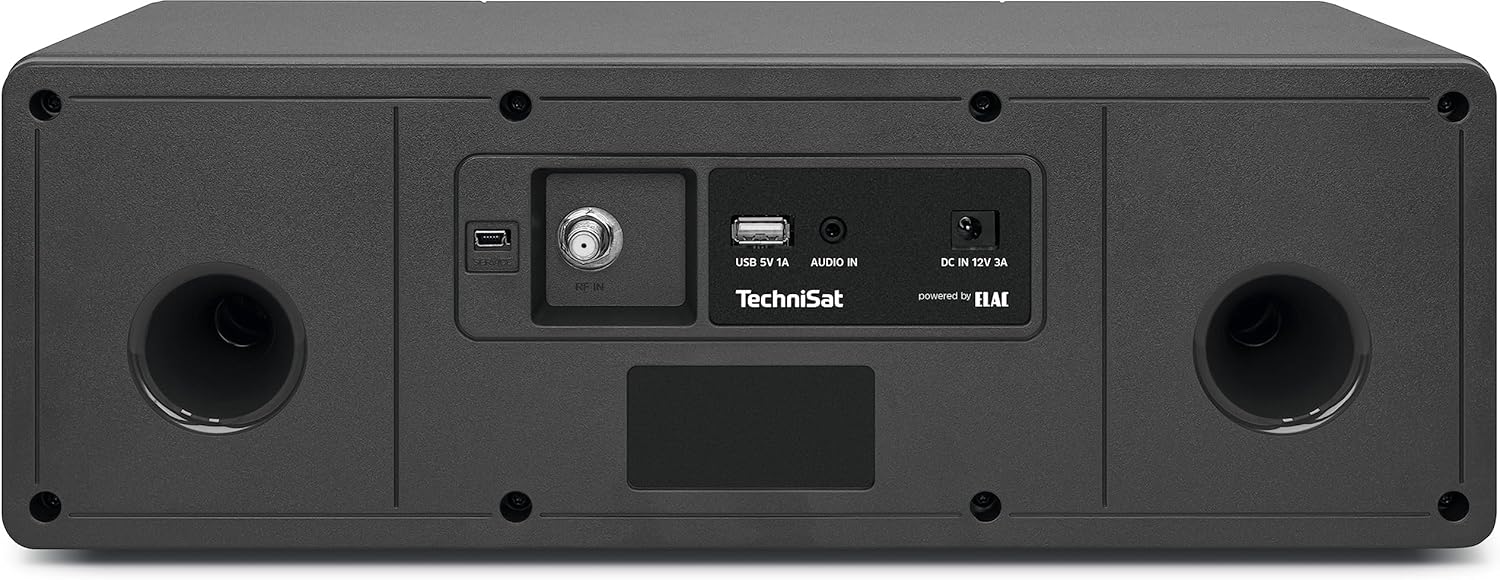
Immaġni: Wara view of the TechniSat DIGITRADIO 4 IR radio, highlighting the connection ports: RF IN for antenna, USB 5V 1A, AUDIO IN (AUX), and DC IN 12V 3A power input. Two bass reflex ports are also visible.

Immaġni: The remote control for the TechniSat DIGITRADIO 4 IR radio, featuring buttons for power, EQ, scan, alarm, sleep timer, playback controls, menu navigation, volume, and a numeric keypad for direct station access.
Setup
- Spakkjar: Neħħi bir-reqqa l-komponenti kollha mill-imballaġġ.
- Konnessjoni tal-antenna: Connect the telescopic antenna to the RF IN port on the rear of the device. Extend the antenna for optimal reception.
- Konnessjoni tal-Enerġija: Connect the power adapter to the DC IN 12V 3A port on the rear of the radio, then plug it into a wall outlet.
- Inizjali Setup Wizard: Upon first power-on, the radio will guide you through an initial setup wizard. Follow the on-screen instructions to set language, time, date, and network connection.
- Konnessjoni tan-Netwerk (Wi-Fi): Select your Wi-Fi network from the list and enter the password. A stable internet connection is required for internet radio and streaming services.
Istruzzjonijiet Operattivi
Power On/Off u Standby
Agħfas il- VOL / STANDBY rotary knob to switch the device on or off. In standby mode, the display shows the time and date.
Għażla tal-Modalità
Agħfas il- MODALITÀ button on the front panel or remote control to cycle through available modes: DAB+, FM, Internet Radio, Bluetooth, USB, and AUX In.
Radju DAB+
- Select DAB+ mode.
- Ir-radju se jiskennja awtomatikament għall-istazzjonijiet DAB+ disponibbli.
- Uża l- SELECT / SNOOZE rotary knob or the </> buttuni fuq ir-remote biex tinnaviga bejn l-istazzjonijiet.
- Agħfas il- SELECT / SNOOZE pum jew OK on the remote to select a station.
- To save a favorite station, press and hold the FAV button, then select a preset number.
Radju FM
- Agħżel modalità FM.
- Agħfas il- SKANJA button to automatically search for FM stations.
- Irfina manwalment billi tuża l- SELECT / SNOOZE rotary knob or the </> buttuni.
- To save a favorite station, press and hold the FAV button, then select a preset number.
Radju fuq l-Internet
- Ensure the radio is connected to your Wi-Fi network.
- Agħżel il-modalità tar-Radju tal-Internet.
- Fittex l-istazzjonijiet skont il-post, il-ġeneru, jew it-tfittxija.
- Agħfas il- SELECT / SNOOZE pum jew OK on the remote to select a station.
- To save a favorite station, press and hold the FAV button, then select a preset number.
Streaming tal-Awdjo Bluetooth
- Select Bluetooth mode on the radio. The display will show "Pairing".
- Enable Bluetooth on your smartphone or tablet and search for available devices.
- Select "DIGITRADIO 4 IR" from the list to pair.
- Ladarba jkun imqabbad, tista' tixxandar l-awdjo mit-tagħmir tiegħek għar-radju.
Daqq USB
- Daħħal USB drive li jkun fih MP3 files fil-port USB fuq wara tar-radju.
- Agħżel il-modalità USB.
- Use the controls to navigate and play your music files.
Input AUX
- Connect an external audio source (e.g., an MP3 player) to the AUX IN port on the rear of the radio using a 3.5mm audio cable (not included).
- Agħżel il-mod AUX.
- Audio from the connected device will play through the radio's speakers.
Arloġġ tal-Allarm u Sleep Timer
Access alarm and sleep timer settings via the MENU button or dedicated buttons on the remote control. Follow the on-screen prompts to configure these functions.
Display Settings
Adjust display brightness for operating and standby modes through the MENU settings. The radio also features an auto-dimming function.
Manutenzjoni
To ensure the longevity and optimal performance of your DIGITRADIO 4 IR, follow these maintenance guidelines:
- Tindif: Uża drapp artab u niexef biex tnaddaf il-barra tar-radju. Tużax prodotti tat-tindif li joborxu, xama', jew solventi.
- Kura tal-Wiri: Gently wipe the display with a soft, lint-free cloth. Avoid pressing hard on the screen.
- Ventilazzjoni: Kun żgur li l-fetħiet tal-ventilazzjoni ma jkunux imblukkati biex tevita sħana żejda.
- Ambjent: Keep the radio away from direct sunlight, heat sources, dust, and moisture.
Issolvi l-problemi
If you encounter issues with your DIGITRADIO 4 IR, refer to the following common solutions:
- Ebda Qawwa: Ensure the power adapter is securely connected to both the radio and a working power outlet.
- Ebda Ħsejjes: Check the volume level. Ensure the correct audio source mode is selected. If using AUX or Bluetooth, verify the external device's volume and connection.
- Poor Radio Reception (DAB+/FM): Extend and adjust the telescopic antenna. Try repositioning the radio to improve signal strength.
- Internet Radio Connection Issues: Verify your Wi-Fi network connection. Ensure the Wi-Fi password is entered correctly. Restart your Wi-Fi router and the radio.
- Problemi ta' Tqabbil tal-Bluetooth: Ensure the radio is in Bluetooth pairing mode. Delete "DIGITRADIO 4 IR" from your device's Bluetooth list and attempt to pair again.
- Connect App Not Recognizing Radio: If using a companion app, try restarting your smartphone or tablet if the app fails to connect to the radio.
- Problemi ta' Daqq tal-USB: Ensure the USB drive is formatted correctly (FAT32) and contains supported MP3 audio files.
Speċifikazzjonijiet
| Karatteristika | Dettall |
|---|---|
| Brand | TechniSat |
| Numru tal-Mudell | 0000/3957 |
| Kulur | Iswed |
| Teknoloġija tal-Konnettività | Auxiliary, Bluetooth, USB, Wi-Fi |
| Karatteristiċi Speċjali | Access to music services (Spotify, Amazon Music, Klassikradio Select, Calm Radio), USB interface with charging function and MP3 playback, FM Radio, Bluetooth audio streaming (reception), Favorite memory (30 DAB+ / 30 FM / 30 Internet) |
| Apparati Kompatibbli | Headphones, Smartphone, Tablet |
| Dimensjonijiet tal-Prodott | 38L x 18.5W x 13.5H ċm |
| Teknoloġija tal-Irfinar | DAB+ |
| Frekwenzi tar-Radju Appoġġjati | DAB+, FM, Internet |
| Sors tal-Enerġija | Corded Elettriku |
| Komponenti Inklużi | Power adapter, Telescopic antenna with mounting tool, DIGITRADIO 4 IR, User manual, Remote control with batteries |
Informazzjoni dwar Garanzija u Appoġġ
For detailed warranty information, please refer to the warranty card included with your product or visit the official TechniSat website. Please note that spare parts availability for this product is currently unavailable, and information regarding guaranteed software updates is not provided.
For technical support or service inquiries, please contact TechniSat customer service through their official channels.


