1. Introduzzjoni
This manual provides essential information for the proper installation, operation, and maintenance of your ENDORFY Arx 500 ARGB ATX Computer Case. Please read this manual thoroughly before beginning installation to ensure optimal performance and safety.
The ENDORFY Arx 500 ARGB is a high-performance ATX computer case designed for efficient cooling and spacious component compatibility. Key features include:
- Pannell tal-ġenb tal-ħġieġ ittemprat għall-ispettakluasinkomponenti interni g.
- Spacious interior for easy component installation and cable management.
- Compatibility with various radiator sizes for advanced cooling solutions.
- Airy and easily accessible front panel for optimal airflow.
- Efficient cooling design to maintain low component temperatures.
- Convenient cable management features for a clean build.
2. Informazzjoni dwar is-Sigurtà
Jekk jogħġbok osserva l-prekawzjonijiet ta' sigurtà li ġejjin biex tevita ħsara lill-prodott jew korriment lilek innifsek.
- Skonnettjar tal-Enerġija: Always disconnect the power supply from the wall outlet before installing or removing any components inside the computer case.
- Elettriku Statiku: Wear an anti-static wrist strap or frequently touch a grounded metal object to discharge static electricity before handling internal components.
- Truf li jaqtgħu: Be cautious of sharp edges inside the case during installation.
- Ħġieġ ittemprat: Handle the tempered glass side panel with care. It is fragile and can break if dropped or subjected to impact. Place it on a soft, flat surface when removed.
- Ventilazzjoni: Ensure adequate ventilation around the case to prevent overheating. Do not block air vents.
- Kuntatt mal-Likwidu: Keep the computer case away from liquids and moisture.
3. Kontenut tal-Pakkett
Iċċekkja li l-oġġetti kollha huma preżenti fil-pakkett tiegħek. Jekk xi oġġetti huma neqsin jew bil-ħsara, ikkuntattja lill-bejjiegħ tiegħek.
- ENDORFY Arx 500 ARGB ATX Computer Case
- 4 x 140 mm ARGB Fans (pre-installed)
- Accessory Box (containing screws, cable ties, and other mounting hardware)
- Manwal għall-Utent (dan id-dokument)

Figura 3.1: Sploda view showing the computer case, fans, and various panels.
4. Setup u Installazzjoni
Follow these steps to install your components into the ENDORFY Arx 500 ARGB case.
4.1 Tħejjija tal-Każ
- Neħħi l-Panewijiet tal-Ġnub: Carefully remove the tempered glass side panel and the solid metal side panel. Place them on a soft, non-abrasive surface to prevent scratches.
- Kaxxa tal-Aċċessorji: Locate the accessory box inside the case, which contains all necessary screws and mounting hardware.
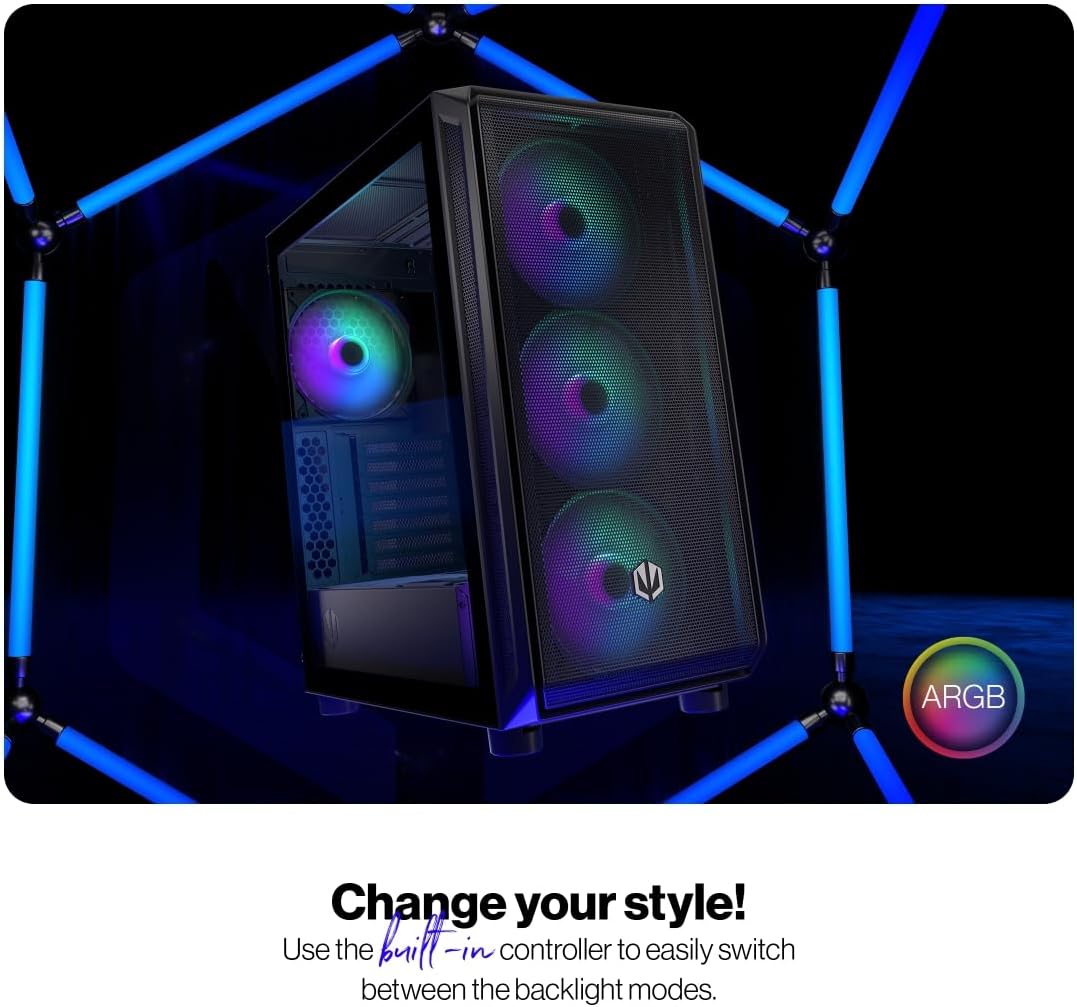
Figure 4.1: The tempered glass side panel allows for a clear view tal-komponenti interni.
4.2 Installazzjoni tal-Motherboard
- Installa Standoffs: Ensure the correct standoffs are installed for your ATX motherboard. The case supports ATX motherboards.
- Immuntar tal-Motherboard: Carefully place your motherboard onto the standoffs and secure it with the provided screws.

Figure 4.2: The spacious interior provides ample room for motherboard and other component installation.
4.3 Installazzjoni tal-Provvista tal-Enerġija u l-Ħażna
- Provvista tal-Enerġija: Install your power supply unit (PSU) into the dedicated bottom mount area. Secure it with screws from the rear of the case.
- Drives tal-Ħażna: Install your 2.5" SSDs or 3.5" HDDs into the designated drive bays. Refer to the case's internal structure for specific mounting points.
4.4 Karta tal-Grafika u Karti tal-Espansjoni
- Neħħi l-Għotjien tas-Slott: Neħħi l-għata meħtieġa tas-slott PCI-E minn wara tal-kaxxa.
- Installa Karti: Insert your graphics card and other expansion cards into the motherboard's PCI-E slots and secure them with screws.
4.5 Cooling System (Fans and Radiators)
The case comes with 4 pre-installed 140mm ARGB fans. Additional fans or radiators can be installed for enhanced cooling.
- Kapaċità tal-Fann: The case accommodates up to 7 fans.
- Kompatibilità tar-radjatur: The design supports various radiator sizes for liquid cooling solutions.

Figure 4.3: The case features pre-installed 140mm ARGB fans for optimal airflow.

Figure 4.4: Perforated front and top panels ensure maximum airflow and dust protection.
4.6 Ġestjoni tal-Cable
Utilize the dedicated cable management space and tie-down points behind the motherboard tray to route and secure cables for a clean build and improved airflow.
4.7 Konnessjonijiet tal-Panel I/O ta' Quddiem
Connect the front panel cables (USB, audio, power, reset, LEDs) to the corresponding headers on your motherboard. Refer to your motherboard manual for header locations.

Figure 4.5: Front I/O panel with USB-C, USB-A, headphone, microphone, reset, and power buttons/LEDs.
- Port USB-C: Connects to a USB 3.x Type-C header on your motherboard.
- Portijiet USB-A: Connects to USB 3.x and USB 2.0 headers on your motherboard.
- Headphones Port: Connects to the audio header on your motherboard.
- Port tal-mikrofonu: Connects to the audio header on your motherboard.
- Buttuna Irrisettja: Connects to the reset header on your motherboard.
- LED tal-qawwa: Connects to the power LED header on your motherboard.
- Storage Activity LED: Connects to the HDD LED header on your motherboard.
- Buttuna tal-Qawwa: Connects to the power switch header on your motherboard.
5. Istruzzjonijiet Operattivi
Ladarba l-komponenti kollha jkunu installati u konnessi, tista' tixgħel is-sistema tiegħek.
- Qawwa Mixgħul: Press the Power Button on the front I/O panel to turn on your computer. The Power LED will illuminate.
- ARGB Fan Control: The pre-installed ARGB fans can be controlled via a built-in controller or synchronized with compatible motherboard software. Use the built-in controller to switch between various backlight modes.

Figure 5.1: The ARGB fans offer customizable lighting effects, controlled via the built-in controller.
6. Manutenzjoni
Regular maintenance helps ensure optimal performance and longevity of your computer case and components.
- Filtri tat-Trab: Neħħi u naddaf perjodikament il-filtri tat-trab li jinsabu fuq quddiem, fuq, u taħt tal-kaxxa. Uża arja kkompressata jew pinzell artab biex tneħħi t-trab akkumulat.
- Tindif ta' barra: Imsaħ l-uċuħ ta' barra tal-kaxxa b'ċarruta ratba u damp drapp. Evita prodotti tat-tindif jew solventi li joborxu.
- Tindif ta 'ġewwa: Bis-sistema mitfija u skonnettjata, uża arja kkompressata biex tneħħi bil-mod it-trab mill-komponenti interni u x-xfafar tal-fann.
- Ħġieġ ittemprat: Clean the tempered glass panel with a microfiber cloth and a glass cleaner designed for electronics.
7 Issolvi l-problemi
If you encounter issues with your computer case, refer to the following common troubleshooting steps.
- Is-Sistema Mhux Tixgħel:
- Ensure the power supply is properly connected to the wall outlet and switched on.
- Verify all power cables from the PSU are correctly connected to the motherboard and components.
- Check that the front panel power button cable is correctly connected to the motherboard's power header.
- Il-Fannijiet Mhux Iduru/L-ARGB Mhux Jixgħel:
- Ensure fan power cables are securely connected to the fan hub or motherboard headers.
- Verify ARGB cables are connected to the built-in controller or motherboard ARGB header.
- Check the built-in controller or motherboard software for fan speed and lighting settings.
- Il-Portijiet USB/Awdjo ta' Quddiem Ma Jaħdmux:
- Confirm that the front panel USB and audio cables are correctly connected to the corresponding headers on your motherboard.
- Ensure motherboard drivers for USB and audio are installed.
If problems persist, consult your motherboard manual or contact ENDORFY customer support.
8. Speċifikazzjonijiet
| Karatteristika | Dettall |
|---|---|
| Brand | ENDORFY |
| Serje | Arx 500 ARGB |
| Numru tal-Mudell | EY2A011 |
| Tip ta' Każ | Torri tal-Midi |
| Kompatibbiltà tal-motherboard | ATX |
| Dimensjonijiet (LxWxH) | 16.89 x 8.98 x 19.13 pulzieri (429 x 228 x 486 mm) |
| Piż tal-oġġett | 16.5 liri |
| Materjal | Ħġieġ ittemprat (pannell tal-ġenb) |
| Metodu tat-tkessiħ | Arja |
| Fannijiet Inklużi | 4 x 140 mm ARGB fans |
| Daqs tal-fann | 140 Millimetru |
| Tip ta' Immuntar tal-Provvista tal-Enerġija | Mount tal-qiegħ |
| Portijiet I / O ta 'quddiem | 2x USB 2.0, 1x USB-C, 1x Headphone, 1x Microphone, Reset Button, Power Button |

Figure 8.1: Front dimensions (228 mm width).

Figure 8.2: Side dimensions (429 mm depth, 486 mm height).
9. Garanzija u Appoġġ
Għal informazzjoni dwar il-garanzija, appoġġ tekniku, jew aktar assistenza, jekk jogħġbok żur is-sit uffiċjali tal-ENDORFY webis-sit jew ikkuntattja lill-bejjiegħ lokali tiegħek.