Introduzzjoni
Welcome to the user manual for your new FERMAX Duox Plus Veo 4.3" Monitor. This manual provides essential information for the proper installation, operation, and maintenance of your device. Please read this manual thoroughly before using the product to ensure safe and efficient operation.
Informazzjoni Importanti dwar is-Sigurtà
- Sigurtà Elettrika: Ensure all electrical connections are made by a qualified professional and comply with local electrical codes. Disconnect power before installation or maintenance.
- Kundizzjonijiet Ambjentali: Do not expose the monitor to extreme temperatures, humidity, or direct sunlight. Install in a dry, well-ventilated area.
- Immaniġġjar: Handle the monitor with care to avoid damage to the screen or internal components.
- Tindif: Uża drapp artab u niexef għat-tindif. Tużax prodotti tat-tindif jew solventi li joborxu.
- Rimi: Dispose of the product and its components according to local electronic waste regulations.
Kontenut tal-Pakkett
Jekk jogħġbok ivverifika li l-oġġetti kollha elenkati hawn taħt huma inklużi fil-pakkett tiegħek:
- FERMAX Duox Plus Veo 4.3" Monitor Unit
- Bracket tal-Immuntar
- Connection Cables (if applicable)
- Viti u Plakek tal-Ħitan
- Manwal għall-Utent (dan id-dokument)
Karatteristiċi tal-Prodott
The FERMAX Duox Plus Veo 4.3" Monitor offers advanced features for your intercom system:
- 4.3-inch color display for clear video communication.
- Hands-free audio communication.
- Intuitive button interface for call answer, door release, and additional functions.
- Sleek, compact design suitable for modern interiors.
- Compatible with Duox Plus digital systems.
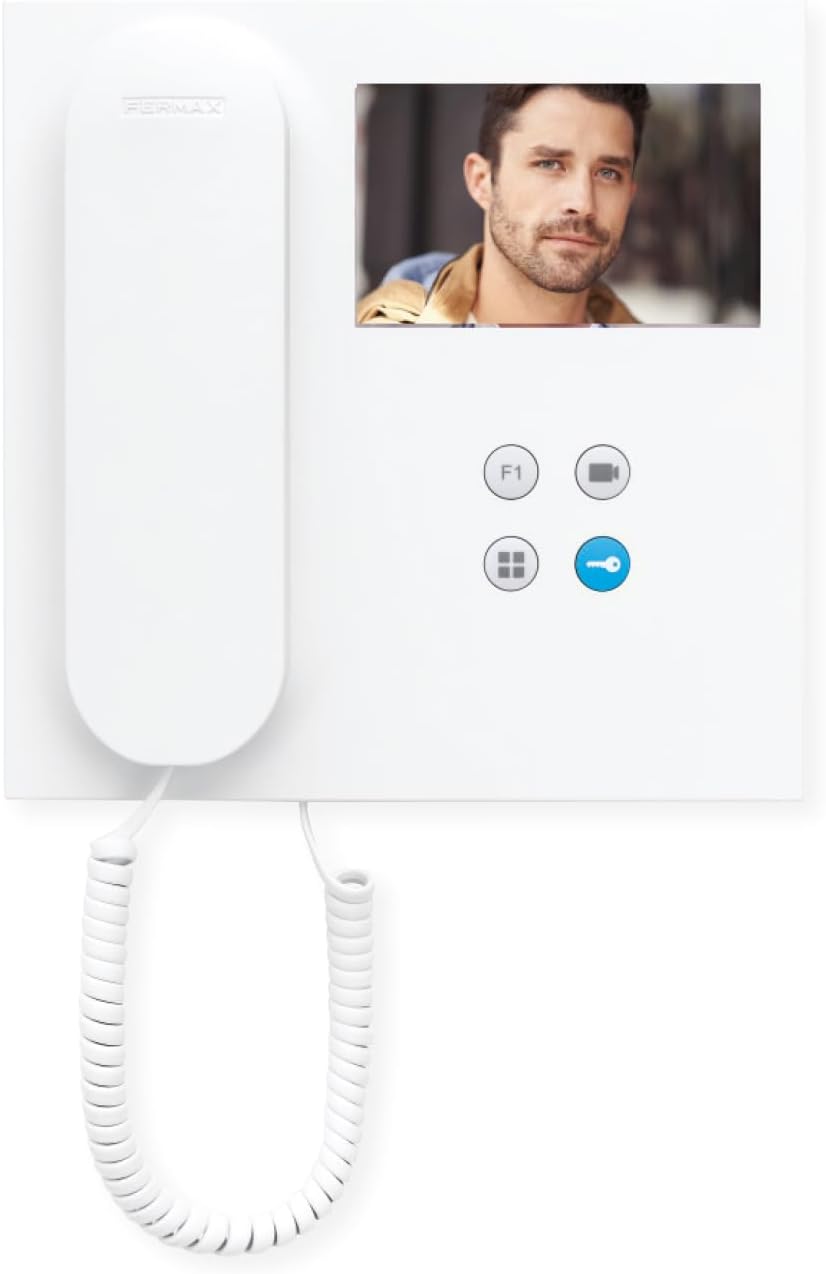
Immaġni: Quddiem view of the FERMAX Duox Plus Veo 4.3" Monitor, showing the display, handset, and control buttons.
Setup u Installazzjoni
1. L-Immuntar tal-Monitor
- Agħżel Post: Select a suitable indoor location, away from direct heat sources or moisture.
- Immarka l-Punti tat-Tħaffir: Uża l-bracket tal-immuntar bħala mudell biex timmarka l-punti tat-tħaffir fuq il-ħajt.
- Drill toqob: Drill holes at the marked points and insert wall plugs.
- Bracket Sikur: Waħħal il-bracket tal-immuntar mal-ħajt billi tuża l-viti pprovduti.
2. Konnessjonijiet tal-Wiring
Twissija: Ensure power is disconnected before making any electrical connections. Refer to your system's wiring diagram for specific connections.
- Connect the Duox Plus bus wires (data and power) to the designated terminals on the monitor.
- Connect any additional wires for auxiliary functions (e.g., second door release, panic button) as per your system's requirements.
- Kun żgur li l-konnessjonijiet kollha huma siguri u iżolati kif suppost.
3. Twaħħil tal-Monitor
- Carefully align the monitor with the mounting bracket.
- Slide the monitor onto the bracket until it clicks securely into place.
- Irrestawra l-enerġija lis-sistema.
Istruzzjonijiet Operattivi
Jirċievu Sejħa
- When a visitor calls from the outdoor panel, the monitor will ring and display the visitor's image.
- Biex twieġeb is-sejħa, agħfas il- Buttuna Tweġiba (typically indicated by a phone icon).
- Biex ittemm is-sejħa, agħfas il- Buttuna Tmiem Sejħa (often the same button or a distinct hang-up icon).
Ftuħ il-Bieb
- During a call, or when monitoring the outdoor panel, press the Buttuna tar-Rilaxx tal-Bieb (typically indicated by a key icon) to open the main entrance door.
Monitoring the Outdoor Panel
- Biex view the outdoor panel camera without an incoming call, press the Buttuna tal-monitor (often indicated by a camera icon). The display will show the live feed.
Aġġustament tas-Settings
- Volum: Use the volume controls (if present, or via menu) to adjust the ringtone and conversation volume.
- Luminożità/Kuntrast: Access the monitor's menu (refer to specific button layout) to adjust display settings.
Manutenzjoni
- Tindif: Use a soft, lint-free cloth to gently wipe the screen and casing. Do not use liquid cleaners, aerosols, or abrasive materials.
- Spezzjoni: Iċċekkja perjodikament il-kejbils u l-konnessjonijiet kollha għal xi sinjali ta’ xedd jew ħsara.
- Aġġornamenti tas-Software: If applicable, check the manufacturer's website for any firmware updates for your Duox Plus system.
Issolvi l-problemi
| Problema | Kawża Possibbli | Soluzzjoni |
|---|---|---|
| L-ebda immaġni fuq l-iskrin. | No power; loose connection; camera issue. | Check power supply. Ensure all cables are securely connected. Verify outdoor panel camera is functioning. |
| L-ebda awdjo waqt is-sejħa. | Volume too low; faulty connection; microphone/speaker issue. | Increase volume. Check audio cable connections. Contact support if issue persists. |
| Il-ftuħ tal-bieb mhux qed jaħdem. | Incorrect wiring; faulty lock mechanism; system error. | Verify wiring to the door strike. Test the lock mechanism independently. Consult system installer. |
| Monitor not ringing. | Ringtone volume off; system not registered; faulty outdoor panel button. | Check ringtone volume. Ensure monitor is properly registered to the system. Test outdoor panel button. |
If the problem persists after attempting these solutions, please contact FERMAX technical support or your installer.
Speċifikazzjonijiet Tekniċi
| Karatteristika | Dettall |
|---|---|
| Mudell | 90b61eff-c290-484c-aba5-73e26c52e3da |
| Daqs tal-Iskrin | 4.3 Pulzier |
| Riżoluzzjoni | 800 x 600 |
| Proporzjon ta' l-aspett | 4:3 |
| Proporzjon tal-Kuntrast tal-Immaġni | 2000:1 |
| Wiċċ tal-Iskrin | Tleqq |
| Manifattur | FERMAX |
| Dimensjonijiet tal-Pakkett | 8.74 x 8.15 x 2.01 pulzieri |
Garanzija u Appoġġ
FERMAX products are designed for durability and reliability. For information regarding warranty terms and conditions, please refer to the warranty card included with your product or visit the official FERMAX websit.
For technical support, installation assistance, or service inquiries, please contact your local FERMAX distributor or visit the support section of the FERMAX websit:

Image: FERMAX brand logo with the slogan "Connectivity for All".


