1. Introduzzjoni
The Ankilo Mini Bluetooth 5.3 Receiver/Transmitter is a versatile 2-in-1 audio adapter designed to add Bluetooth functionality to non-Bluetooth devices. Featuring the latest Bluetooth 5.3 technology, it ensures stable connections and a transmission range of up to 33 feet (10 meters). This device is suitable for use with cars, speakers, stereo systems, and headphones, allowing you to enjoy wireless audio streaming and hands-free calling.

Figure 1: Ankilo Mini Bluetooth 5.3 Receiver/Transmitter.

Figure 2: Highlighting Bluetooth 5.3 for stable connections, auto reconnect in RX mode, 33 ft signal range, and fast transmission.
2. Prodott Aktarview
Iffamiljarizza ruħek mal-komponenti tal-apparat:
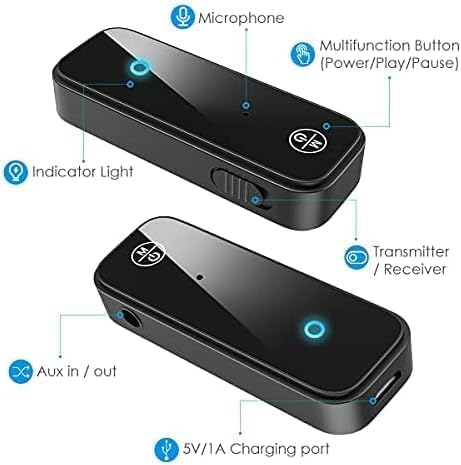
Figure 3: Labeled diagram of the Ankilo Bluetooth adapter. Key components include the Microphone, Multifunction Button (Power/Play/Pause), Indicator Light, Transmitter/Receiver (TX/RX) switch, Aux in/out port, and 5V/1A Charging port.
3. Kontenut tal-Pakkett
Kun żgur li l-oġġetti kollha huma preżenti fil-pakkett:
- 1 x Ankilo Mini Bluetooth 5.3 Receiver/Transmitter
- 1 x 3.5mm Audio Connector (new and old versions may be sent randomly)
- 1 x USB Iċċarġjar Cable
- 1 x Manwal għall-Utent
4. Setup u Konnessjoni
4.1. Modalità tar-Riċevitur (RX)
Use Receiver Mode to stream audio from your Bluetooth-enabled device (e.g., smartphone, laptop) to a non-Bluetooth audio system (e.g., car stereo, wired speakers, wired headphones).
- Aqleb għall-Modalità RX: Locate the TX/RX switch on the side of the adapter and slide it to the "RX" position.
- Qabbad mas-Sistema Awdjo: Plug the 3.5mm audio connector into the Aux in/out port of the Bluetooth adapter. Then, plug the other end of the 3.5mm audio connector into the auxiliary input port of your non-Bluetooth audio system.
- Ixgħel u Par: Press and hold the Multifunction Button (power button) for 3 seconds to turn on the device. The indicator light will flash red and blue alternately, indicating it is in pairing mode.
- Agħlaq mat-Tagħmir Tiegħek: On your smartphone or other Bluetooth-enabled device, go to Bluetooth settings and search for "Ankilo" or "ZF-360" (or similar device name). Select it to connect. Once connected, the indicator light on the adapter will turn solid blue.

Figure 4: Step-by-step visual guide for connecting in both Receiver (RX) and Transmitter (TX) modes.
4.2. Transmitter Mode (TX)
Use Transmitter Mode to stream audio from a non-Bluetooth audio source (e.g., TV, computer, MP3 player) to your Bluetooth headphones or speakers.
- Aqleb għall-Modalità TX: Locate the TX/RX switch on the side of the adapter and slide it to the "TX" position.
- Qabbad mas-Sors Awdjo: Plug the 3.5mm audio connector into the Aux in/out port of the Bluetooth adapter. Then, plug the other end of the 3.5mm audio connector into the auxiliary output port of your non-Bluetooth audio source (e.g., TV headphone jack).
- Ixgħel u Par: Press and hold the Multifunction Button (power button) for 3 seconds to turn on the device. The indicator light will flash red and blue alternately, indicating it is in pairing mode.
- Imqabbad ma' Headphones/Speakers Bluetooth: Put your Bluetooth headphones or speakers into pairing mode. The adapter will automatically search and connect to your headphones/speakers. Once connected, the indicator light on the adapter will turn solid red.
Video 1: General guide on how to use an Aux Bluetooth Adapter for Car. (Note: Product shown may vary slightly from Ankilo model.)
Video 2: Demonstration of ensuring the audio plug is firmly inserted for optimal sound quality. (Note: Product shown may vary slightly from Ankilo model.)
5. Modi u Funzjonijiet Operattivi
5.1. Sejħiet mingħajr idejn
The adapter features a built-in HD microphone for convenient hands-free calling while driving or performing other tasks.
- Tweġiba/Hang Up Call: Agħfas il-Butuna Multifunzjoni darba.
- Irrifjuta Sejħa: Agħfas u żomm il-buttuna Multifunzjoni għal 2 sekondi.
- Isemmi mill-ġdid l-Aħħar Numru: Agħfas darbtejn il-Buttuna Multifunzjoni.
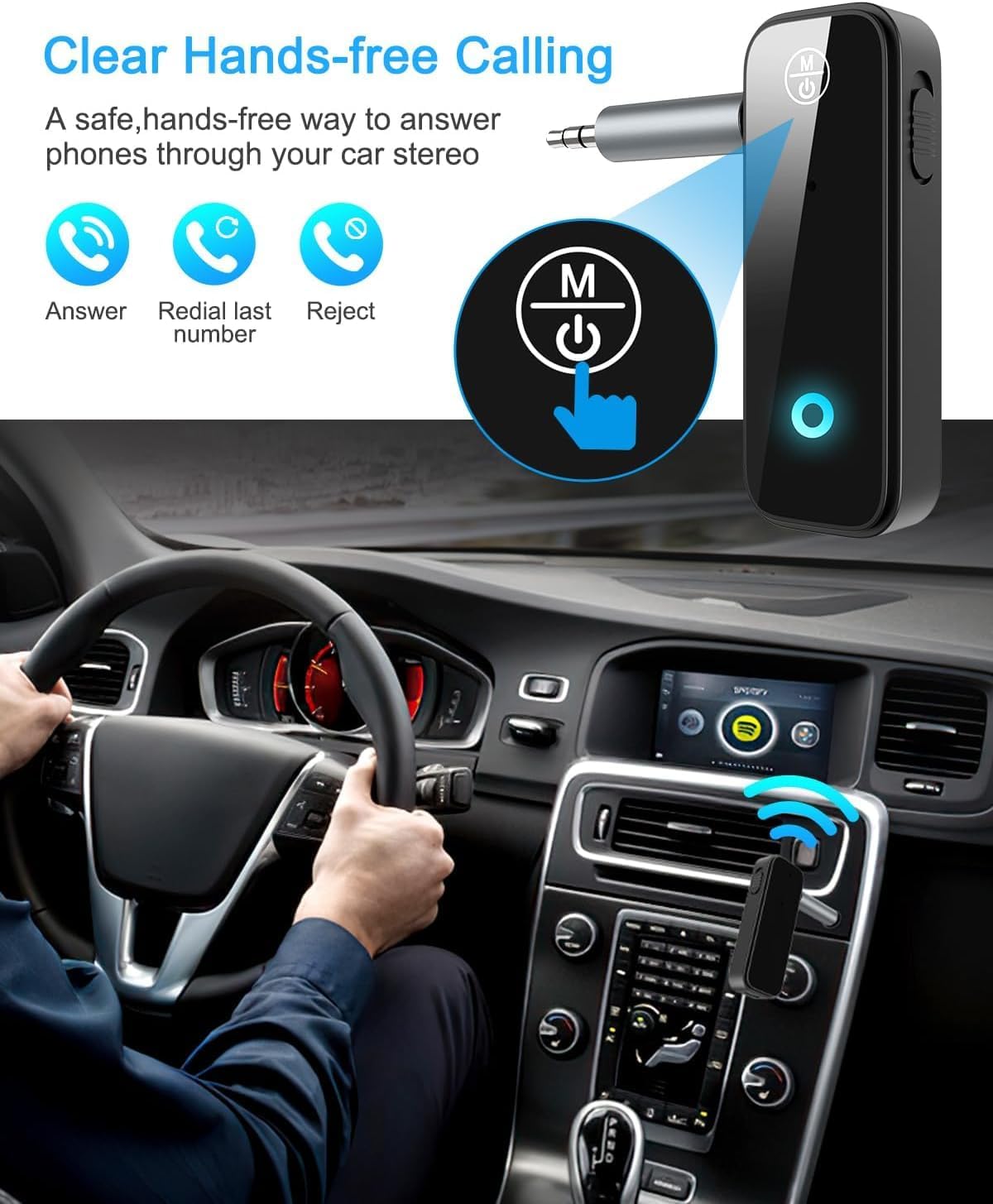
Figure 5: Visual representation of hands-free calling functionality in a vehicle.
5.2. Kontroll tad-Daqq tal-Mużika
- Play/Pawsa: Agħfas il-Butuna Multifunzjoni darba.
- Track li jmiss: Agħfas il-buttuna "+" darba.
- Track preċedenti: Agħfas il-buttuna "-" darba.
- Volum 'il fuq: Agħfas u żomm il-buttuna "+".
- Volum 'l isfel: Agħfas u żomm il-buttuna "-".
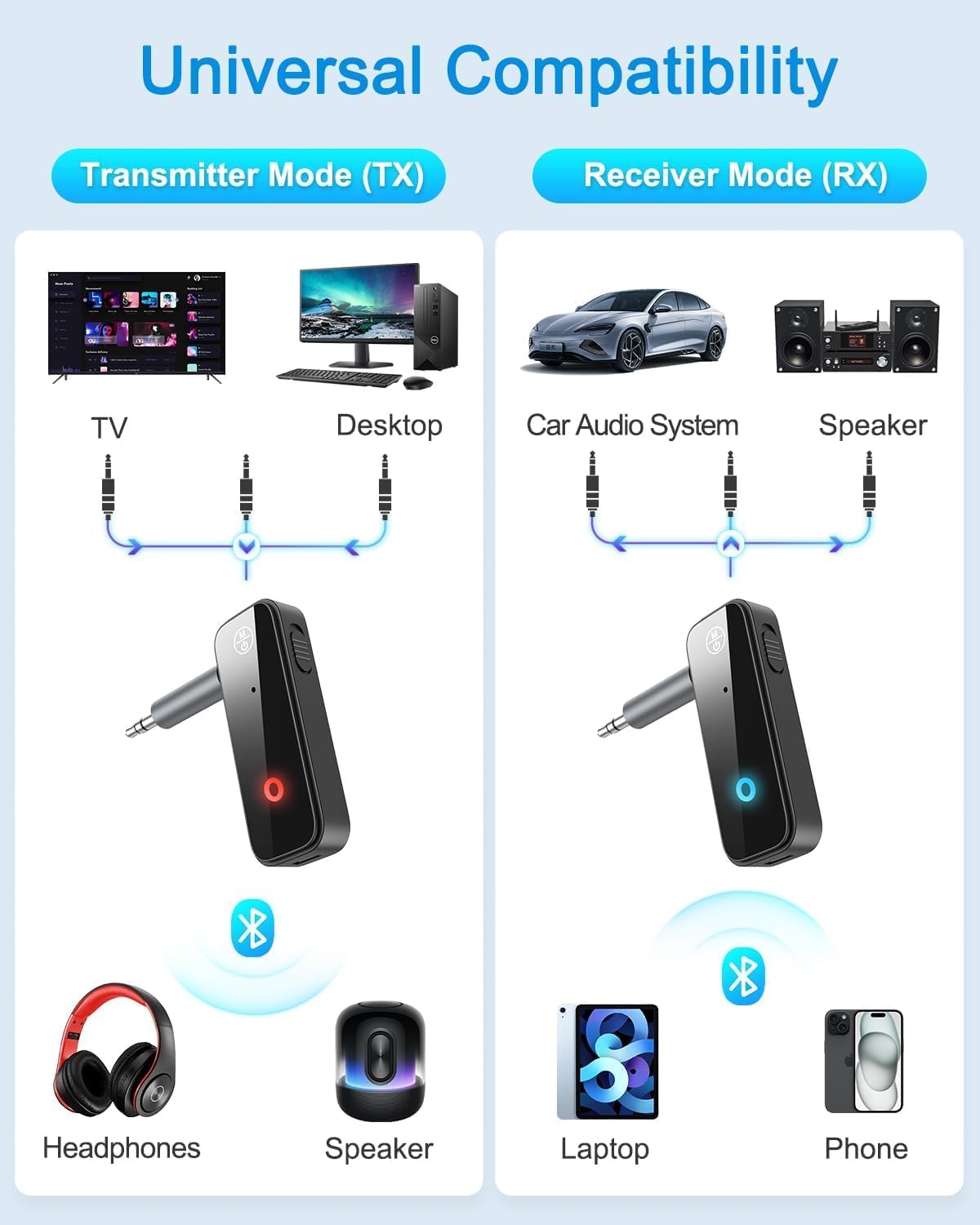
Figure 6: Illustrates the universal compatibility of the device in both Transmitter (TX) and Receiver (RX) modes with various devices like TVs, desktops, car audio systems, speakers, headphones, laptops, and phones.
6. Iċċarġjar u Ħajja tal-Batterija
The Ankilo Mini Bluetooth adapter is equipped with a built-in rechargeable battery. A full charge takes approximately 2 hours and provides up to 8 hours of music playback or call time.
- Iċċarġjar: Connect the provided USB charging cable to the 5V/1A Charging port on the adapter and to a USB power source. The red indicator light will be solid during charging and turn off when fully charged.
- Indikazzjoni Baxxa tal-Batterija: When the battery is low, the red indicator light will flash.

Figure 7: Details on the device's 8-hour battery life, 2-hour fast charging, and USB charging port.
7. Speċifikazzjonijiet
| Karatteristika | Dettall |
|---|---|
| Brand | Ankilo |
| Mudell | CP210-MA06CA-KH |
| Verżjoni Bluetooth | 5.3 |
| Modi Operattivi | Receiver (RX) & Transmitter (TX) |
| Firxa tat-Trażmissjoni | Sa 33 pied (10 metri) |
| Ħajja tal-batterija | Approx. 8 hours (music/call) |
| Ħin tal-Iċċarġjar | Appross. 2 sigħat |
| Port tal-Iċċarġjar | 5V/1A (USB) |
| Input/Output Awdjo | 3.5mm Awżiljarju |
| Mikrofonu inkorporat | Yes (HD) |
| Materjal | Plastik |
| Dimensjonijiet tal-Prodott | 6.7 x 1.8 x 10 ċm; 30 g |
8 Issolvi l-problemi
- Apparat mhux mixgħul: Kun żgur li l-apparat huwa ċċarġjat kompletament. Qabbad ma' sors ta' enerġija permezz tal-kejbil USB.
- Cannot pair with a device:
- Ensure the adapter is in the correct TX or RX mode.
- Make sure the adapter is in pairing mode (red and blue lights flashing alternately).
- Ensure the target device (phone, headphones, speaker) is also in pairing mode.
- Turn off and on the Bluetooth function on your device and try searching again.
- Neħħi l-konnessjonijiet Bluetooth preċedenti fuq iż-żewġ apparati jekk meħtieġ.
- No audio or low audio:
- Check that the 3.5mm audio connector is fully and firmly inserted into both the adapter and the audio system/source.
- Kun żgur li l-volum kemm fuq l-adapter kif ukoll fuq l-apparat awdjo konness ikun għoli.
- Verify that the adapter is correctly connected to the audio source/system (TX mode for output, RX mode for input).
- Konnessjoni intermittenti: Ensure there are no significant obstacles (like walls) between the adapter and the connected Bluetooth device. Keep devices within the 33-foot (10-meter) range.
9. Informazzjoni dwar is-Sigurtà
- Tesponix l-apparat għal temperaturi estremi, umdità, jew ambjenti korrużivi.
- Żarmax jew tipprova ssewwi l-apparat lilek innifsek.
- Żomm fejn ma jintlaħaqx mit-tfal.
- Note: This adapter is not suitable for SONY devices. Please confirm compatibility before purchase.
10. Garanzija u Appoġġ
Ankilo offers a 12-month quality protection warranty and 60 days free replacement for this product. For any questions or concerns, please contact our customer support. We are committed to responding within 24 hours to assist you.


