1. Informazzjoni dwar is-Sigurtà
Dejjem ilbes elmu meta ssuq.
Operating an electric kickscooter carries inherent risks, including but not limited to loss of control, collisions, and falls. To minimize these risks, it is crucial to read and follow all instructions and warnings in this manual. Ensure you understand how to operate the kickscooter safely before your first ride.
- Dejjem ilbes tagħmir tas-sigurtà xieraq, inkluż elmu, pads għall-irkoppa, u pads għall-minkeb.
- Do not ride in wet conditions, on slippery surfaces, or in poor visibility.
- Adhere to local laws and regulations regarding electric kickscooter use.
- Żomm veloċità u distanza sikura minn vetturi oħra u persuni mexjin.
- Avoid sudden maneuvers, sharp turns, and excessive speeds.
- Do not allow children under the recommended age or individuals exceeding the weight limit to operate the kickscooter.
- Regularly inspect the kickscooter for any damage or loose parts before each ride.
2. Prodott Aktarview
The Segway Ninebot F2 Pro Electric KickScooter is designed for urban commuting, offering a balance of performance, safety, and convenience. It features a robust design with advanced functionalities.
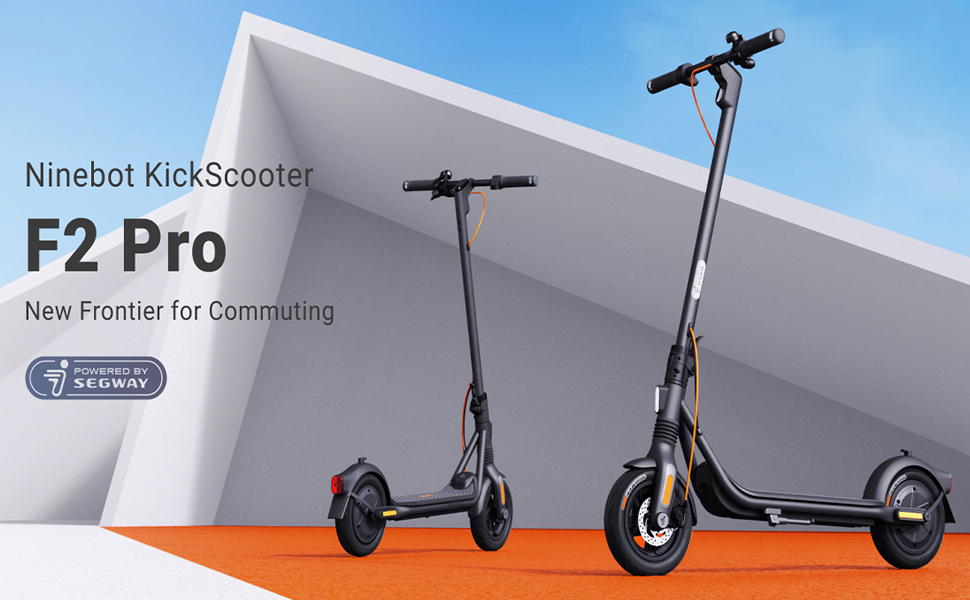
Image: The Segway Ninebot F2 Pro Electric KickScooter, showcasing its design for urban commuting.
Karatteristiċi ewlenin:
- Veloċità Massima: 32 km/h (20 mph)
- Firxa massima: Sa 55 km (34 mili)
- Output tal-Mutur: 800W maximum power
- Tajers: 10-inch self-sealing tubeless tires
- Sospensjoni: Front spring suspension for a smoother ride
- Sistema tal-Ibbrejkjar: Dual braking system (front disc brake + rear E-ABS)
- Karatteristiċi tas-Sigurtà: Integrated turn signals, Traction Control System (TCS), high-decibel electric horn, built-in LED headlight.
- Konnettività: Bluetooth connection, Apple Find My compatibility.
- Portabbiltà: Portable folding design.

Immaġni: Quddiem view of the Segway Ninebot F2 Pro Electric KickScooter.

Immaġni: Ġenb view of the Segway Ninebot F2 Pro Electric KickScooter.

Immaġni: Wara view of the Segway Ninebot F2 Pro Electric KickScooter.
3. Setup
3.1 Unfolding the KickScooter
- Place the kickscooter on a flat surface.
- Lift the stem until it locks into the upright position. Ensure the locking mechanism is securely engaged.
- Iftaħ il-kickstand biex tappoġġja l-iskuter.

Image: Dimensions of the Segway Ninebot F2 Pro KickScooter in both folded and unfolded states.
3.2 Iċċarġjar inizjali
Before first use, fully charge the kickscooter's battery. Connect the charger to the charging port and then to a power outlet. The charging indicator on the charger will change color (e.g., red to green) when fully charged.
- Il-ħin tal-iċċarġjar huwa madwar sagħtejn għal ħlas sħiħ.
- Only use the official charger provided with the kickscooter.

Immaġni: Interna view of the battery cells within the kickscooter deck, illustrating the 34-mile max range and 8-hour fast charging capability.
3.3 Connecting to the Smart App
Download the official Segway-Ninebot app from your smartphone's app store. Follow the in-app instructions to connect your F2 Pro KickScooter via Bluetooth. The app allows for firmware updates, riding status monitoring, and scooter locking/unlocking.

Image: Screenshot of the Segway-Ninebot smart app, demonstrating features like Bluetooth connection, lock/unlock, riding status, cruise mode, and firmware updates.
4. Istruzzjonijiet Operattivi
4.1 Tixgħel/Jitfi
- Qawwa Mixgħul: Press the power button located on the display panel.
- Itfi: Agħfas u żomm il-buttuna tal-qawwa għal ftit sekondi.
4.2 Riding the KickScooter
- Poġġi sieq waħda sew fuq il-gverta.
- Push off with your other foot to gain initial momentum.
- Ladarba tkun miexi, agħfas bil-mod il-lieva tat-throttle biex tattiva l-mutur.
- Poġġi t-tieni sieq tiegħek fuq il-gverta.
- To slow down, release the throttle. To brake, use the brake lever on the handlebar.

Image: Detail of the front wheel, highlighting the disc brake and front suspension system.

Image: Diagram showing the front spring suspension, designed for smooth riding over bumps.
4.3 Using Turn Signals and Horn
- Sinjali tad-dawran: Use the switch on the handlebar to activate the integrated turn signals for indicating turns.
- Qarn: Press the horn button on the handlebar to alert others.

Image: Close-up of the handlebar, showing the activated turn signal for improved visibility.
4.4 Folding for Transport
To fold the kickscooter for storage or transport:
- Ensure the kickscooter is powered off.
- Locate the folding mechanism at the base of the stem.
- Follow the specific instructions in the quick start guide to release the latch and fold the stem down until it clicks into place.

Image: A person carrying the folded Segway Ninebot F2 Pro KickScooter, demonstrating its portability.
5. Manutenzjoni
Regular maintenance ensures the longevity and safe operation of your Segway Ninebot F2 Pro KickScooter.
5.1 Tindif Ġenerali
Wipe the kickscooter with a soft, damp cloth. Do not use alcohol, gasoline, kerosene, or other corrosive chemical solvents to clean the scooter. Do not wash the scooter with a high-pressure water jet.
5.2 Kura tat-Tajers
The F2 Pro features 10-inch self-sealing tubeless tires, which reduce the risk of punctures. However, it is important to regularly check tire pressure and inflate to the recommended PSI for optimal performance and safety.

Image: Diagram showing the self-sealing layer within the tire, designed to prevent punctures.
5.3 Manutenzjoni tal-batterija
- Avoid fully discharging the battery. Charge it regularly, even if not in use for extended periods.
- Store the kickscooter in a cool, dry place, away from direct sunlight and extreme temperatures.
- Tippruvax tiżżarma jew timmodifika l-pakkett tal-batterija.
5.4 Kontroll tas-Sistema tal-Brejkijiet
Periodically check the functionality of both the front disc brake and the rear E-ABS brake. Ensure the brake levers operate smoothly and the braking power is effective. If you notice any issues, consult a qualified technician.

Image: Illustration detailing the dual braking system, which includes a front disc brake and a rear E-ABS for effective stopping power.
6 Issolvi l-problemi
This section addresses common issues you might encounter with your F2 Pro KickScooter.
6.1 KickScooter Not Powering On
- Iċċekkja l-Livell tal-Batterija: Ensure the battery is sufficiently charged. Connect the charger and attempt to power on after a short charge.
- Buttuna tal-Qawwa: Confirm the power button is being pressed correctly and held for the required duration.
6.2 Kwistjonijiet ta' Konnessjoni tal-App
- Bluetooth: Ensure Bluetooth is enabled on your smartphone and the kickscooter is within range.
- Irristartja l-App: Close and reopen the Segway-Ninebot app.
- Aġġornament tal-Firmware: If possible, check for and install any pending firmware updates via the app on a successful connection.
6.3 Reduced Performance or Range
- Pressjoni tat-Tajers: Incorrect tire pressure can significantly impact range and performance. Check and adjust to recommended levels.
- Kundizzjonijiet tal-irkib: Steep inclines, heavy loads, and aggressive riding (e.g., frequent acceleration/braking) will reduce range.
- Saħħa tal-batterija: Over time, battery capacity may decrease. Ensure proper battery maintenance.
7. Speċifikazzjonijiet
| Karatteristika | Speċifikazzjoni |
|---|---|
| Isem tal-Mudell | F2 Pro |
| Numru tal-Mudell tal-Oġġett | 051203U |
| Brand | Segway |
| Veloċità Massima | 32 km/h (20 mph) |
| Medda Max | Sa 55 km (34 mili) |
| Output tal-Mutur | 900W (l-ogħla livell) |
| Hill Grad | Sa 22% |
| Daqs tat-Tajers | 10 Inches (Self-Sealing Tubeless) |
| Tip ta' brejk | Front Disc Brake, Rear E-ABS |
| Sospensjoni | Front Spring Suspension |
| Tip ta 'batterija | Jonju tal-litju (1 meħtieġa, inkluża) |
| Ħin tal-Iċċarġjar | Appross. 8 sigħat |
| Dimensjonijiet tal-Prodott (Miftuħ) | 56.9 x 125.22 x 115.82 ċm |
| Piż tal-oġġett | 18.5 kg (Madwar 39 libbra) |
| Kapaċità massima tal-piż | 265 Liri |
| Medda ta' Età | Adulti |
| Materjal | Aluminum (Frame: Alloy Steel) |
| Reżistenza għall-Ilma | IPX5 Resistant |
| Komponenti Inklużi | Ċarġer tal |

Image: Infographic detailing key specifications and features such as range, speed, power, climbing slope, TCS, dual braking, front suspension, electric horn, self-sealing tires, and Apple Find My compatibility.
8. Garanzija u Appoġġ
Specific warranty details and support contact information are typically provided with the product packaging or available on the manufacturer's official website. Please refer to the documentation included with your purchase or visit the official Segway website for the most up-to-date information regarding warranty coverage and customer support.
9. Vidjows tal-Prodott
Ma ġew ipprovduti l-ebda vidjows uffiċjali tal-prodott mill-bejjiegħ fid-dejta disponibbli biex tiġi inkorporata f'dan il-manwal.


