1. Prodott Aktarview
The Noorio T110 is a 2K QHD indoor security camera designed for comprehensive home monitoring. It features 4MP ultra-HD resolution, 360° pan, and 60° tilt capabilities, ensuring wide coverage. Equipped with dual-band Wi-Fi 6 (2.4GHz/5GHz), it offers fast and stable connectivity. Advanced AI-powered detection distinguishes between people, pets, and sounds, minimizing false alarms. The camera supports two-way audio, integration with Amazon Alexa, and flexible storage options including local microSD card (up to 128GB, not included) and optional cloud storage.

Figure 1.1: Noorio T110 2K Indoor Security Camera and its mobile app interface.
2. X'hemm fil-Kaxxa
Jekk jogħġbok ivverifika li l-komponenti kollha huma preżenti fil-pakkett tiegħek:
- T110 Security Indoor Camera x1
- Manwal għall-Utent x1
- Pożizzjonament Stiker x1
- Cable tal-iċċarġjar x1
- Charger Plug x1
3. Gwida ta' Setup
3.1 Setup Inizjali
- Qawwa Mixgħul: Connect the camera to a power outlet using the provided charging cable and charger plug. The camera will power on automatically.
- Niżżel l-App: Download the official Noorio app from your smartphone's app store (iOS or Android).
- Oħloq Kont: Open the Noorio app and follow the on-screen instructions to create a new account or log in if you already have one.
- Żid Apparat: In the app, tap the '+' icon to add a new device. Select the T110 camera model.
- Qabbad mal-Wi-Fi: Follow the app's instructions to connect the camera to your home Wi-Fi network. The T110 supports both 2.4GHz and 5GHz dual-band Wi-Fi 6 for enhanced speed and stability.
- Pożizzjonament: Use the included positioning sticker to determine the ideal mounting location. The camera can be placed on a flat surface or mounted on a ceiling.

Figure 3.1: Easy installation allows the camera to be placed or mounted anywhere.
3.2 MicroSD Card Installation (Optional)
For local storage, you can install a microSD card (up to 128GB, not included).
- Gently push the camera's circular 'eye' upward until the microSD card slot is revealed.
- Insert the microSD card into the slot with the gold contacts facing down. Push until it clicks into place.
- In the Noorio app, navigate to the camera settings and format the newly inserted microSD card.

Figure 3.2: MicroSD card slot location for local storage.
4. Istruzzjonijiet Operattivi
4.1 Ħaj View u Kontroll Pan/Tilt
Access the live feed of your camera through the Noorio app. Use the on-screen controls to remotely pan (360°) and tilt (60°) the camera lens to view different areas of your room.
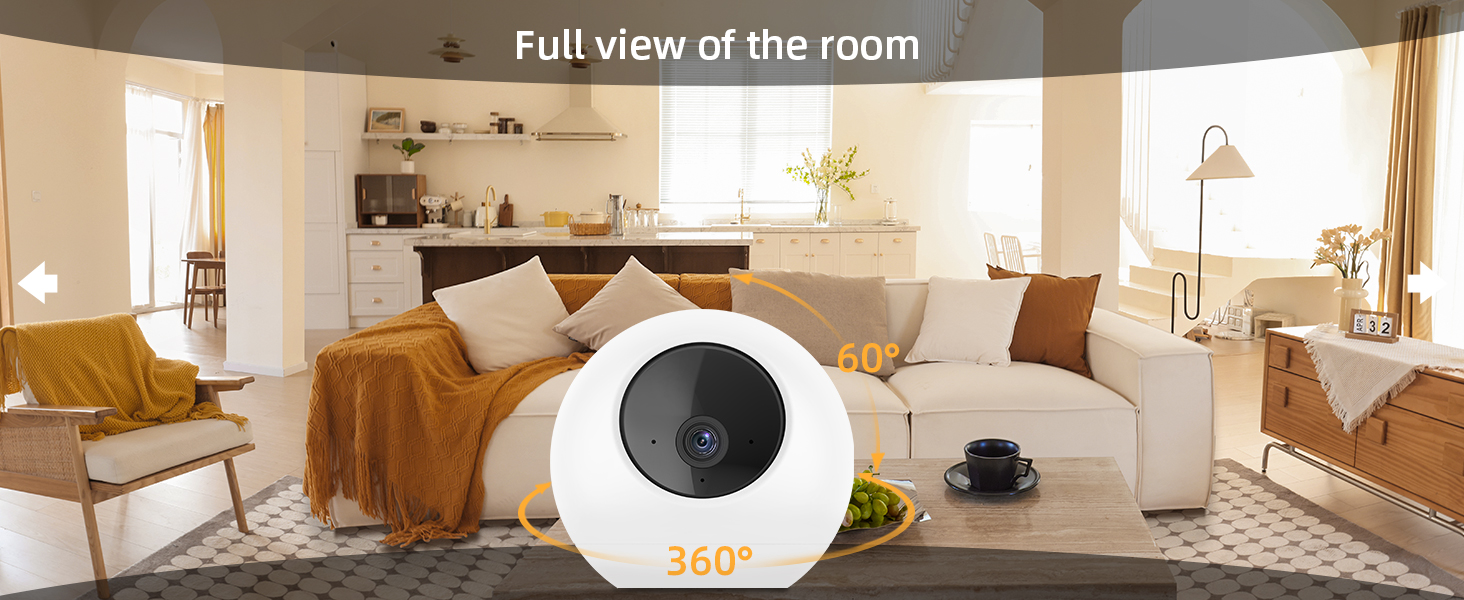
Figura 4.1: Sħiħa view of the room with 360° pan and 60° tilt.
4.2 Sejbien tal-Mozzjoni u Traċċar Awtomatiku
The T110 features AI-powered detection to identify people, pets, and sounds. Enable auto-tracking in the app settings, and the camera will automatically follow moving objects within its field of view.
- Żoni ta' Mozzjoni Personalizzati: Iddefinixxi żoni speċifiċi fil-kamera view where you want to receive motion alerts, reducing unnecessary notifications.
- Sejbien tal-Annimali Domestiċi: The camera can differentiate between human and pet movements, allowing for tailored alerts.

Figure 4.2: Auto-tracking moving objects within the camera's view.

Figure 4.3: AI-powered detection distinguishes between people and pets.
4.3 Awdjo b'żewġ direzzjonijiet
Utilize the built-in microphone and speaker to communicate with anyone near the camera. This feature is ideal for soothing pets or greeting family members remotely.

Figure 4.4: Use two-way audio to communicate with pets or family.
4.4 Viżjoni bil-lejl
The T110 provides advanced IR night vision, delivering clear images even in complete darkness, with a range of up to 30 feet.
4.5 Integrazzjoni ta' Dar Intelliġenti
The Noorio T110 is compatible with Amazon Alexa. You can use voice commands to view il-feed tal-kamera fuq displays intelliġenti kompatibbli.

Figure 4.5: The camera works seamlessly with Amazon Alexa.
5. Manutenzjoni
To ensure optimal performance and longevity of your Noorio T110 camera, follow these maintenance guidelines:
- Tindif: Imsaħ bil-mod il-lenti u l-korp tal-kamera b'ċarruta ratba, niexfa u mingħajr suf. Evita li tuża kimiċi ħarxa jew materjali li joborxu.
- Aġġornamenti tal-Firmware: Regularly check the Noorio app for available firmware updates. Keeping your camera's firmware up-to-date ensures you have the latest features and security enhancements.
- Provvista tal-Enerġija: Uża biss l-adapter tal-enerġija u l-kejbil oriġinali pprovduti mal-kamera biex tevita l-ħsara.
- Pjazzament: Kun żgur li l-kamera titqiegħed f'post stabbli, 'il bogħod mix-xemx diretta, temperaturi estremi, u umdità għolja.
6 Issolvi l-problemi
| Problema | Kawża Possibbli | Soluzzjoni |
|---|---|---|
| Il-kamera ma tikkonnettjax mal-Wi-Fi | Password tal-Wi-Fi mhux korretta; Kamera 'l bogħod wisq mir-router; Problemi bir-router; Banda tal-Wi-Fi mhux korretta magħżula. | Double-check Wi-Fi password. Move camera closer to router. Restart router. Ensure you are connecting to the correct 2.4GHz or 5GHz network. |
| Kwalità fqira tal-vidjo | Bandwidth tan-netwerk insuffiċjenti; Lenti maħmuġa; Kundizzjonijiet ta' dawl baxx. | Ensure stable internet connection. Clean the camera lens. Verify night vision is enabled in low light. |
| Is-sejbien tal-moviment mhux qed jaħdem jew hemm wisq allarmi foloz | Sensitivity settings; Incorrect motion zone setup; Environmental factors. | Adjust motion detection sensitivity in the app. Configure custom motion zones to exclude high-traffic areas. Ensure AI detection for people/pets is enabled. |
| Kwistjonijiet tal-awdjo f'żewġ direzzjonijiet | Microphone/speaker blocked; App permissions; Volume settings. | Ensure nothing is obstructing the microphone or speaker. Check app permissions for microphone access. Adjust volume settings in the app. |
| Kard MicroSD mhux rikonoxxuta | Card not inserted correctly; Card not formatted; Incompatible card. | Reinsert the microSD card. Format the card via the Noorio app. Ensure the card is up to 128GB and a compatible class. |
7. Speċifikazzjonijiet
| Karatteristika | Dettall |
|---|---|
| Numru tal-Mudell | T110 |
| Riżoluzzjoni tal-Qbid tal-Vidjo | 2K QHD (4MP Effective Still Resolution) |
| Teknoloġija tal-Konnettività | 2.4G/5G Dual Band Wi-Fi, Wired |
| Medda Pan/Tilt | 360 Grad (Pan), 60 Grad (Tilt) |
| Medda tal-Viżjoni Lejl | Sa 30 pied |
| Għażliet ta' Ħażna | Karta MicroSD (sa 128GB, mhux inkluża), Ħażna fis-Sħab (mhux obbligatorja) |
| Awdjo | 2-Way Audio (Microphone & Speaker) |
| Sors tal-Enerġija | Elettriku bil-Fili (10 watts) |
| Apparati Kompatibbli | Amazon Alexa, Smartphone |
| Użu fuq ġewwa/barra | Ġewwa |
| Dimensjonijiet (L x W x H) | 4.84 x 4.84 x 5.63 pulzieri |
| Piż tal-oġġett | 1.43 liri |
8. Informazzjoni dwar Garanzija
For detailed warranty information regarding your Noorio T110 camera, please refer to the warranty card included in your product packaging or visit the official Noorio websit. Żomm il-prova tax-xiri tiegħek għal talbiet ta' garanzija.
9. Appoġġ għall-Klijent
If you encounter any issues or have questions about your Noorio T110 camera, please contact Noorio Customer Service:
- Telefon: 800-642-5905 (9 AM - 6 PM ET, Business Days)
- Email: support@nooriolife.com

Figure 9.1: Noorio Customer Service contact information.
You can also visit the official Noorio websit għal FAQs u riżorsi ta' appoġġ addizzjonali.


