Introduzzjoni
Thank you for choosing the TAB ErasePro H6 Portable Carpet Cleaner. This user manual provides essential information for the safe and efficient operation, maintenance, and troubleshooting of your new appliance. Please read this manual thoroughly before first use and keep it for future reference.
Informazzjoni Importanti dwar is-Sigurtà
Dejjem segwi l-prekawzjonijiet bażiċi ta' sigurtà meta tuża apparati elettriċi biex tnaqqas ir-riskju ta' nar, xokk elettriku, jew korriment.
- Aqra l-istruzzjonijiet kollha qabel tuża l-apparat.
- Uża biss kif deskritt f'dan il-manwal. Uża biss l-aċċessorji rakkomandati mill-manifattur.
- Tgħaddix l-apparat fl-ilma jew likwidi oħra.
- Tużax b'korda jew plagg bil-ħsara. Jekk l-apparat mhux qed jaħdem kif suppost, ikun waqa’, saritlu ħsara, jitħalla barra, jew waqa’ fl-ilma, erġa’ lura f’ċentru ta’ servizz.
- Tħallix li tintuża bħala ġugarell. Attenzjoni mill-qrib hija meħtieġa meta jintuża minn jew ħdejn it-tfal.
- Use only non-foaming cleaning solutions specifically designed for carpet cleaners.
- Ensure tanks are properly secured before operation.
- Do not tilt the machine or use it upside down.
Kontenut tal-Pakkett
Ivverifika li l-oġġetti kollha huma preżenti fil-pakkett tiegħek:
- TAB ErasePro H6 Portable Carpet Cleaner Unit
- PowerBrush Attachment
- Extend Hose with cleaning head
- Kejbil tal-Iċċarġjar tat-Tip C

Image: The TAB ErasePro H6 Portable Carpet Cleaner shown with its main unit, PowerBrush, and extendable hose attachment.

Image: Close-up of the extendable hose and its cleaning head, which are included with the cleaner.
Prodott Overview
Familiarize yourself with the main components of your TAB ErasePro H6:
- Unità Prinċipali: Houses the motor, battery, and control panel.
- Tank tal-Ilma Nadif (350ml): Iżomm ilma ħelu u soluzzjoni tat-tindif.
- Dirty Water Tank (260ml): Jiġbor ilma maħmuġ u debris.
- PowerBrush: Integrated brush head for agitating and lifting stains.
- Extend Hose: For cleaning hard-to-reach areas.
- Wiri Diġitali LED: Shows battery level, hose connection status, and brush switch status.

Image: Close-up of the cleaner's LED digital display, indicating battery level, spray function, hose connection, and power brush status.
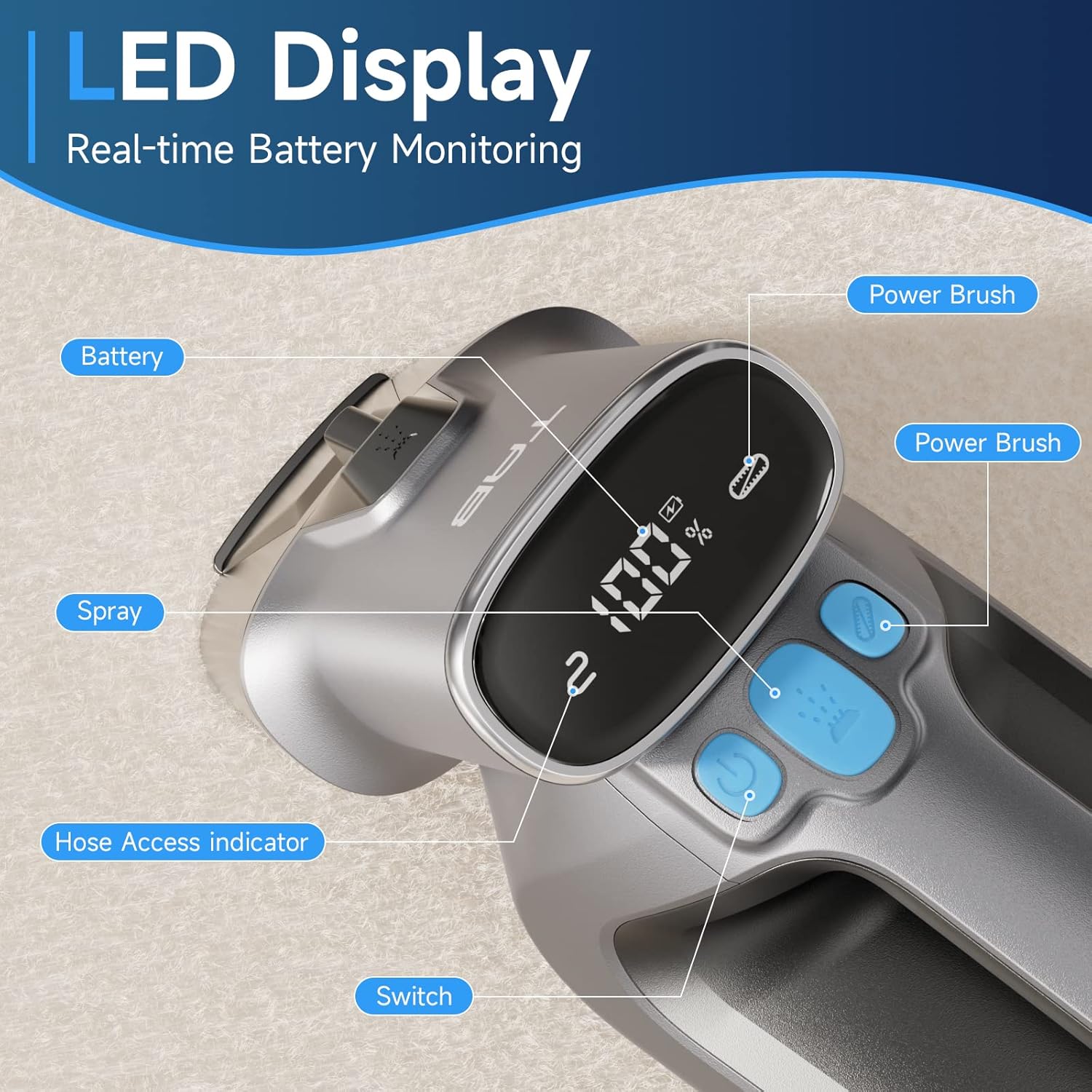
Image: Diagram showing the separate 350ml clean water tank and 260ml dirty water tank, highlighting their removable design.
Setup
Iċċarġjar tal-batterija
Before first use, fully charge the appliance. The LED display will show the battery percentage.
- Locate the Type-C charging port on the cleaner.
- Connect the provided Type-C charging cable to the port and a 5V/2A adapter (not included).
- The LED display will show charging progress. A full charge provides up to 20 minutes of runtime.

Image: Close-up of the Type-C charging port on the cleaner, with the charging cable connected.
Mili tat-Tank tal-Ilma Nadif
- Neħħi t-tank tal-ilma nadif mill-unità prinċipali.
- Open the tank cap and fill with clean water. You may add a non-foaming cleaning solution as recommended by the solution manufacturer. Do not overfill.
- Securely close the cap and reinsert the tank into the cleaner until it clicks into place.
Istruzzjonijiet Operattivi
Operazzjoni Ġenerali
- Ensure the clean water tank is filled and the dirty water tank is empty and properly installed.
- Agħfas il-buttuna tal-qawwa biex tixgħel il-cleaner.
- To activate the PowerBrush, press the dedicated PowerBrush button. The brush will rotate to agitate stains.
- To spray cleaning solution, press the spray button.
- Move the cleaner slowly over the stained area, allowing the PowerBrush and suction to work.

Image: The PowerBrush mechanism shown in operation, highlighting its high-speed automatic washing action for better cleaning.

Image: The cleaner demonstrating its strong suction power on a carpet, suitable for various fabric surfaces like mattresses and sofas.
Tindif ta' Uċuħ Differenti
- Twapet u twapet: Use the main PowerBrush head directly on the carpet. For deep stains, pre-treat the area if necessary.
- Upholstery & Car Interiors: For delicate fabrics or hard-to-reach spots, attach the Extend Hose. Ensure the hose is securely connected; the LED display will indicate proper connection.
- Pet Stains: The PowerBrush is effective for agitating and lifting pet messes. Apply cleaning solution, scrub gently, and then suction up the dirty liquid.

Image: The cleaner being used to remove a pet stain from a carpet, illustrating its effectiveness for quick spot cleaning.

Image: A user demonstrating the use of the extended hose to clean curtains, showcasing its ability to reach various areas.

Image: The cordless cleaner being used to clean a car seat, emphasizing its portability and 20-minute run time for on-the-go cleaning.
Official Product Video: Usage Demonstration
Video: This official product video demonstrates the TAB ErasePro H6 Portable Carpet Cleaner in action, showing its effectiveness on various stains and surfaces, including the PowerBrush and extended hose features. It also illustrates the ease of use and maintenance.
Manutenzjoni
Emptying and Cleaning Tanks
For optimal performance and hygiene, empty and clean both water tanks after each use.
- Neħħi t-tank tal-ilma maħmuġ mill-unità prinċipali.
- Open the tank and dispose of the dirty water. Rinse the tank thoroughly with clean water.
- Remove the clean water tank and rinse it if any cleaning solution residue remains.
- Allow both tanks to air dry completely before reassembling.

Image: A visual representation of the clean and dirty water tanks, indicating their positions on the cleaner for easy removal and cleaning.
Cleaning the PowerBrush
Regularly inspect and clean the PowerBrush to prevent hair and debris buildup.
- Detach the PowerBrush head from the main unit.
- Remove any tangled hair or debris from the brush bristles.
- Rinse the brush under running water.
- Allow the PowerBrush to air dry completely before reattaching.

Immaġni: Close-up view of the detachable PowerBrush component, showing its bristles for effective cleaning and ease of maintenance.
Issolvi l-problemi
If you encounter issues with your TAB ErasePro H6, refer to the table below for common problems and solutions.
| Problema | Kawża Possibbli | Soluzzjoni |
|---|---|---|
| Il-magna tat-tindif ma tixgħelx. | Il-batterija hija baxxa jew eżawrita. | Iċċarġja l-batterija kompletament. |
| L-ebda sprej jew sprej dgħajjef. | Clean water tank is empty or improperly installed. Nozzle is clogged. | Refill clean water tank. Reinstall tank correctly. Clean the spray nozzle. |
| Ġbid ħażin. | Dirty water tank is full. Dirty water tank is improperly installed. Suction nozzle is blocked. | Empty dirty water tank. Reinstall tank correctly. Clear any blockages from the suction nozzle. |
| PowerBrush not rotating. | PowerBrush button not pressed. Brush is jammed by debris. | Press the PowerBrush button. Remove any hair or debris from the brush. |
| Cleaner leaks. | Water tanks are not properly sealed or installed. | Ensure tank caps are securely closed and tanks are correctly seated in the unit. |
Speċifikazzjonijiet
| Karatteristika | Speċifikazzjoni |
|---|---|
| Brand | TAB |
| Isem tal-Mudell | H6-3 |
| Karatteristika Speċjali | Cleaner Tapit li jinġarr |
| Tip ta 'filtru | Fowm |
| Kapaċità tat-Tank tal-Ilma Nadif | 0.35 Litri (350ml) |
| Kapaċità tat-Tank tal-Ilma Maħmuġ | 0.26 Litri (260ml) |
| Battery Wattage | 2200 milliamp_sigħat |
| Runtime | Sa 20 minuta |
| Użi Rakkomandati | Carpet, Upholstery, Stairs, Car |
| Fattur tal-Formola | Jinżamm fl-idejn |
| Livell ta' Storbju | 80 dB |
| Piż tal-oġġett | 4.4 liri |
| Dimensjonijiet tal-Pakkett | 17.28 x 13.07 x 6.69 pulzieri |
Garanzija u Appoġġ
Your TAB ErasePro H6 Portable Carpet Cleaner comes with a standard manufacturer's warranty. For detailed warranty information, product support, or to purchase replacement parts, please visit the official TAB website or contact customer service through your retailer.
Għal aktar assistenza, jekk jogħġbok irreferi għall-informazzjoni ta' kuntatt ipprovduta mad-dokumentazzjoni tax-xiri tiegħek.


