Introduzzjoni
This manual provides detailed instructions for the setup, operation, and maintenance of your TOMLOV TriL107 3-Lens Digital Microscope. This device features a 7-inch IPS screen, up to 2500X magnification, and versatile connectivity options including HDMI and USB outputs. It is designed for various applications such as coin inspection, soldering, and biological observation.
X'hemm fil-Kaxxa
- 7-Inch 3-Lens HDMI Digital Microscope (1)
- 12.6-Inch Adjustable Stand (1)
- 64GB Micro SD Card (1)
- Slides Bottom Light (1)
- Kontroll mill-bogħod (1)
- Kejbil USB (2)
- Cable HDMI (1)
Karatteristiċi tal-Prodott
- Triple-Lens System: Features a rotating lens barrel for quick switching between three distinct lenses (1000X, 1500X, 2500X) for diverse observation needs.
- Skrin IPS ta' 7 pulzieri: Provides a clear, vibrant display with 30MP photo and 2K video resolution, offering a 178-degree viewangolu tal-ing.
- Stand aġġustabbli: A 12.6-inch tall stand with a 7x8-inch base ensures stability and ample workspace, suitable for viewing entire coins.
- Dawl versatili: Equipped with 12 built-in LED lens lights, 2 adjustable gooseneck side lights, and a slide bottom light, all independently dimmable and rechargeable.
- Output Estern: Supports real-time HDMI and USB output for connecting to larger screens like monitors or computers for enhanced viewing and presentations.
- Reġistrazzjoni ta' Ritratti u Vidjows: One-button capture and video recording capabilities, with a pre-installed 64GB Micro SD card for storage.
- Kontroll mill-bogħod mingħajr fili: Allows for adjusting magnification, capturing photos, and recording videos remotely, minimizing device movement.
Gwida ta' Setup
- Arma l-Istand: Attach the adjustable stand to the base. Ensure all screws are tightened for stability.
- Mount the Microscope: Secure the microscope unit onto the adjustable stand.
- Ikkonnettja Dwal: Plug in the 2 gooseneck side lights and the slide bottom light to their respective ports on the base.
- Qawwa Mixgħul: Connect the microscope to a power source using one of the provided USB cables. Press the power button on the screen to turn on the device.
- Daħħal SD Card: The 64GB Micro SD card is pre-installed. Ensure it is properly seated in the slot.
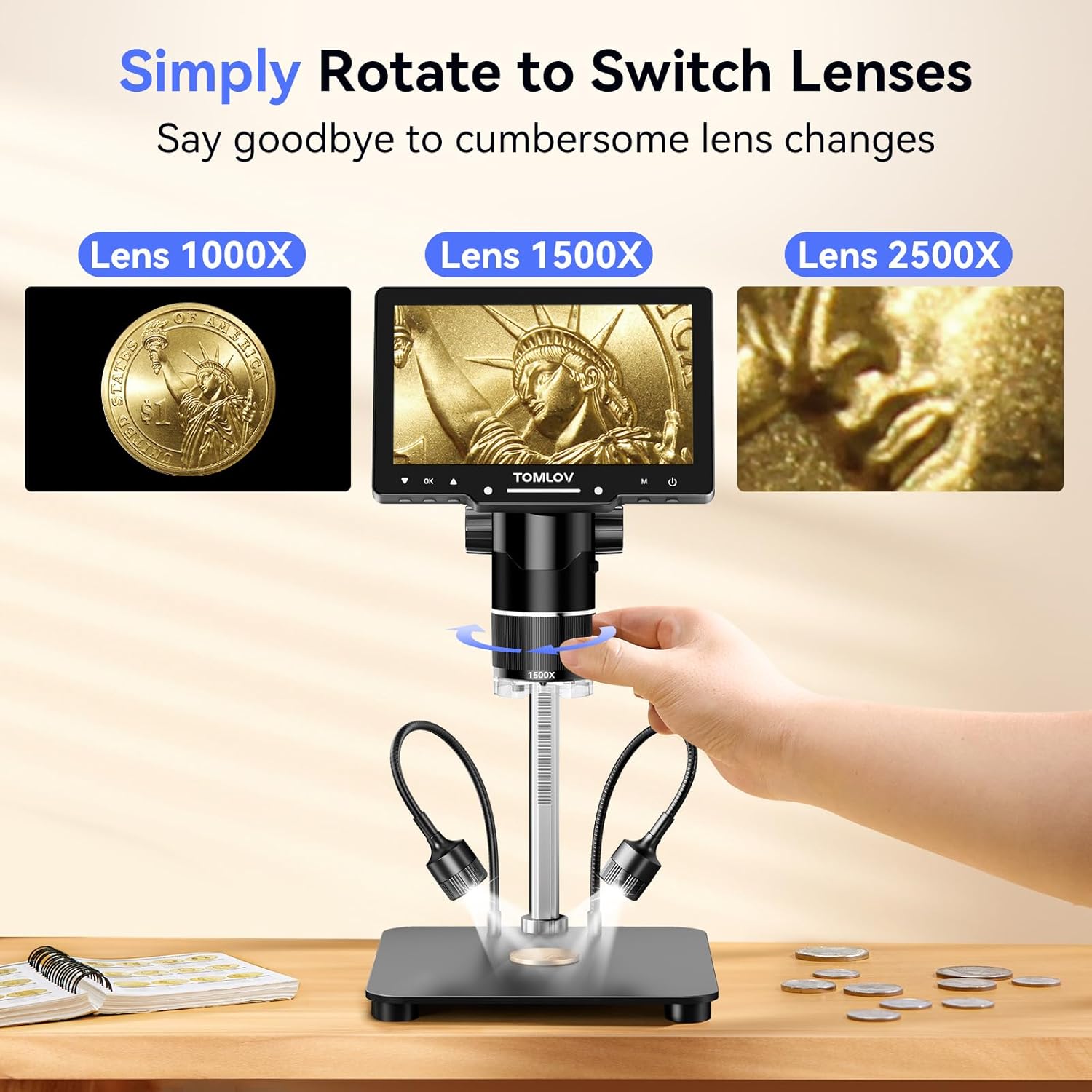
Image: The TOMLOV TriL107 Digital Microscope fully assembled, showing the screen, lens, stand, and adjustable side lights.
Istruzzjonijiet Operattivi
1. Lens Switching
The TriL107 features a rotating lens barrel to switch between the three integrated lenses. Simply rotate the barrel to select the desired magnification lens (1000X, 1500X, or 2500X).
Image: A hand rotating the lens barrel of the microscope to select a different lens.
2. Focusing and Magnification
Place the object you wish to observe on the base. Adjust the height of the microscope unit using the knob on the stand to bring the object into approximate focus. Then, fine-tune the focus by rotating the focus wheel on the lens barrel until the image on the screen is clear.

Image: A user adjusting the focus knob on the microscope to achieve a clear image of a coin.
3. Magnification Lenses and Applications
- Lens 1000X (2X-1000X): Ideal for observing coins, stamps, and stones, providing a full view of an entire coin.
- Lens 1500X (10X-1500X): Suitable for intricate tasks such as PCB soldering and watch repair, offering a stable and spacious work area.
- Lens 2500X (2000X-2500X): Designed for biological slides and mite observation. Note: The observation distance for the 2500X lens is 3mm-4mm, requiring the lens to be very close to the object for focus.

Immaġni: Aktar minnview of the three interchangeable lenses (1000X, 1500X, 2500X) and their primary uses.

Image: A user performing soldering work under the microscope with the 1500X lens.

Image: An adult and child using the microscope with the 2500X lens to view a biological slide.
4. Sistema tad-Dawl
The microscope features 12 main LED lights around the lens, two flexible gooseneck side lights, and a slide bottom light. Each lighting component can be independently adjusted for brightness to achieve optimal illumination for your observation.

Immaġni: Dettaljata view of the microscope's comprehensive lighting system.
5. Qbid ta' Ritratti u Vidjows
Use the dedicated buttons on the microscope screen or the wireless remote control to capture still images or record videos. The captured media will be saved to the pre-installed 64GB Micro SD card.
6. External Display (HDMI & USB Output)
Connect the microscope to an external monitor via the HDMI port or to a computer via the USB port for a larger viewing experience. This allows for real-time sharing and detailed analysis on a bigger screen.

Image: The microscope displaying its output on an external monitor and a laptop.
7. Dimostrazzjoni bil-Vidjo
Video: This video demonstrates key operational aspects of the TOMLOV TriL107 microscope, including lens switching, focusing, using photo and video modes, and connecting to external displays.
Manutenzjoni
- Tindif tal-Lentijiet: Use a soft, lint-free cloth specifically designed for optical lenses to gently clean the microscope lenses. Avoid abrasive materials or harsh chemicals.
- Cleaning Screen: Wipe the IPS screen with a soft, dry microfiber cloth. For stubborn smudges, use a screen-cleaning solution applied to the cloth, not directly to the screen.
- Tindif Ġenerali: Keep the microscope body and stand free from dust and debris using a soft brush or cloth.
- Ħażna: Store the microscope in a dry, dust-free environment when not in use. Consider using a protective cover.
Issolvi l-problemi
- Ebda Qawwa: Ensure the USB power cable is securely connected to both the microscope and a working power source. Check if the power button is pressed.
- Immaġni mċajpra: Adjust the microscope's height on the stand and rotate the focus wheel until the image is clear. Ensure the correct lens is selected for the observation distance. For the 2500X lens, the object must be very close (3-4mm).
- No Image on External Display: Verify that the HDMI or USB cable is correctly connected to both the microscope and the external display/computer. Ensure the external display is set to the correct input source (HDMI/USB).
- Il-Kontroll mill-bogħod Mhux Jaħdem: Check the battery in the remote control. Ensure there are no obstructions between the remote and the microscope's sensor.
- Cannot Record/Save: Confirm that the Micro SD card is properly inserted and has sufficient free space.
Speċifikazzjonijiet Tekniċi
| Karatteristika | Speċifikazzjoni |
|---|---|
| Isem tal-Mudell | TriL107 |
| Daqs tal-Iskrin | 7-il pulzier IPS |
| Medda ta' Tkabbir | 2X-2500X (depending on lens) |
| Riżoluzzjoni tar-Ritratti | 30MP |
| Riżoluzzjoni tal-vidjo | 2K HD |
| Portijiet tal-ħruġ | HDMI, USB |
| Ħażna | 64GB Mikro SD Card (inkluża) |
| Dawl | 12 Main LEDs, 2 Gooseneck Side Lights, 1 Slide Bottom Light |
| Materjal | Liga tal-Aluminju |
| Piż tal-oġġett | 3.31 libbra (1500 Gramm) |
| Qawwa | 5 Volts, 1 Lithium Ion battery (included) |
Garanzija u Appoġġ
Your TOMLOV TriL107 Digital Microscope comes with a standard manufacturer's warranty. For specific warranty details, please refer to the documentation included with your purchase or visit the official TOMLOV websit.
If you encounter any issues or require technical assistance, please contact TOMLOV customer support through their official channels. Provide your product model number (TriL107) and a detailed description of the problem for efficient service.


