1. Introduzzjoni
The Raddy WM6 is a versatile wireless weather station designed to provide comprehensive environmental data for both indoor and outdoor conditions. It features a clear display and a range of functions to help you monitor your surroundings effectively.

Image 1.1: The Raddy WM6 main console and its wireless remote sensor.
Karatteristiċi ewlenin:
- Dejta Komprensiva: Displays calendar, 12-hour weather forecast, indoor/outdoor temperature (℃/℉) and humidity, barometric pressure, comfort level, mold risk, and moon phase.
- DCF Atomic Clock: Automatic time synchronization for precise timekeeping, eliminating manual adjustments.
- Allarmi Doppju: Customizable alarms for weekdays and weekends.
- Luminożità aġġustabbli: Screen brightness can be scheduled and adjusted to suit different times of day.
- Expandable Monitoring: Supports up to 3 remote sensors (R3 model) with a transmission range of up to 100 meters.
- Għażliet ta' Enerġija Doppju: Operates via AC adapter or a built-in 2000mAh rechargeable battery for wireless use.

Image 1.2: Visual representation of the weather station's various functions including calendar, forecast, temperature, humidity, barometer, comfort level, mold risk, moon phase, atomic clock, and high/low alerts.
2. Kontenut tal-Pakkett
Jekk jogħġbok iċċekkja l-pakkett bir-reqqa biex tiżgura li l-oġġetti kollha huma preżenti u bla ħsara.
- WM6 Main Console
- Adapter tal-Qawwa AC
- Remote Sensor (R3 model)
- Ħardwer tal-Immuntar (viti u ankri)
- Manwal għall-Utent
3. Setup
3.1 Powering the Main Console
The WM6 console offers two power options:
- Adapter tal-AC: For continuous operation, plug the provided AC adapter into the console and a power outlet.
- Batterija inkorporata: The console has a 2000mAh rechargeable battery for wireless use. A full charge can last up to 45 days depending on brightness settings. When using the screen for extended periods, it is recommended to connect the AC adapter to prevent rapid battery discharge and ensure consistent functionality.

Image 3.1: The two power options for the WM6 console: AC adapter or internal 2000mAh battery.

Image 3.2: An internal diagram showing the integrated 2000mAh battery, providing up to 45 days of working time.
3.2 Installazzjoni tas-Sensor Remot
Insert 2 AA batteries (not included) into the remote sensor. Place the sensor outdoors in a shaded, dry location, protected from direct sunlight and rain, to ensure accurate readings. The sensor has a transmission range of up to 100 meters (330 feet).
3.3 Initial Synchronization and Settings
Upon first power-up, the main console will automatically search for the remote sensor and attempt to synchronize with the DCF atomic clock signal. This process may take several minutes. Ensure the console is not charging during initial setup for optimal signal reception.
- DCF Time Synchronization: The atomic clock automatically sets the time and date.
- Settings manwali: If automatic synchronization fails or for specific preferences, refer to the detailed instructions in the manual for setting time zone, date format, temperature units (℃/℉), and barometric pressure calibration.
3.4 Immuntar tal-ħajt
The WM6 console is designed for wall mounting. Use the provided mounting hardware to secure it to a desired location. The wireless operation due to the built-in battery allows for a clean, cable-free installation.

Image 3.3: The WM6 console neatly mounted on a wall, demonstrating its wireless capability.
4. It-tħaddim tal-Apparat
4.1 Wiri Informazzjoni
The main console displays a variety of information:
- Ħin u Data: Synchronized by the DCF atomic clock.
- Tbassir tat-Temp ta' 12-il Siegħa: Icons indicate predicted weather conditions.
- Temperatura u Umdità ta' ġewwa: Current readings from the main console.
- Temperatura u Umdità ta' Barra: Qari tal-kurrent mis-sensor remot.
- Pressjoni Barometrika: Pressjoni atmosferika attwali.
- Livell ta' Kumdità: Indicates indoor comfort based on temperature and humidity.
- Riskju tal-Moffa: Assesses the risk of mold growth based on environmental conditions.
- Fażi tal-Qamar: Displays the current lunar phase.
- High/Low Alerts: Customizable alerts for temperature and humidity thresholds.

Image 4.1: The display indicating mold risk levels (HI-ME-LO-NO) and comfort levels based on humidity.

Image 4.2: The 12-hour weather forecast feature, showing various weather conditions.
4.2 Aġġustament tal-luminożità
The screen brightness can be adjusted to four levels (OFF, 1%, 60%, 100%). You can also schedule specific brightness levels for different times of the day, for example, 60% brightness from 8:00 AM to 6:00 PM and OFF from 6:00 PM to 11:00 PM.

Immaġni 4.3: Eż.amples of the WM6 display at various brightness settings (OFF, 1%, 60%, 100%).
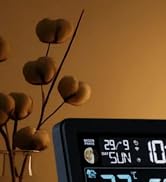
Image 4.4: The console demonstrating scheduled brightness levels, such as 60% during the day and off in the evening.
4.3 Funzjonijiet ta' Allarm
The WM6 features dual alarms that can be configured for weekdays, weekends, or daily use. A snooze function is also available.

Image 4.5: The atomic clock display with an indicator for the snooze function and dual alarm settings for weekdays and weekends.
4.4 Remote Sensor Monitoring
The console can connect to up to 3 remote sensors (R3 model) to monitor different areas such as baby rooms, kitchens, or gardens. The display will cycle through the readings from each connected sensor.

Image 4.6: The WM6 console receiving data from multiple remote sensors placed in different rooms and outdoors, with a transmission range of up to 100m.
4.5 High/Low Alerts
Set customizable high and low alerts for temperature and humidity to be notified when conditions exceed or fall below your desired thresholds. This feature helps in maintaining optimal indoor environments and preventing issues like mold.
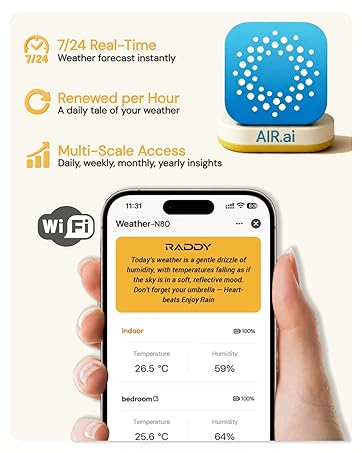
Image 4.7: The weather station displaying alerts for high/low temperatures and mold risk, useful for monitoring conditions in sensitive areas like a child's room.
5. Manutenzjoni
5.1 Kura tal-Batterija
The WM6 console's built-in 2000mAh battery is rechargeable. To prolong battery life, avoid frequent deep discharges. Recharge the console using the provided AC adapter when the battery indicator shows low power. The use of rechargeable batteries contributes to environmental sustainability by reducing waste from disposable batteries.

Image 5.1: The WM6's rechargeable battery eliminates the need for disposable batteries, promoting environmental responsibility.

Image 5.2: A comparison highlighting the benefits of the WM6's built-in rechargeable battery, including longer life and data retention after power loss, versus disposable batteries.
For the remote sensor, replace AA batteries when the low battery indicator appears on the console or sensor display.
5.2 Tindif
Wipe the console and sensor with a soft, dry cloth. Do not use abrasive cleaners or solvents, as these may damage the surfaces.
6 Issolvi l-problemi
| Problema | Kawża Possibbli | Soluzzjoni |
|---|---|---|
| L-ebda qari tat-temperatura/umdità ta' barra | Remote sensor not paired or out of range; low sensor battery. | Ensure sensor batteries are fresh. Move sensor closer to the main console. Re-pair the sensor by following the instructions in the full manual. |
| Time is incorrect or not setting automatically | DCF signal interference or weak signal; incorrect time zone setting. | Move the console away from electronic devices that may cause interference. Ensure the console is placed near a window for better signal reception. Manually set the time zone. |
| Id-displej huwa mċajpar jew mitfi | Low console battery; brightness set to OFF or low level; scheduled brightness. | Charge the console battery. Adjust brightness settings. Check scheduled brightness settings. |
| Qari mhux preċiż tat-temperatura/umdità | Sensor exposed to direct sunlight, rain, or heat sources; console placed near heat/cold sources. | Relocate the sensor to a shaded, protected area. Ensure the console is not near windows, vents, or appliances that affect temperature. |
7. Speċifikazzjonijiet
| Karatteristika | Dettall |
|---|---|
| Numru tal-Mudell | 988309012 |
| Dimensjonijiet (L x W x H) | 16 x 11.43 x 2.54 cm (Console); 9 x 4.5 cm (Sensor) |
| Piż | 540 gramma |
| Sors tal-Enerġija | Rechargeable Battery (2000mAh Lithium-ion, included) and AC Adapter |
| Remote Sensor Batteries | 2 x AA (mhux inklużi) |
| Teknoloġija tal-Konnettività | 433.92 MHz |
| Firxa tat-Trażmissjoni | Sa 100 metri (330 pied) |
| Materjal | Plastik |
| Karatteristiċi Speċjali | Adjustable Brightness, Alarm, Clock, Customizable Alert, Pre-Calibrated, Wireless |

Image 7.1: Dimensions of the Raddy WM6 main console and its wireless sensor.
8. Garanzija u Appoġġ
Warranty information for the Raddy WM6 Wireless Weather Station is typically provided with your purchase documentation. Please refer to the warranty card or contact the retailer/manufacturer directly for details regarding warranty coverage and claims.
For technical support, product inquiries, or assistance with troubleshooting beyond this manual, please visit the official Raddy website or contact their customer service department. Information regarding spare parts availability is currently not provided.


