1. Introduzzjoni
Grazzi tax-xiriasing the CANYON BSP-8 Bluetooth Speaker. This manual provides essential information for the safe and efficient use of your device. Please read it thoroughly before operation and retain it for future reference.
Karatteristiċi ewlenin:
- Ħruġ tal-Awdjo ta' 10W: Jagħti ħoss ċar u qawwi.
- Bluetooth 5.2: For stable and energy-efficient wireless connection up to 10 meters.
- Dawl ta' wara RGB: Integrated lighting for enhanced ambiance.
- Stereo bla fili veru (TWS): Connect two BSP-8 speakers for a full stereo sound experience.
- Għażliet multipli ta' daqq: Supports Bluetooth, AUX, USB, and MicroSD card inputs.
- Disinn portabbli: Compact size with a convenient hanger for easy transport.
- Ħajja twila tal-batterija: Sa 3-il siegħa ta' logħob fuq ħlas wieħed.
2. Informazzjoni dwar is-Sigurtà
- Tesponix l-ispiker għal temperaturi estremi, dawl tax-xemx dirett, jew umdità għolja.
- Evita li twaqqa’ jew tissuġġetta lill-kelliem għal impatti qawwija.
- Tiżżarmax jew tippruvax issewwi l-ispiker int stess. Ikkuntattja persunal tas-servizz kwalifikat.
- Żomm l-ispiker 'il bogħod mill-ilma u likwidi oħra. Mhuwiex reżistenti għall-ilma.
- Uża biss il-kejbil tal-iċċarġjar provdut jew kejbil tat-Tip Ċ iċċertifikat għall-iċċarġjar.
- Armi l-batterija u l-ispiker skont ir-regolamenti lokali.
3. Kontenut tal-Pakkett
- CANYON BSP-8 Bluetooth Speaker
- Cable tal-Iċċarġjar tal-USB tat-Tip-Ċ
- Manwal għall-Utent
4. Prodott Aktarview
Iffamiljarizza ruħek mal-komponenti u l-kontrolli tal-ispiker.
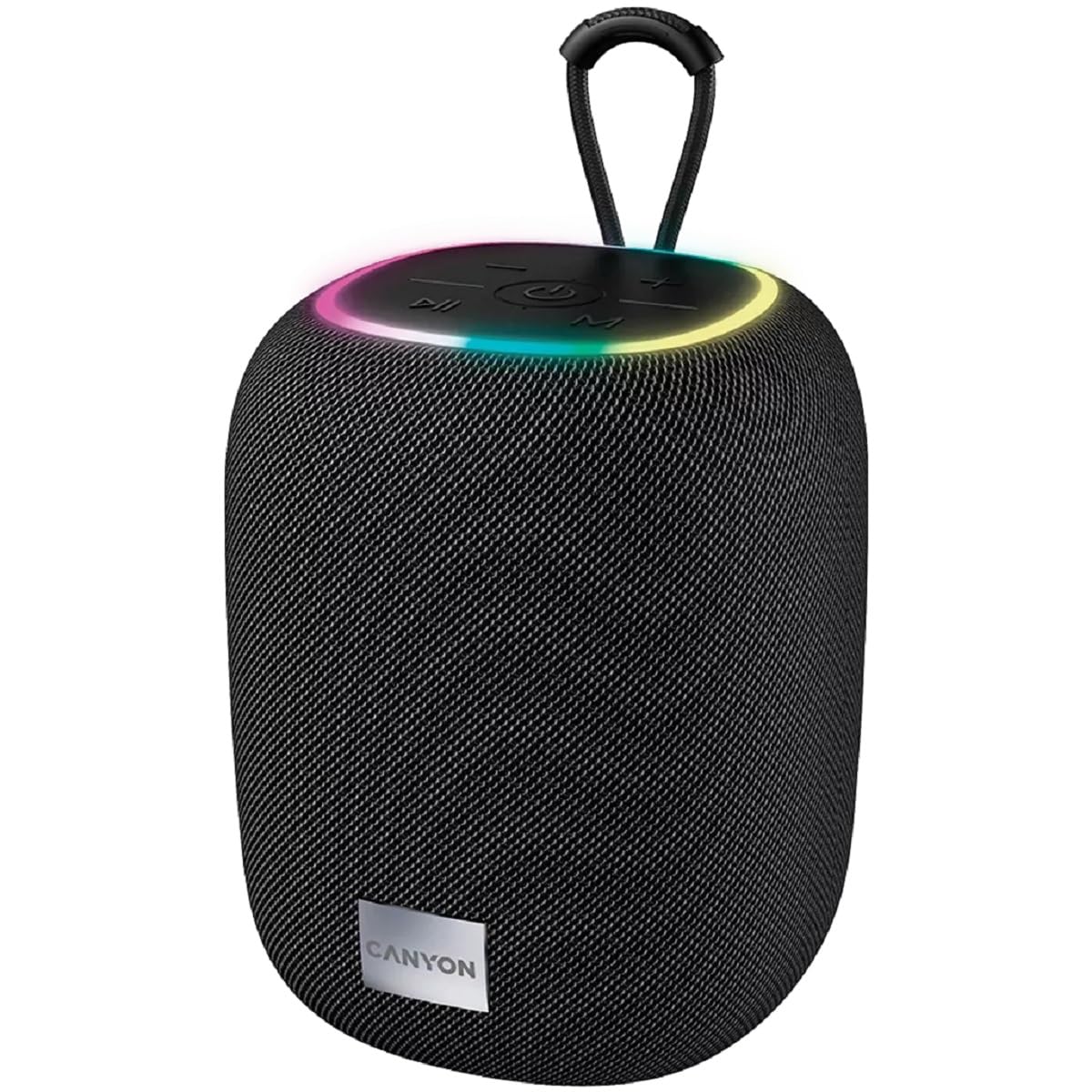
Immaġni 1: Fuq view of the CANYON BSP-8 speaker, showing the control buttons, RGB backlight, and integrated hanger.
Buttuni tal-Kontroll (Il-Panel ta' Fuq):
- Buttuna tal-Qawwa: Press and hold to turn on/off. Short press to play/pause.
- Buttuna Volum 'l isfel / Trakka Preċedenti: Agħfas qasir biex tnaqqas il-volum. Agħfas fit-tul għat-trakka ta' qabel.
- Buttuna tal-Volum 'il Fuq / tat-Trakka li Jmiss: Agħfas qasir biex tgħolli l-volum. Agħfas fit-tul għat-trakka li jmiss.
- Buttuna tal-Modalità (M): Short press to switch between Bluetooth, AUX, USB, and MicroSD modes.

Stampa 2: Wara view of the CANYON BSP-8 speaker, illustrating the various input ports including AUX, USB, TF (MicroSD) card slot, and DC5V Type-C charging port.
Input Ports (Rear Panel):
- Port AUX: Għall-konnessjoni ta' apparati awdjo esterni permezz ta' kejbil awdjo ta' 3.5mm.
- Port USB: Għad-daqq tal-awdjo minn flash drive USB.
- TF Card Slot (MicroSD): Għad-daqq tal-awdjo minn kard MicroSD.
- DC5V (Type-C) Port: Għall-iċċarġjar tal-ispiker.
5. Setup
5.1 Iċċarġjar tal-Ispeaker
- Connect the provided USB Type-C cable to the DC5V port on the speaker.
- Qabbad it-tarf l-ieħor tal-kejbil ma' adapter tal-enerġija USB (5V/1A rakkomandat) jew mal-port USB tal-kompjuter.
- Id-dawl indikatur tal-iċċarġjar se jixgħel. Se jintefa jew jibdel il-kulur ladarba jkun iċċarġjat kompletament.
Note: For optimal battery life, fully charge the speaker before first use.

Image 3: Illustration showing the 1800 mAh battery capacity and up to 3 hours of playtime for the CANYON BSP-8 speaker.
5.2 Tixgħel/Jitfi
- Biex Tixgħel: Press and hold the Power button for approximately 3 seconds. You will hear an audible prompt.
- Biex Tifi: Press and hold the Power button for approximately 3 seconds. You will hear an audible prompt.
5.3 Tqabbil tal-Bluetooth
- Ixgħel l-ispiker. Dan jidħol awtomatikament fil-modalità ta' tqabbil Bluetooth, indikat minn dawl LED li jteptep.
- Ippermetti l-Bluetooth fuq l-apparat mobbli tiegħek (smartphone, tablet, kompjuter).
- Fittex għal available Bluetooth devices and select "CANYON BSP-8" from the list.
- Once paired, the LED light will stop flashing, and you will hear a confirmation sound.
Note: The speaker will automatically reconnect to the last paired device if it is within range and Bluetooth is enabled.

Image 4: Illustration highlighting the stable and energy-efficient Bluetooth 5.2 connection with an operating range of up to 10 meters.
5.4 Tqabbil ta' Stereo Veru Wireless (TWS)
To connect two CANYON BSP-8 speakers for a stereo sound experience:
- Ensure both BSP-8 speakers are powered on and not connected to any Bluetooth device.
- Fuq kelliem wieħed (dan se jkun il-kelliem primarju), agħfas darbtejn il-buttuna tal-Power. Dan jidħol fil-modalità ta' tqabbil tat-TWS.
- The two speakers will automatically search for and connect to each other. You will hear a confirmation sound once connected.
- Once TWS is established, connect your mobile device to the primary speaker via Bluetooth as described in section 5.3.
Note: TWS mode only works with two identical CANYON BSP-8 speakers.
6. Istruzzjonijiet Operattivi
6.1 Daqq tal-Awdjo
- Modalità Bluetooth: Wara tqabbil b'suċċess, l-awdjo mit-tagħmir konness tiegħek se jindaqq mill-ispiker.
- Modalità AUX: Connect a 3.5mm audio cable from your external audio device to the AUX port on the speaker. Press the 'M' button to switch to AUX mode.
- Modalità USB: Insert a USB flash drive into the USB port. The speaker will automatically switch to USB mode and begin playing audio files. If not, press the 'M' button.
- Modalità tal-Kard MicroSD: Insert a MicroSD card into the TF card slot. The speaker will automatically switch to MicroSD mode and begin playing audio files. If not, press the 'M' button.
6.2 Kontroll tal-Daqq
- Play/Pawsa: Agħfas qasir il-buttuna Power.
- Volum 'il fuq: Agħfas fil-qosor il-buttuna 'l fuq mill-Volum (+).
- Volum 'l isfel: Agħfas fil-qosor il-buttuna 'l isfel tal-Volum (-).
- Track li jmiss: Agħfas fit-tul il-buttuna 'l fuq mill-Volum (+).
- Track preċedenti: Agħfas fit-tul il-buttuna 'l isfel tal-Volum (-).
Dawl ta' wara RGB 6.3
The speaker features an integrated RGB backlight on the top panel. The backlight activates automatically when the speaker is powered on. There are no specific controls for changing the RGB pattern or turning it off/on independently of the speaker's power state.


