1. Introduzzjoni
This manual provides essential information for the safe and efficient use of your Xiaomi TV Q2 65 Inch Ultra HD 4K QLED television. Please read this manual thoroughly before operating the device and retain it for future reference. The Xiaomi TV Q2 features a 65-inch QLED display, 4K resolution, Google TV operating system, Dolby Vision IQ, and Dolby Atmos audio technology.
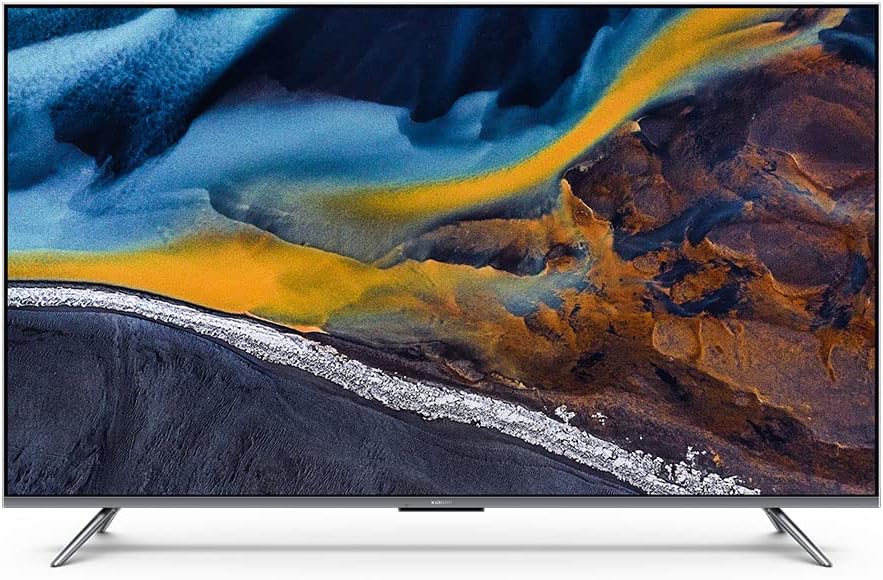
Figura 1: Quddiem view of the Xiaomi TV Q2 65 Inch television.
2. Informazzjoni dwar is-Sigurtà
Observe the following safety precautions to prevent damage to the TV and ensure user safety:
- Pjazzament: Position the TV on a stable, level surface or mount it securely to a wall. Ensure adequate ventilation around the TV to prevent overheating. Do not block ventilation openings.
- Qawwa: Use only the provided power cord. Connect the power cord to a grounded outlet. Do not overload power outlets. Disconnect the power cord during lightning storms or when unused for extended periods.
- Ilma u Umdità: Do not expose the TV to rain or moisture. Do not place objects filled with liquids, such as vases, on or near the TV.
- Tindif: Unplug the TV before cleaning. Use a soft, dry cloth to clean the screen and exterior. Do not use liquid cleaners or aerosol sprays directly on the TV.
- Servizzi: Tippruvax tagħmel manutenzjoni tat-TV int stess. Irreferi għal kull manutenzjoni f'idejn persunal tas-servizz kwalifikat.
3. Kontenut tal-Pakkett
Ivverifika li l-komponenti kollha huma preżenti fil-pakkett:
- Xiaomi TV Q2 65 Inch Unit
- Kontroll mill-Bogħod (Bluetooth)
- Stand tat-TV (2 biċċiet)
- Korda tal-Enerġija
- Viti għall-Installazzjoni tal-Stand
- Manwal għall-Utent (dan id-dokument)
4. Setup
4.1 Disimballaġġ
- Carefully remove the TV from its packaging. It is recommended to have two people for this process due to the size and weight of the unit.
- Place the TV screen-down on a soft, flat surface (e.g., a blanket or foam) to protect the screen during stand installation.
4.2 Installazzjoni ta' Stand
Biex twaħħal l-istand inkluż:
- Identifika l-biċċiet tal-istand tax-xellug u tal-lemin.
- Allinja kull biċċa tal-istand mas-slots korrispondenti fil-qiegħ tat-TV.
- Waħħal kull biċċa tal-istand billi tuża l-viti pprovduti. Kun żgur li huma ssikkati sew.

Figura 2: Angolat view tat-TV, li turi l-punti tat-twaħħil tal-istand.
4.3 Immuntar mal-Ħajt (Mhux obbligatorju)
The Xiaomi TV Q2 is compatible with VESA wall mounts. Consult a professional for wall mounting installation to ensure safety and proper alignment. Refer to the wall mount manufacturer's instructions for specific details.
4.4 Konnessjoni tal-Periferali
Locate the input ports on the side or rear of the TV. Connect your devices as follows:
- Apparati HDMI: Connect gaming consoles, Blu-ray players, or set-top boxes to the HDMI ports.
- Apparat USB: Connect USB drives for media playback or external storage to the USB ports.
- Qawwa: Qabbad il-korda tal-enerġija mad-dħul tal-enerġija tat-TV u mbagħad ma' sokit tal-ħajt.

Figura 3: Proġett tal-ġenbfile of the TV, highlighting the connectivity ports.

Figura 4: In-naħa opposta profile of the TV, emphasizing its thinness.
4.5 L-Ewwel Xgħel u l-Wizard tas-Setup
- Agħfas il-buttuna tal-qawwa fuq il-kontroll remot jew fuq it-TV.
- Segwi l-istruzzjonijiet fuq l-iskrin biex tlesti s-setup inizjali, inkluż l-għażla tal-lingwa, il-konnessjoni tan-netwerk (Wi-Fi), il-login tal-kont tal-Google, u l-iskennjar tal-kanali.
5. It-tħaddim tat-TV
5.1 Kontroll mill-Bogħod
The Xiaomi TV Q2 comes with a 360° Bluetooth remote control. Ensure the remote is paired with the TV for full functionality. Refer to the on-screen guide during initial setup for pairing instructions.
5.2 L-Interfaċċja tat-TV tal-Google
Navigate the Google TV interface using the directional pad and select button on your remote. The home screen provides access to installed apps, recommended content, and settings.
5.3 Settings tal-Istampa
Access the picture settings menu to adjust:
- Modalità Stampa: Select from various presets (e.g., Standard, Vivid, Movie, Game).
- Luminożità/Kuntrast: Aġġusta l-luminanza ġenerali u d-differenza bejn iż-żoni mdawla u dawk mudlama.
- Kulur/Tintura: Fine-tune color saturation and hue.
- Settings Avvanzati: Explore options like local dimming, motion smoothing, and color temperature.
The QLED display technology provides vibrant colors and high contrast. Dolby Vision IQ dynamically adjusts picture settings based on ambient light and content.
5.4 Settings tal-Ħoss
Access the sound settings menu to adjust:
- Modalità tal-Ħoss: Choose from presets like Standard, Music, Movie, Voice.
- Equalizer: Aġġusta l-frekwenzi tal-awdjo manwalment.
- Dolby Atmos: Enable or disable Dolby Atmos for immersive audio experiences.
5.5 Kontroll tal-Vuċi
Utilize the built-in voice control feature by pressing the dedicated microphone button on your remote and speaking commands. This allows for hands-free control of the TV, app launching, and content search.
5.6 Konnettività
The TV supports Bluetooth for connecting wireless accessories and Wi-Fi for internet access. Supported internet services include Netflix, YouTube, Amazon Prime Video, and Disney+.
6. Manutenzjoni
6.1 Tindif
- Skrin: Imsaħ l-iskrin bil-mod b'ċarruta ratba u mingħajr suf. Għal marki persistenti, nixxef bil-modampen the cloth with water or a screen-specific cleaning solution (do not spray directly).
- Qafas u Stand: Use a soft, dry cloth to wipe dust from the aluminum-alloy frame and stand.
6.2 Aġġornamenti tas-Software
The TV may receive periodic software updates to improve performance and add new features. To check for updates, navigate to the settings menu, then select System > About > System update. Ensure your TV is connected to the internet for updates.
7 Issolvi l-problemi
If you encounter issues with your Xiaomi TV Q2, refer to the following common problems and solutions:
| Problema | Soluzzjoni Possibbli |
|---|---|
| Ebda qawwa | Ensure the power cord is securely connected to both the TV and a working power outlet. Try a different outlet. |
| L-ebda stampa, iżda l-ħoss huwa preżenti | Iċċekkja s-sors tad-dħul. Kun żgur li l-apparati esterni huma mixgħula u konnessi b'mod korrett. |
| L-ebda ħoss, iżda l-istampa hija preżenti | Check the volume level and mute status. Verify audio output settings. Ensure external audio devices are connected and functioning. |
| Il-kontroll mill-bogħod ma jirrispondix | Replace the batteries. Re-pair the Bluetooth remote control (refer to initial setup instructions). |
| Operating system is slow or unresponsive | Restart the TV by unplugging it from the power outlet for 30 seconds and plugging it back in. Close unused applications. Check for system updates. |
| Kwistjonijiet ta 'konnessjoni Wi-Fi | Erġa' ibda r-router u l-modem tiegħek. Kun żgur li t-TV jinsab fil-firxa tan-netwerk Wi-Fi tiegħek. Erġa' daħħal il-password tal-Wi-Fi. |
8. Speċifikazzjonijiet
Key technical specifications for the Xiaomi TV Q2 65 Inch:
| Karatteristika | Dettall |
|---|---|
| Brand | XIAOMI |
| Mudell | Q2 65 Inch |
| Daqs tal-Iskrin | 65 Pulzier (166 ċm djagonali viżibbli) |
| Teknoloġija tal-Wiri | QLED |
| Riżoluzzjoni | 4K (Ultra HD) |
| Riffriskar Rata | 60 Hz |
| Sistema Operattiva | Google TV |
| Teknoloġija Awdjo | Dolby Atmos |
| Video Technology | Dolby Vision IQ |
| Teknoloġija tal-Konnettività | Bluetooth, WiFi |
| Proporzjon ta' l-aspett | 16:9 |
| Dimensjonijiet tal-Prodott (bl-istand) | 8 x 8.7 x 84.3 ċm (approssimattiv, skont id-dejta tal-prodott) |
| Piż | 18.6 kg (approssimattiv) |
| Komponenti Inklużi | Remote Control, Stand, TV |
9. Garanzija u Appoġġ
Your Xiaomi TV Q2 65 Inch is covered by a limited warranty. Please refer to the warranty card included with your product for specific terms and conditions, including the warranty period and coverage details. For technical support, service inquiries, or to report issues, please contact Xiaomi customer service through their official webis-sit jew l-informazzjoni ta' kuntatt ipprovduta fid-dokumentazzjoni tal-garanzija tiegħek.


