1. Introduzzjoni
Thank you for choosing the Maxcom FW36 Aurum SE Smartwatch. This manual provides detailed instructions to help you set up, operate, and maintain your device, ensuring optimal performance and longevity. Please read this manual carefully before using your smartwatch.

Figura 1: Quddiem view of the Maxcom FW36 Aurum SE Smartwatch, displaying time and health metrics.
2. Setup
2.1 Tneħħija tal-kaxxa u Spezzjoni Inizjali
Upon opening the package, verify that all components are present: Maxcom FW36 Aurum SE Smartwatch, charging cable, and this user manual. Inspect the device for any visible damage.
2.2 Iċċarġjar tal-Ismartwatch
Before first use, fully charge your smartwatch. Connect the charging cable to the charging port on the back of the watch and to a standard USB power adapter (not included). The battery icon on the screen will indicate charging status. A full charge typically takes approximately 2 hours.
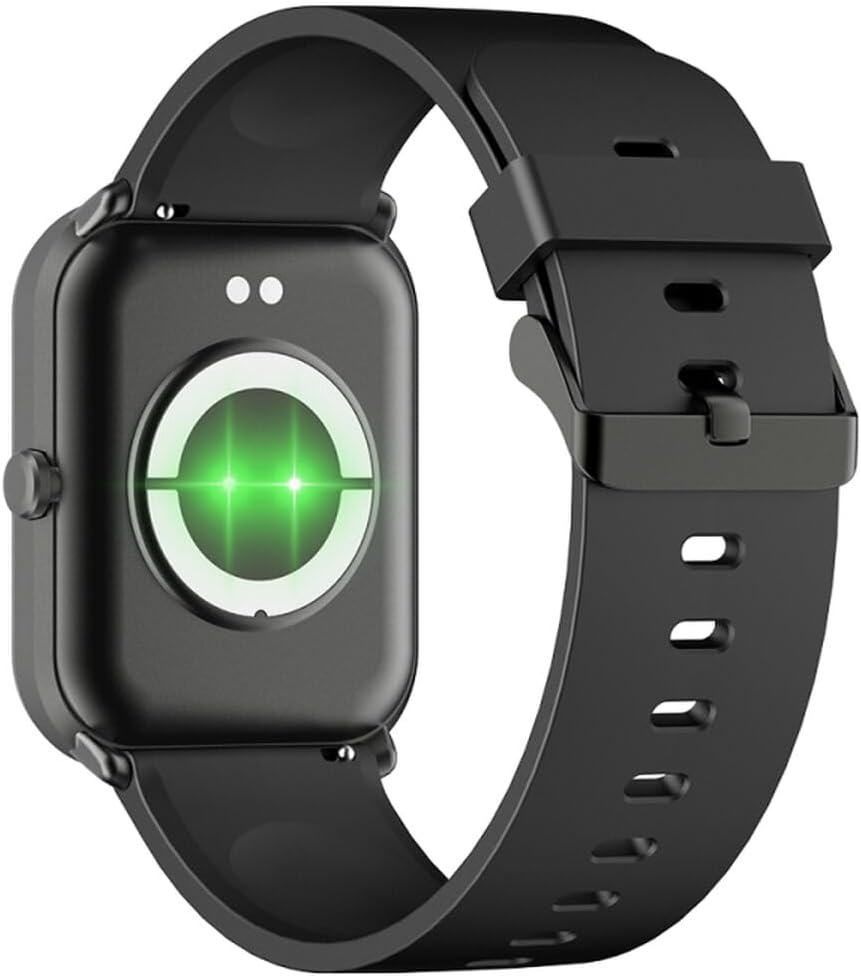
Figura 2: Wara view tal-ismartwatch, li jenfasizza l-kuntatti tal-iċċarġjar u s-sensuri tas-saħħa.
2.3 Power On/Off
- Qawwa Mixgħul: Agħfas u żomm il-buttuna tal-ġenb għal ftit sekondi sakemm l-iskrin jixgħel.
- Itfi: From the watch face, swipe down to access quick settings, then tap the power icon, or navigate to "Settings" > "System" > "Power Off". Confirm your selection.
2.4 Installazzjoni u Tqabbil tal-App
- Niżżel l-App: Scan the QR code in the manual (if provided) or search for "GLORY FIT" in your smartphone's app store (Google Play Store for Android, Apple App Store for iOS).
- Irreġistra/Idħol: Open the GLORY FIT app and follow the on-screen instructions to create an account or log in.
- Tqabbil:
- Kun żgur li l-Bluetooth huwa attivat fuq l-ismartphone tiegħek.
- Open the GLORY FIT app, go to "Device" or "My Device", and tap "Add Device".
- The app will search for nearby devices. Select "FW36 Aurum SE" from the list.
- Ikkonferma t-talba ta' tqabbil kemm fuq l-ismartphone tiegħek kif ukoll fuq l-ismartwatch.
Once paired, the smartwatch will synchronize data with your phone, including time and date settings.
3. Istruzzjonijiet Operattivi
3.1 Navigazzjoni Bażika
- Touchscreen: Swipe left/right to navigate between main functions (e.g., activity, heart rate). Swipe up to view notifiki. Skrolla 'l isfel biex taċċessa s-settings rapidi.
- Buttuna tal-ġenb: Press once to return to the watch face or wake the screen. Press and hold for power options.

Figura 3: Ġenb view of the smartwatch, illustrating the physical button and strap design.
3.2 Monitoraġġ tas-Saħħa
The Maxcom FW36 Aurum SE Smartwatch features several health monitoring functions:
- Monitor tar-rata tal-qalb: Swipe to the heart rate interface and wait for the measurement to complete. Ensure the watch is snug on your wrist.
- Sensor tal-Ossiġnu tad-Demm: Similar to heart rate, navigate to the SpO2 interface for measurement.
- Monitor tal-Pressjoni tad-Demm: Access this function from the main menu or by swiping to its dedicated screen.
- Monitoraġġ tal-Kwalità tal-Irqad: L-arloġġ isegwi awtomatikament ix-xejriet tal-irqad tiegħek meta tintlibes waqt l-irqad. View detailed reports in the GLORY FIT app.
- Pedometer: Tracks your daily steps, distance, and calories burned automatically.
Importanti: The health data provided by this device is for reference only and should not be used for medical diagnosis or treatment.
3.3 Modalità Multi-Sport
Access the multi-sport mode from the main menu to select various activities such as running, walking, cycling, etc. The watch will track specific metrics relevant to your chosen activity.
3.4 Notifiki
Once paired with your smartphone and notification permissions are granted in the GLORY FIT app, your smartwatch will display incoming calls, messages, and app notifications. Swipe up from the watch face to view l-istorja tan-notifiki tiegħek.
4. Manutenzjoni
4.1 Tindif
Regularly clean your smartwatch and strap with a soft, dry cloth. For stubborn dirt, use a slightly damp drapp u mbagħad nixxef sew. Evita li tuża kimiċi ħarxa jew materjali li joborxu.
4.2 Reżistenza għall-Ilma u t-Trab
The Maxcom FW36 Aurum SE Smartwatch is designed to be dust resistant and water resistant. This means it can withstand splashes, rain, and brief immersion in shallow water. However, it is not suitable for hot showers, saunas, diving, or high-speed water sports. Avoid pressing buttons underwater.
4.3 Kura tal-Batterija
To prolong battery life, avoid fully discharging the battery frequently. Charge the device regularly, even if not in use for extended periods. Store the device in a cool, dry place.
5 Issolvi l-problemi
- L-ismartwatch mhux qed jixgħel: Ensure the device is fully charged. Press and hold the side button for an extended period (10-15 seconds).
- Ma tistax tqabbad ma' smartphone:
- Ensure Bluetooth is enabled on your phone and the smartwatch is within range.
- Erġa' ibda kemm l-ismartphone tiegħek kif ukoll l-ismartwatch.
- Check if the GLORY FIT app has necessary permissions.
- Jekk qabel kien imqabbad, ipprova neħħi l-akkoppjar u erġa' qabbad l-apparat.
- Qari tas-saħħa mhux preċiż: Ensure the watch is worn snugly on your wrist, not too tight or too loose. Clean the sensors on the back of the watch. Avoid excessive movement during measurement.
- Notifiki mhux riċevuti: Verify that notification permissions are enabled for the GLORY FIT app in your phone's settings. Ensure the app is running in the background.
6. Speċifikazzjonijiet
| Mudell | FW36 Aurum SE |
| Brand | Maxcom |
| Sistema Operattiva | Android |
| Wiri | 1.69" (4.29 cm) Color Touchscreen, 240 x 280 pixels, Digital, Rounded Corners |
| Kapaċità tal-batterija | 220 mAh Lithium-ion |
| Konnettività | Bluetooth |
| Sensuri | Heart Rate Monitor, Blood Oxygen Sensor, Blood Pressure Monitor, Pedometer |
| Protezzjoni | Dust Resistant, Water Resistant |
| App Kompatibbli | GLORY FIT |
| Dimensions (W x T x D) | 44.6 mm x 1.04 cm x 35 mm |
| Funzjonalità GPS | Mhux disponibbli |
7. Garanzija u Appoġġ
The Maxcom FW36 Aurum SE Smartwatch comes with a garanzija ta' sentejn against factory defects. Please retain your proof of purchase for warranty claims.
For technical support, troubleshooting assistance, or warranty inquiries, please contact Maxcom customer service through their official webis-sit jew l-informazzjoni ta' kuntatt ipprovduta mad-dokumentazzjoni tax-xiri tiegħek.


