1. Introduzzjoni
This manual provides essential information for setting up, operating, maintaining, and troubleshooting your MEDION ERAZER Crawler E40 gaming laptop. Please read this manual thoroughly to ensure proper use and to maximize the performance and longevity of your device.

Figura 1: Quddiem view of the MEDION ERAZER Crawler E40 Gaming Laptop.
The MEDION ERAZER Crawler E40 is a high-performance gaming laptop designed for an immersive gaming experience. It features an Intel i5-12450H processor, 16GB DDR5 RAM, an NVIDIA GeForce RTX 4050 graphics card with 6GB VRAM, and a 512GB SSD. The 15.6-inch Full HD display boasts a 144Hz refresh rate for smooth visuals. It comes pre-installed with Windows 11 Home Plus 64-bit.
2. Setup Inizjali
2.1 Tneħħija tal-pakkett u l-Ewwel Xgħel
- Oħroġ il-laptop u l-aċċessorji kollha mill-imballaġġ bir-reqqa.
- Place the laptop on a stable, flat surface.
- Qabbad l-adapter tal-enerġija mal-port tad-dħul tal-enerġija tal-laptop u mbagħad waħħalha f'sokit tal-ħajt.
- Iftaħ l-għatu tal-laptop u agħfas il-buttuna tal-qawwa, li tipikament tinsab 'il fuq mit-tastiera jew fuq il-ġenb.
- Segwi l-istruzzjonijiet fuq l-iskrin biex tlesti s-setup inizjali tal-Windows 11, inkluż l-għażla tal-lingwa, il-konnessjoni tan-netwerk, u l-ħolqien tal-kont tal-utent.
2.2 Konnessjoni tal-Periferali
Your ERAZER Crawler E40 laptop offers various ports for connecting external devices:

Figure 2: Left side ports including USB and Ethernet.
- Portijiet USB: Connect USB devices such as mice, keyboards, or external storage drives. The laptop includes 1x USB 2.0, 1x USB 3.2 Gen 2 Type A, 1x USB 3.2 Gen 1 Type A, and 1x USB 3.2 Gen 2 Type C.
- Port HDMI: Connect an external monitor or TV using an HDMI cable.
- Mini DisplayPort: Connect an external display using a Mini DisplayPort cable.
- Ethernet (RJ45) Port: Għal konnessjoni ta' netwerk bil-fili.
- Jack tal-Kombozzjoni tal-Awdjo: For connecting headphones or a headset with a combined microphone and audio jack.

Figure 3: Right side ports including USB and audio jacks.
3. Istruzzjonijiet Operattivi
3.1 Tastiera u Touchpad
The laptop features a QWERTY keyboard with backlighting. You can typically adjust the backlight intensity or turn it off using function keys (Fn + specific F-key, refer to your laptop's key legends). The integrated touchpad supports multi-touch gestures for navigation.
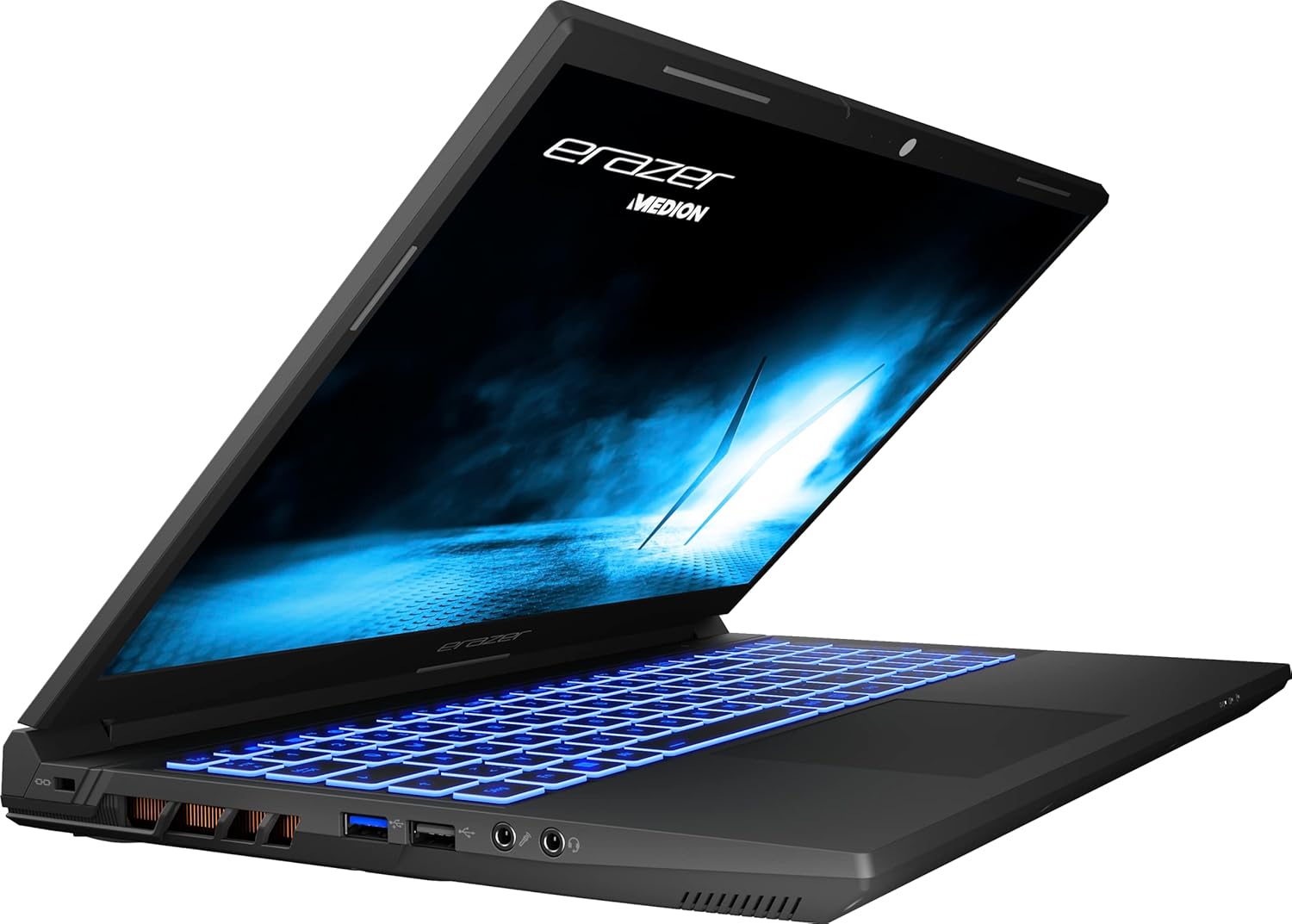
Figure 4: Keyboard and display of the ERAZER Crawler E40.
3.2 Settings tal-wiri
The 15.6-inch Full HD (1920 x 1080) display operates at a 144Hz refresh rate, providing smooth visuals, especially beneficial for gaming. You can adjust display settings, such as brightness, resolution, and refresh rate, through Windows Display Settings (Right-click on desktop > Display settings).
3.3 Konnettività bla fili
- Wi-Fi: The laptop supports Intel WiFi 6E for high-speed wireless internet access. Connect to available Wi-Fi networks via the Windows network settings.
- Bluetooth: Integrated Bluetooth 5.2 allows you to connect wireless peripherals like headphones, speakers, or game controllers. Enable Bluetooth in Windows settings to pair devices.
4. Manutenzjoni u Kura
- Tindif: Uża drapp artab u mingħajr suf biex tnaddaf l-iskrin u x-chassis. Għal marki persistenti, neħħi ftit.ampNaddaf id-drapp bl-ilma jew b'prodott tat-tindif li ma jagħmilx ħsara lill-iskrin. Evita kimiċi ħarxa.
- Ventilazzjoni: Ensure the laptop's ventilation grilles are clear of obstructions to prevent overheating. Regularly clean dust from the vents using compressed air.
- Kura tal-batterija: To prolong battery life, avoid frequently discharging the battery completely. If storing the laptop for an extended period, charge it to around 50-60%.
- Aġġornamenti tas-Software: Regularly update your operating system, drivers (especially graphics drivers), and security software to ensure optimal performance and protection.
- Ħażna: Aħżen il-laptop f'post frisk u niexef 'il bogħod mix-xemx diretta u minn temperaturi estremi.
5 Issolvi l-problemi
This section addresses common issues you might encounter with your MEDION ERAZER Crawler E40 laptop.
| Problema | Soluzzjoni Possibbli |
|---|---|
| Il-laptop ma jixgħelx. | Kun żgur li l-adapter tal-enerġija huwa konness sew kemm mal-laptop kif ukoll ma' sokit tal-enerġija li jaħdem. Iċċekkja jekk is-sokit tal-enerġija hux qed jaħdem. Ipprova żomm il-buttuna tal-enerġija għal 15-20-il sekonda biex twettaq hard reset. |
| Id-displej huwa vojt jew iswed. | Check if the laptop is powered on. Try connecting an external monitor to see if there is output. Adjust display brightness using function keys. |
| Prestazzjoni bil-mod jew iffriżar. | Close unnecessary applications. Check Task Manager for high CPU/RAM usage. Ensure drivers are updated. Run a virus scan. Ensure adequate ventilation to prevent thermal throttling. |
| Wi-Fi or Bluetooth not working. | Ensure Wi-Fi/Bluetooth is enabled in Windows settings. Restart the laptop. Update wireless drivers. Check for physical switches or function keys that might disable wireless communication. |
| Il-batterija tiskula malajr. | Adjust power settings in Windows to a more power-efficient mode. Reduce screen brightness. Close background applications. Disconnect unnecessary peripherals. |
6. Speċifikazzjonijiet Tekniċi
| Karatteristika | Speċifikazzjoni |
|---|---|
| Brand | MEDION |
| Isem tal-Mudell | ERAZER Crawler E40 |
| Numru tal-Mudell | BB00188 |
| Kulur | Iswed |
| Sistema Operattiva | Windows 11 Home Plus 64 Bit |
| Proċessur | Intel Core i5-12450H (2.0 GHz, boost up to 4.7 GHz) |
| Numru ta' Cores | 6 |
| RAM (Installed) | 16 GB DDR5 4800MHz (2x 8GB Samsung) |
| RAM massimu | 16 GB |
| Ħażna | 512 GB SSD (Phison) |
| Daqs tal-Wiri | 15.6 Pulzier |
| Riżoluzzjoni tal-Wiri | 1920 x 1080 pixels (Full HD) |
| Riffriskar Rata | 144 Hz |
| Karta Grafika | NVIDIA GeForce RTX 4050 (6 GB VRAM) |
| Konnettività bla fili | Intel WiFi 6E, Bluetooth 5.2 |
| Portijiet | 1x USB 2.0, 1x USB 3.2 Gen 2 Type A, 1x USB 3.2 Gen 1 Type A, 1x USB 3.2 Gen 2 Type C, 1x Mini Display 1.4a, 1x HDMI v2.1, 1x LAN (RJ45), 1x Audio Combo (audio out & mic in) |
| Layout tat-Tastiera | QWERTY |
| Dimensjonijiet (L x W x H) | 32.9 x 1.6 x 21.9 ċm |
| Piż tal-Prodott | 3.66 Kilogrammi |
| Tip ta 'batterija | 1 batterija tal-jone tal-litju meħtieġa |
7. Garanzija u Appoġġ
MEDION products are backed by a manufacturer's warranty. For specific warranty terms and conditions, please refer to the documentation included with your product or visit the official MEDION support website. As MEDION is part of the Lenovo group, support resources may also be available through Lenovo channels.
For technical assistance, driver downloads, or service requests, please visit the official MEDION support portal. Have your model number (BB00188) and serial number ready when contacting support.
- Appoġġ onlajn: Visit the MEDION official websit għal FAQs, downloads ta' sewwieqa, u informazzjoni ta' kuntatt.
- Servizz tal-Klijent: Contact MEDION customer service for direct assistance.


