Introduzzjoni
This manual provides detailed instructions for the TELE System 27-inch Full HD LED TV, model palco hevc s2. Please read this manual carefully before using the product to ensure proper operation, maximize its lifespan, and understand its features. Keep this manual for future reference.
1. Setup
1.1 Disimballaġġ
Neħħi t-TV u l-aċċessorji kollha mill-imballaġġ bir-reqqa. Kun żgur li l-komponenti kollha huma preżenti:
- TELE System 27-inch Full HD LED TV
- Kontroll mill-bogħod
- Kejbil tal-Enerġija
- Manwal għall-Utent (dan id-dokument)
- Komponenti tal-Stand tat-TV (jekk applikabbli)
1.2 Twaħħil tal-Istand jew Immuntar mal-Ħajt
Għall-Installazzjoni tal-Stand:
- Poġġi l-iskrin tat-TV 'l isfel fuq wiċċ artab u nadif biex tevita l-grif.
- Allinja l-komponenti tal-istand mat-toqob tal-immuntar fil-qiegħ tat-TV.
- Waħħal l-istand billi tuża l-viti pprovduti. Tissikkax iżżejjed.
Għall-Immuntar tal-Ħajt:
This TV supports wall mounting. Refer to the specific instructions provided with your wall mount kit for proper installation. Ensure the wall mount is compatible with the TV's VESA mounting pattern and weight.
1.3 Qawwa tal-Konnessjoni
Connect the power cable to the TV's power input, then plug the other end into a suitable electrical outlet. The TV will enter standby mode.
1.4 Konnessjoni ta' Apparati Esterni
Use the available ports on the TV to connect your external devices:
- HDMI: For high-definition video and audio from devices like Blu-ray players, game consoles, or set-top boxes.
- USB: Għall-konnessjoni ta' apparati tal-ħażna USB biex tilgħab il-midja files.
- Antenna/Kejbil: Connect your DVB-T2 antenna for digital terrestrial television reception.
1.5 L-Ewwel Setup
Malli tixgħel it-TV għall-ewwel darba, dan jiggwidak permezz ta' proċess inizjali ta' setup. Dan tipikament jinkludi:
- Għażla tal-lingwa.
- Għażla ta' Pajjiż/Reġjun.
- Automatic channel scanning for DVB-T2 broadcasts.
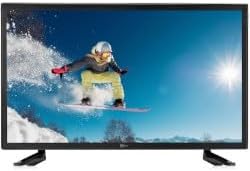
Din l-immaġni turi l-parti ta’ quddiem view of the TELE System 27-inch Full HD LED TV, model palco hevc s2, with its stand attached. The screen displays a vibrant image of a snowboarder in action, highlighting the display quality.
2. Istruzzjonijiet Operattivi
2.1 Kontrolli Bażiċi
Use the remote control to operate your TV. Key functions include:
- Buttuna tal-Qawwa: Jixgħel jew jitfi t-TV (modalità standby).
- Volum 'il fuq/Niżżel: Jaġġusta l-livell tal-ħoss.
- Kanal 'l fuq/'l isfel: Jibdel il-kanali tat-TV.
- Buttuni tan-Numri (0-9): Għażla diretta tal-kanal.
- Siekta: Jissikket il-ħoss tat-TV.
2.2 Għażla tal-Input
Agħfas il- SORS or INPUT button on your remote control to cycle through available input sources (e.g., HDMI1, HDMI2, USB, DVB-T2). Select the desired input for your connected device.
2.3 Navigazzjoni tal-Menu
Agħfas il- MENU button to access the TV's main menu. Use the arrow buttons (Up, Down, Left, Right) to navigate through options and the OK or DĦUL button to confirm selections. The menu allows you to adjust picture settings, sound settings, channel settings, and more.
2.4 DVB-T2 Tuner Usage
After completing the channel scan during initial setup, you can access digital terrestrial channels. Use the Channel Up/Down buttons or direct number input to switch channels. The TV supports DVB-T2 for high-quality digital broadcast reception.
2.5 Daqq tal-Midja USB
Insert a USB storage device into the TV's USB port. The TV should automatically detect the device and prompt you to open the media browser. You can then navigate and play supported video, audio, and image files maħżuna fuq l-apparat USB.
3. Manutenzjoni
3.1 Cleaning the Screen and Casing
- Skrin: Imsaħ l-iskrin bil-mod b'ċarruta ratba u mingħajr suf. Għal marki persistenti, nixxef ftit.ampLaħlaħ id-drapp bl-ilma jew b'prodott speċjalizzat għat-tindif tal-iskrin. Qatt ma tisprejja likwidu direttament fuq l-iskrin.
- Casing: Uża drapp artab u niexef biex timsaħ it-TV.asing. Avoid using abrasive cleaners, waxes, or solvents as they can damage the finish.
Importanti: Dejjem aqla’ t-TV mill-plagg tal-elettriku qabel ma tnaddaf.
3.2 Aġġornamenti tas-Software
The TV's software may receive updates to improve performance or add new features. Check the TV's menu for a 'Software Update' or 'System Update' option. Follow the on-screen instructions carefully if an update is available. (Note: Software update guarantee information is not available for this model.)
3.3 Prekawzjonijiet tas-Sigurtà
- Twaqqafx il-fetħiet tal-ventilazzjoni.
- Tesponix it-TV għax-xita jew l-umdità.
- Evita li tpoġġi t-TV fid-dawl tax-xemx dirett jew ħdejn sorsi ta’ sħana.
- Tiftaħx it-TV casing; irreferi s-servizz kollu lil persunal kwalifikat.
4 Issolvi l-problemi
Qabel ma tikkuntattja l-appoġġ, ipprova s-soluzzjonijiet li ġejjin għal problemi komuni:
| Problema | Soluzzjoni Possibbli |
|---|---|
| Ebda Qawwa | Ensure the power cable is securely plugged into both the TV and the wall outlet. Check if the outlet is working by plugging in another device. |
| L-ebda Stampa, iżda l-Ħoss huwa Preżenti | Iċċekkja s-sors tad-dħul. Agħfas il-buttuna SORS button on the remote to ensure the correct input (e.g., HDMI1) is selected. |
| L-ebda ħoss, iżda l-istampa hija preżenti | Check the volume level and ensure the TV is not muted. If using external audio, ensure it is correctly connected and powered on. |
| Il-Kontroll Remot Mhux Jaħdem | Ibdel il-batteriji fir-remote control. Kun żgur li m'hemm l-ebda ostaklu bejn ir-remote u s-sensor IR tat-TV. |
| Poor DVB-T2 Signal/No Channels | Check your antenna connection. Try repositioning the antenna or performing a new channel scan in the TV's menu. |
| USB Media Not Playing | Ensure the USB device is formatted correctly (e.g., FAT32) and the media files are in a supported format. Try another USB device. |
5. Speċifikazzjonijiet
The following are the technical specifications for the TELE System 27-inch Full HD LED TV (Model: palco hevc s2):
- Isem tal-Mudell: palco hevc s2
- Daqs tal-iskrin: 27 Pulzier
- Teknoloġija tal-Wiri: LED
- Riżoluzzjoni: 1080p (Full HD)
- Rata ta' Aġġornar: 120 hertz
- Teknoloġija tuner: DVB-T2
- Interface tal-ħardwer: HDMI
- Portijiet USB totali: 1
- Proporzjon tal-aspett: 16:9
- Modalità tal-Ħruġ tal-Awdjo: Stereo
- Surround Configuration: 2.0
- Tip ta 'Immuntar: Mount Wall
- Karatteristika Speċjali: Skrin Ċatt
- Sena Mudell: 2010
Specifications are subject to change without notice. For the most up-to-date information, please refer to the product packaging or manufacturer's websit.
6. Informazzjoni dwar Garanzija
This TELE System TV comes with a manufacturer's warranty. The specific terms and duration of the warranty may vary by region and retailer. Please retain your proof of purchase for warranty claims. For detailed warranty information, refer to the warranty card included with your product or visit the official TELE System websit.
7. Appoġġ għall-Klijent
If you encounter issues that cannot be resolved using the troubleshooting guide, or if you require further assistance, please contact TELE System customer support. Contact details can typically be found on the official TELE System webis-sit jew fuq l-imballaġġ tal-prodott.
Appoġġ onlajn: Visit the official TELE System websit għal FAQs, artikli ta' appoġġ, u formoli ta' kuntatt.
Appoġġ bit-Telefon: Check the TELE System websit għal numri ta' kuntatt reġjonali.