1. Introduzzjoni
This manual provides essential information for setting up, operating, and maintaining your Amazfit Pop 3S Smart Watch. Please read it carefully to ensure optimal performance and longevity of your device.

Image 1.1: Amazfit Pop 3S Smart Watch with metallic silver strap.
2. Setup
2.1. X'hemm fil-Kaxxa
- Amazfit Pop 3S Smart Watch (with strap) x 1
- Bażi tal-Iċċarġjar x 1
- Watch Strap Adjustment Tool x 1
- Manwal għall-Utent x 1

Image 2.1: Contents of the Amazfit Pop 3S retail box, including the smartwatch, charging base, strap adjustment tool, and user manual.
2.2. Iċċarġjar tal-Apparat
Before first use, fully charge your Amazfit Pop 3S. Connect the charging base to a USB power source and place the watch onto the magnetic contacts. The watch display will indicate charging status.
2.3. Installazzjoni u Tqabbil tal-App
- Download the 'Zepp Active' app from your smartphone's app store (iOS or Android).
- Iftaħ l-app u oħloq kont jew idħol.
- Follow the on-screen instructions in the app to pair your Amazfit Pop 3S Smart Watch via Bluetooth. Ensure Bluetooth is enabled on your smartphone.
2.4. Aġġustament taċ-Ċinga
If your watch comes with a metallic strap, use the provided strap adjustment tool to remove or add links for a comfortable fit. Refer to the detailed instructions in the included user manual for proper adjustment.
3. Istruzzjonijiet Operattivi
3.1. Wiri u Navigazzjoni
The Amazfit Pop 3S features a 1.96-inch HD AMOLED display. Navigate through menus and functions using touch gestures and the multi-function button on the side.
- Swipe' l isfel: Access quick settings (brightness, do not disturb, flashlight, battery saver, Bluetooth, settings).
- Swipe 'l fuq: View notifications/messages.
- Swipe Xellug/Lemin: Cycle through widgets (e.g., activity data, heart rate, weather).
- Agħfas il-Buttuna tal-Ġenb: Erġa' lura għall-iskrin ewlieni jew aċċessa l-menù prinċipali.

Image 3.1: The Amazfit Pop 3S showcasing its ultra-large 1.96" HD AMOLED display and metallic design.
3.2. Sejħiet bil-Bluetooth
The watch supports Bluetooth calling with a built-in microphone and speaker. Once paired with your smartphone, you can make and answer calls directly from your wrist.
- Access the 'Dial' function from the main menu to dial numbers.
- View 'Contact Person' and 'Call Records' directly on the watch.
- Is-sejħiet li deħlin se jintwerew fuq l-arloġġ, u b'hekk tkun tista' twieġebhom jew tirrifjutahom.

Image 3.2: A user demonstrating Bluetooth phone calls on the Amazfit Pop 3S, highlighting the built-in mic and speaker.
3.3. Assistent tal-Vuċi bl-AI
Interact with your smartphone's AI voice assistant (e.g., Siri, Google Assistant) through your watch. Ensure your watch is connected to your phone via Bluetooth.

Image 3.3: Visual representation of using the Bluetooth Voice Assistant feature on the Amazfit Pop 3S.
3.4. Kontroll tal-Mużika
Control music playback on your smartphone directly from your watch. This includes playing, pausing, skipping tracks, and adjusting volume.

Image 3.4: A user controlling music playback on their smartphone using the Amazfit Pop 3S.
3.5. Watch Faces and Always-On Display (AOD)
Customize your watch's appearance with a variety of watch faces. The watch also supports an Always-On Display feature.
- To change watch faces, long-press on the current watch face and swipe to select.
- AOD settings can be configured in the watch's settings menu, offering digital and analog clock styles.
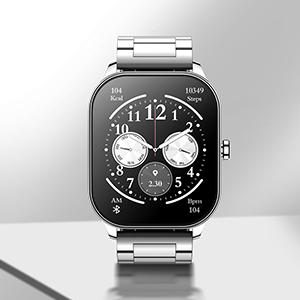
Image 3.5: A digital watch face displayed on the Amazfit Pop 3S.
3.6. Modi Sportivi
The Amazfit Pop 3S supports over 100 sports modes to track various physical activities. Select your desired sport from the workout menu to begin tracking.

Image 3.6: Icons representing various sports modes available on the Amazfit Pop 3S, including walking, football, running, cycling, and cricket.
4. Monitoraġġ tas-Saħħa
The Amazfit Pop 3S provides comprehensive health monitoring features to help you stay informed about your physical condition.
- Monitoraġġ tar-Rata tal-Qalb: Continuous 24-hour heart rate tracking with alerts for excessively high rates.
- Monitoraġġ SpO2: All-day blood-oxygen saturation (SpO2) monitoring.
- Monitoraġġ tal-istress: Jirreġistra l-livelli ta' stress tiegħek matul il-ġurnata.
- Traċċar tal-irqad: Monitors total sleep, light sleep, deep sleep periods, awake time, fall asleep time, and wake-up time.

Image 4.1: Visuals depicting the 24/7 heart rate, SpO2, and stress monitoring capabilities of the Amazfit Pop 3S.
5. Manutenzjoni
5.1. Tindif
Regularly clean your watch and strap with a soft, dry cloth. For stubborn dirt, use a slightly damp drapp u sapun ħafif, imbagħad laħlaħ u nixxef sewwa. Evita kimiċi ħarxa jew materjali li joborxu.
5.2. Reżistenza għall-Ilma
The Amazfit Pop 3S has an IP68 water resistance rating, making it suitable for daily use and light water exposure. Avoid prolonged submersion or use in hot water/steam.
5.3. Ottimizzazzjoni tal-Ħajja tal-Batterija
To maximize the 12-day battery life, consider adjusting settings such as screen brightness, Always-On Display duration, and frequency of heart rate/SpO2 monitoring. Frequent Bluetooth calls and media playback will consume more power.
6 Issolvi l-problemi
- L-arloġġ ma jixgħelx: Kun żgur li l-arloġġ ikun iċċarġjat kompletament. Qabbad mal-bażi tal-iċċarġjar u ma' sors tal-enerġija għal mill-inqas 30 minuta.
- Ma tistax tqabbad ma' smartphone: Make sure Bluetooth is enabled on your phone and the watch. Restart both devices and try pairing again through the Zepp Active app.
- Qari mhux preċiż tas-sensuri: Kun żgur li l-arloġġ jintlibes sew fuq il-polz tiegħek, la issikkat wisq u lanqas maħlul wisq. Naddaf iż-żona tas-sensor fuq wara tal-arloġġ.
- L-ebda notifika: Check app notification settings on both your phone and the Zepp Active app. Ensure the app is running in the background and has necessary permissions.
- Bluetooth call issues: Verify that the watch is properly connected for both call audio and media audio in your phone's Bluetooth settings.
7. Speċifikazzjonijiet
| Karatteristika | Dettall |
|---|---|
| Brand | Amazfit |
| Mudell | Pop 3S |
| Tip ta 'Wiri | AMOLED |
| Daqs tal-Iskrin | 1.96 Pulzier |
| Riżoluzzjoni | 410 x 502 |
| Kapaċità tal-batterija | 300 mAh Polimer tal-litju |
| Ħajja tal-Batterija (Użu Tipiku) | 12 Jiem |
| Konnettività | Bluetooth |
| Karatteristiċi Speċjali | Bluetooth Calling, SpO2, Heart Rate, AI Voice Assistance, 100 Sports Modes |
| Reżistenza għall-Ilma | IP68 |
| Piż tal-oġġett | 107 g |
| Apparati Kompatibbli | Smartphone |

Image 7.1: Diagram illustrating the dimensions of the Amazfit Pop 3S Smart Watch, including case width, case length, and strap width.
8. Garanzija u Appoġġ
The Amazfit Pop 3S Smart Watch comes with a 1-year warranty. For warranty claims, technical support, or further assistance, please visit the official Amazfit support websit jew ikkuntattja lis-servizz tal-konsumatur tagħhom.
Official Amazfit Store: Ħanut tal-Amazfit fuq Amazon


