1. Introduzzjoni
The Magicshine SEEMEE 150 is a compact and powerful bike rear light designed to enhance cyclist visibility and safety. Featuring a smart brake sensor and multiple lighting modes, it is suitable for urban riding and daily commuting. This manual provides essential information for the proper setup, operation, and maintenance of your SEEMEE 150 light.
Komponenti Inklużi:
- Dawl ta' wara SEEMEE 150
- Ċinga tal-Immuntar
- Saddle Mount
- Tie Band
- Cable tal-Mikro-USB
- Manwal għall-Utent

Figure 1: Magicshine SEEMEE 150 Bike Rear Light

Figure 2: The compact design of the SEEMEE 150 taillight.
2. Speċifikazzjonijiet
| Output Max | 150 Lumens |
| Ħin ta 'Ħadd Massimu | 44 Sigħat |
| Angolu tad-Dawl | 260° |
| Visibility Distance | 1500 Meters |
| Klassifikazzjoni li ma jgħaddix ilma minnha | IPX6 |
| Test Drop | 1 Meter |
| Piż | 26g |
| Dimensjonijiet (LxWxH) | 30x34x32 mm |
| Sors tal-Enerġija | Mħaddma bil-batterija |
| Port tal-Iċċarġjar | USB Tip-Ċ |
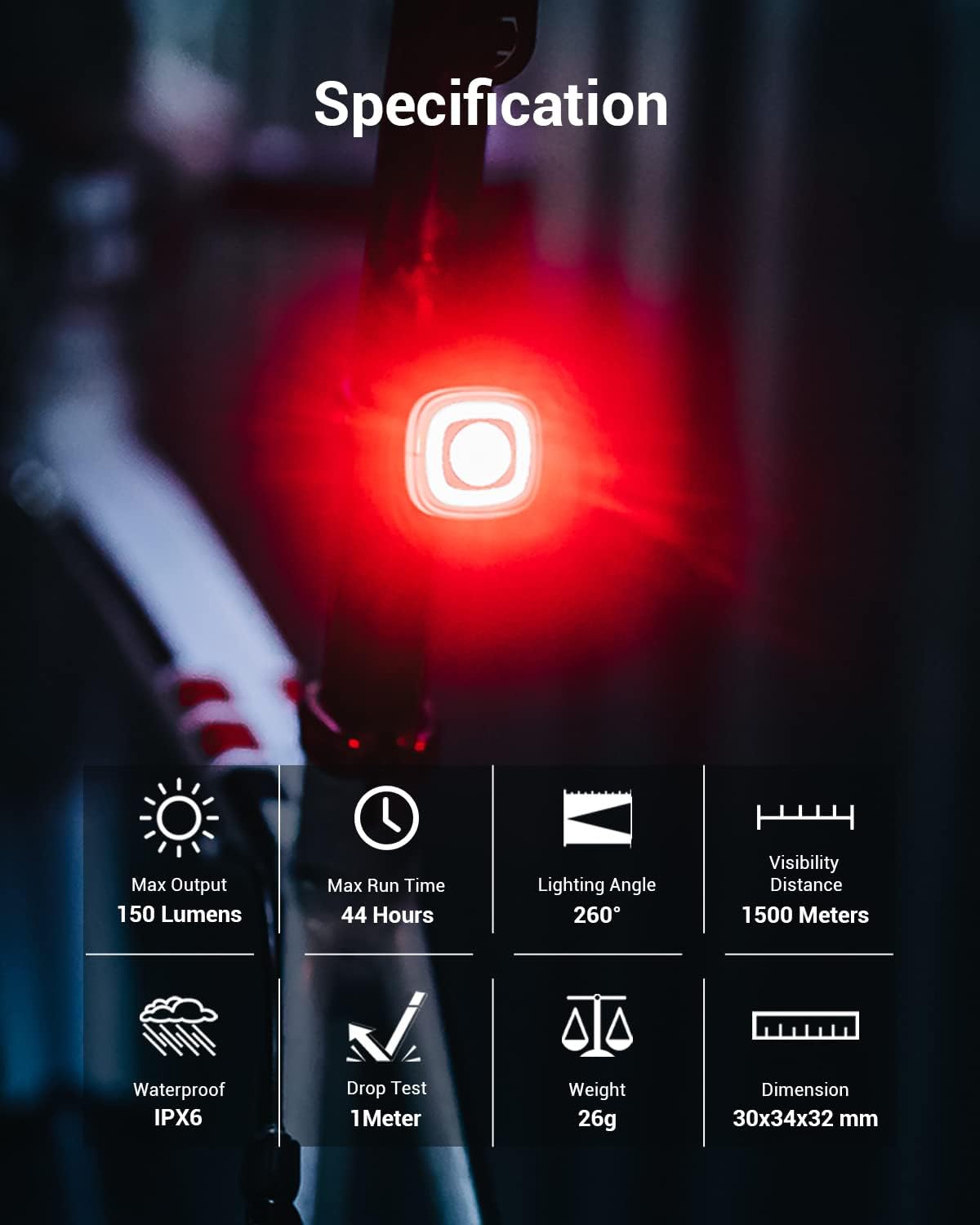
Figure 3: Visual overview of SEEMEE 150 specifications.

Figure 4: The SEEMEE 150 offers 260° visibility for all-around protection.
3. Setup u Installazzjoni
The SEEMEE 150 offers two primary mounting methods: seat post mount and saddle mount. Both methods are designed for easy, tool-free installation.
3.1. Seat Post Installation
- Attach the mounting strap to the seat post.
- Align the SEEMEE 150 with the mount and twist to secure it in place.
3.2. Under Saddle Installation
- Secure the saddle mount to the rails under your bicycle seat.
- Align the SEEMEE 150 with the mount and twist to secure it in place.

Figure 5: The SEEMEE 150 can be easily mounted on a seat post or under the saddle without tools.
Video 1: Watch the official Magicshine SEEMEE 150 Taillight Unboxing for detailed installation steps.
4. Istruzzjonijiet Operattivi
4.1. Power On/Off
- To turn the taillight ON/OFF, press and hold the power button for 1 second.
4.2. Ibdel il-Modalità
- When the taillight is ON, click the power button to cycle through the available modes: Low → High → Night Flash → Day Flash → Eco Flash → Low.
4.3. Karatteristiċi Smart
The SEEMEE 150 incorporates intelligent features for enhanced safety:
- Smart Brake Sensor: Built-in motion sensor automatically switches to the highest output (150 lumens) when braking, ensuring maximum visibility.
- Detection Alert Function: When activated, the taillight automatically detects approaching vehicles within 25 meters from behind and alerts with a rapid 100-lumen flash. The taillight returns to the previous lighting mode when no vehicle is detected within range.
- Auto-Adjust Brightness: An integrated light sensor automatically adjusts brightness to your environment, ensuring optimal visibility at all times.

Figure 6: The smart brake sensor activates maximum brightness upon deceleration.

Figure 7: The integrated light sensor automatically adjusts brightness.
4.4. Lockout Mode
- To enter lockout mode (for transport or storage), when the taillight is OFF, press and hold the power button for 3 seconds.
- To unlock, press and hold the power button for 3 seconds or connect the taillight to a charger.
4.5. Funzjoni tal-Memorja
- When the taillight is turned on again, it will automatically return to the last selected lighting mode.
Video 2: Learn about the functions of the SEEMEE R300, which shares many features with the SEEMEE 150, including side visibility, dual-button control, IPX6 waterproofing, quick installation, ANT+ wireless connection, automatic rear traffic alerts, and automatic wake-up.
Video 3: This video demonstrates how to connect front and rear lights using the FTR function, which is compatible with some Magicshine models including the SEEMEE 150 MAG (a newer version of this product).
5. Iċċarġjar
The SEEMEE 150 is equipped with a convenient USB Type-C charging port. The charging port is located on the back of the light, protected by the mounting mechanism.
5.1. Proċess tal-Iċċarġjar
- Remove the light from its mount.
- Locate the USB Type-C port on the back of the light.
- Connect the provided Micro-USB cable to the light and a USB power source (5V 1A recommended).
- Il-ħin standard tal-iċċarġjar huwa ta' madwar 1.5 sigħat.
5.2. Indikatur tal-batterija
The power button acts as a battery indicator:
- 100% -21%: Aħdar Kostanti
- 20% -11%: Aħmar Kostanti
- 10% -1%: Aħmar li jteptep

Figure 8: The SEEMEE 150 features convenient USB-C recharging.

Figure 9: Easy-to-read battery indicator on the SEEMEE 150.
6. Manutenzjoni
Proper maintenance ensures the longevity and optimal performance of your SEEMEE 150 light.
- Tindif: Imsaħ id-dawl b'artab, damp drapp biex tneħħi l-ħmieġ u d-debris. Evita li tuża kimiċi ħarxa.
- Waterproofing: The SEEMEE 150 has an IPX6 waterproof rating. Ensure the USB port cover is securely closed to maintain water resistance, especially in rainy conditions. Water resistance may decline over time.
- Ħażna: Store the light in a cool, dry place when not in use. If storing for extended periods, charge the battery periodically to prevent deep discharge.

Figure 10: The rugged IPX6 waterproof design allows for use in various weather conditions.
7 Issolvi l-problemi
If you encounter issues with your SEEMEE 150, refer to the following common solutions:
- Id-dawl ma jixgħelx: Ensure the battery is charged. If in lockout mode, press and hold the power button for 3 seconds or connect to a charger to unlock.
- Id-dawl mhux qed jiċċarġja: Verify the USB cable is properly connected and the power source is active. Check the USB port for any debris.
- Smart features not working: Ensure the light is not in lockout mode. Some smart features may have specific activation steps (refer to operating instructions).
8. Garanzija u Appoġġ
For warranty information or technical support, please contact Magicshine customer service. Keep your proof of purchase for warranty claims.
Informazzjoni ta' Kuntatt:
- Email: amazon@magicshine.com
- Visit the official Magicshine websit għal FAQs u riżorsi addizzjonali.


