1. Introduzzjoni
Thank you for choosing the FLYLINKTECH BD10 6000A 12V Car Jump Starter and Power Bank. This device is designed to provide emergency jump-starting for vehicles and serve as a portable power bank for various electronic devices. Please read this manual thoroughly before use to ensure safe and optimal operation.

Image 1.1: The FLYLINKTECH BD10 Jump Starter unit with its smart battery clamps.
2. Informazzjoni dwar is-Sigurtà
Dejjem osserva l-prekawzjonijiet ta' sigurtà li ġejjin biex tevita korriment jew ħsara lill-apparat jew lill-vettura:
- Tippruvax tibda batterija ffriżata b'għajnuna.
- Kun żgur li l-konnessjoni tal-polarità hija xierqa (il-klamp aħmar)amp għal pożittiv, iswed clamp to negative). Reverse polarity can cause damage.
- Do not allow the smart clamps to touch each other when connected to the jump starter.
- Żomm l-apparat 'il bogħod mit-tfal.
- Do not expose the device to extreme temperatures (above 60°C / 140°F or below -20°C / -4°F) or direct sunlight for extended periods.
- Żarmax jew timmodifikax l-apparat.
- Uża biss is-smart cl provdutamps u kejbils tal-iċċarġjar.
- If the device becomes excessively hot during use, disconnect it immediately.

Image 2.1: The jump starter incorporates multiple safety features such as spark-proof, reverse polarity, overvoltage, short circuit, overload, and high-temperature protection.
3. Kontenut tal-Pakkett
Ivverifika li l-oġġetti kollha huma preżenti fil-pakkett:
- FLYLINKTECH BD10 Jump Starter Unit
- Smart Battery Clamps
- USB-C għal USB-C Cable
- USB-A għal USB-C Cable
- Adapter tal-Ċarġer tal-Karozza 12V DC
- Manwal għall-Utent
- Kawża tal-Ħażna

Image 3.1: The complete package includes the jump starter, smart clamps, various cables, user manual, and a protective storage case.
4. Setup u Iċċarġjar
4.1 Ħlas Inizjali
Before first use, fully charge the jump starter. The device features a 26800mAh battery capacity.
- Connect the provided USB-C cable to the jump starter's USB-C input port.
- Connect the other end of the cable to a compatible USB wall charger (not included). For fastest charging, use a PD 45W charger.
- The LED screen will display the charging status and battery percentage.
4.2 Ħinijiet tal-Iċċarġjar
| Klassifikazzjoni tal-Ċarġer tal | Ħin Approssimattiv tal-Iċċarġjar |
|---|---|
| 5W | 18 Sigħat |
| 18W | 7 Sigħat |
| 45W | 2 Sigħat |
Note: A 45W wall charger is not included in the package.

Image 4.1: The device supports PD 45W fast charging, significantly reducing recharge time when using a compatible charger.
5. Istruzzjonijiet Operattivi
5.1 Aqbeż Startjar ta' Vettura
The FLYLINKTECH BD10 is capable of jump-starting all gas engines and diesel engines up to 12.0L.
- Kun żgur li hemm biżżejjed ħlas: Check the jump starter's LED screen to ensure it has at least 50% charge.
- Qabbad Smart Clamps: Daħħal il-plagg blu tal-ismart clamps into the jump starter's 12V output port. Ensure a firm connection.
- Qabbad mal-Batterija tal-Karozza:
- Waħħal il- aħmar (+) clamp to the vehicle's positive battery terminal.
- Waħħal il- iswed (-) clamp to the vehicle's negative battery terminal.
- Iċċekkja Indikatur: Il smart clamp indicator light should turn solid green, indicating a correct connection. If it flashes or shows red, check connections and battery status.
- Press BOOST (if needed): If the vehicle battery is extremely low or completely dead, press the 'BOOST' button on the jump starter. Wait for the indicator light on the smart clamps to turn solid green.
- Ibda l-Vettura: Attempt to start your vehicle. If it doesn't start on the first try, wait 30 seconds before trying again. Do not attempt more than 3 consecutive starts.
- Neħħi Clamps: Ladarba l-vettura tibda, neħħi immedjatament is-smart clamps mill-batterija tal-karozza, imbagħad skonnettjahom mill-jump starter.

Image 5.1: The jump starter connected to a car battery, ready for operation. It supports 6000A peak current, 12V output, and is suitable for a wide range of engines.

Image 5.2: Visual guide illustrating the four steps to jump-start a vehicle: connect the plug, attach clamps, press boost, and start the engine.
5.2 Funzjoni tal-Bank tal-Enerġija
The BD10 can charge multiple electronic devices via its USB-A and USB-C ports.
- Output USB1: Up to 18W (max)
- Output USB2: Up to 18W (max)
- Output USB-C: Sa 45W (PD)
Connect your device using the appropriate USB cable to the desired output port. The LED screen will show 'OUT' and the wattage being drawn.

Image 5.3: The jump starter functioning as a power bank, simultaneously charging a smartphone and a tablet via its USB ports.
5.3 Linterna LED
The built-in LED flashlight offers three modes: constant light, SOS signal, and strobe light.
- Press and hold the flashlight button to turn on the constant light.
- Press the button again to cycle through SOS and strobe modes.
- Agħfas u żomm għal darb'oħra biex titfi.

Image 5.4: The integrated LED flashlight provides illumination, an SOS signal, and a strobe function for emergency situations.
5.4 Informative LED Screen
The 6.0-inch LED screen provides real-time information about the device's status:
- Livell tal-batterija: Juri l-bqija tal-batterija perċentwalitage.
- IN/OUT Indicator: Shows whether the device is charging (IN) or discharging (OUT).
- Wattage Display: Indicates the power (W) being drawn or supplied.
- Twissijiet ta' Żball: Displays specific error codes or symbols if an issue occurs.
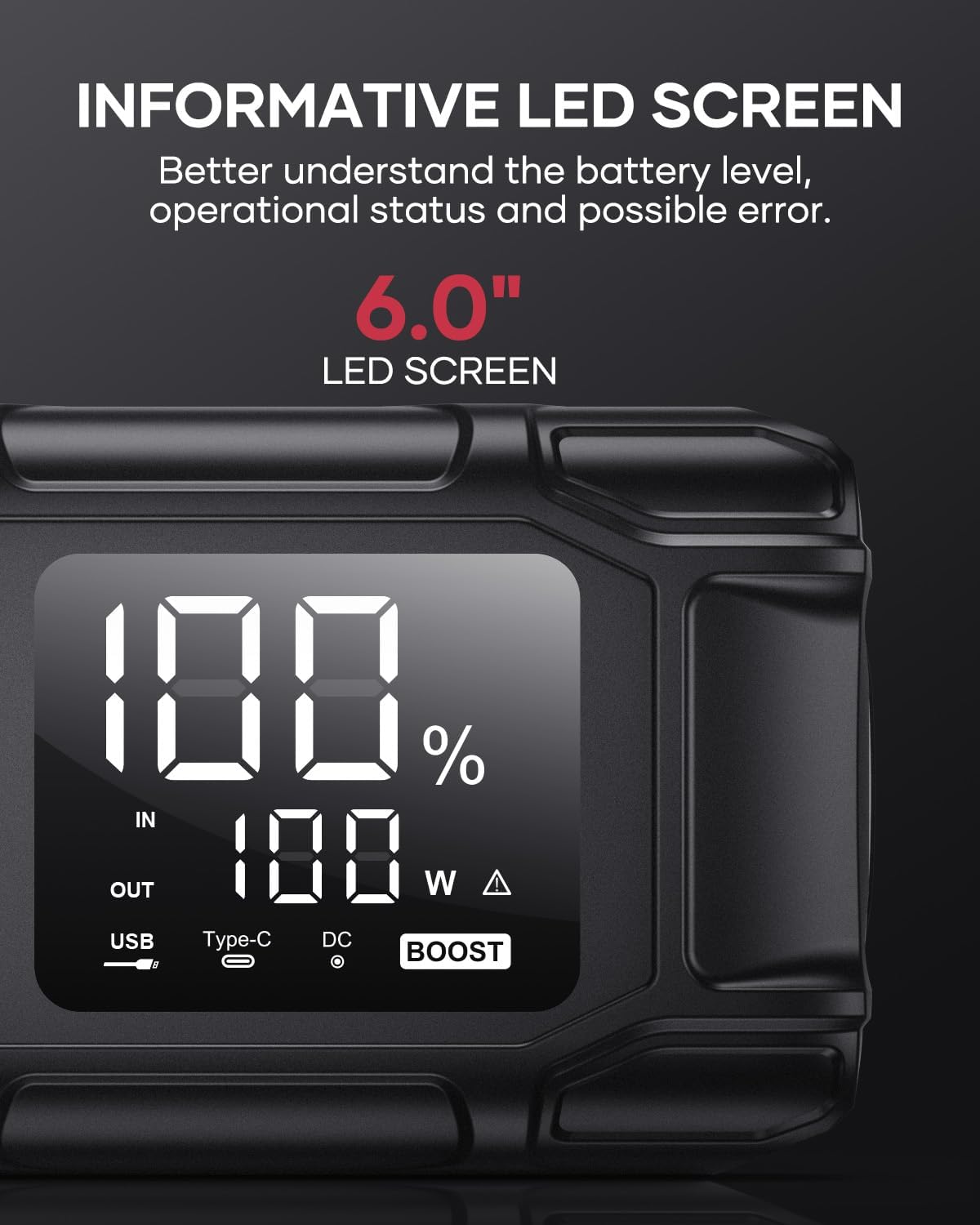
Image 5.5: The 6.0-inch LED screen provides clear information on battery percentage, input/output status, and power consumption.
6. Manutenzjoni
- Iċċarġja mill-ġdid regolarment: Biex ittawwal il-ħajja tal-batterija, erġa' ...
- Ħażna: Store the device in its protective case in a cool, dry place, away from direct sunlight and moisture.
- Tindif: Imsaħ l-apparat b'ċarruta ratba u niexfa. Tużax kimiċi ħarxa jew materjali li joborxu.
- Clamp Kura: Kun żgur li l-intelliġenti clamps are clean and free of corrosion before and after each use.
7 Issolvi l-problemi
The device features multiple alarm situations indicated by audible signals and screen displays:
- Vol baxxtage Protezzjoni: Audible signal "3". Recharge the device.
- Vol Esterntage Exceeds Vehicle Voltage: Audible signal "4". Check vehicle battery voltage.
- Protezzjoni Short Circuit: Audible signal "5". Check clamp connections for short circuits.
- Safety Mode Activated: Audible signal "6". Device has entered safety mode due to an issue.
- Protezzjoni tal-kurrent żejjed: Audible signal "7". Reduce load or check connections.
- Allarm ta' Temperatura Għolja/Baxxa: Audible signal "8". Allow device to return to operating temperature range (-20°C to 60°C).
- Reverse Connection: Audible signal "9". Correct the clamp polarità.

Immaġni 7.1: Fuqview of the device's multi-alarm system, indicating various protection states with unique audible signals.
Jekk il-problemi jippersistu wara li ssegwi dawn il-passi, jekk jogħġbok ikkuntattja l-appoġġ għall-klijenti.
8. Speċifikazzjonijiet
| Karatteristika | Speċifikazzjoni |
|---|---|
| Brand | FLYLINKTECH |
| Mudell | BD10 |
| L-ogħla Kurrent tal-Ħruġ | 6000 Ampere |
| Kapaċità tal-batterija | 26800mAh |
| Ħruġ Voltage | 12V |
| Input/Output USB-C | PD 45W |
| Output USB-A | 18W (massimu) |
| Applicable Engine Types | All Gas, up to 12.0L Diesel |
| Temperatura operattiva | -20°C sa 60°C (-4°F sa 140°F) |
| Dimensjonijiet tal-Prodott | 23.95 x 10 x 5.69 ċm |
| Piż tal-oġġett | 920 g |

Image 8.1: The device is designed to operate reliably in extreme climates, from -20°C (-4°F) to 60°C (140°F).
9. Garanzija u Appoġġ
FLYLINKTECH is committed to providing high-quality products. For any questions, technical assistance, or warranty claims, please refer to the contact information provided with your purchase or visit the official FLYLINKTECH websit. Jekk jogħġbok żomm il-prova tax-xiri tiegħek għal skopijiet ta' garanzija.


