1. Introduzzjoni
This manual provides detailed instructions for the setup, operation, and maintenance of your Creative Sound Blaster Katana SE Multi-Channel Gaming Soundbar. Designed for an immersive audio experience, this soundbar features 180W peak power, a bi-amplified 4-driver design, Super X-Fi technology, and customizable RGB lighting. Please read this manual thoroughly before using your device to ensure optimal performance and safety.

Figure 1: Creative Sound Blaster Katana SE Gaming Soundbar
2. Informazzjoni Importanti dwar is-Sigurtà
- Aqra dawn l-istruzzjonijiet.
- Żomm dawn l-istruzzjonijiet.
- Oqgħod attent għat-twissijiet kollha.
- Segwi l-istruzzjonijiet kollha.
- Tużax dan l-apparat ħdejn l-ilma.
- Naddaf biss b'ċarruta niexfa.
- Timblokkax il-fetħiet tal-ventilazzjoni. Installa skont l-istruzzjonijiet tal-manifattur.
- Tinstallax ħdejn xi sorsi tas-sħana bħal radjaturi, reġistri tas-sħana, stufi, jew apparat ieħor (inkluż amplifiers) li jipproduċu sħana.
- Ipproteġi l-korda tad-dawl milli timxi fuqha jew maqrusa, partikolarment fil-plakek, ir-reċipjenti tal-konvenjenza, u l-punt fejn joħorġu mill-apparat.
- Uża biss aċċessorji/aċċessorji speċifikati mill-manifattur.
- Aqla’ dan l-apparat waqt maltempati tas-sajjetti jew meta ma jintużax għal perjodi twal ta’ żmien.
3. Kontenut tal-Pakkett
Ivverifika li l-oġġetti kollha huma preżenti fil-pakkett tiegħek:
- Creative Sound Blaster Katana SE Soundbar
- Subwoofer (wired)
- Kontroll mill-bogħod
- Adapter tal-Enerġija
- USB-C Cable
- Kejbil ottiku
4. Prodott Aktarview
The Sound Blaster Katana SE is an all-in-one soundbar designed for powerful and immersive audio. It features a sleek design with integrated controls and a front-facing display.
4.1. Soundbar Components
- Kontrolli tal-Panew ta' Fuq: Power, Volume Up/Down, Source, Mode, SXFI.
- Wiri ta' Quddiem: Shows current source (USB, AUX, OPTICAL, BT, TV), volume level, and selected sound mode.
- Front Headphone Jack: For connecting headphones directly.
- Mikrofonu inkorporat: Għall-komunikazzjoni bil-vuċi.
- Strixxa tad-Dawl RGB: Customizable lighting effects located at the bottom of the soundbar.
- Sewwieqa: Bi-amplified 4-driver design for clear and precise audio.

Figura 2: Quddiem view of the Sound Blaster Katana SE with RGB lighting
4.2. Konnessjonijiet tal-Panew ta 'wara
The rear panel provides various ports for connecting to your devices:
- HDMI Out (ARC): For connecting to a TV with Audio Return Channel support.
- SXFI Out: Dedicated port for Super X-Fi enabled headphones.
- Input tal-Awdjo USB: For digital audio connection to PC/Mac.
- Aux In: Input awdjo analogu ta' 3.5mm.
- Ottiku In: Input awdjo ottiku diġitali.
- Sub Out: For connecting the wired subwoofer.
- Input ta' Enerġija: Għall-adapter tal-enerġija.

Figure 3: Rear panel with HDMI ARC, SXFI Out, USB Audio In, Aux In, Optical In, Sub Out, and Power Input.
4.3. Subwoofer
The included wired subwoofer enhances bass response for a more dynamic audio experience.

Figura 4: Intern view showing the soundbar's bi-amplified drivers and the subwoofer's design.
5. Setup
Follow these steps to set up your Sound Blaster Katana SE:
- Pjazzament: Place the soundbar on a stable surface below your TV or monitor. Position the subwoofer on the floor near the soundbar for optimal bass.
- Qabbad is-Subwoofer: Connect the wired subwoofer cable to the 'Sub Out' port on the soundbar's rear panel.
- Qabbad l-Enerġija: Connect the power adapter to the soundbar's power input and then plug it into a wall outlet.
- Qabbad is-Sors tal-Awdjo: Choose your preferred audio connection method (HDMI ARC, Optical, USB, Aux, or Bluetooth) and connect the appropriate cable.
Video 1: Official product video demonstrating the Sound Blaster Katana SE's features and connectivity options.
6. Għażliet ta' Konnettività
The Sound Blaster Katana SE offers a wide range of connectivity to suit various devices:
- HDMI Out (ARC): Connect to your TV's HDMI ARC port for high-quality audio and control.
- Input tal-Awdjo USB: Ideal for connecting to PCs, Macs, or gaming consoles that support USB audio.
- Aux In: Use a 3.5mm audio cable to connect to devices with an analog audio output.
- Ottiku In: For digital audio connection from TVs, game consoles, or other media players.
- Bluetooth 5.0: Pair wirelessly with your mobile devices, tablets, or computers for convenient audio streaming.
- SXFI Out: Connect Super X-Fi certified headphones for a personalized holographic audio experience.

Figure 5: Soundbar showcasing versatile connectivity with gaming consoles and mobile devices.
7. Istruzzjonijiet Operattivi
7.1. Power On/Off
Press the Power button on the soundbar's top panel or the remote control to turn the device on or off.
7.2. Kontroll tal-Volum
Use the Volume Up (+) and Volume Down (-) buttons on the soundbar or remote to adjust the audio level. The current volume will be displayed on the front panel.
7.3. Għażla tas-Sors
Press the 'Source' button on the soundbar or remote to cycle through available input sources (HDMI ARC, USB, Aux, Optical, Bluetooth).
7.4. Modi tal-Ħsejjes
The soundbar features optimized sound modes for different content types. Press the 'Mode' button on the soundbar or remote to switch between:
- Mużika: Enhanced for musical playback.
- Films: Optimized for cinematic audio.
- Logħob: Tailored for immersive gaming soundscapes.
- Effects Off: Neutral audio profile.
7.5. Bl-użu tal-Kontroll mill-bogħod
The included remote control provides full functionality for the soundbar, including power, volume, source, mode, SXFI, RGB lighting, and custom buttons.
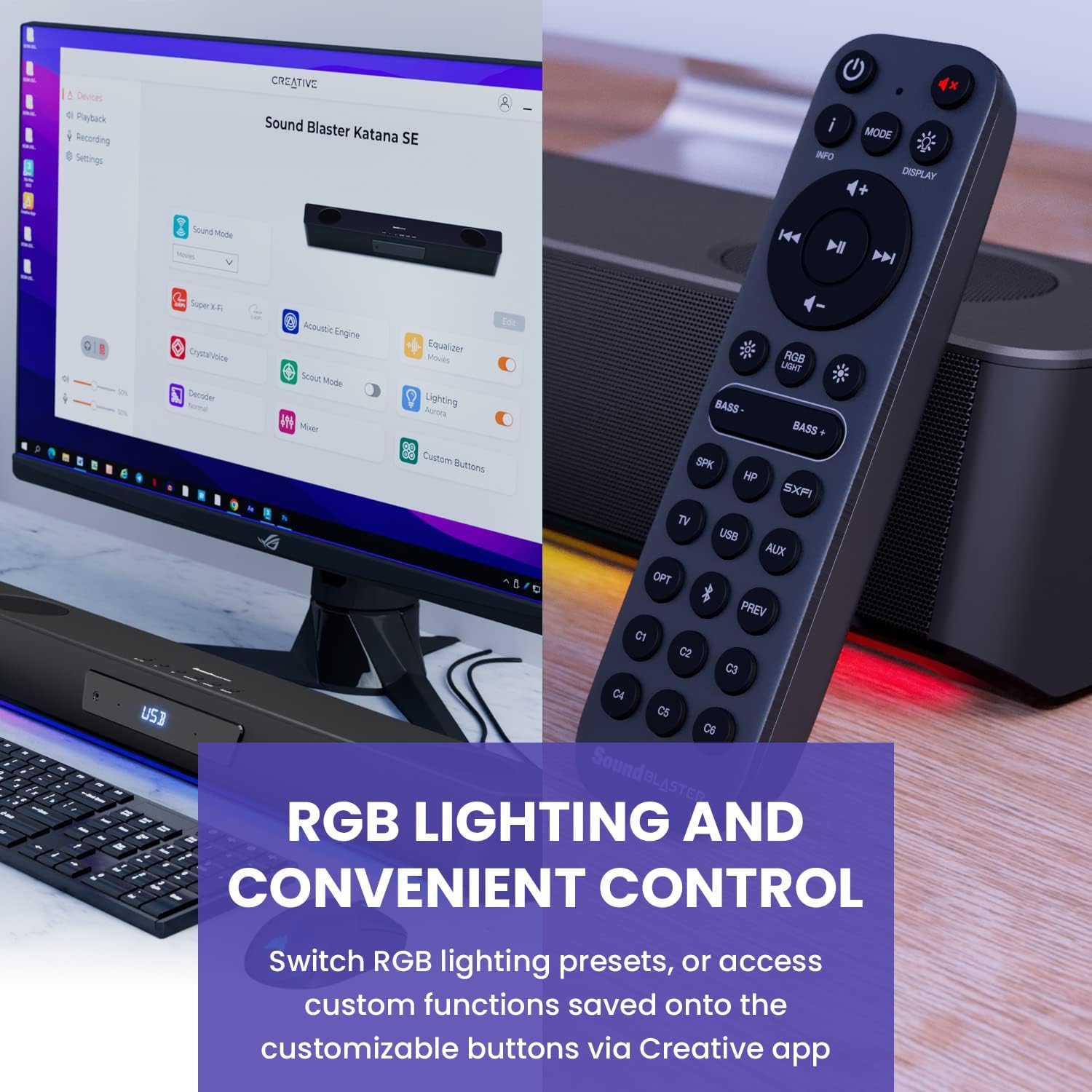
Figure 6: Remote control for the Sound Blaster Katana SE.
7.6. Creative App Customization
For advanced customization, download the Creative app on your PC or Mac. The app allows you to:
- Tune Audio Performance: Adjust EQ settings and activate Sound Blaster processing technologies.
- Ippersonalizza Dawl RGB: Select from various RGB presets or create your own custom lighting effects.
- Map Custom Functions: Assign specific commands to the six customizable buttons on the remote control.

Figure 7: Creative app interface showing sound mode, Super X-Fi, Acoustic Engine, Equalizer, CrystalVoice, Scout Mode, Lighting, Decoder, Mixer, and Custom Buttons.
8. Super X-Fi Technology
Super X-Fi technology personalizes your headphone audio experience for optimized and realistic listening. It recreates the soundstage of a multi-speaker system in your headphones.
- SXFI Battle Mode: Ikseb vantaġġ kompetittivtage in FPS games by accurately pinpointing enemy locations through enhanced audio cues.

Figure 8: Super X-Fi and SXFI Battle Mode for enhanced gaming audio.
9. Mikrofonu Mibni
The Sound Blaster Katana SE includes a built-in beamforming microphone, allowing you to participate in calls or in-game voice chat directly through the soundbar.
10. Dawl RGB
The integrated RGB lighting strip can be customized to match your setup or mood. Use the remote control to cycle through presets or the Creative app for advanced color and effect adjustments.
11. Manutenzjoni
To ensure the longevity and performance of your Sound Blaster Katana SE:
- Żomm l-apparat nadif billi timsaħ b'ċarruta ratba u niexfa.
- Avoid using liquid cleaners or aerosols.
- Kun żgur li l-fetħiet tal-ventilazzjoni ma jkunux ostakolati.
- Tesponix l-apparat għal temperaturi jew umdità estremi.
12 Issolvi l-problemi
Jekk tiltaqa' ma' problemi bis-soundbar tiegħek, irreferi għas-soluzzjonijiet komuni li ġejjin:
- Ebda Ħsejjes: Check all cable connections (power, audio source, subwoofer). Ensure the correct input source is selected on the soundbar. Verify the volume is not muted or too low.
- Ħoss Mgħawġ: Try reducing the volume. Check audio cable integrity. Ensure the audio source is providing a clean signal.
- Kwistjonijiet ta' Konnettività Bluetooth: Ensure the soundbar is in Bluetooth pairing mode. Delete the soundbar from your device's Bluetooth list and re-pair. Move closer to the soundbar to reduce interference.
- Il-Kontroll mill-bogħod Mhux Jaħdem: Check battery levels and replace if necessary. Ensure there are no obstructions between the remote and the soundbar.
- Dwal RGB Ma Jaħdmux: Check settings in the Creative app. Ensure RGB lighting is enabled via the remote or app.
13. Speċifikazzjonijiet
| Karatteristika | Speċifikazzjoni |
|---|---|
| Isem tal-Mudell | 51MF8415AA000 27585486 |
| Tip ta' Kelliem | Soundbar |
| Tip ta 'Immuntar | Immonta fuq il-mejda |
| Karatteristika Speċjali | Bass Boost, Built In Microphone, Radio, Stereo Pairing, USB Port |
| Użi Rakkomandati Għall-Prodott | For Gaming Consoles, For Computers |
| Apparati Kompatibbli | Desktop, Laptop, MP3 Player, Proġettur, Smartphone, Tablet, Televiżjoni |
| Għadd ta' Unitajiet | 1.0 Għadd |
| Surround Sound Channel Konfigurazzjoni | 5.1 |
| Kulur | 180W Peak Power with Bluetooth 5.0 |
| Komponenti Inklużi | Remote |
| Dimensjonijiet tal-Prodott | 25.6"D x 4.3"W x 3.1"H |
| Piż tal-oġġett | 5.9 Liri |
| Huwa Waterproof | FALZ |
| Tip ta' Garanzija | Limited |
| Numru ta' Oġġetti | 1 |
| Metodu ta' Kontroll | Remote |
| Teknoloġija tal-Komunikazzjoni mingħajr Fili | Bluetooth |
| Daqs tal-Kelliem | 1 Pulzier |
| Sors tal-Enerġija | Corded Elettriku |
| Dijametru tat-Tweeter | 1 Pulzier |
| Livell ta 'Reżistenza għall-Ilma | Mhux Reżistenti għall-Ilma |
| Tip ta' Pakkett tal-Klijent | FFP |
| Tip ta' Sewwieq Awdjo | Sewwieq Dinamika |
| Teknoloġija tal-Konnettività tas-Subwoofer | Wireless |
| Numru ta 'Livelli ta' Qawwa | 1 |
| Użi Speċifiċi Għall-Prodott | Gaming Consoles, Computers |
| UPC | 054651195639 |
| Manifattur | Laboratorji Kreattivi |
| Forma | priżma rettangolari |
| Piż tal-oġġett | 5.9 liri |
| ASIN | B0C5DFMB93 |
| Numru tal-mudell tal-oġġett | MF8415 |
| Data L-Ewwel Disponibbli | 16 ta’ Mejju, 2023 |
| Brand | Kreattiv |
| Qawwa tal-Ħruġ Massimu tal-Ispeaker | 100 Watts |
| Rispons ta' Frekwenza | 20000 Hz |
| Teknoloġija tal-Konnettività | Bluetooth |
| Modalità tal-Ħruġ tal-Awdjo | Surround, Stereo |
14. Garanzija u Appoġġ
Your Creative Sound Blaster Katana SE comes with a Limited Warranty. For detailed warranty information, product registration, technical support, and customer service, please visit the official Creative website or refer to the warranty card included in your package.


