1. Introduzzjoni
Thank you for choosing the BuTure VC70 Cordless Vacuum Cleaner. This manual provides important information on the safe operation, maintenance, and troubleshooting of your new appliance. Please read this manual thoroughly before first use and keep it for future reference.
2. Istruzzjonijiet tas-Sigurtà
Dejjem segwi l-prekawzjonijiet bażiċi ta' sigurtà meta tuża apparati elettriċi biex tnaqqas ir-riskju ta' nar, xokk elettriku, jew korriment.
- Tużax barra jew fuq uċuħ imxarrbin.
- Tħallix li tintuża bħala ġugarell. Attenzjoni mill-qrib hija meħtieġa meta jintuża minn jew ħdejn it-tfal.
- Uża biss kif deskritt f'dan il-manwal. Uża biss l-aċċessorji rakkomandati mill-manifattur.
- Tużax b'korda jew plagg bil-ħsara. Jekk l-apparat mhux qed jaħdem kif suppost, ikun waqa’, saritlu ħsara, jitħalla barra, jew waqa’ fl-ilma, erġa’ lura f’ċentru ta’ servizz.
- Tiġbedx jew iġorrux bil-korda, uża korda bħala manku, agħlaq bieb fuq korda, jew iġbed korda madwar truf jew kantunieri li jaqtgħu. Tmexxix l-apparat fuq il-korda. Żomm il-korda 'l bogħod minn uċuħ imsaħħna.
- Tneħħix il-plagg billi tiġbed il-korda. Biex tneħħi l-plagg, aqbad il-plagg, mhux il-korda.
- M'għandekx timmaniġġja l-plagg jew l-apparat b'idejhom imxarrbin.
- Tpoġġi l-ebda oġġett fil-fetħiet. Tużax b'xi ftuħ imblukkat; żomm ħieles minn trab, lint, xagħar, u kull ħaġa li tista 'tnaqqas il-fluss ta' l-arja.
- Żomm ix-xagħar, il-ħwejjeġ maħlula, is-swaba’, u l-partijiet kollha tal-ġisem 'il bogħod mill-fetħiet u l-partijiet li jiċċaqilqu.
- Tiġborx xi ħaġa li tkun qed taħraq jew tpejjep, bħal sigaretti, lofarini, jew irmied jaħraq.
- Tużax biex tiġbor likwidi li jaqbdu jew kombustibbli, bħall-gażolina, jew tuża f'żoni fejn jistgħu jkunu preżenti.
- Tiġborx materjal tossiku, bħal bliċ tal-kloru, ammonja, jew prodott għat-tindif tad-drejns.
- Tużax mingħajr borża tat-trab u/jew filtri f'posthom.
- Itfi l-kontrolli kollha qabel ma splaggja.
- Uża attenzjoni żejda meta tnaddaf it-taraġ.
- Tużax biex tiġbor oġġetti iebsin jew li jaqtgħu bħal ħġieġ, imsiemer, viti, muniti, eċċ.
3. Kontenut tal-Pakkett
Carefully unpack your BuTure VC70 and check that all items are present and in good condition. If any items are missing or damaged, please contact customer support.

Figura 3.1: All components of the BuTure VC70 cordless vacuum cleaner, including the main unit, extension wand, floor brush, crevice tool, 2-in-1 brush, wall mount, charger, and spare filter.
- Main Vacuum Body (with dustbin and motor)
- Bastun ta 'Estensjoni
- Pinzell tal-Art Motorizzat
- Għodda tal-Xquq
- Għodda tal-Pinzell 2-in-1
- Ħitan Mount Bracket
- Adapter/Ċarġer tal-Enerġija
- Spare Filtru
- Manwal għall-Utent (dan id-dokument)
4. Prodott Aktarview
Familiarize yourself with the main parts of your BuTure VC70 vacuum cleaner.

Figura 4.1: The BuTure VC70 cordless vacuum cleaner shown as a stick vacuum, and in handheld configurations with different attachments, along with the wall mount and filters.
- Unità Prinċipali: Contains the motor, dustbin, and control panel.
- Bastun ta 'Estensjoni: Connects the main unit to the floor brush for upright cleaning.
- Xkupilja tal-art motorizzata: Features an integrated brush with soft and hard bristles for effective cleaning on various floor types.
- Trab tat-trab: Kontenitur trasparenti għall-ġbir tat-trab u l-fdalijiet.
- Sistema ta' Filtrazzjoni: Multi-layer system designed to capture fine dust and allergens.
- Skrin tat-Touch LED: Displays battery level, current mode, and maintenance reminders.
5. Setup u Assemblea
Follow these steps to assemble your vacuum cleaner for first use.
5.1 Iċċarġjar inizjali
Before first use, fully charge the battery. The battery is removable for convenient charging.
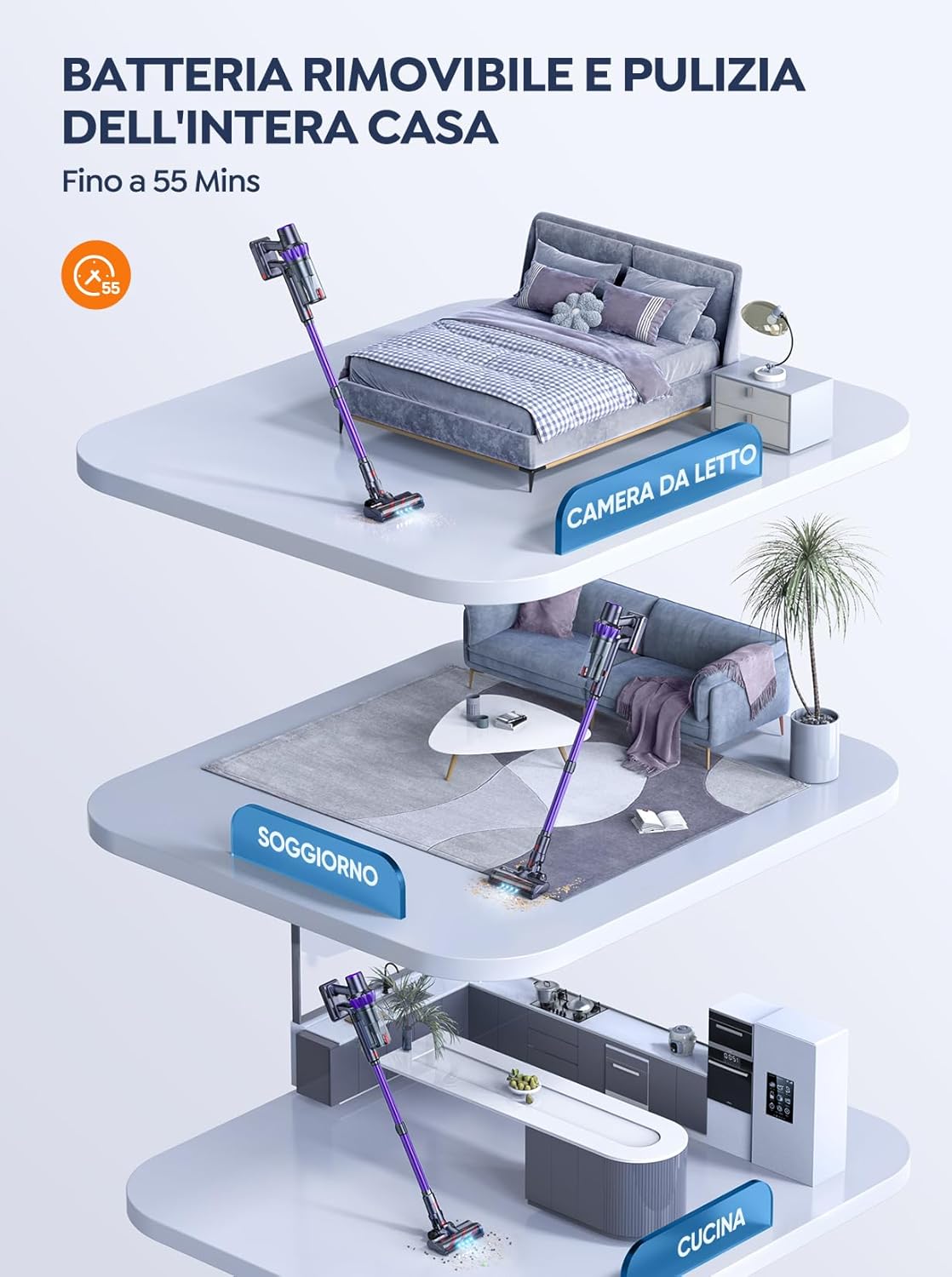
Figura 5.1: The removable battery allows for flexible charging options and extended cleaning time across multiple rooms.
- Connect the power adapter to the charging port on the main unit or directly to the battery if removed.
- Ipplaggja l-adapter ma 'plagg tal-ħajt.
- The LED screen will indicate charging status. A full charge typically takes 4-5 hours.
5.2 L-Immuntar tal-Vakwu
- Waħħal il-Bastun ta' Estensjoni: Insert the top end of the extension wand into the main vacuum body until it clicks into place.
- Waħħal il-Pinzell tal-Art: Insert the bottom end of the extension wand into the motorized floor brush until it clicks into place.
- Attach Accessories (for handheld use): For handheld cleaning, you can directly attach the crevice tool or 2-in-1 brush tool to the main vacuum body.
6. It-tħaddim tal-Vacuum Cleaner
Learn how to effectively use your BuTure VC70 for various cleaning tasks.
6.1 Mixgħul/Mitfi u Għażla tal-Modalità

Figura 6.1: The intelligent LED touch screen provides real-time information on battery status and selected cleaning mode.
- Biex Tixgħel: Press the power button on the main unit. The vacuum will start in the default mode.
- Biex Tibdel il-Modalitajiet: Use the mode selection button on the LED touch screen to cycle through available suction modes (e.g., Eco, Standard, Max, Auto).
- Biex Tifi: Agħfas il-buttuna tal-qawwa mill-ġdid.
6.2 Intelligent Automatic Suction Mode
The BuTure VC70 features an intelligent automatic suction mode that adjusts power based on floor type.
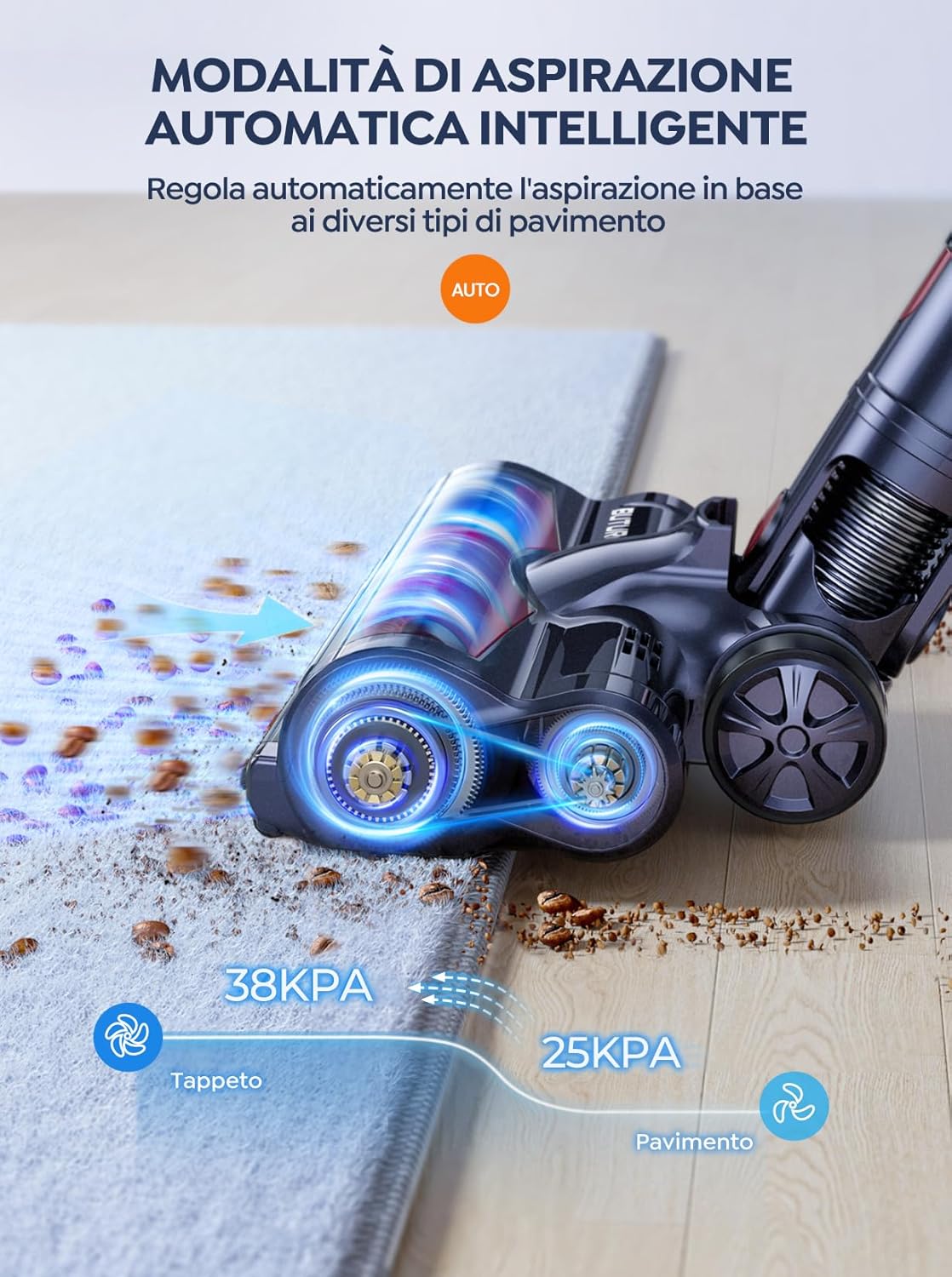
Figura 6.2: The vacuum automatically adjusts suction power, providing 38KPA for carpets and 25KPA for hard floors in Auto mode.
In Auto mode, the vacuum detects the floor type and automatically increases suction for carpets (up to 38KPA) and reduces it for hard floors (25KPA), optimizing cleaning efficiency and battery life.
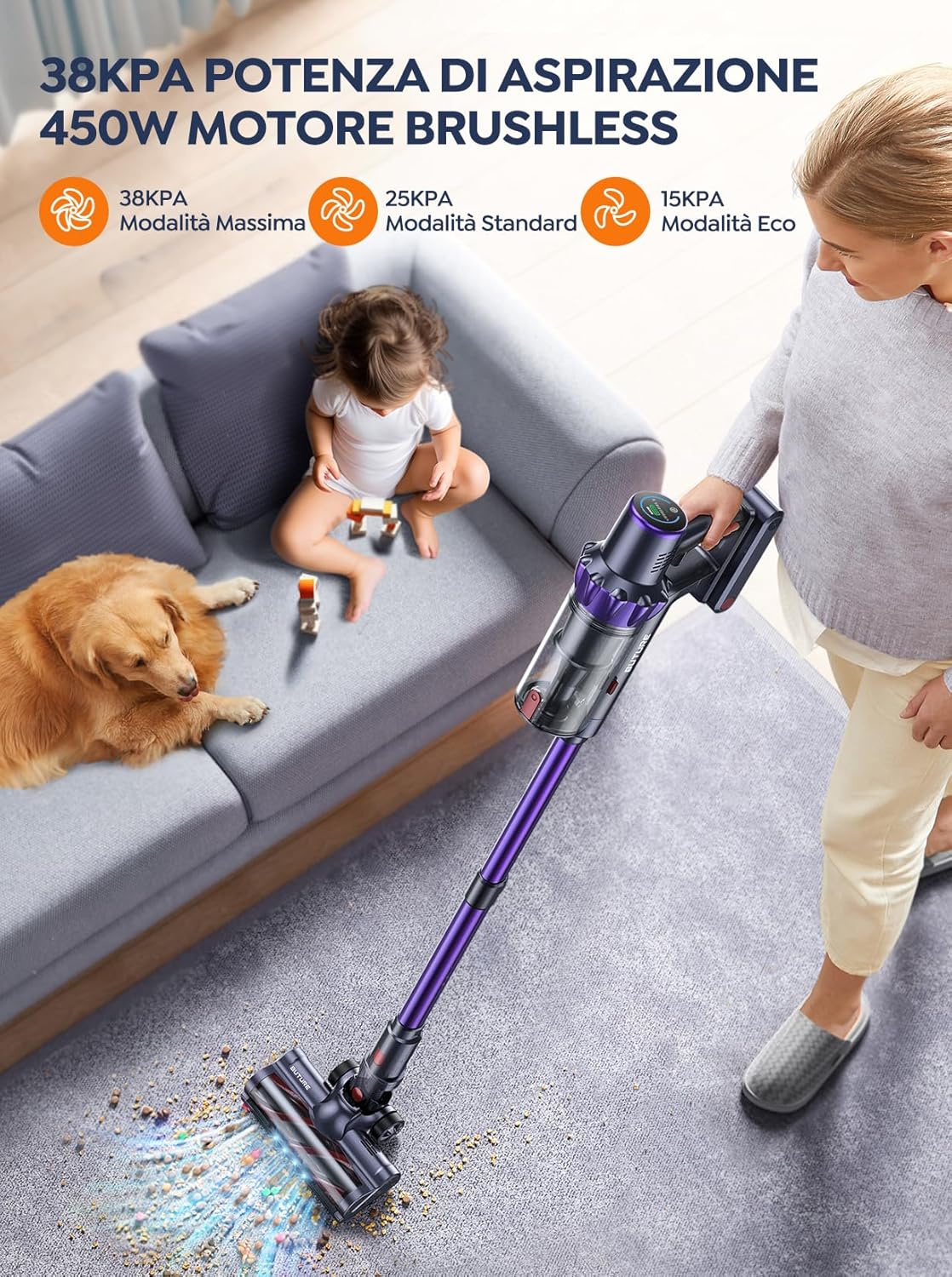
Figura 6.3: The 450W brushless motor delivers powerful suction, with modes including 38KPA Max, 25KPA Standard, and 15KPA Eco.
6.3 L-Użu tal-Annessi
- Għodda tal-qsim: Ideali għal lakuni dojoq, kantunieri u truf.
- Għodda tal-Pinzell 2 f'1: Use the brush for delicate surfaces like upholstery or curtains, and the nozzle for general dusting.
- Xkupilja tal-art motorizzata: Designed for efficient cleaning of both hard floors and carpets. Its integrated bristles effectively pick up various debris.

Figura 6.4: The motorized floor brush features a combination of soft and hard bristles to effectively clean different types of debris from various floor surfaces.
7. Manutenzjoni
Manutenzjoni regolari tiżgura prestazzjoni ottimali u testendi l-ħajja tal-vacuum cleaner tiegħek.
7.1 Tbattil tal-landa taż-żibel
Empty the dustbin after each use or when the MAX fill line is reached.
- Agħfas il-buttuna tar-rilaxx tal-kontenitur tat-trab biex tneħħih mill-unità prinċipali.
- Open the dustbin lid and empty contents into a trash can.
- Close the lid and reattach the dustbin to the main unit.
7.2 Tindif tal-Filtri
The BuTure VC70 features an advanced multi-layer filtration system. Clean filters regularly to maintain suction power.

Figura 7.1: The advanced multi-layer filtration system captures 99.99% of dust and dirt, ensuring cleaner exhaust air.
- Neħħi l-kontenitur tat-trab u sib il-filtri ġewwa.
- Gently tap the filters to remove loose dust.
- Rinse the filters under cold running water. Ensure they are completely dry before reinserting (allow 24-48 hours for air drying).
- Ibdel il-filtri kull 3-6 xhur skont l-użu.
7.3 Tindif tar-Romblu tal-Pinzell
Iċċekkja r-romblu tal-pinzell perjodikament għal xagħar imħabbel jew debris.
- Turn off the vacuum and detach the motorized floor brush.
- Locate the brush roll access latch/button and open it.
- Remove the brush roll. Use scissors or a cleaning tool to cut and remove any tangled hair or fibers.
- Erġa' daħħal ir-romblu tal-pinzell u waħħal il-lukkett tal-aċċess.
8 Issolvi l-problemi
Jekk tiltaqa' ma' problemi bil-vacuum cleaner tiegħek, irreferi għat-tabella li ġejja għal problemi u soluzzjonijiet komuni.
| Problema | Kawża Possibbli | Soluzzjoni |
|---|---|---|
| Il-vakwu ma jixgħelx | Il-batterija mhix iċċarġjata Il-batterija mhix installata sew | Iċċarġja l-batterija kompletament Ensure battery is securely clicked into place |
| Qawwa baxxa ta 'ġbid | Dustbin huwa mimli Il-filtri huma misduda Ir-romblu tal-pinzell huwa mħabbel Hose/nozzle is blocked | Żvojta l-dustbin Naddaf jew ibdel il-filtri Naddaf ir-roll tal-pinzell Iċċekkja u neħħi l-imblukkar |
| Roll pinzell mhux għażil | Ir-romblu tal-pinzell huwa mħabbel Problema bil-mutur tar-romblu tal-pinzell | Naddaf ir-roll tal-pinzell Ikkuntattja l-appoġġ għall-klijenti jekk il-problema tippersisti |
| Vacuum stops suddenly | Protezzjoni tas-sħana żejda attivata Batterija baxxa | Turn off and allow to cool for 30 minutes Iċċarġja l-batterija |
9. Speċifikazzjonijiet
Technical specifications for the BuTure VC70 Cordless Vacuum Cleaner.
| Karatteristika | Speċifikazzjoni |
|---|---|
| Numru tal-Mudell | VC70 |
| Brand | BuTure |
| Qawwa Rated | 450 Watts |
| Voltage | 100-240 volt |
| Kapaċità ta 'Dustbin | 1.5 Litru |
| Livell ta' Storbju | 68 dB |
| Piż tal-oġġett | 1.81 Kilogrammi (madwar 4 lbs) |
| Tip ta 'batterija | Lithium-ion |
| Kulur | Vjola |
10. Garanzija u Appoġġ
BuTure products are manufactured to the highest quality standards. For warranty information or technical support, please refer to the warranty card included with your purchase or visit the official BuTure website. Please have your model number (VC70) and purchase details ready when contacting support.