1. Introduzzjoni
This manual provides detailed instructions for the installation, operation, and programming of your DieseRC 433Mhz RF Wireless Remote Control Switch. This 2-channel AC relay receiver is designed to control various electrical devices and motors remotely, offering convenience and flexibility. Please read this manual thoroughly before installation and use to ensure proper functionality and safety.
2. Kontenut tal-Pakkett
Il-pakkett għandu jkun fih l-oġġetti li ġejjin:
- 1x DieseRC 433Mhz RF Relay Receiver Module
- 1x Protective Casing for Receiver Module
- 2x 2-Button Remote Controls

Figura 1: Components of the DieseRC RF Wireless Remote Control Switch kit.
3. Speċifikazzjonijiet
| Karatteristika | Speċifikazzjoni |
|---|---|
| Brand | DieseRC |
| Numru tal-Mudell | 2 Boutons |
| Konnessjonijiet | Wireless |
| Tip ta' Terminal | Clamp |
| Apparati Kompatibbli | AC |
| Tip ta 'Batterija Remota | Lithium Manganese Dioxide (CR2032) |
| Modi Operattivi | Momentary, Toggle, Latched |
| Max Power | 2500 Watts |
| Ħidma Voltage | AC 85V-250V |
| Ħruġ Voltage | 1V-250V |
| Klassifikazzjoni kurrenti | 10A |
| Kuntatt Materjal | Ram |
| Tip ta' Kuntatt | Normalment Miftuħ (LE) |
| Tip ta 'Immuntar | Mount Wall |
| Frekwenza | 433Mhz |
| Tip ta' Kodiċi | 1527 Learning Code or 2262 Fixed Code |
4. Istruzzjonijiet tas-Sigurtà
- Periklu Elettriku: Always disconnect power before installing or servicing the device. Improper wiring can lead to electric shock or fire.
- Persunal kwalifikat: L-installazzjoni għandha titwettaq minn elettriċista kwalifikat jew individwu b'għarfien.
- Voltage Kompatibilità: Tiżgura l-vol operattivtage of your device matches the specifications of this receiver (AC 85V-250V).
- Kapaċità tat-Tagħbija: Do not exceed the maximum current rating of 10A or power rating of 2500W.
- Ambjent: Install the receiver in a dry, well-ventilated area, away from direct sunlight, high temperatures, and corrosive environments.
- Tfal: Keep remote controls and the receiver out of reach of children.
5. Installazzjoni u Wiring
The receiver module features input terminals (N, L) for power supply and output terminals (NO, COM, NC) for connecting your device. Refer to the wiring diagrams below for common applications.
5.1 Terminal Definitions
- N: Input tal-wajer newtrali
- L: Input tal-wajer ħaj
- LE: Normally Open contact (connects to COM when activated)
- COM: Kuntatt komuni
- NC: Normally Closed contact (connects to COM when deactivated)
5.2 Dijagrammi tal-Wiring
Below are typical wiring configurations for various devices. Always ensure power is disconnected before making any connections.

Figura 2: Four common wiring modes for the receiver module.
- AC Device: Connect the live wire from the power source to the 'L' input. Connect the neutral wire from the power source to the 'N' input. For the device, connect one wire to 'COM' and the other to 'NO'.
- DC Device: Connect the AC power source to 'L' and 'N' inputs. Connect the DC power supply output to the 'COM' and 'NO' terminals, ensuring correct polarity for your DC device.
- AC Motor (e.g., for rolling shutters): Connect the AC power source to 'L' and 'N' inputs. Connect the motor's 'Up' wire to one 'NO' terminal and 'Down' wire to the other 'NO' terminal. Connect the motor's common wire to the corresponding 'COM' terminals. Ensure proper grounding.
- Mutur DC: Connect the AC power source to 'L' and 'N' inputs. Connect the DC power supply output to the 'COM' terminals. Connect the motor's positive and negative wires to the 'NO' terminals.
5.3 Applikazzjoni Eżamples

Figura 3: Remote control for garage doors.
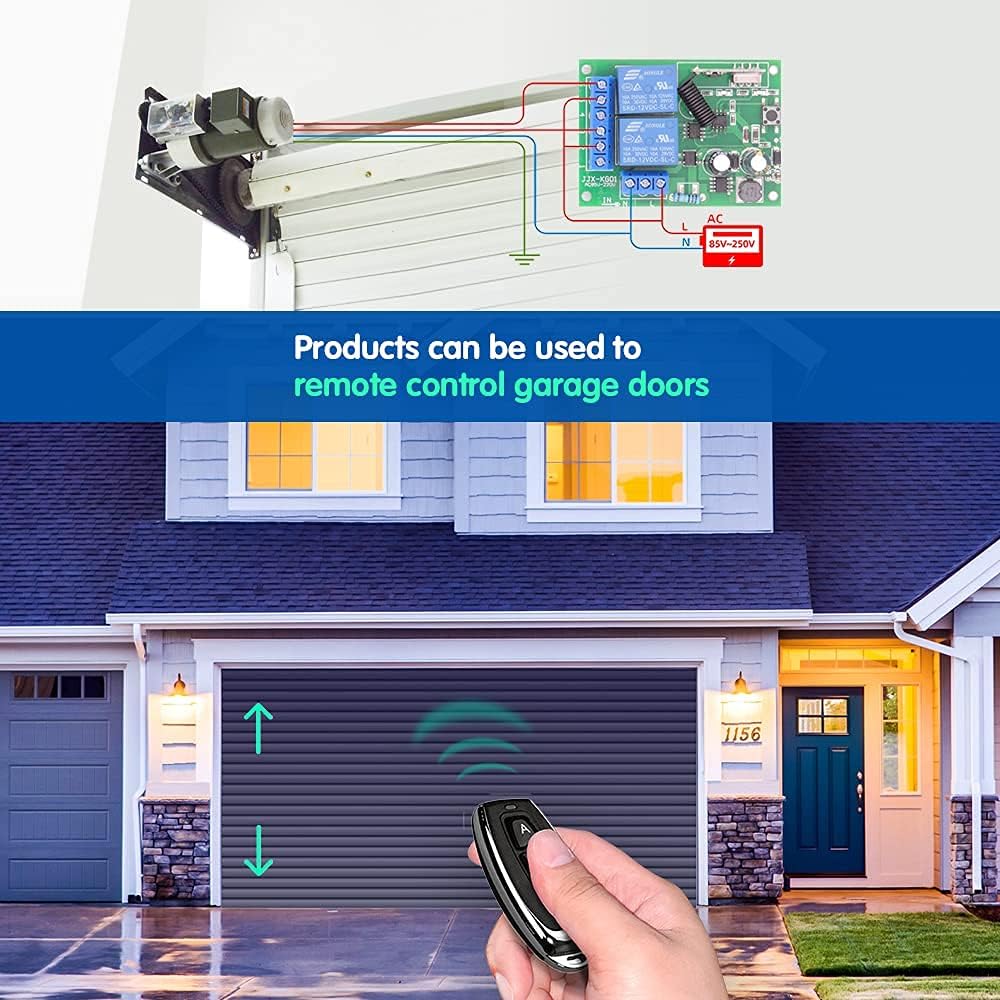
Figura 4: Remote control for lighting systems.
6. Modi Operattivi
The receiver supports three operating modes: Momentary, Toggle, and Latched. Each mode offers different control behavior for your connected devices.

Figura 5: Visual representation of operating modes.
6.1 Momentary Mode
In Momentary mode, the relay is activated only while the remote control button is pressed and held. Releasing the button deactivates the relay. This mode is suitable for applications like electric door locks or temporary power supply.
6.2 Toggle Mode
In Toggle mode, pressing the remote control button once activates the relay, and it remains active. Pressing the same button again deactivates the relay. This mode is ideal for controlling lights or other devices that require a persistent ON/OFF state.
6.3 Latched Mode
In Latched mode, pressing button 'A' on the remote activates Relay 1. Pressing button 'B' on the remote activates Relay 2 and simultaneously deactivates Relay 1. This mode is useful for applications where only one of two relays should be active at any given time, such as controlling the up/down movement of a motor where both directions should not be active simultaneously.
7. Programmar tal-Kontroll mill-Bogħod
To pair your remote control with the receiver and set the desired operating mode, follow these steps:

Figura 6: Remote control programming steps.
- Agħżel il-Modalità: Press the learning button on the receiver module a specific number of times according to the desired mode:
- Għal Modalità Momentarja: Agħfas il-buttuna tat-tagħlim 1 darba.
- Għal Toggle Mode: Agħfas il-buttuna tat-tagħlim 2 darba.
- Għal Modalità maqfula: Agħfas il-buttuna tat-tagħlim 3 darba.
- Par Remote: Within approximately 3 seconds after the indicator light flashes, press the 'A' button on your remote control. The indicator light will flash again to confirm successful pairing for the first relay.
- Pair Second Button (if applicable): If you are using a 2-channel setup (e.g., for Latched mode), press the 'B' button on your remote control. The indicator light will flash again to confirm successful pairing for the second relay.
- Test: Test the remote control to ensure the desired operating mode is correctly set.
8. Resetting the Receiver
To clear all programmed remote controls from the receiver, follow these steps:

Figura 7: Resetting the receiver module.
- Press the learning button on the receiver module 8 darba konsekuttivament.
- The indicator light will flash rapidly and then turn off, indicating that all stored remote control codes have been cleared.
After a reset, you will need to reprogram your remote controls following the steps in Section 7.
9. Remote Control Details
The remote control features two buttons (A and B) and is powered by a CR2032 lithium cell battery.

Figura 8: Components of the 2-button remote control.
9.1 Sostituzzjoni tal-batterija
If the remote control's range decreases or it stops responding, the battery may need replacement. To replace the battery:
- Iftaħ bir-reqqa l-kontroll remot casing.
- Neħħi l-batterija CR2032 l-antika.
- Daħħal batterija CR2032 ġdida bin-naħa pożittiva (+) tħares 'il fuq.
- Agħlaq il-kontroll remot casing b'mod sigur.
10 Issolvi l-problemi
- L-apparat ma jirrispondix:
- Iċċekkja l-konnessjonijiet tal-wajers kollha għas-sigurtà u l-korrettezza.
- Kun żgur li r-riċevitur huwa mixgħul.
- Verify the remote control battery is not depleted.
- Reprogram the remote control to the receiver (see Section 7).
- Firxa operattiva qasira:
- Ibdel il-batterija tal-kontroll mill-bogħod.
- Kun żgur li m'hemm l-ebda ostaklu sinifikanti (eż. ħitan ħoxnin, oġġetti tal-metall) bejn ir-remote u r-riċevitur.
- Avoid installing the receiver near large metal structures or other RF interference sources.
- Relay clicks but device does not activate:
- Check the wiring between the receiver's output terminals (NO, COM, NC) and your device.
- Ensure the device itself is functioning correctly when directly powered.
11. Manutenzjoni
The DieseRC RF Wireless Remote Control Switch requires minimal maintenance. Keep the receiver module and remote controls clean and dry. Avoid exposing them to extreme temperatures, humidity, or corrosive substances. Do not attempt to repair the internal components yourself; contact qualified personnel if service is required.
12. Garanzija u Appoġġ
For warranty information or technical support, please refer to the product packaging or contact DieseRC customer service through your retailer. Keep your purchase receipt as proof of purchase.


