Introduzzjoni
Thank you for choosing the Technics EAH-AZ60M2 Wireless in-Ear Noise-Cancelling Headphones. This manual provides essential information for the proper setup, operation, and maintenance of your new headphones. Please read this manual thoroughly before use to ensure optimal performance and longevity of the product.

Image: The Technics EAH-AZ60M2 wireless in-ear headphones, shown alongside their compact black charging case.
X'hemm fil-Kaxxa
Upon opening the packaging, please verify that all the following components are included:
- Technics EAH-AZ60M2 Wireless In-Ear Noise-Cancelling Headphones (Left and Right earbuds)
- Kawża tal-Iċċarġjar
- Cable tal-Iċċarġjar tal-USB-C
- Multiple sizes of Earpieces (7 pairs)
- Manwal għall-Utent (dan id-dokument)
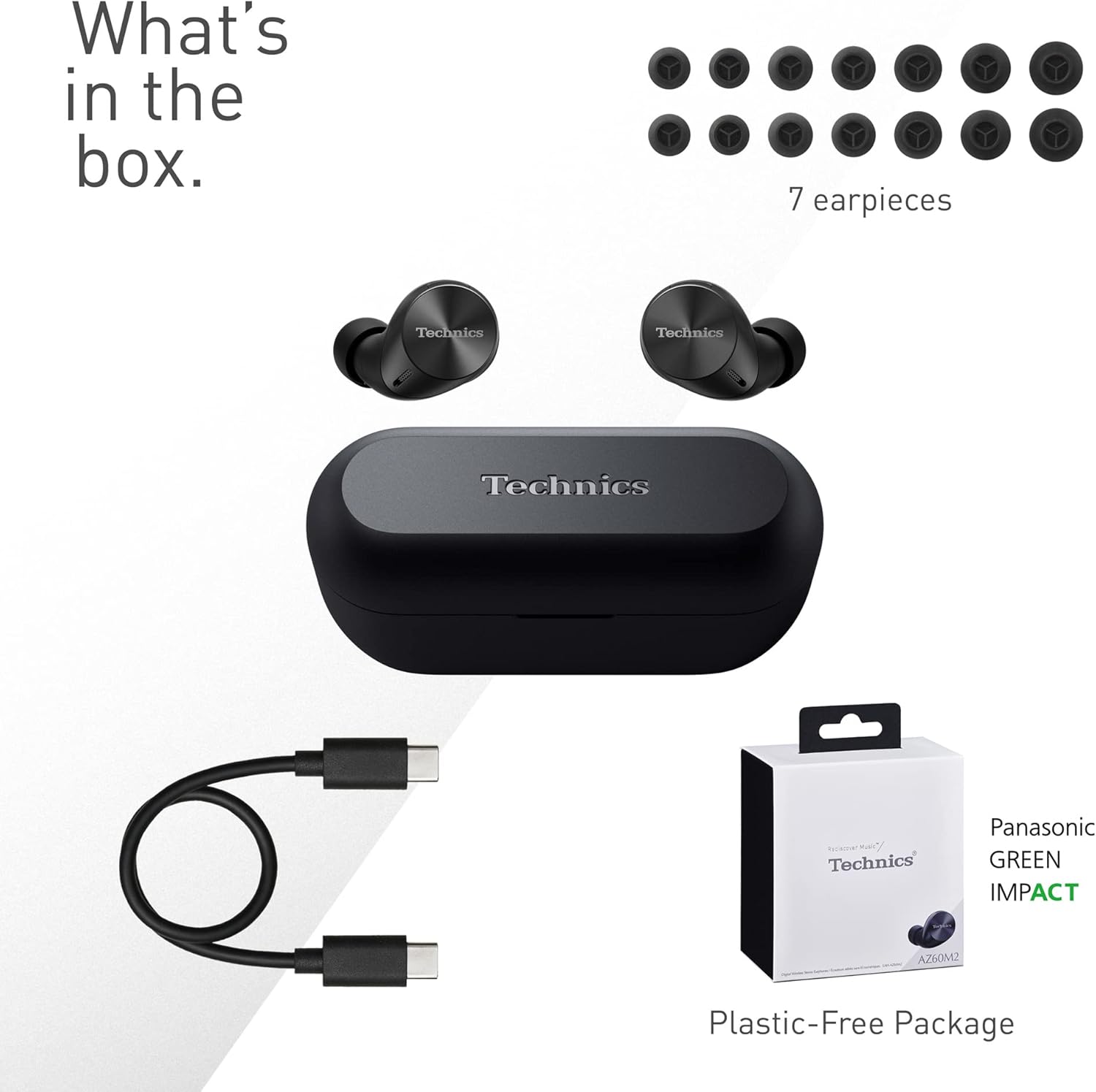
Image: A visual representation of the items included in the product packaging: the two earbuds, the charging case, a USB-C charging cable, and a selection of seven different earpiece sizes.
Setup
Iċċarġjar Inizjali
Qabel l-ewwel użu, iċċarġja l-headphones u l-kaxxa tal-iċċarġjar kompletament.
- Poġġi ż-żewġ earbuds fil-kaxxa tal-iċċarġjar.
- Qabbad il-kejbil tal-iċċarġjar USB-C mal-port tal-iċċarġjar fuq il-kaxxa u ma' sors ta' enerġija USB.
- The indicator lights on the case will show charging status. A full charge typically takes approximately 2.5 hours for the case and earbuds.
Tqabbil ma' Apparat
The EAH-AZ60M2 headphones use Bluetooth for wireless connection.
- Iftaħ il-kaxxa tal-iċċarġjar bil-earbuds ġewwa. L-earbuds jidħlu awtomatikament fil-modalità ta' tqabbil.
- Fuq l-apparat tiegħek (smartphone, tablet, PC), attiva l-Bluetooth u fittex apparati disponibbli.
- Select "EAH-AZ60M2" from the list of found devices.
- Once connected, a confirmation sound will play from the headphones.
App tal-Konnessjoni tal-Awdjo Technics
For enhanced control and customization, download the "Technics Audio Connect" app from your device's app store (Google Play for Android 6.0+ or App Store for iOS 12+). The app allows you to:
- Iċċekkja l-livelli tal-batterija.
- Select EQ sound modes.
- Adjust noise cancelling levels.
- Customize touch sensor functions.
- Agħmel aġġornamenti tal-firmware.
Istruzzjonijiet Operattivi
Liebes il-headphones
Select the earpieces that provide the most comfortable and secure fit for optimal sound quality and noise cancellation. The app can assist in finding the best fit. Insert the earbuds gently into your ears and rotate them slightly to ensure a snug seal.

Image: A person wearing the Technics EAH-AZ60M2 headphones, illustrating their comfortable, low-profile design. The image also displays the wide range of eartip sizes available for a customized fit.
Touch Kontrolli
The headphones feature touch-sensitive panels on each earbud for controlling playback, calls, and noise modes. Functions can be customized via the Technics Audio Connect App.
| Azzjoni | Earbud tax-Xellug | Earbud tal-lemin |
|---|---|---|
| Tektek Uniku | Play/Pawsa, Wieġeb Sejħa | Play/Pawsa, Wieġeb Sejħa |
| Tektek Doppju | Aqbeż Track 'l quddiem | Volum Up |
| Tektek triplu | Aqbeż Track Lura | Volum 'l isfel |
| Stampa twila | Toggle Noise Cancelling/Ambient Mode | Assistent tal-Vuċi |
Modi ta' Kontroll tal-Ħoss
The EAH-AZ60M2 features Dual Hybrid Active Noise Cancelling for immersive listening and Ambient Sound Modes for situational awareness.
- Kanċellazzjoni Attiva tal-Ħoss (ANC): Inaqqas l-istorbju estern għal smigħ iffukat.
- Natural Ambient Mode: Allows you to hear surrounding sounds naturally.
- Attention Mode: Focuses on human voices, making it easier to hear announcements or conversations without removing the headphones.
Toggle between these modes by long-pressing the left earbud's touch sensor, or adjust settings precisely using the Technics Audio Connect App.

Image: A close-up of a single Technics EAH-AZ60M2 earbud, highlighting its key audio features including Hi-Res Audio Wireless support, LDAC compatibility, 8mm drivers, and Noise Cancelling capabilities.
Konnessjoni multipunt
The headphones support multipoint connection, allowing simultaneous pairing with up to three devices (e.g., a smartphone, tablet, and PC). This enables seamless switching between audio sources without re-pairing.
- To switch audio, simply play content on the desired device. The headphones will automatically connect to the active audio source.
- Note: LDAC playback is not possible when connected to three devices simultaneously.

Image: A person sitting at a desk, demonstrating the smart 3-device switching feature of the Technics EAH-AZ60M2 headphones, with connection lines illustrating simultaneous pairing to a smartphone, tablet, and laptop.
Making and Receiving Calls (JustMyVoice Technology)
The EAH-AZ60M2 incorporates JustMyVoice Technology, utilizing 8 separate microphones and advanced wind noise reduction to isolate and amplify your speech while minimizing background noise during calls.
- Irrispondi Sejħa: Tektek darba waħda fuq kwalunkwe earbud.
- Tmiem Sejħa: Tektek darba waħda fuq kwalunkwe earbud waqt telefonata.
- Irrifjuta Sejħa: Agħfas fit-tul fuq kwalunkwe earbud.
- Użu ta' Earphone Uniku: You can use one earbud independently while the other is charging or stored.

Image: A person outdoors, demonstrating the JustMyVoice Technology feature of the Technics EAH-AZ60M2 headphones, with visual cues indicating sound pickup and voice isolation.
Iċċarġjar u Ħajja tal-Batterija
The EAH-AZ60M2 headphones offer extended listening times with the included charging case.
- Ħajja tal-Batterija tal-Earbud: Up to 7 hours of playback with Active Noise Cancelling (ANC) enabled.
- Total Playback with Case: Up to 24 hours of total playback time with multiple charges from the case.
- Ħlas ta' malajr: A 15-minute quick charge provides approximately 70 minutes of playback.
Qi Iċċarġjar bla Fili
The charging case supports Qi wireless charging. Simply place the case on a compatible Qi wireless charger (sold separately) to charge.

Image: An illustration depicting the battery life of the Technics EAH-AZ60M2 headphones, showing 7 hours of listening time for the earbuds and an additional 24 hours of backup with the charging case.
Manutenzjoni
Tindif
- Regularly clean the earbuds, especially the earpieces and mesh grilles, with a soft, dry, lint-free cloth.
- Remove earpieces and clean them with mild soap and water if necessary, ensuring they are completely dry before reattaching.
- Naddaf il-kuntatti tal-iċċarġjar kemm fuq il-earbuds kif ukoll ġewwa l-kaxxa b'tajjara niexfa tal-qoton.
- Tużax prodotti tat-tindif li joborxu, alkoħol, jew solventi.
Reżistenza għall-Ilma
The EAH-AZ60M2 earbuds are IPX4 water resistant, meaning they are protected against splashing water from any direction. This makes them suitable for light rain or intensive workouts.
- Il-kaxxa tal-iċċarġjar mhix reżistenti għall-ilma.
- Tgħaddasx il-earbuds fl-ilma.
- Ensure earbuds are dry before placing them back into the charging case.
Ħażna
When not in use, store the headphones in their charging case to protect them and keep them charged. Store in a cool, dry place away from direct sunlight and extreme temperatures.
Issolvi l-problemi
| Problema | Kawża Possibbli | Soluzzjoni |
|---|---|---|
| L-ebda ħoss mill-headphones. | Headphones not paired or connected. Low battery. Volume too low. | Ensure headphones are paired and connected to your device. Charge headphones. Increase volume on both headphones and device. |
| Cannot pair headphones. | Headphones not in pairing mode. Device Bluetooth off. Interference. | Ensure earbuds are in the case and lid is open to enter pairing mode. Turn device Bluetooth off and on. Move closer to device. Forget device and re-pair. |
| It-tħassir tal-istorbju mhux effettiv. | Poor earbud fit. ANC mode not active. | Try different earpiece sizes for a better seal. Ensure ANC is enabled via touch control or app. |
| Il-kwalità tas-sejħa hija fqira. | Environmental noise. Single earbud use. | Ensure both earbuds are used for optimal call quality. Move to a quieter environment. |
| Il-headphones mhux qed jiċċarġjaw. | Poor contact. Faulty cable/charger. | Ensure earbuds are correctly seated in the case. Clean charging contacts. Try a different USB-C cable or power source. |
For further assistance, refer to the Technics Audio Connect App or visit the official Technics support websit.
Speċifikazzjonijiet
| Karatteristika | Dettall |
|---|---|
| Isem tal-Mudell | EAH-AZ60M2 |
| Numru tal-Mudell tal-Oġġett | EAH-AZ60M2EK |
| Brand | Teknika |
| Kulur | Iswed |
| Teknoloġija tal-Konnettività | Wireless (Bluetooth) |
| Fattur tal-Formola | Fil-widnejn |
| Kontroll tal-Ħoss | Active Noise Cancellation (Dual Hybrid) |
| Daqs tas-Sewwieq | 8mm |
| Mikrofoni | 8 (for JustMyVoice Technology) |
| Konnessjoni multipunt | Sa 3 apparati |
| Reżistenza għall-Ilma | IPX4 (earbuds biss) |
| Earbud Battery Life (ANC On) | Sa 7-il Siegħa |
| Total Battery Life with Case | Sa 24-il Siegħa |
| Kawża tal-Iċċarġjar tal-batterija | 24 Hours average life |
| Iċċarġjar | USB-C, Iċċarġjar mingħajr fili Qi |
| Piż tal-Oġġett (Earbud) | 7 Grams (madwar 0.247 uqija) |
| Piż tal-Każ tal-Ġarr | 28 Gramm |
| Dimensjonijiet tal-Prodott | 1.1 x 0.91 x 1.02 pulzier (earbud) |
Garanzija u Appoġġ
For information regarding warranty coverage, terms, and conditions, please refer to the warranty card included with your product or visit the official Technics websit.
For technical support, product registration, or frequently asked questions, please visit the Technics support page or contact their customer service.
- Technics Official Websit: www.technics.com
- App Technics Audio Connect: Disponibbli fuq Google Play Store u Apple App Store.


