Introduzzjoni
This user manual provides detailed instructions for the operation and maintenance of your Jensen CD-660 Portable Stereo CD Player Boombox. Please read this manual thoroughly before using the device to ensure proper function and to maximize your listening experience. Keep this manual for future reference.
Istruzzjonijiet Importanti dwar is-Sigurtà
Biex tnaqqas ir-riskju ta’ xokk elettriku, nar, jew korriment, dejjem segwi dawn il-prekawzjonijiet bażiċi ta’ sigurtà:
- Tesponix dan l-apparat għax-xita jew l-umdità.
- Timblokka l-ebda fetħiet tal-ventilazzjoni.
- Tinstallax ħdejn xi sorsi tas-sħana bħal radjaturi, reġistri tas-sħana, stufi, jew apparat ieħor (inkluż amplifiers) li jipproduċu sħana.
- Ipproteġi l-korda tad-dawl milli jimxi fuqu jew maqrusa.
- Uża biss aċċessorji/aċċessorji speċifikati mill-manifattur.
- Spluggja dan l-apparat waqt maltempati tas-sajjetti jew meta ma jintużax għal perjodi twal.
- Irreferi l-manutenzjoni kollha lil persunal tas-servizz kwalifikat.
Kontenut tal-Pakkett
Iċċekkja li l-oġġetti kollha elenkati hawn taħt huma inklużi fil-pakkett tiegħek:
- Jensen CD-660 Portable Stereo CD Player Boombox
- AC Adapter (120V)
- Manwal tas-Sid
Prodott Overview
Familiarize yourself with the various parts and controls of your Jensen CD-660 boombox.
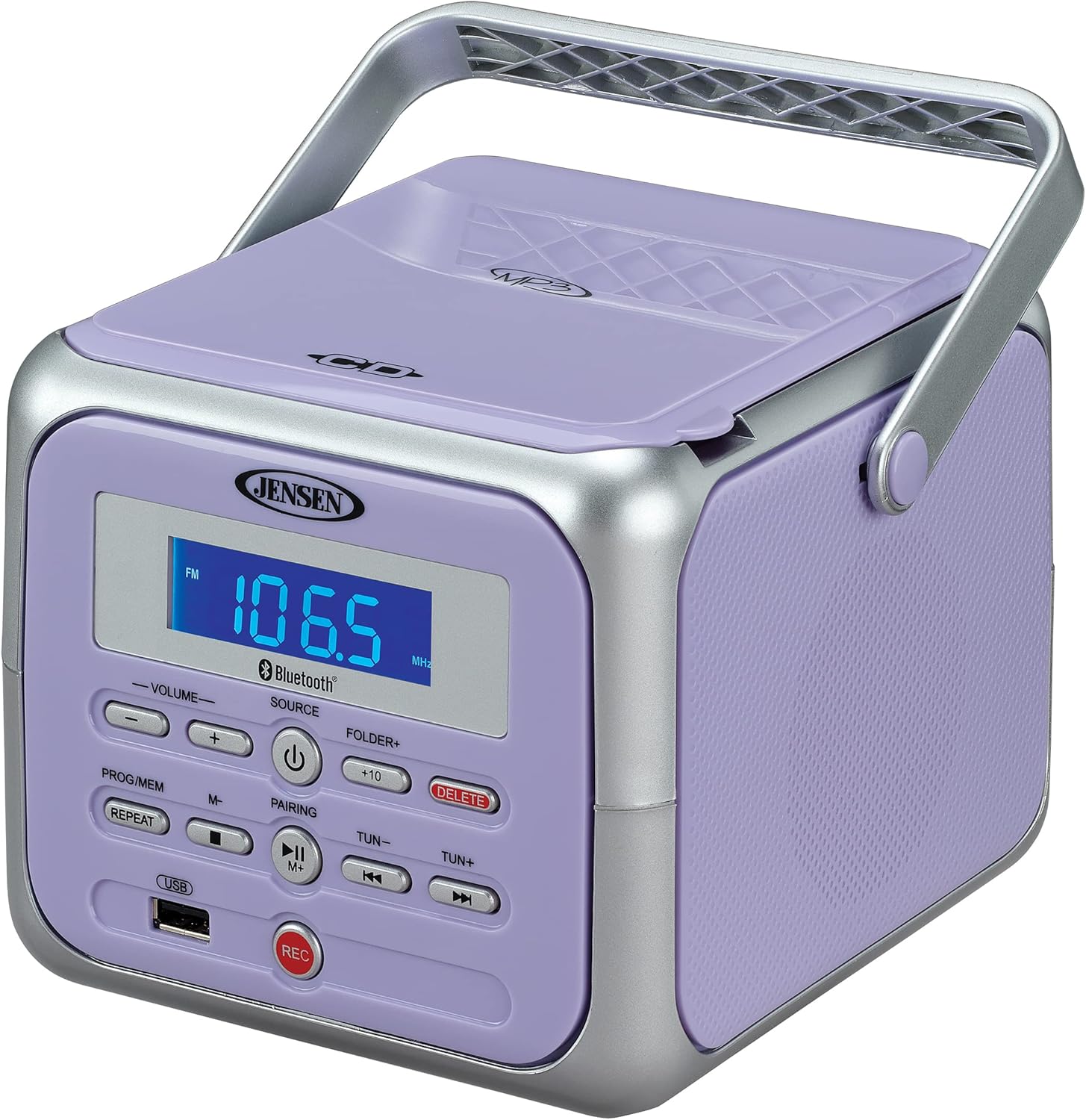
Figura 1: Quddiem view of the Jensen CD-660 with the carrying handle extended. This image displays the main control panel, including the display screen, volume controls, source selection, and playback buttons.

Figura 2: Quddiem view of the Jensen CD-660 with the carrying handle folded down. This perspective highlights the compact design and the arrangement of buttons and the LCD display.

Figura 3: Fuq view of the Jensen CD-660 with the CD compartment lid open, revealing the CD tray. This illustrates the top-loading mechanism for disc insertion.
Karatteristiċi tal-Panew tal-Kontroll:
- Display LCD: Shows current mode, track number, frequency, and other information.
- Buttuni tal-VOLUM +/-: Aġġusta l-livell tal-ħruġ tal-awdjo.
- Buttuna SORS: Selects between CD, Bluetooth, FM Radio, and Aux-in modes.
- Buttuna POWER: Ixgħel jew jitfi l-unità.
- PROG/MEM Button: Programs CD tracks or stores FM radio presets.
- Buttuna IRREPETI: Jirrepeti t-trakka kurrenti jew it-trakkijiet kollha.
- Buttuna PAIRING: Jibda l-modalità ta' tqabbil Bluetooth.
- Buttuna PLAY/PAUSE: Jibda jew iwaqqaf il-plejbek.
- Buttuna STOP: Jieqaf daqq.
- Buttuni SKIP/FITTEX (◀◀ / ▶▶): Skips tracks or searches within a track.
- TUN +/- Buttons: Tunes FM radio frequency.
- FOLDER+ Button: Navigates to the next folder on a USB device.
- +10 Button: Skips 10 tracks forward on CD/USB.
- Buttuna Ħassar: Deletes recorded files mill-USB.
- Buttuna REC: Initiates recording to a USB flash drive.
- Port USB: For USB flash drive playback and recording.
- Jack Aux-in: Tqabbad apparati awdjo esterni.
- Jack tal-headphone: Għal smigħ privat.
Setup
It-Tħaddim tal-Unità
The Jensen CD-660 can be powered by either the included AC adapter or batteries.
Tħaddim tal-Enerġija AC:
- Plug the AC adapter into the AC IN jack located on the back of the unit.
- Plug the other end of the AC adapter into a standard 120V AC wall outlet.
Operazzjoni tal-Enerġija tal-batterija:
For portable use, the unit requires 6 x 'C' (UM-2) batteries (not included).
- Iftaħ l-għatu tal-kompartiment tal-batterija fil-qiegħ tal-unità.
- Insert 6 'C' size batteries, ensuring correct polarity (+/-) as indicated inside the compartment.
- Agħlaq l-għatu tal-kompartiment tal-batterija sew.
Nota: Disconnect the AC adapter when operating on battery power. Remove batteries if the unit will not be used for an extended period.
Istruzzjonijiet Operattivi
Operazzjoni Ġenerali:
- Agħfas il- QAWWA buttuna biex tixgħel l-unità.
- Agħfas il- SORS button repeatedly to select your desired mode (CD, Bluetooth, FM, USB, AUX).
- Aġġusta l-volum billi tuża VOLUM +/- buttuni.
Daqq tas-CD:
The unit supports CD, CD-R/RW, MP3, and WMA disc formats.
- Iftaħ l-għatu tal-kompartiment tas-CD.
- Poġġi CD bin-naħa tat-tikketta tħares 'il fuq fuq il-magħżel.
- Agħlaq l-għatu tal-kompartiment tas-CD.
- Agħfas il- SORS buttuna biex tagħżel il-modalità tas-CD.
- Agħfas il- DĦABBA/PAWŻA buttuna biex tibda d-daqq.
- Uża l- SKIP / FITTEX buttons (◀◀ / ▶▶) to navigate tracks.
- Agħfas il- STOP buttuna biex twaqqaf il-plejbek.
Operazzjoni Bluetooth:
Ixxandar l-awdjo mingħajr fili mit-tagħmir tiegħek li jaħdem bil-Bluetooth.
- Agħfas il- SORS button to select Bluetooth mode. The display will show "BT" and flash, indicating pairing mode.
- Fuq it-tagħmir Bluetooth tiegħek, ippermetti l-Bluetooth u fittex tagħmir disponibbli.
- Select "JENSEN CD-660" from the list of devices.
- Once paired, the display will stop flashing and show "BT".
- Ibda ddoqq l-awdjo fuq l-apparat konness tiegħek.
- Uża l- DĦABBA/PAWŻA u SKIP / FITTEX buttons on the boombox or your device to control playback.
Radju FM:
Isma' l-istazzjonijiet tar-radju FM favoriti tiegħek.
- Agħfas il- SORS buttuna biex tagħżel il-modalità tar-radju FM.
- Extend the FM wire antenna for optimal reception.
- Agħfas il- TUN +/- buttuni biex tirranġa stazzjon manwalment.
- Agħfas u żomm il- TUN +/- buttons for automatic scanning to the next available station.
Il-ħażna u t-tifkira ta' presets:
The unit can store up to 30 FM presets.
- Intuna fuq l-istazzjon FM mixtieq.
- Agħfas il- PROG/MEM button. The display will show a flashing preset number.
- Uża l- SKIP / FITTEX buttons (◀◀ / ▶▶) to select the desired preset number.
- Agħfas il- PROG/MEM Agħfas il-buttuna mill-ġdid biex tikkonferma u ssalva l-istazzjon.
- Biex tirrevoka preset, agħfas il-buttuna PROG/MEM Agħfas il-buttuna ripetutament biex tiċċaqlaq bejn l-istazzjonijiet maħżuna.
Daqq USB:
Play MP3, WAV, or FLAC audio files minn USB flash drive.
- Daħħal flash drive tal-USB fil-port tal-USB.
- Agħfas il- SORS buttuna biex tagħżel il-modalità USB.
- The unit will automatically begin playing the first compatible audio file.
- Uża l- SKIP / FITTEX buttons (◀◀ / ▶▶) to navigate tracks.
- Uża l- FOLDER+ button to navigate between folders on the USB drive.
- Il- +10 button can be used to skip 10 tracks forward.
Reġistrazzjoni USB:
Record audio directly to a USB flash drive from CD, FM Radio, Aux-in, or Bluetooth sources.
- Daħħal flash drive tal-USB fil-port tal-USB.
- Select the desired audio source (CD, FM, AUX, or Bluetooth).
- Start playback of the audio you wish to record.
- Agħfas il- REC button to begin recording. The display will indicate recording status.
- Agħfas il- REC buttuna għal darb'oħra biex tieqaf tirrekordja.
- Biex tħassar irrekordjat file, innaviga lejn il- file in USB playback mode and press the Ħassar buttuna.
Aux-in Connection:
Connect external audio devices like smartphones or tablets.
- Connect one end of a 3.5mm audio cable (not included) to the Aux-in jack on the boombox.
- Qabbad it-tarf l-ieħor tal-kejbil mal-jack tal-headphones jew mal-output tal-awdjo tat-tagħmir estern tiegħek.
- Agħfas il- SORS button to select Aux-in mode.
- Ibda ddoqq l-awdjo fuq l-apparat estern tiegħek.
- Aġġusta l-volum kemm fuq il-boombox kif ukoll fuq l-apparat estern tiegħek għal ħoss ottimali.
Manutenzjoni
Tindif tal-Unità:
- Imsaħ il-barra tal-unità b'artab, damp drapp. Tużax tindif jew solventi li joborxu.
- Għal-lenti tas-CD, uża diska speċjalizzata għat-tindif tal-lentijiet tas-CD.
Kura tal-batterija:
- Neħħi l-batteriji jekk l-unità ma tkunx se tintuża għal perjodu estiż biex tevita t-tnixxija.
- Tħallatx batteriji qodma u ġodda, jew tipi differenti ta 'batteriji.
Issolvi l-problemi
If you encounter issues with your Jensen CD-660, refer to the following table for common problems and solutions.
| Problema | Kawża Possibbli | Soluzzjoni |
|---|---|---|
| Ebda qawwa | AC adapter not connected; Batteries depleted or incorrectly inserted. | Ensure AC adapter is securely plugged in; Replace batteries or check polarity. |
| L-ebda ħoss | Volume too low; Incorrect source selected; Headphones connected. | Increase volume; Select correct source; Disconnect headphones. |
| Is-CD mhux qed idoqq | CD inserted incorrectly; Disc is dirty or scratched; CD compartment not closed. | Insert CD with label side up; Clean or replace disc; Close compartment securely. |
| Tqabbil Bluetooth falla | Device too far; Bluetooth not enabled on external device; Boombox not in pairing mode. | Move device closer; Enable Bluetooth; Ensure boombox is in BT pairing mode. |
| Akkoljenza fqira tal-FM | Antenna mhux estiża; Sinjal dgħajjef. | Fully extend the FM wire antenna; Reposition the unit for better reception. |
| Problemi ta' daqq bil-USB | Mhux appoġġjat file format; USB drive not properly inserted or corrupted. | Tiżgura files are MP3/WAV/FLAC; Reinsert USB drive; Try a different USB drive. |
Speċifikazzjonijiet
| Karatteristika | Dettall |
|---|---|
| Numru tal-Mudell | CD-660 |
| Sors tal-Enerġija | AC 120V (included adapter) or 6 x 'C' (UM-2) batteries (not included) |
| Konnettività | Bluetooth 5.1 (A2DP, AVRCP), USB, Aux-in |
| Kompatibilità CD | CD, CD-R/RW, MP3, WMA |
| Daqq USB | MP3, WAV, FLAC |
| Radju FM | Stereo Receiver with 30 Presets, PLL Digital Tuning |
| Dimensjonijiet (W x H x D) | 6.38" x 5.2" x 6.57" (16.2 ċm x 13.2 ċm x 16.7 ċm) |
| Piż | Madwar 2.46 lbs (1.12 kg) |
Garanzija u Appoġġ
This Jensen CD-660 Portable Stereo CD Player Boombox comes with a manufacturer's warranty. Please refer to the included Owner's Manual for specific details regarding warranty coverage, terms, and conditions. For technical support or service inquiries, please contact Jensen customer service directly. Contact information can typically be found in the Owner's Manual or on the official Jensen websit.


