1. Introduzzjoni
The LENVII CW888 is a versatile 2-in-1 barcode scanner designed for efficient data capture. It supports both 2.4G wireless and USB wired connections, offering flexibility for various environments. This device is capable of reading a wide range of 1D and 2D barcodes, including QR codes, from both printed labels and digital screens. Its integrated charging base provides convenient power management and hands-free operation.

Image 1: LENVII CW888 Wireless 2D Barcode Scanner with its charging base.
2. Kontenut tal-Pakkett
Ivverifika li l-oġġetti kollha huma preżenti fil-pakkett:
- 1x LENVII CW888 Barcode Scanner
- 1x USB Cable
- 1x Manwal għall-Utent
3. Prodott Aktarview
Familiarize yourself with the components of the LENVII CW888 barcode scanner.
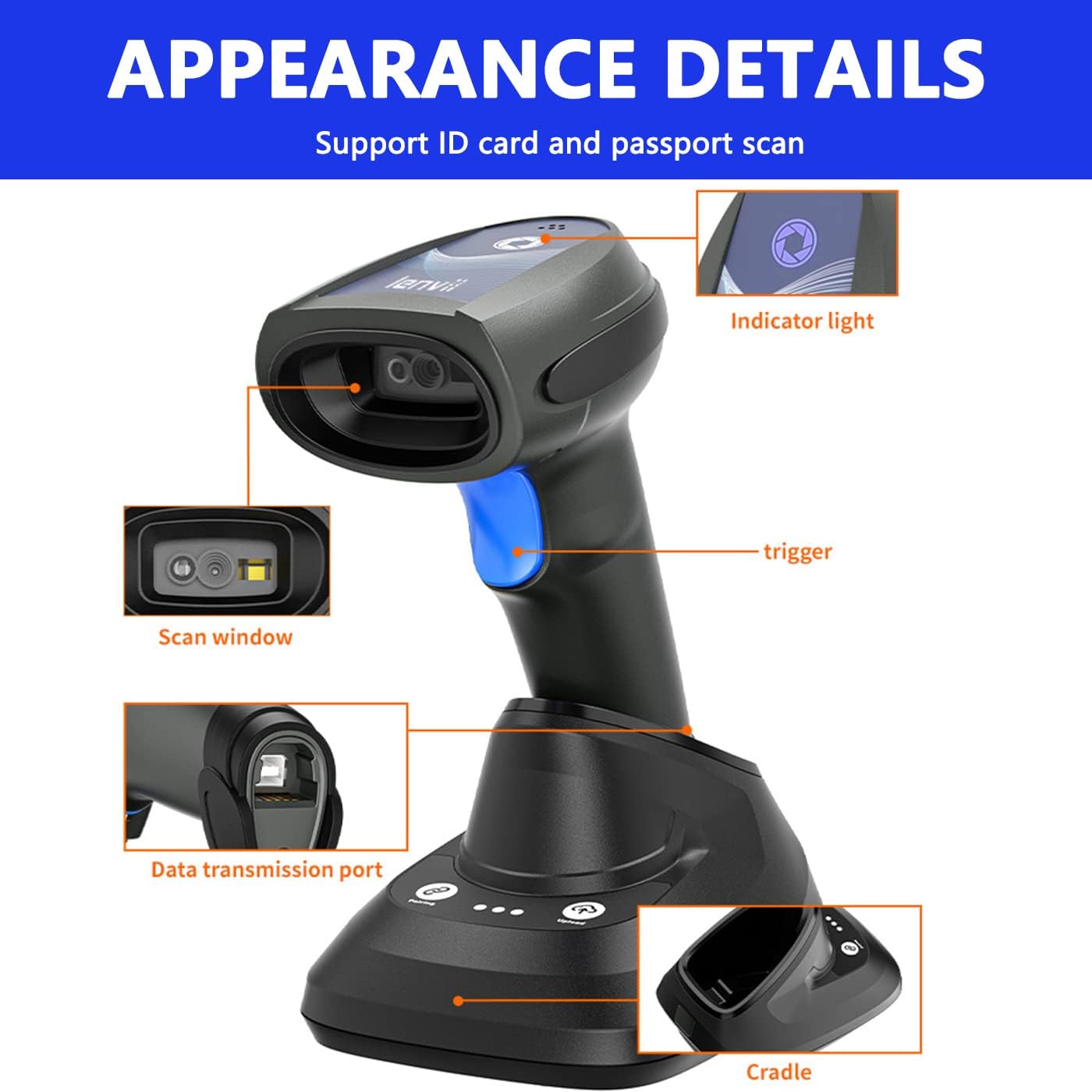
Immaġni 2: Dettaljata view of the scanner components, including the scan window, trigger, indicator light, data transmission port, and cradle.
- Tieqa tal-Iskanjar: Żona fejn jinqraw il-barcodes.
- Trigger: Button to initiate scanning in Key Trigger Mode.
- Dawl Indikatur: Jipprovdi feedback dwar l-istatus (eż., enerġija, konnessjoni, suċċess tal-iskennjar).
- Data Transmission Port: USB port for wired connection and charging.
- Cradle (Charging Base): Used for charging and hands-free continuous scanning.
4. Setup
4.1. Iċċarġjar tal-Iskaner
The scanner is equipped with a built-in 2200mAh battery. A full charge takes approximately 5 hours and provides up to 12 hours of continuous scanning or 3 months of standby time.
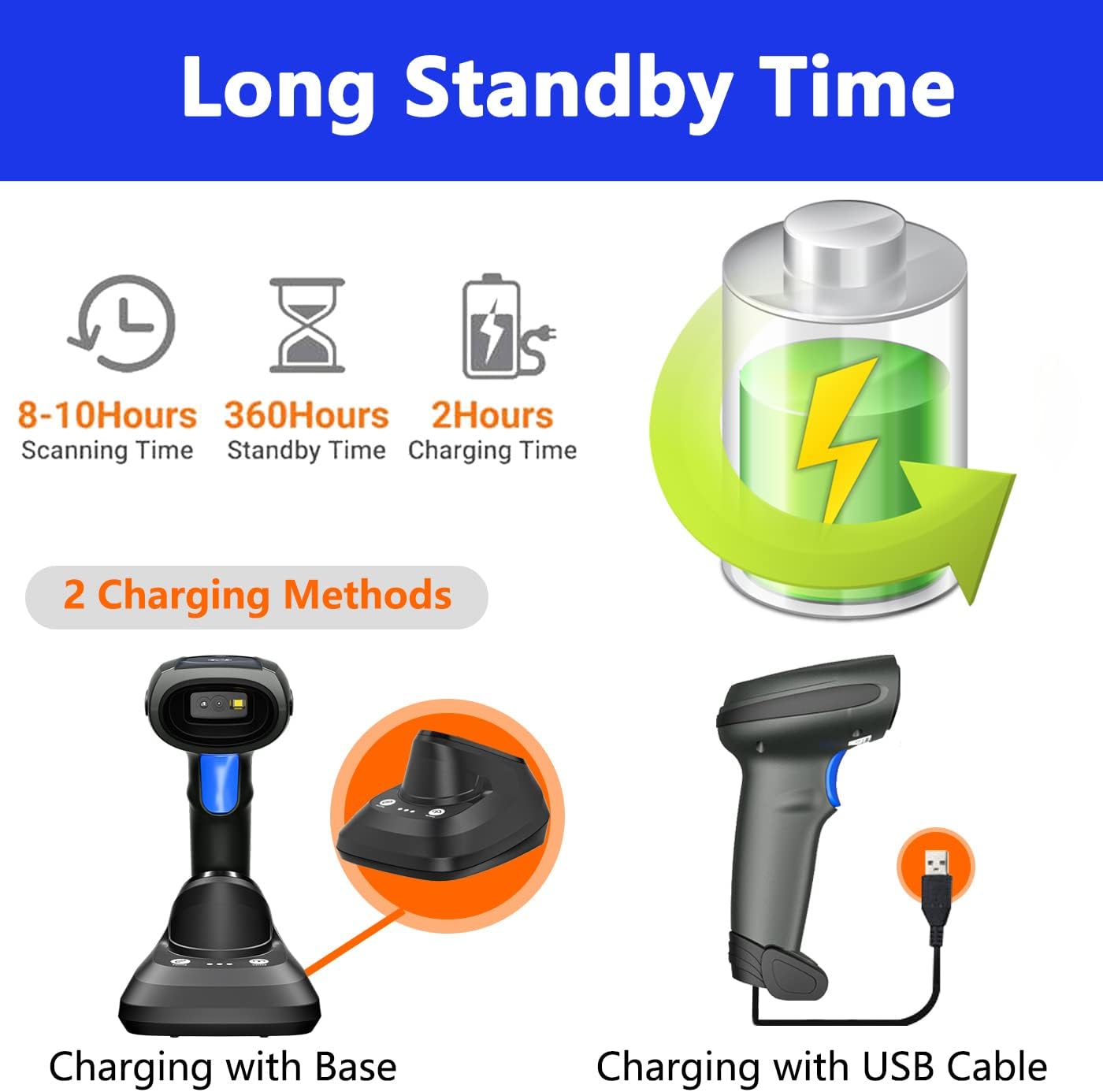
Image 3: Illustration of the two charging methods: using the charging base or directly via USB cable.
- Charging with Base: Place the scanner onto the charging base. Ensure the base is connected to a power source via the USB cable.
- Iċċarġjar bil-Cable USB: Connect the USB cable directly to the scanner's data transmission port and a power source (e.g., computer USB port, USB wall adapter).
4.2. Konnessjoni tal-Iskaner
The CW888 offers two connection methods: 2.4G wireless and USB wired.

Image 4: Depicts wireless connection to a laptop and USB cable connection to a desktop computer.
- Konnessjoni bla fili 2.4G: Plug the 2.4G USB receiver (usually located in the charging base or scanner itself) into your computer's USB port. The scanner will automatically pair. The wireless signal range can reach up to 50 meters.
- Konnessjoni bil-wajer USB: Qabbad l-iskaner direttament mal-kompjuter tiegħek billi tuża l-kejbil USB provdut. L-iskaner se jiffunzjona bħala apparat bil-fili u jiċċarġja wkoll simultanjament.
4.3. Kompatibilità tas-Sistema
The LENVII CW888 barcode scanner is compatible with various operating systems:
- Windows XP/7/8/8.1/10
- Mac OS
- Android
- Linux
It works with common software applications such as Quickbook, Word, Excel, and Novell.
5. Modi Operattivi
5.1. Modi ta' Skennjar
L-iskaner jappoġġja żewġ modi primarji ta' skennjar:

Image 5: Illustrates Key Trigger Mode (manual scan) and Continuous Scanning Mode (automatic scan with base).
- Modalità Trigger Ewlenin: Press the trigger button to scan each barcode individually.
- Modalità ta' Skennjar Kontinwu: When placed on the charging base, the scanner can automatically detect and scan barcodes without needing to press the trigger, providing a hands-free operation.
5.2. Upload Modes
L-iskaner joffri żewġ modi ta' upload tad-dejta:

Image 6: Shows Instant Upload Mode (real-time data transfer) and Storage Mode (offline data collection).
- Modalità ta' Upload Instant: Barcode data is synchronously uploaded to your connected device immediately after scanning.
- Mod ta 'Ħażna: The scanner can store up to 50,000 barcode entries (512KB internal memory) when out of range or disconnected. Data can be uploaded to your device later when a connection is re-established.
6. Decoding Capabilities
The LENVII CW888 scanner can easily capture a wide range of 1D and 2D barcodes, even those that are poorly printed, damaged, or displayed on screens.

Immaġni 7: Eż.amples of supported 1D and 2D barcode types.
Supported barcode symbologies include:
- Kodiċijiet tal-Barrijiet 1D: UPC/EAN (including additional code), Code128, Code39, Code39 Full ASCII, Codebar, Industrial/Interleaved 2 of 5, Code93, MSI, Code11, ISBN/ISSN.
- Kodiċijiet tal-Barrijiet 2D: QR Code, Data Matrix, PDF417, kodiċi Aztec, Maxicode.
7. Manutenzjoni
To ensure optimal performance and longevity of your LENVII CW888 barcode scanner, follow these maintenance guidelines:
- Tindif: Use a soft, dry cloth to clean the scanner's exterior. For the scan window, use a lint-free cloth and a mild cleaning solution if necessary. Avoid abrasive materials or harsh chemicals.
- Kura tal-batterija: Evita li tiċċarġja l-batterija kompletament ta' spiss. Għal ħażna fit-tul, iċċarġja l-batterija sa madwar 50% u aħżinha f'post frisk u niexef.
- Ħażna: Store the scanner in a safe place away from extreme temperatures, direct sunlight, and moisture.
- Immaniġġjar: Handle the scanner with care to prevent drops or impacts that could damage internal components.
8 Issolvi l-problemi
If you encounter issues with your LENVII CW888 barcode scanner, consider the following:
- L-iskaner mhux qed jaħdem: Ensure the scanner is fully charged and properly connected (either wirelessly via the USB receiver or directly via USB cable).
- Ebda Trażmissjoni ta' Dejta: Check the connection. For wireless mode, ensure the USB receiver is plugged in and within range. For wired mode, verify the USB cable is securely connected to both the scanner and the computer.
- Unable to Read Barcodes: Ensure the barcode is clean and not excessively damaged. Adjust the scanning distance. Check if the barcode type is supported by the scanner.
- Kwistjonijiet tas-Software: Confirm that your operating system and application are compatible with the scanner.
For persistent issues, please refer to the detailed troubleshooting section in the full manual (if available) or contact customer support for assistance. Provide specific details about the problem to receive a prompt response.
9. Speċifikazzjonijiet
Technical specifications for the LENVII CW888 Wireless 2D Barcode Scanner:

Image 8: Dimensions of the scanner and its charging base.
| Karatteristika | Speċifikazzjoni |
|---|---|
| Mudell | CW888 |
| Teknoloġija tal-Konnettività | 2.4G Wireless, USB Wired |
| Distanza bla fili | Sa 50 metri |
| Ħażna Interna | 512 KB (stores up to 50,000 code entries) |
| Decoding Rate | 100 scan kull sekonda |
| Riżoluzzjoni Minima | 5mil |
| Sors tad-Dawl | LED 650+/-20nm |
| Batterija | 2200mAh Lithium Ion |
| Ħin tal-Iċċarġjar | Appross. 5 sigħat |
| Ħin ta' Skennjar Kontinwu | Sa 12 sigħat |
| Ħin ta' Standby | Sa 3 xhur |
| Dimensjonijiet tal-Prodott | 5.31 x 2.01 x 1.57 pulzieri |
| Piż tal-oġġett | 1.76 liri |
| Lingwa tat-Tastiera | English/French/German/Spanish/Italian |
| Sistemi Kompatibbli | Windows XP/7/8/8.1/10, Mac OS, Android, Linux |
10. Applikazzjonijiet
The LENVII CW888 barcode scanner is suitable for a wide range of industries and applications, enhancing efficiency in various operational settings.

Immaġni 9: Eż.amples of environments where the scanner can be used, such as warehouses, logistics, and supermarkets.
- Supermarkets u Ħwienet tal-Bejgħ bl-Imnut
- Warehouses and Inventory Management
- Logistics and Express Services
- Libraries and Document Management
- Restaurants and Point-of-Sale (POS)
- Banks and Financial Institutions
- Servizzi Postali
- Industrial and Manufacturing Process Management
11. Garanzija u Appoġġ
For warranty information or technical support, please refer to the documentation included with your purchase or contact the LENVII customer service. When contacting support, please have your product model (CW888) and purchase details ready.


