1. Introduzzjoni
This manual provides comprehensive instructions for the Maxcom Fit FW55 Aurum Pro Smartwatch. It covers essential information regarding product setup, operation, maintenance, and troubleshooting to ensure optimal performance and user experience. Please read this manual carefully before using your device.
2. Kontenut tal-Pakkett
Jekk jogħġbok ivverifika li l-oġġetti kollha elenkati hawn taħt huma preżenti fil-pakkett tal-prodott tiegħek:
- Maxcom Fit FW55 Aurum Pro Smartwatch
- Iċċarġjar Cable
- Manwal għall-Utent (dan id-dokument)
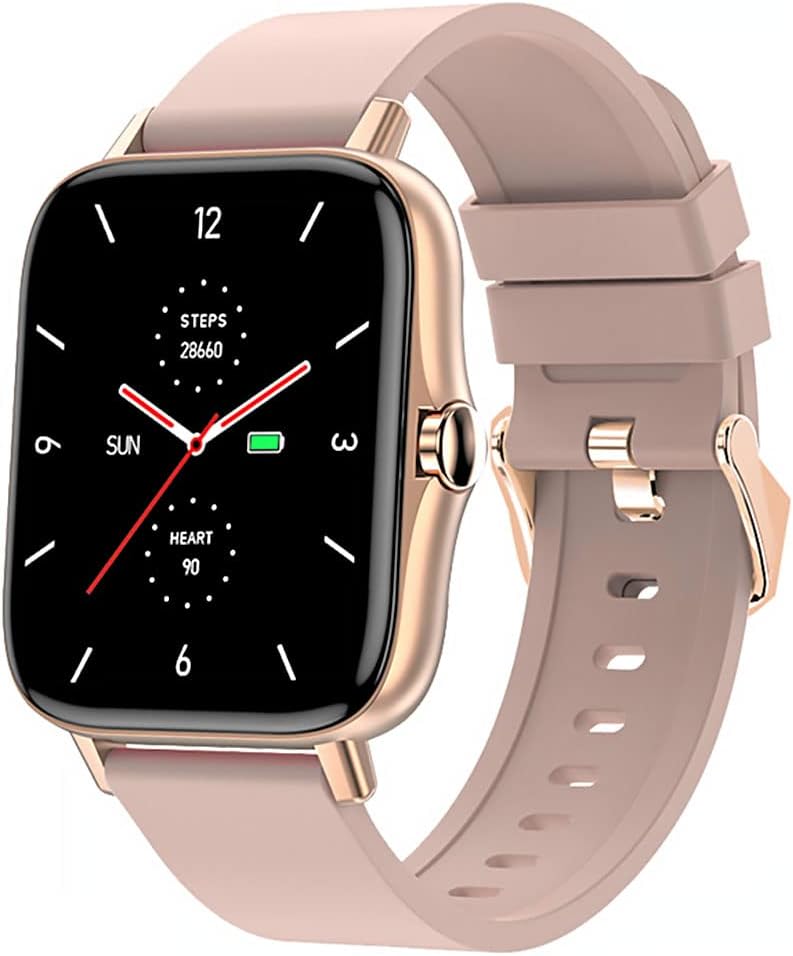
Image 1: Maxcom Fit FW55 Aurum Pro Smartwatch with a pink silicone band. The watch face displays steps, heart rate, and time.
3. Setup
3.1. Iċċarġjar tal-Ismartwatch
Before initial use, fully charge your Maxcom Fit FW55 Aurum Pro Smartwatch. Connect the provided charging cable to the charging port on the back of the smartwatch and plug the other end into a standard USB power adapter (not included) or a computer's USB port. The watch display will indicate charging status.
- Ensure the charging pins are clean and properly aligned with the watch's charging contacts.
- Ċarġ sħiħ tipikament jieħu madwar 2 sigħat.
3.2. It-tqabbil mal-Ismartphone Tiegħek
To unlock the full functionality of your smartwatch, you need to pair it with your smartphone via Bluetooth.
- Niżżel l-App: Fittex għal the official Maxcom Fit application in your smartphone's app store (iOS App Store or Google Play Store) and install it.
- Ippermetti Bluetooth: Kun żgur li l-Bluetooth huwa attivat fuq l-ismartphone tiegħek.
- Iftaħ l-App: Launch the Maxcom Fit application on your smartphone.
- Żid Apparat: Follow the in-app instructions to add a new device. Select "FW55 Aurum Pro" from the list of available devices.
- Ikkonferma l-Imqabbad: Talba ta' tqabbil tista' tidher kemm fuq l-ismartphone tiegħek kif ukoll fuq l-ismartwatch. Ikkonferma l-tqabbil fuq iż-żewġ apparati.
Once successfully paired, the smartwatch will synchronize data with your phone, and you can customize settings through the app.
4. Tħaddim tal-Ismartwatch
4.1. Power On/Off
- Qawwa Mixgħul: Press and hold the side button for a few seconds until the Maxcom logo appears.
- Itfi: From the watch face, swipe down to access quick settings, or navigate to the 'Settings' menu. Select 'Power Off' and confirm. Alternatively, press and hold the side button and select 'Power Off'.
4.2. Navigazzjoni Bażika
- Touch Screen: The FW55 Aurum Pro features a 1.7-inch touch screen for intuitive interaction.
- Swipe 'l fuq/'l isfel: Scroll through notifications, menus, or quick settings.
- Swipe Xellug/Lemin: Access different widgets or main functions (e.g., heart rate, activity data).
- Tektek: Agħżel oġġett jew ikkonferma azzjoni.
- Buttuna tal-ġenb: Press to return to the watch face or wake the screen. A long press may access power options.
4.3. Karatteristiċi ewlenin
The Maxcom Fit FW55 Aurum Pro Smartwatch offers a range of features to support your daily activities and health monitoring:
- Traċċar tal-Attività: Monitors steps taken, distance covered, and calories burned.
- Monitoraġġ tar-Rata tal-Qalb: Jipprovdi dejta dwar ir-rata tal-qalb f'ħin reali.
- Monitoraġġ tal-irqad: Isegwi x-xejriet u l-kwalità tal-irqad.
- Notifiki: Jirċievi allerti għal telefonati, messaġġi, u notifiki tal-app mill-ismartphone imqabbad tiegħek.
- GPS: Integrated GPS for accurate outdoor activity tracking.
- Uċuħ ta' l-arloġġi personalizzabbli: Personalize your watch face through the companion app.

Image 2: Maxcom Fit FW55 Aurum Pro Smartwatch featuring a gold metal mesh band. The watch face displays digital time, steps, and heart rate.
5. Manutenzjoni
Proper care and maintenance will extend the lifespan of your smartwatch.
- Tindif: Regularly wipe the watch screen and body with a soft, dry, lint-free cloth. For stubborn dirt, slightly dampLaħlaħ id-drapp bl-ilma. Evita li tuża kimiċi ħarxa jew materjali li joborxu.
- Kura taċ-ċinga: Clean the watch strap according to its material. Silicone straps can be washed with mild soap and water. Metal straps may require specific cleaning agents.
- Evita Kundizzjonijiet Estremi: Do not expose the smartwatch to extreme temperatures, direct sunlight for prolonged periods, or corrosive liquids.
- Reżistenza għall-Ilma: While the watch may have some water resistance, it is not suitable for diving or high-pressure water activities. Refer to the product specifications for detailed water resistance ratings.
6 Issolvi l-problemi
If you encounter issues with your Maxcom Fit FW55 Aurum Pro Smartwatch, try the following solutions:
- L-arloġġ ma jixgħelx: Kun żgur li l-arloġġ ikun iċċarġjat kompletament. Qabbad mal-ċarġer għal mill-inqas 30 minuti.
- Ma tistax tqabbad ma' smartphone:
- Kun żgur li l-Bluetooth huwa attivat fuq it-telefon u l-arloġġ tiegħek.
- Kun żgur li l-arloġġ jinsab fil-firxa tal-Bluetooth tat-telefon tiegħek.
- Erġa' ibda kemm it-telefon tiegħek kif ukoll l-ismartwatch.
- Ipprova neħħi l-akkoppjar u erġa' qabbad l-apparat permezz tal-app.
- Dejta mhux preċiża (passi, rata tal-qalb):
- Kun żgur li l-arloġġ jintlibes sew fuq il-polz tiegħek, madwar wisa' ta' saba' 'l fuq mill-għadma tal-polz tiegħek.
- Naddaf is-sensor fuq wara tal-arloġġ.
- Update the companion app to the latest version.
- Notifiki mhux riċevuti:
- Check notification settings in the Maxcom Fit app.
- Ensure your phone's notification permissions are granted to the app.
- Verify that the watch is successfully paired and connected to your phone.
If problems persist, consult the Maxcom support websit jew ikkuntattja lis-servizz tal-konsumatur.
7. Speċifikazzjonijiet
Below are the technical specifications for the Maxcom Fit FW55 Aurum Pro Smartwatch:
| Karatteristika | Dettall |
|---|---|
| Brand | Maxcom |
| Numru tal-Mudell | FW55 Aurum Pro |
| Daqs tal-Iskrin | 1.7 Pulzier |
| Teknoloġija tal-Konnettività | Bluetooth |
| Komunikazzjoni mingħajr fili Standard | Bluetooth |
| Apparati Kompatibbli | Smartphone |
| GPS | GPS integrat |
| Forma | Pjazza |
| Udjenza fil-mira | Adulti Unisex |
| Komponenti Inklużi | Ċarġer tal |

Stampa 3: Quddiem view of the Maxcom Fit FW55 Aurum Pro Smartwatch with a pink silicone band, highlighting the square display.
8. Garanzija u Appoġġ
For warranty information and customer support, please refer to the documentation included with your purchase or visit the official Maxcom websit. Żomm il-prova tax-xiri tiegħek għal talbiet ta' garanzija.
Għal assistenza teknika jew aktar mistoqsijiet, jekk jogħġbok ikkuntattja lis-servizz tal-klijenti ta' Maxcom permezz tal-kanali uffiċjali tagħhom.


