Introduzzjoni
This manual provides comprehensive instructions for the installation, operation, and maintenance of your Natec Cabassu G2 Midi Tower PC Case. Please read this manual thoroughly before beginning installation to ensure proper setup and optimal performance.
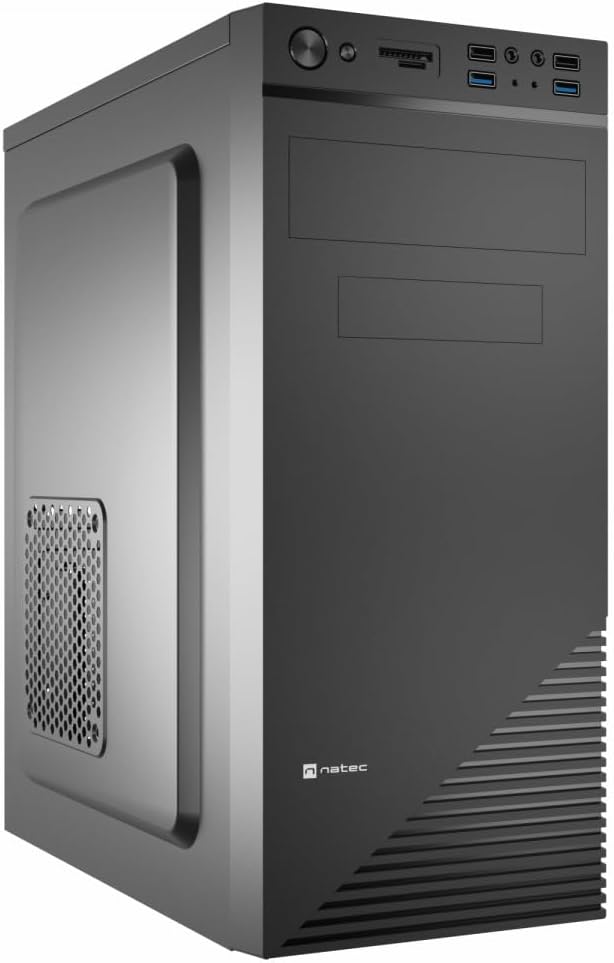
Figure 1: Natec Cabassu G2 Midi Tower PC Case. This image shows the front and left side of the black PC case, highlighting its sleek design and front panel layout.
Informazzjoni dwar is-Sigurtà
- Dejjem skonnettja l-provvista tal-enerġija mis-sokit tal-ħajt qabel ma tinstalla jew tneħħi xi komponenti.
- Handle components with care to prevent damage from static electricity.
- Żomm il-kaxxa 'l bogħod mill-ilma, l-umdità, u temperaturi estremi.
- Żgura ventilazzjoni xierqa biex tevita sħana żejda.
- Do not attempt to open the power supply unit.
Kontenut tal-Pakkett
Ivverifika li l-oġġetti kollha huma preżenti fil-pakkett:
- Natec Cabassu G2 Midi Tower PC Case
- Accessory kit (screws, standoffs, cable ties)
- Manwal għall-Utent (dan id-dokument)
Konfigurazzjoni u Installazzjoni tal-Komponenti
1. Tħejjija tal-Każ
- Poġġi l-kaxxa fuq wiċċ ċatt u stabbli.
- Remove the side panels by unscrewing the thumbscrews at the rear and sliding the panels backward.

Figura 2: Intern view of the Natec Cabassu G2 case with the side panel removed, illustrating the internal layout for component installation.
2. Installazzjoni tal-Motherboard
- Installa l-ilqugħ tal-I/O fil-ftuħ ta' wara tal-kaxxa.
- Align the motherboard with the pre-installed standoffs. The Cabassu G2 supports Mini ITX, Micro ATX, and ATX motherboards.
- Waħħal il-motherboard bil-viti pprovduti.
3. Installazzjoni ta 'Provvista ta' Enerġija
- Il-provvista tal-enerġija titwaħħal fil-qiegħ tal-kaxxa.
- Slide the power supply into its designated bay from the rear of the case.
- Secure it with screws from the rear.
4. Installazzjoni tad-Drajv tal-Ħażna
- 2.5" Drives (SSDs/HDDs): The case features 3 x 2.5" drive bays. Mount drives using the provided screws in the designated locations.
- 3.5" Drives (HDDs): The case also supports 3.5" drives.
5. Installazzjoni tal-Karta tal-Espansjoni
- Remove the necessary expansion slot covers from the rear of the case (7 expansion slots available).
- Daħħal il-karta grafika tiegħek jew karti ta' espansjoni oħra fis-slots PCIe tal-motherboard.
- Waħħal il-karti bil-viti.

Figura 3: Wara view of the Natec Cabassu G2 case, detailing the I/O shield cutout, power supply opening, and seven expansion slots.
6. Ġestjoni tal-Kejbil
Route cables behind the motherboard tray where possible to improve airflow and aesthetics. Use the included cable ties to secure bundles.
7. Konnessjoni tal-Kejbils tal-Pannell ta' Quddiem
Connect the front panel cables (USB 2.0, USB 3.0, audio, power switch, reset switch, HDD LED, power LED) to the corresponding headers on your motherboard. Refer to your motherboard manual for exact pin assignments.

Figure 4: Close-up of the Natec Cabassu G2 front panel, showing 2x USB 2.0 ports, 2x USB 3.0 ports, audio jacks, and power/reset buttons.
Istruzzjonijiet Operattivi
Tixgħel/Jitfi
- Qawwa Mixgħul: Agħfas il-buttuna tal-qawwa li tinsab fuq il-pannell ta 'quddiem.
- Itfi: Initiate shutdown through your operating system. For a forced shutdown, press and hold the power button for several seconds.
- Irrisettja: Press the reset button on the front panel to restart the system.
Using Front Panel Ports
Il-pannell ta' quddiem jipprovdi aċċess konvenjenti għal:
- 2 x portijiet USB 2.0
- 2 x portijiet USB 3.0
- Audio input (microphone) and output (headphone) jacks
Connect compatible devices to these ports as needed.
Manutenzjoni
Tindif
- Naddaf regolarment il-barra tal-kaxxa b'ċarruta ratba u damp drapp. Evita cleaners li joborxu.
- Use compressed air to remove dust from fan filters and internal components. Ensure the system is powered off and unplugged before cleaning.
Filtri tat-Trab
The case may include removable dust filters. Periodically remove and clean these filters to maintain optimal airflow and cooling performance.
Issolvi l-problemi
| Problema | Kawża Possibbli | Soluzzjoni |
|---|---|---|
| Is-sistema ma tixgħel. | Power cables not connected properly. Faulty power supply. | Check all power connections (motherboard, CPU, GPU, power supply to wall). Ensure power supply switch is ON. |
| Il-portijiet USB tal-pannell ta' quddiem mhux qed jaħdmu. | Front panel USB cables not connected to motherboard. | Verify that the USB 2.0 and USB 3.0 headers are correctly connected to the motherboard. |
| Excessive fan noise. | Dust accumulation. Loose fan. | Clean dust from fans and filters. Ensure all fans are securely mounted. |
Speċifikazzjonijiet
| Karatteristika | Dettall |
|---|---|
| Isem tal-Mudell | Cabassu G2 |
| Numru tal-Mudell tal-Oġġett | S5624687 |
| Tip ta' Każ | Torri tal-Midi |
| Dimensjonijiet (LxWxH) | 19.69 x 19.69 x 11.02 pulzieri (50 x 50 x 28 ċm) |
| Piż | 7.04 liri (3.19 kg) |
| Materjal | Akrilonitril Butadiene Styrene (ABS), Azzar Liga |
| Kompatibbiltà tal-motherboard | Mini ITX, Mikro ATX, ATX |
| Kompartimenti tad-Drajv ta' 2.5" | 3 |
| Slots ta 'Espansjoni | 7 |
| Portijiet I / O ta 'quddiem | 2 x USB 2.0, 2 x USB 3.0, Dħul/Ħruġ tal-Awdjo |
| Appoġġ tal-fann | 120mm (rear, pre-installed if applicable) |
| Metodu tat-tkessiħ | Arja |
| Immuntar tal-Provvista tal-Enerġija | Mount tal-qiegħ |
Informazzjoni dwar Garanzija
Natec products are covered by a manufacturer's warranty. Specific warranty terms and conditions may vary by region and retailer. Please refer to the warranty card included with your product or visit the official Natec website for detailed information regarding warranty coverage and claims.
Appoġġ
For technical assistance, troubleshooting, or further inquiries, please visit the official Natec support webis-sit jew ikkuntattja lid-dipartiment tas-servizz tal-konsumatur tagħhom. L-informazzjoni ta' kuntatt tipikament tista' tinstab fuq l-imballaġġ tal-prodott jew fuq il-marka uffiċjali websit.
Websit: www.natec-zone.com (Eżampil-link, il-link attwali jista' jvarja)


