Introduzzjoni
This manual provides comprehensive instructions for the installation, setup, operation, maintenance, and troubleshooting of your TEEHO TE002L Fingerprint Door Lock. Please read this manual carefully before installation and retain it for future reference.
Vidjo: Overview of the TEEHO TE002L Fingerprint Door Lock, highlighting its key features and functionality.
X'inhu Inkluż
The TEEHO TE002L Fingerprint Door Lock package includes the following components:
- Assemblaġġ tat-Tastiera Esterni
- Assemblea Intern
- 2 Mankijiet tal-lieva
- Lukkett Deadbolt
- Pjanċa tal-Immuntar
- Strike Plate
- Screws and Installation Hardware
- Ċwievet tal-Backup (2)
- Irrisettja Għodda
- Istruzzjonijiet għall-installazzjoni

Image: All components included in the TEEHO TE002L Fingerprint Door Lock package, laid out for easy identification.
Istruzzjonijiet għall-installazzjoni
Follow these steps to properly install your TEEHO TE002L Fingerprint Door Lock. Ensure your door is compatible with the lock's dimensions (1-3/8" to 2" thick, 2-3/8" or 2-3/4" backset).
1. Ipprepara l-Bieb
- Remove any existing lock hardware from your door.
- Verify door dimensions and drill holes if necessary, according to the provided template (not included in this manual).

Image: Diagram illustrating door thickness and backset measurements for compatibility with the TEEHO TE002L lock, suitable for both left-handed and right-handed doors.
2. Installa l-Lukkett
- Insert the deadbolt latch into the door edge. Ensure the "TOP" indicator on the latch is facing upwards.
- Waħħal il-lukkett bil-viti pprovduti.
3. Installa l-Assemblea Esterna
- Feed the cable from the exterior keypad assembly through the door hole and under the latch.
- Align the tailpiece with the center hole of the latch.
- Press the exterior assembly firmly against the door.
4. Installa l-Pjanċa tal-Immuntar
- Place the mounting plate on the interior side of the door, aligning it with the exterior assembly.
- Secure the mounting plate using the long screws, ensuring the cable is not pinched.
5. Installa l-Assemblea Interna
- Qabbad il-kejbil mill-assemblaġġ ta 'barra mal-assemblaġġ ta' ġewwa.
- Ensure the thumbturn on the interior assembly is in the vertical (unlocked) position.
- Waħħal l-assemblaġġ intern mal-pjanċa tal-immuntar u waħħalha bil-viti.
- Test the thumbturn to ensure smooth operation.
6. Install the Lever Handles
- Insert the spindle of the exterior lever handle through the latch mechanism.
- Attach the interior lever handle, ensuring it engages correctly with the spindle.
- Secure both lever handles with the provided screws.
7. Installa l-Pjanċa tal-Istrikk
- Allinja l-pjanċa tal-istrajk mal-lukkett fuq il-qafas tal-bieb.
- Secure the strike plate with the provided screws.
Video: Detailed installation guide for the TEEHO TE002L Fingerprint Door Lock, demonstrating each step from preparing the door to securing the components.
Setup u Programmazzjoni
After installation, you need to set up and program your lock. The default master code is 12345678. It is required that you change it to a code of your own before programming any other features.
1. Restore to Factory Settings (Initial Setup)
- Install 3 AA batteries into the interior assembly.
- Using the reset tool (or a similar pointed object), press and hold the reset button located inside the battery compartment.
- While holding the reset button, insert the 4th AA battery.
- Continue holding the reset button for 5 seconds until you hear a long "Beep". This indicates a successful reset.
2. Ibdel il-Kodiċi Master
- Press the "TEEHO" button twice.
- Enter the current Master Code (default: 12345678).
- Press the "TEEHO" button.
- Press "1".
- Daħħal il-Kodiċi Prinċipali l-ġdid tiegħek (4-10 ċifri).
- Press the "TEEHO" button.
- Re-enter your new Master Code.
- Press the "TEEHO" button. (A green light flash indicates success).
3. Add User Code
- Press the "TEEHO" button twice.
- Daħħal il-Kodiċi Prinċipali tiegħek.
- Press the "TEEHO" button.
- Press "2".
- Daħħal Kodiċi tal-Utent ġdid (4-10 ċifri).
- Press the "TEEHO" button.
- Erġa' daħħal il-Kodiċi tal-Utent il-ġdid.
- Press the "TEEHO" button. (A green light flash indicates success).
4. Add User Fingerprints
- Press the "TEEHO" button twice.
- Daħħal il-Kodiċi Prinċipali tiegħek.
- Press the "TEEHO" button.
- Press "4".
- Scan the user's fingerprint 8 times, each time succeeding with a short beep. (A green light flash indicates success).

Image: A hand demonstrating the fingerprint unlock feature on the TEEHO TE002L lock, highlighting its biometric identification capabilities.
5. Karatteristika ta' Serratura Awtomatika
- To enable/disable Auto-Lock: Press the "TEEHO" button twice, enter Master Code, press "TEEHO", then press "7". Press "1" to enable or "2" to disable.
- To set Auto-Lock time delay (10-99 seconds): Press the "TEEHO" button twice, enter Master Code, press "TEEHO", then press "0". Enter the desired duration (e.g., 30 for 30 seconds), then press "TEEHO".

Image: A woman carrying a baby and groceries, illustrating the convenience of the auto-lock feature of the TEEHO TE002L lock, which can be set to lock automatically after 10-99 seconds.
6. One-Touch Locking
- To activate one-touch locking, press and hold any key on the keypad for 2 seconds. The door will lock immediately.
7. One-Time PIN Code
- To add a one-time PIN code: Press the "TEEHO" button twice, enter Master Code, press "TEEHO", then press "9". Enter the new one-time user code, press "TEEHO", re-enter the code, then press "TEEHO". This code will be automatically deleted after one use.
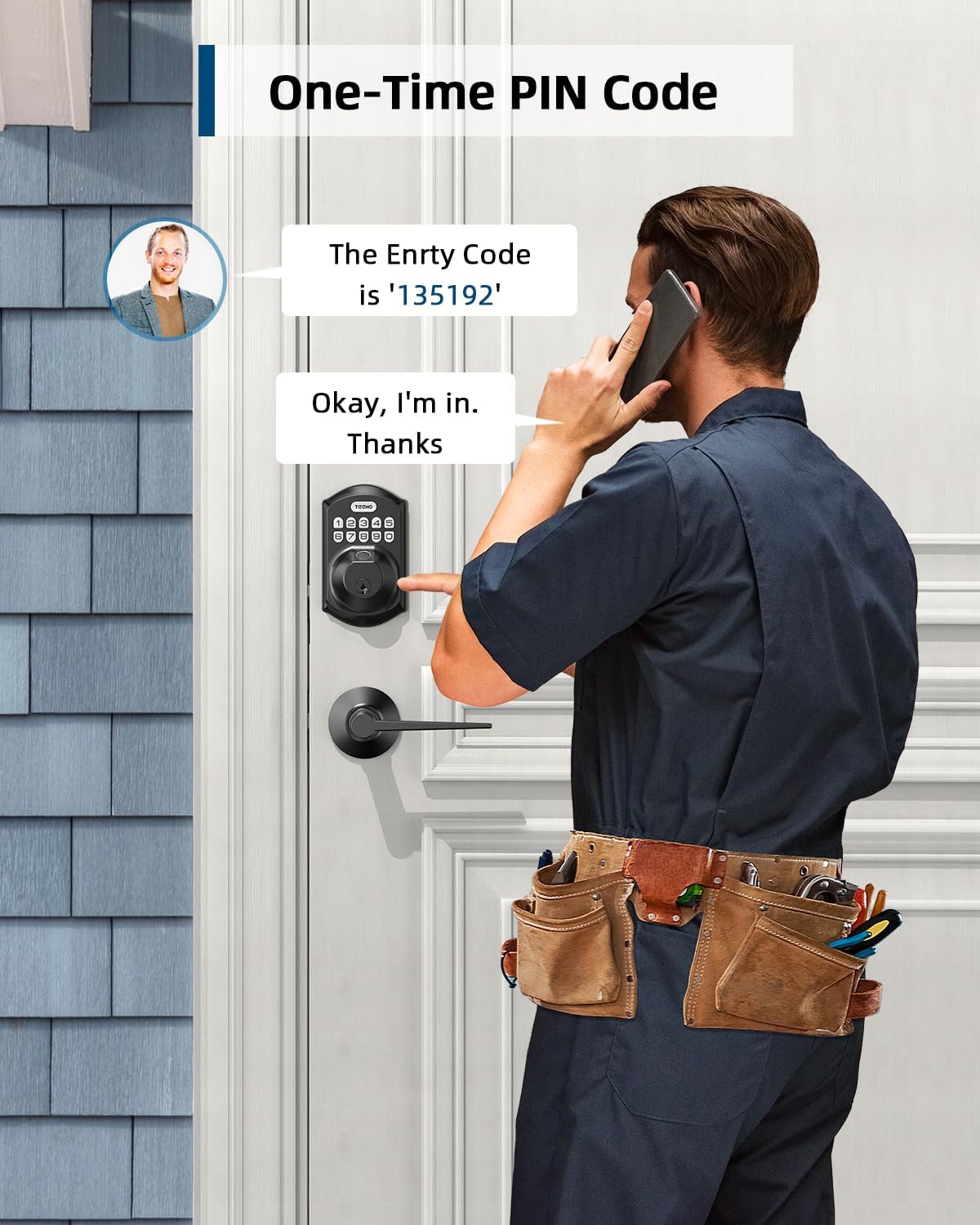
Image: A man receiving a one-time PIN code via phone, demonstrating the temporary access feature of the TEEHO TE002L lock for visitors or service providers.
8. Anti-Peeping PIN Code
- To prevent others from seeing your code, you can enter random digits before or after your actual PIN code. The lock will still recognize the correct sequence within the longer entry.

Image: A hand entering an anti-peeping PIN code on the TEEHO TE002L keypad, showing how random digits can be added before or after the actual code for privacy.
9. Modalità Vaganza
- To enable/disable Vacation Mode: Press the "TEEHO" button twice, enter Master Code, press "TEEHO", then press "8". (A green light flash indicates Vacation Mode is enabled). In this mode, all user codes and fingerprints are temporarily disabled, and only the Master Code or physical key can unlock the door.
10. Modalità Siekta
- To enable/disable Silent Mode: Press the "TEEHO" button twice, enter Master Code, press "TEEHO", then press "6". Press "1" to enable or "2" to disable. This mutes all beeps and sounds from the lock.
Video: Programming guide for the TEEHO TE002L Smart Lock, detailing steps for changing the master code, adding user codes, adding fingerprints, and setting various modes.
Karatteristiċi u Funzjonijiet
- 3D Fingerprint Unlock: 99.99% biometric fingerprint recognition rate, unlocks in 0.3 seconds.
- Dħul mingħajr ċavetta: Supports up to 20 access codes (4-10 digits) and fingerprints. One-time PIN codes can be set for temporary access.
- Auto-Lock: Can be set to lock automatically in 10-99 seconds.
- Serratura b'Messaġġ Wieħed: Press and hold any key on the keypad for 2 seconds to lock the door.
- Limitu ta 'Dħul ta' Kodiċi Ħażin: Keypad deactivates for 3 minutes after 10 unsuccessful attempts with an invalid password.
- Security Deadbolt: ANSI Grade 3 rated, made with sturdy lock cylinder and alloy.
- Qawwa: Powered by 4 AA batteries, providing over 1 year of battery life. Features a low battery indicator.
- Reżistenza għat-temp: IP54 rating, operates well in temperatures from -22°F to 158°F.

Immaġni: Fuqview of the TEEHO TE002L lock's key features, including support for multiple fingerprints and user codes, auto-lock, IP54 weather resistance, one-time PIN codes, one-touch locking, and a low battery indicator.
Manutenzjoni
- Sostituzzjoni tal-batterija: Replace all four AA batteries when the low battery indicator appears. Use alkaline batteries for optimal performance.
- Tindif: Wipe the keypad and lock body with a soft, dry cloth. Avoid abrasive cleaners or solvents.
- Lubrikazzjoni: Periodically lubricate the latch mechanism with a silicone-based lubricant to ensure smooth operation.
- Aġġornamenti tal-Firmware: Check the TEEHO website or app (if applicable) for any available firmware updates to ensure optimal performance and security.
Issolvi l-problemi
| Problema | Kawża Possibbli | Soluzzjoni |
|---|---|---|
| Is-serratura ma tirrispondix / Bla enerġija | Batteriji mejta. | Ibdel l-erba 'batteriji AA kollha. |
| Keypad deactivated | 10 incorrect code entries. | Wait 3 minutes for the keypad to reactivate. |
| Marki tas-swaba' mhux rikonoxxuti | Is-saba' huwa maħmuġ, imxarrab, jew imqiegħed ħażin. Il-marka tas-saba' mhux irreġistrata. | Ensure finger is clean and dry. Place finger flat on the sensor. Re-register fingerprint if necessary. |
| Auto-lock not working | Auto-lock feature is disabled or time delay is too long. | Enable Auto-Lock and set the desired time delay in programming. |
| Lock does not lock/unlock smoothly | Nuqqas ta' allinjament tal-komponenti tas-serratura jew tal-qafas tal-bieb. | Iċċekkja l-installazzjoni għal allinjament xieraq. Kun żgur li l-pjanċa tal-istrajk tal-qafas tal-bieb tkun pożizzjonata b'mod korrett. |
Speċifikazzjonijiet
- Ditta: TEEHO
- Isem tal-Mudell: Fingerprint Door Lock with 2 Lever Handles
- Numru tal-Mudell tal-Oġġett: TE002L
- Tip ta' serratura: Bijometriċi
- Karatteristika Speċjali: Fingerprint, Keypad, Auto-Lock, One-Touch Lock, One-Time PIN Code, Anti-Peeping Code, Silent Mode, Vacation Mode
- Materjal: Azzar Liga
- Kulur: Iswed Matte
- Dimensjonijiet tal-oġġett (L x W x H): 1 x 1 x 1 pulzieri
- Piż tal-oġġett: 3.7 libbra (1.68 Kilogrammi)
- Sors tal-Enerġija: 4 Batteriji AA (mhux inklużi)
- Ħajja tal-batterija: Aktar minn sena
- Reżistenza għat-temp: IP54
- Temperatura operattiva: -22°F sa 158°F
- Klassifikazzjoni tas-Sigurtà: ANSI Grad 3
- Protokoll tal-Konnettività: Mhux konnessi
Garanzija u Appoġġ
TEEHO offers a 1-year warranty on all parts and lifetime customer service for the TE002L Fingerprint Door Lock. This includes online phone support from Monday to Friday, 9 AM to 5 PM PST, and 24/7 online email service.
For assistance, please contact TEEHO customer support:
- Appoġġ tat-Telefon: Mit-Tnejn sal-Ġimgħa, 9 AM - 5 PM PST
- Appoġġ bl-Email: 24/7 online service


