1. Introduzzjoni
The RovyVon Angel Eyes E5 is a compact and versatile keychain flashlight designed for everyday carry. It features a powerful 700-lumen primary light and practical auxiliary lights, including white and UV LEDs. The E5 offers a unique dual power source system, allowing it to be powered by either its built-in rechargeable battery or a replaceable AAA battery. Its glow-in-the-dark (GITD) shell enhances visibility in low-light conditions.

Immaġni 1.1: Il-flashlight RovyVon Angel Eyes E5, wirjaasing its compact design and USB-C charging port.
2. Setup
2.1. Iċċarġjar Inizjali
The RovyVon E5 features a built-in 330mAh Li-po battery. Before first use, fully charge the device.
- Sib il-port tal-iċċarġjar USB-C fuq il-ġenb tat-torċa.
- Qabbad il-flashlight ma' sors ta' enerġija billi tuża kejbil USB-C (mhux inkluż).
- The charging indicator light will show charging status. A full charge typically takes 1 hour.
2.2. AAA Battery Installation (Optional)
The E5 can also be powered by a single AAA battery (not included) as an alternative power source.
- Gently pull the head of the flashlight to detach it from the main body.
- Insert a fresh AAA battery into the compartment with the positive (+) end facing towards the head of the flashlight.
- Reattach the head securely to the main body.
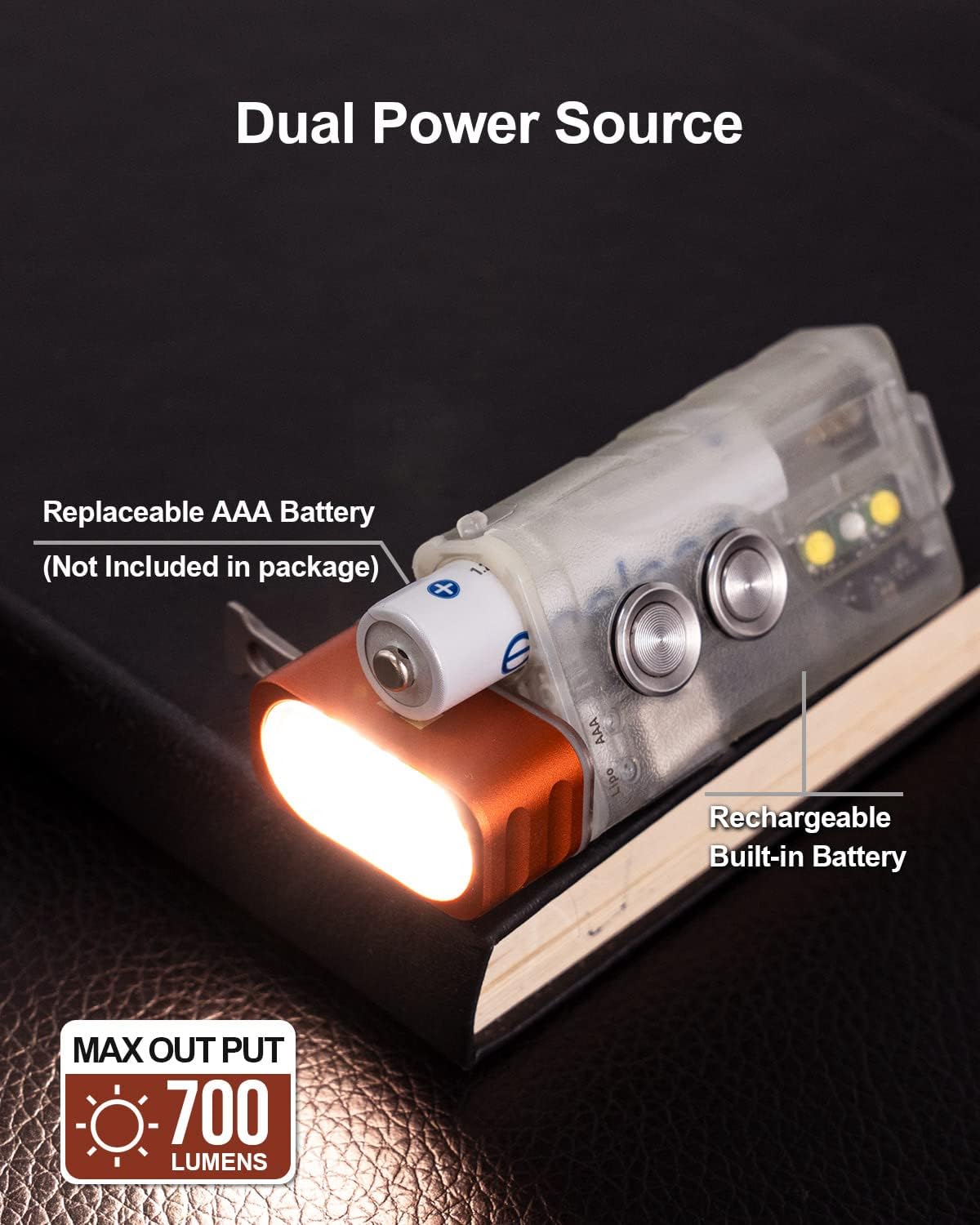
Image 2.1: The RovyVon E5 demonstrating its dual power source capability with an AAA battery inserted.
2.3. Activating Glow-in-the-Dark (GITD) Feature
The E5's green fluorescent shell glows in the dark after exposure to light. To activate this feature:
- Expose the flashlight to direct sunlight or a 365nm UV light source.
- The UV sidelight on the E5 can be used to charge the fluorescent shell. Quickly double-click Button 2 to turn on the UV light for this purpose.

Image 2.2: The RovyVon E5 glowing green in a dark environment after being charged by light.
3. Istruzzjonijiet Operattivi
The RovyVon E5 features two main buttons for control:
- Buttuna 1: Controls the front primary light.
- Buttuna 2: Controls the side auxiliary lights.
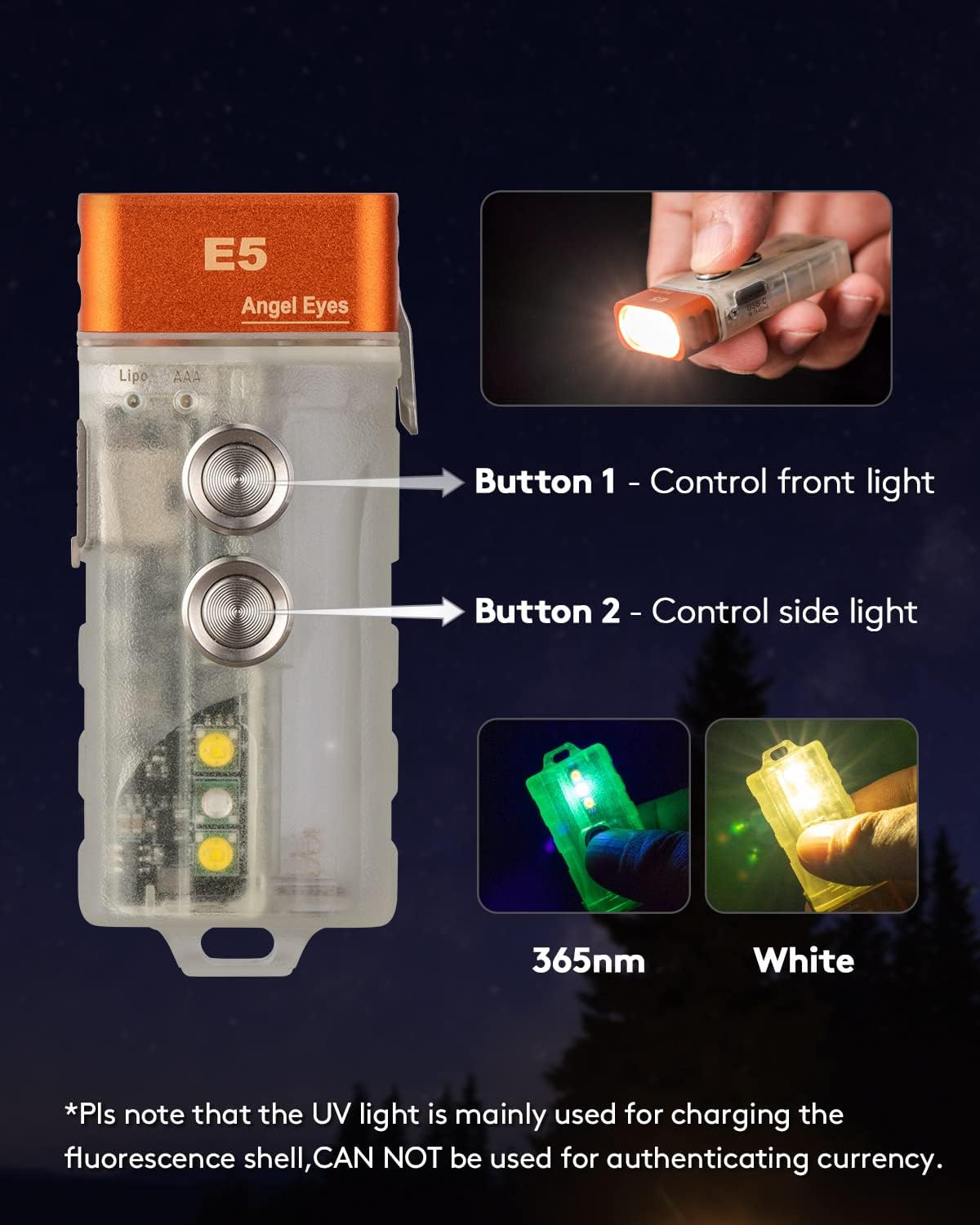
Image 3.1: Diagram illustrating the functions of Button 1 (front light) and Button 2 (side light) on the RovyVon E5.
3.1. Front Primary Light Operation
The front light offers five modes: Moonlight, Low, Medium, High, and Strobe.
- Ixgħel/Itfi: Rapidly double-click Button 1 to turn the front light on or off.
- Ibdel il-luminożità: While the front light is on, single-click Button 1 to cycle through Moonlight → Low → Medium → High.
- Modalità Strobe: Rapidly triple-click Button 1 to activate Strobe mode. Single-click to exit Strobe mode and return to the previously used brightness level.
- Momentary High: Press and hold Button 1 for momentary access to High mode. Release to turn off.
3.2. Side Auxiliary Lights Operation
The side lights include White and UV LEDs.
- Ixgħel/Itfi: Rapidly double-click Button 2 to turn the side light on or off.
- Bidla Modalità: While the side light is on, single-click Button 2 to cycle through White Low → White High → UV.

Immaġni 3.2: Mill-qrib view of the RovyVon E5 sidelights, highlighting the White LED and UV LED functions.
3.3. Funzjoni ta' Lockout
To prevent accidental activation, the E5 features a lockout function.
- Attiva l-Imblukkar: Rapidly four-click Button 1. The blue indicator light will flash for 3 seconds, confirming lockout.
- Iddiżattiva l-Imblukkar: Rapidly four-click Button 1 again. The green indicator light will flash for 2 seconds, indicating the flashlight is unlocked.
3.4. Using the Reversible Pocket Clip
The included reversible pocket clip offers versatile carrying options.
- Attach the clip to your hat brim to use the flashlight as a headlamp.
- Attach the clip to a wristband or clothing for hands-free illumination.
4. Manutenzjoni
4.1. Kura Ġenerali
- Żomm il-flashlight nadifa u niexfa. Imsaħ b'ċarruta ratba u nadifa.amp drapp jekk meħtieġ.
- Avoid dropping the flashlight or subjecting it to strong impacts.
- Aħżen f'post frisk u niexef meta ma tkunx qed tintuża għal perjodi twal.
4.2. Reżistenza għall-Ilma
The RovyVon E5 is rated IPX6 water-resistant, meaning it is protected against powerful water jets. It is suitable for use in rain or wet conditions but should not be submerged in water.
5 Issolvi l-problemi
- Il-flashlight ma tixgħel:
- Ensure the flashlight is not in lockout mode. Deactivate by rapidly four-clicking Button 1.
- Check the battery level. Recharge the built-in battery via USB-C or replace the AAA battery if using.
- Ensure the AAA battery is inserted with correct polarity.
- Kwistjonijiet tal-iċċarġjar:
- Verify the USB-C cable and power adapter are functioning correctly.
- Kun żgur li l-port USB-C huwa nadif u ħieles minn debris.
- Glow-in-the-dark feature not working:
- Ensure the flashlight has been sufficiently exposed to light (sunlight or UV light) to charge the fluorescent material.
6. Speċifikazzjonijiet
| Karatteristika | Dettall |
|---|---|
| Mudell | E5 |
| Primary Light Output | Sa 700 Lumens |
| Distanza tar-raġġ | 220 pied |
| Tip ta' Sors tad-Dawl | Cool White LEDs (Front), White LED, UV LED (Side) |
| Temperatura tal-Kulur | 6500 Kelvin |
| Sors tal-Enerġija | Built-in 330mAh Lithium Polymer (Li-Po) battery, 1x AAA battery (Ni-MH or Alkaline) |
| Port tal-Iċċarġjar | USB-C |
| Ħin tal-Iċċarġjar | Approx. 1 hour (for built-in battery) |
| Max Runtime (Moonlight) | Sa 62 sigħat |
| Materjal | Aluminju, Polikarbonat |
| Dimensjonijiet | 2.6"D x 1.08"W x 0.53"Għ (66.1mm x 27.5mm x 13.5mm) |
| Piż tal-oġġett | 1.45 uqija (41 Grammi) |
| Reżistenza għall-Ilma | IPX6 |
| Karatteristiċi Speċjali | Adjustable Light Modes, Dual Source, GITD Shell, Lockout Function, Reversible Pocket Clip |

Image 6.1: Size comparison of the RovyVon E5 flashlight, showing its compact dimensions relative to a quarter.
7. Garanzija u Appoġġ
7.1. Informazzjoni dwar Garanzija
The RovyVon Angel Eyes E5 comes with a full warranty. Please refer to the included Warranty Card in your product packaging for specific terms and conditions.
7.2. Appoġġ għall-Klijent
For further assistance, technical support, or warranty claims, please contact RovyVon customer service. You can find contact information on the official RovyVon websit jew permezz tal-bejjiegħ bl-imnut tiegħek.
Visit the official RovyVon Store: RovyVon Direct Store


