1. Introduzzjoni
Thank you for choosing the ZZZMOON Projector Toy. This device is designed to provide an engaging storytelling experience and serve as a comforting night light for children. Please read this manual carefully to ensure proper use, maintenance, and to maximize your product's lifespan.

Stampa 1.1: Quddiem view of the ZZZMOON Projector Toy, showcasing its compact design and the bunny figure.
2. Kontenut tal-Pakkett
Iċċekkja li l-oġġetti kollha elenkati hawn taħt huma inklużi fil-pakkett tiegħek:
- 1 x ZZZMOON Projector Toy (Story Machine)
- 1 x Cartoon Figure (bunny astronaut)
- 8 x Story Slides (feature films)
- 1 x English & German Story Book
- 1 x USB Iċċarġjar Cable
- 1 x Manwal tal-Istruzzjonijiet (dan id-dokument)

Image 2.1: Visual representation of the ZZZMOON Projector Toy and its included accessories, along with product dimensions.
3. Informazzjoni dwar is-Sigurtà
Jekk jogħġbok osserva l-linji gwida tas-sigurtà li ġejjin biex tevita korriment jew ħsara lill-prodott:
- This product is recommended for children aged 3 years and up.
- Is-superviżjoni tal-adulti hija rakkomandata waqt l-użu, speċjalment għat-tfal iżgħar.
- Tesponix l-apparat għall-ilma jew għal umdità eċċessiva.
- Avoid direct eye exposure to the projector light.
- Uża biss il-kejbil tal-iċċarġjar USB provdut jew wieħed ekwivalenti ċċertifikat.
- Tippruvax tiżżarma jew timmodifika l-apparat.
- Keep small parts, such as story slides, out of reach of very young children to prevent choking hazards.
4. Setup
4.1 Iċċarġjar tal-Apparat
Before first use, fully charge the projector toy. Connect the provided USB charging cable to the charging port on the device and to a standard USB power adapter (not included) or a computer USB port. The charging indicator will illuminate during charging and turn off when fully charged.
4.2 Inserting Story Slides
To project a story, gently insert one of the story slides into the designated slot on the side of the projector. Ensure it is inserted correctly for clear projection.

Image 4.1: The projector toy displaying a story on a wall while connected to its USB charging cable.
5. Istruzzjonijiet Operattivi
5.1 Power On/Off
Locate the power button on the device. Press and hold to turn the projector toy on or off.
5.2 Story Projection Mode
With a story slide inserted, turn on the device. The projector will automatically display the story images on a flat surface (wall or ceiling). Adjust the focus ring around the lens for a clear image. The device features synchronized sound and automatic screen switching for an immersive experience.
5.3 Modalità Dawl bil-lejl
The projector toy can function as a gentle night light. Activate this mode by pressing the designated button (refer to device markings). It includes a 30-minute timer for automatic shut-off.
5.4 Daqq tal-Mużika
The device offers 5 hypnotic music tracks. Press the music button to cycle through or activate the music feature.
5.5 Starlight Projection
In addition to story projection, the device can project a starlight pattern onto the ceiling, creating a soothing environment.
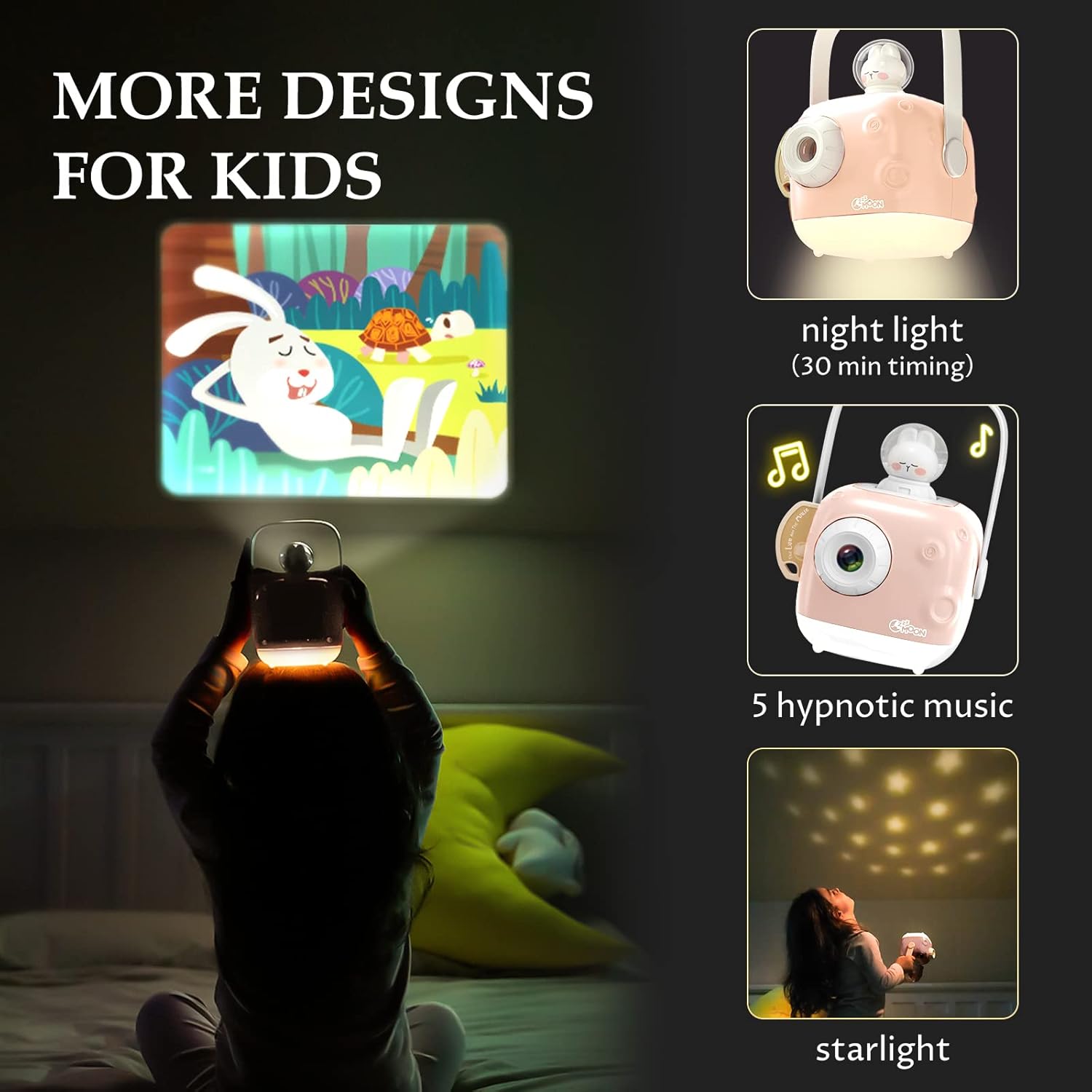
Image 5.1: Illustration of the projector toy's various modes, including night light, music playback, and starlight projection.

Image 5.2: A child comfortably using the ZZZMOON Projector Toy as a bedside night light.
6. Karatteristiċi
The ZZZMOON Projector Toy offers several advanced features for an enhanced user experience:
- Synchronized Sound and Picture: Stories are accompanied by audio for a complete narrative experience.
- Tibdil Awtomatiku tal-Iskrin: Images transition automatically during story projection.
- Lentijiet Doppju: Equipped with two lenses for improved projection quality.
- Extended Projection Distance: Capable of projecting clearly up to 2 meters.
- Tfiq bil-ħin: Features a timed shutdown function for convenience, especially in night light mode.
- Disinn portabbli: Lightweight and small with a handle, making it easy to carry.
- Eight Classic Stories: Includes a collection of eight classic stories to inspire learning and imagination.

Image 6.1: A visual display of the seven classic stories included with the projector toy, such as 'The Hare and the Tortoise' and 'The Emperor's New Clothes'.

Image 6.2: A comparison chart illustrating the advanced features of the ZZZMOON Projector Toy, such as synchronized sound, automatic switching, and extended projection distance.
7. Manutenzjoni
7.1 Tindif
Wipe the exterior of the projector toy with a soft, dry cloth. Do not use abrasive cleaners or solvents. For the lens, use a specialized lens cleaning cloth to avoid scratches.
7.2 Ħażna
Store the device in a cool, dry place away from direct sunlight and extreme temperatures. Keep story slides and the USB cable organized to prevent loss or damage.
8 Issolvi l-problemi
If you encounter any issues with your ZZZMOON Projector Toy, please refer to the following table:
| Problema | Kawża Possibbli | Soluzzjoni |
|---|---|---|
| L-apparat ma jixgħelx | Batterija baxxa; Il-buttuna tal-qawwa mhux ippressata sew | Iċċarġja l-apparat kompletament; Agħfas u żomm il-buttuna tal-qawwa sew. |
| Il-projezzjoni hija mċajpra | Focus not adjusted; Projector too far/close to surface | Rotate the focus ring around the lens; Adjust distance to projection surface. |
| No sound during story projection | Volume too low; Mute activated | Increase volume; Check for a mute function (if applicable). |
| Story slides not advancing | Slide inserted incorrectly; Device malfunction | Re-insert the story slide correctly; If problem persists, contact customer support. |
9. Speċifikazzjonijiet
| Karatteristika | Dettall |
|---|---|
| Dimensjonijiet tal-Prodott | 14.48 x 11.43 x 19.81 ċm |
| Piż | 748 g |
| Batteriji | 1 batterija tal-polimer tal-litju (inkluża) |
| Età Rakkomandata | 3 snin 'il fuq |
| Tip ta' Materjal | Plastik |
| Kulur | Roża |
| Teknoloġija tal-Konnettività | USB |
| Tip ta 'Wiri | LED, LCD |
| Fattur tal-Formola | Portabbli |
| Tip ta 'Immuntar | Immonta fuq il-mejda |
| Karatteristiċi Speċjali | Ħfief, portabbli |
| Komponenti Inklużi | Projector, Cartoon Figure, Story Slides, Story Book, USB Cable, User Manual |
10. Informazzjoni dwar Garanzija
Specific warranty details are not provided in the product information. Please refer to your purchase receipt or contact the retailer for information regarding warranty coverage and terms.
11. Appoġġ għall-Klijent
For further assistance, technical support, or inquiries not covered in this manual, please contact ZZZMOON customer service through the retailer's platform or the official brand websit, jekk disponibbli.