1. Introduzzjoni
Grazzi tax-xiriasing the Aspen 40-inch Washable Tower Fan. This manual provides important information regarding the safe operation, installation, maintenance, and troubleshooting of your new fan. Please read this manual thoroughly before use and retain it for future reference.
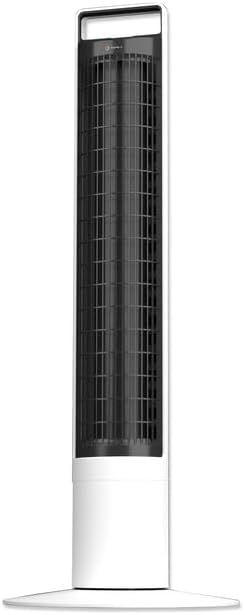
Immaġni: Quddiem view of the Aspen 40-inch Washable Tower Fan.
2. Informazzjoni dwar is-Sigurtà
Dejjem segwi l-prekawzjonijiet bażiċi ta' sigurtà meta tuża apparati elettriċi biex tnaqqas ir-riskju ta' nar, xokk elettriku, u korriment lil persuni.
- Tħaddem ebda fann b'korda jew plagg bil-ħsara.
- Tmexxix korda taħt it-twapet. Tgħattix il-korda b'twapet tat-twapet, runners, jew kisi simili. Irranġa l-korda 'l bogħod miż-żona tat-traffiku u fejn ma titfixkelx.
- Always unplug the fan before moving, cleaning, or performing maintenance.
- Do not immerse the main unit (base) in water or other liquids. Only the detachable tower is designed for washing.
- Ensure the fan is completely dry before reassembling and plugging in after cleaning.
- Dan il-fann huwa għal użu fuq ġewwa biss.
3. Kontenut tal-Pakkett
Ivverifika li l-komponenti kollha huma preżenti fil-pakkett:
- Aspen 40-inch Tower Fan (Main Unit and Detachable Tower)
- Base Assembly (2 parts)
- Kontroll mill-bogħod (b'batterija CR2 waħda inkluża)
- Manwal għall-Utent (dan id-dokument)
4. Setup
Follow these steps to assemble and set up your tower fan:
- Assemblaġġ tal-Bażi: Connect the two halves of the base assembly. Align the fan tower with the assembled base and twist clockwise to secure it. A screwdriver may be needed for initial base assembly.
- Pjazzament: Place the fan on a firm, level surface. Ensure there is adequate space around the fan for proper airflow and oscillation.
- Konnessjoni tal-Enerġija: Ipplaggja l-korda tad-dawl fi żbokk elettriku standard.

Image: Illustration of the fan base assembly process.
5. Istruzzjonijiet Operattivi
Your Aspen Tower Fan can be operated using the control panel on top of the unit or the included magnetic RF remote control.
Funzjonijiet tal-Panel tal-Kontroll u tal-Kontroll mill-Bogħod:

Image: Close-up of the fan's top control panel and the magnetic remote control, showing button functions.
- Power On/Off: Agħfas il-buttuna tal-enerġija (⏻) biex tixgħel jew titfi l-fann.
- Veloċità tal-fann: Cycle through 4 fan speeds (Low, Medium, High, Turbo) by pressing the fan speed button (⇋).
- Oxxillazzjoni: Agħfas il-buttuna tal-oxxillazzjoni (↻) to activate or deactivate the 60-degree narrow-angle oscillation feature. This provides a consistent, focused breeze.

Image: Visual representation of the fan's 60-degree narrow-angle oscillation, showing airflow.
- Timer: Set the auto-off timer for up to 8 hours by pressing the timer button (◷). Each press adds an hour to the timer.
- Dawl bil-lejl: Activate the 3-color LED nightlight by pressing the nightlight button (💡). Cycle through colors or turn off the light.

Image: The Aspen Tower Fan with its base illuminated by the built-in nightlight.
Karatteristiċi konvenjenti:
- Manku tal-ġarr: The integrated handle on top of the fan allows for easy transport.

Image: A hand holding the fan by its convenient top carry handle.
- Magnetic Remote: The remote control magnetically attaches to the top of the fan for convenient storage.
6. Manutenzjoni
The Aspen Tower Fan features an easy-wash design for convenient cleaning. Regular cleaning ensures optimal performance and extends the life of your fan.
Cleaning the Detachable Fan Tower:
- Remove Remote: First, remove the magnetic remote control from the top of the fan.
- Detach Tower: Twist the fan tower counter-clockwise from the base and gently pull it up to detach.
- Aħsel: The detached fan tower can be washed or rinsed with soap and water. You can soak it or spray it with a water nozzle.
- Nixxef kompletament: Allow the fan tower to dry completely before reassembling. Ensure no moisture remains inside.
- Erġa' arma: Align the line on the fan tower with the unlock symbol on the base, then push down and twist clockwise to lock it into place. Reinsert the remote.

Image: A person rinsing the detached fan tower with a shower head in a bathtub.

Image: A visual sequence showing a dusty fan, the rinsing process, and a clean, fresh fan.
Vidjow Istruttiv:
Video: Official Aspen video demonstrating how to clean the tower fan. This video shows the steps for detaching the tower, washing it, and reassembling it.
7 Issolvi l-problemi
If you encounter issues with your Aspen Tower Fan, refer to the following common problems and solutions:
| Problema | Kawża Possibbli | Soluzzjoni |
|---|---|---|
| Il-fann ma jixgħelx. | Bla enerġija, konnessjoni maħlula, batterija baxxa tar-remote. | Check power cord connection. Ensure outlet is working. Replace remote battery (CR2). |
| Fluss ta 'arja mnaqqas. | Dust buildup in tower. | Clean the detachable fan tower as per Maintenance section. |
| Il-fann jagħmel ħoss mhux tas-soltu. | Obstruction, improper assembly. | Ensure no foreign objects are inside. Check if the tower is securely locked into the base. |
| Il-kontroll mill-bogħod ma jaħdimx. | Battery depleted, obstruction between remote and fan. | Replace the CR2 battery in the remote. Ensure no objects are blocking the signal path. |
If the problem persists after trying these solutions, please contact Aspen customer support.
8. Speċifikazzjonijiet
| Karatteristika | Dettall |
|---|---|
| Brand | Aspen |
| Isem tal-Mudell | Aspen Tower Fan Black (ASTF-A40-BLK) |
| Dimensjonijiet tal-Prodott | 12"D x 12"W x 41"H |
| Piż tal-oġġett | 9.9 liri |
| Kulur | Abjad |
| Sors tal-Enerġija | Corded Elettriku |
| Numru ta 'Livelli ta' Qawwa | 4 Veloċità |
| Metodu ta' Kontroll | Remote |
| Karatteristiċi Speċjali | Lightweight, Oscillating, Detachable for Washing, 3-Color Nightlight, 4 Timers, Magnetic RF Remote |
| Tip ta' Kamra | Kamra tas-sodda, Kamra tal-Ħajja, Uffiċċju tad-Dar |
| Komponenti Inklużi | Remote |
| Użu fuq ġewwa/barra | Ġewwa |
| Batteriji | 1 batterija CR2 meħtieġa (inkluża) |
9. Garanzija u Appoġġ
Specific warranty details are not provided in this manual. For warranty information, product support, or to purchase replacement parts, please contact Aspen customer service.
You can visit the official Aspen store on Amazon for more information: Aspen Store


