Introduzzjoni
This manual provides detailed instructions for the safe and effective operation of your ENEGON RGB Video Light. Please read this manual thoroughly before using the product and retain it for future reference.
X'hemm fil-Kaxxa
Meta tiftaħ il-pakkett, jekk jogħġbok kun żgur li l-oġġetti kollha li ġejjin huma preżenti:
- 1 RGB Video Light
- 1 Portable Carrying Bag
- 1 1/4 Invita
- 1 Cable tal-Iċċarġjar tat-Tip-Ċ
- 1 Manwal

Image: Contents of the ENEGON RGB Video Light package.
Prodott Overview u Karatteristiċi
The ENEGON RGB Video Light is a versatile lighting solution designed for various photography and videography needs. Key features include:
- Effetti tad-Dawl Kuluriti: Features 90 bi-color LED beads and 48 RGB color LED beads, providing up to 1500Lux at 0.5 meters. Offers 3 modes with 24 common lighting scene effects in RGB full color.
- Aġġustabilità: Adjust hue (0-359 degrees), color saturation (0-100%), brightness (0-100%), and color temperature (2500K-9000K). All settings are displayed on the built-in LCD screen.
- Preċiżjoni Għolja tal-Kulur: CRI of ≥95 and TLCI of ≥95 for accurate color rendering.
- Built-in Battery & Power Bank Function: Equipped with a 3.7V 4000mAh rechargeable battery. Features a USB Type-C charging port and a USB output port, allowing it to function as a power bank. Full charge in approximately 2.5 hours.
- Immuntar versatili: Includes a cold shoe for mounting on DSLR cameras, camcorders, tripods, and lamp detenturi.
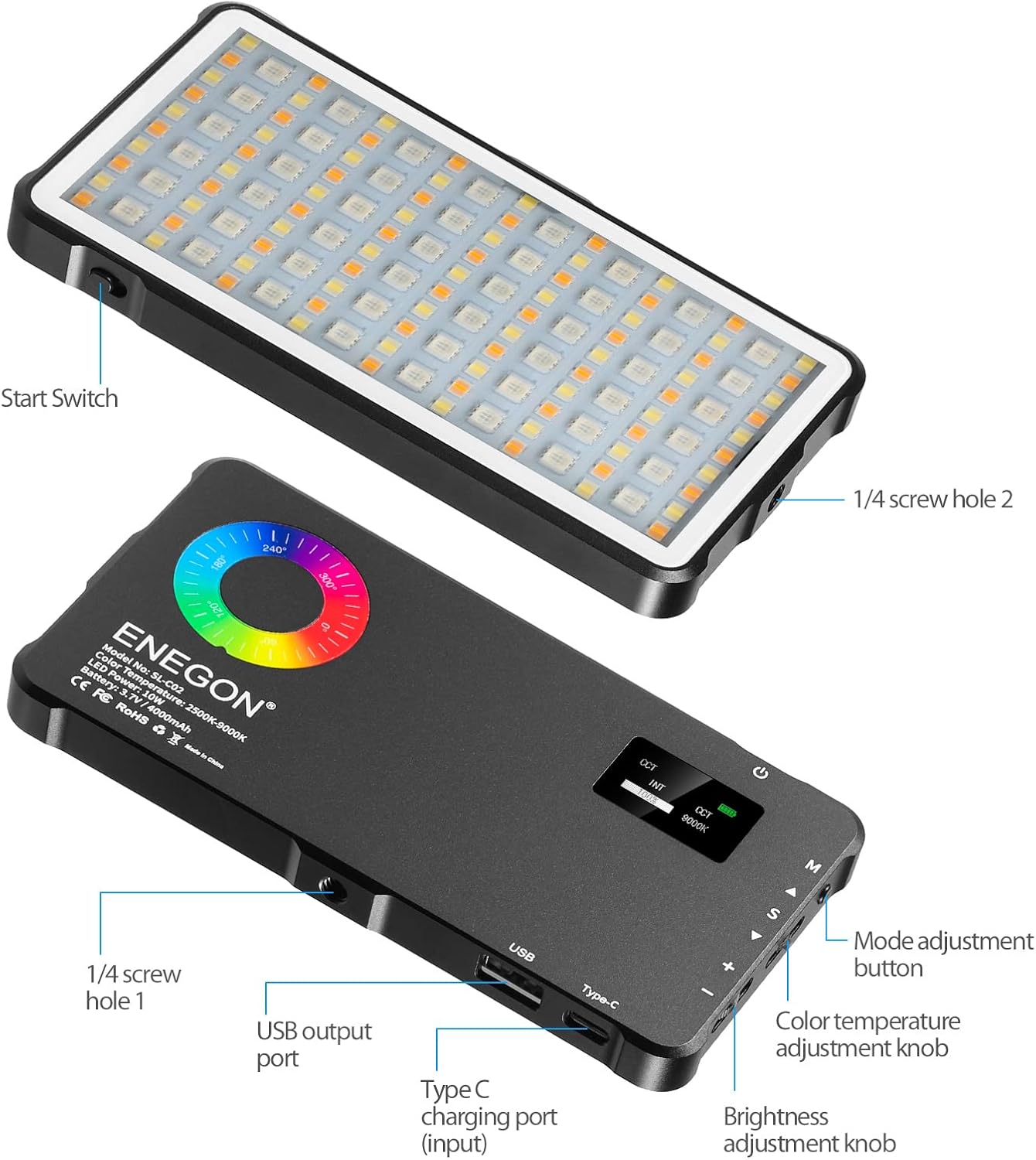
Immaġni: Quddiem u wara view of the ENEGON RGB Video Light, highlighting controls and ports.

Image: Visual representation of brightness, color temperature, and RGB color adjustments.

Image: Icons representing the 24 available light effects.
Setup
- Ippakkja: Neħħi bir-reqqa l-komponenti kollha mill-imballaġġ.
- Ħlas Inizjali: Before first use, fully charge the RGB Video Light using the provided Type-C charging cable. Connect the cable to the Type-C charging port on the device and a suitable USB power source. The LCD screen will indicate charging status.
- Attach Mount (Optional): If using with a camera or tripod, screw the 1/4 screw adapter into one of the 1/4 screw holes on the light. Then attach it to your desired device.
Istruzzjonijiet Operattivi
Familiarize yourself with the controls located on the side of the light:
- Buttuna tal-Qawwa: Press and hold to turn the light ON/OFF.
- Mode Adjustment Button (M): Press to cycle through different lighting modes (CCT, HSI, Scene Effects).
- Color Temperature Adjustment Knob (S): In CCT mode, rotate to adjust color temperature from 2500K to 9000K.
- Brightness Adjustment Knob (+/-): Rotate to adjust brightness from 0% to 100% in any mode.
- Hue Adjustment (A/V): In HSI mode, use the up/down buttons to adjust hue from 0 to 359 degrees.
- Saturation Adjustment (S): In HSI mode, use the S button to adjust color saturation from 0% to 100%.
Using Scene Effects:
In Scene Effects mode, use the mode button to cycle through the 24 pre-programmed lighting effects such as "Sun," "Candle," "Police," "Fire," etc. Adjust brightness as needed.
Iċċarġjar u Batterija
The ENEGON RGB Video Light features a built-in 4000mAh rechargeable Lithium Polymer battery. A full charge takes approximately 2.5 hours and provides up to 2 hours of continuous use at maximum brightness.
- Iċċarġjar: Connect the provided Type-C USB cable to the Type-C input port on the light and a standard USB power adapter (not included).
- Funzjoni tal-Bank tal-Enerġija: The light also has a USB output port, allowing you to use its internal battery to charge other devices, such as smartphones, in an emergency.

Image: The ENEGON RGB Video Light demonstrating its charging and power bank capabilities.
Għażliet ta 'Immuntar
The versatile design of the ENEGON RGB Video Light allows for multiple mounting configurations:
- Muntaġġ taż-żarbun kiesaħ: Use the integrated cold shoe to attach the light directly to DSLR cameras, camcorders, or other compatible accessories.
- 1/4" Screw Holes: The light features 1/4" screw holes on multiple sides, enabling attachment to tripods, light stands, or other photographic equipment.

Immaġni: Eżamples of mounting the ENEGON RGB Video Light on various devices.
Speċifikazzjonijiet
| Karatteristika | Dettall |
|---|---|
| Dimensjonijiet tal-Prodott | 5.94"T x 3.15"W x 0.47"Għ (15.15 x 8.05 x 1.20 ċm) |
| Piż tal-oġġett | 10.8 uqija (306 gramma) |
| Numru tal-Mudell tal-Oġġett | ES-EN-SL-C02-KM-VD-NEW |
| Batterija | 1 Lithium Polymer battery (3.7V 4000mAh) |
| Ħajja tal-batterija | Up to 2 hours (at max brightness) |
| Ħin tal-Iċċarġjar | Appross. 2.5 sigħat |
| Temperatura tal-Kulur | 2500K-9000K |
| CRI | ≥95 |
| TLCI | ≥95 |
| Teknoloġija tal-Konnettività | USB |
| Interface tal-Ħardwer | USB Tip Ċ |
Manutenzjoni
- Żomm l-apparat nadif billi timsaħ b'ċarruta ratba u niexfa.
- Evita li tesponi l-apparat għal temperaturi estremi, umdità, jew dawl tax-xemx dirett.
- Tippruvax iżarma jew isewwi l-apparat lilek innifsek. Ikkuntattja l-appoġġ tal-klijent għall-assistenza.
- Store the device in its portable carrying bag when not in use to protect it from dust and scratches.
Issolvi l-problemi
- Id-dawl ma jixgħelx: Kun żgur li l-batterija hija ċċarġjata. Qabbad ma' sors ta' enerġija billi tuża l-kejbil tat-Tip Ċ.
- Id-dawl mhux qed jiċċarġja: Verify the Type-C cable is securely connected to both the light and the power source. Try a different USB power adapter.
- Ħruġ ta' dawl inkonsistenti: Check battery level. Ensure no obstructions are blocking the LED panel.
- Device not charging from light (power bank function): Ensure the light has sufficient charge. Connect the device to the USB output port securely.
Garanzija u Appoġġ
For warranty information, technical support, or service inquiries, please refer to the contact details provided in the product packaging or visit the official ENEGON websit. Żomm l-irċevuta tax-xiri tiegħek bħala prova tax-xiri għal talbiet ta' garanzija.
Vidjows Uffiċjali tal-Prodott
Watch these official videos for additional guidance and demonstrations of your ENEGON RGB Video Light.
Video: Full Color RGB Video Light demonstration by Creator Coyal.
Video: RGB Video Light features and usage by Virginia Grant.


