Introduzzjoni
This manual provides detailed instructions for the installation, operation, and maintenance of the Supermicro MBD-X12DPI-N6-B E-ATX Server Motherboard. It is designed to assist users in setting up their server system correctly and efficiently. Please read this manual thoroughly before proceeding with any installation or configuration.
Informazzjoni dwar is-Sigurtà
Observe the following safety precautions to prevent damage to the motherboard and ensure personal safety:
- Always disconnect the power cord from the power supply before installing or removing any components.
- Wear an anti-static wrist strap and work on an anti-static mat to prevent electrostatic discharge (ESD) damage to sensitive components.
- Handle the motherboard by its edges to avoid touching components directly.
- Ensure proper ventilation within the server chassis to prevent overheating.
- Refer to the power supply unit's manual for specific safety guidelines related to power connections.
Kontenut tal-Pakkett
Ivverifika li l-oġġetti kollha huma preżenti fil-pakkett:
- Supermicro MBD-X12DPI-N6-B E-ATX Server Motherboard
- Tarka I / O
- Kejbils SATA (il-kwantità tista' tvarja)
- Gwida ta' Referenza Mgħaġġla
- Driver and Utility DVD/USB (if included)
Setup u Installazzjoni
Din it-taqsima tiggwidak fl-installazzjoni fiżika tal-motherboard u l-komponenti primarji tagħha.
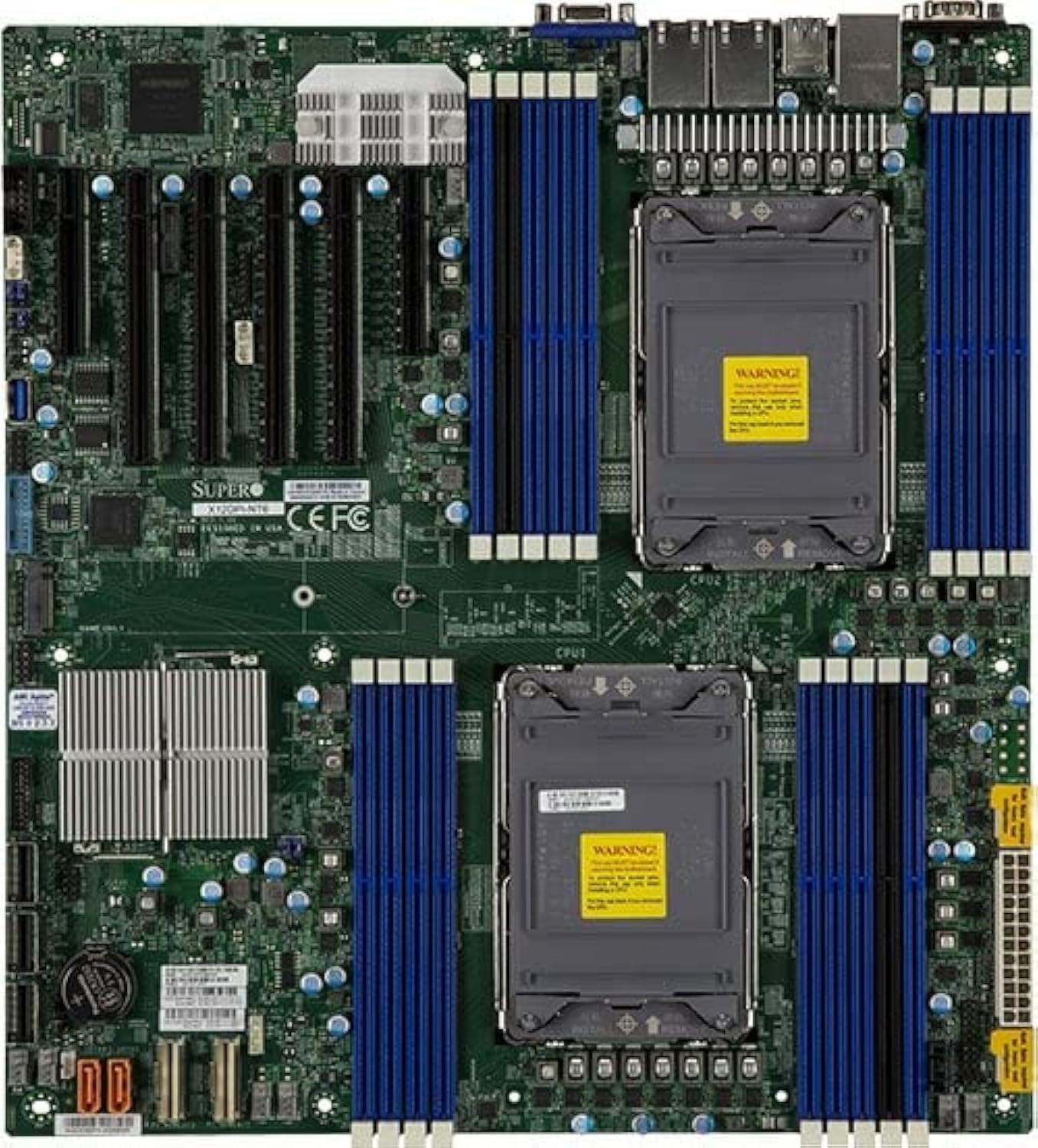
Figura 1: Minn fuq għal isfel view of the Supermicro MBD-X12DPI-N6-B E-ATX Server Motherboard, showcasing its dual LGA 4189 CPU sockets, 18 DDR4 DIMM slots, multiple PCIe 4.0 expansion slots, and various connectors for storage and peripherals. The board features a green PCB with blue and black DIMM slots, and silver heatsinks for chipset and VRMs.
1. CPU Installation (LGA 4189)
- Carefully open the CPU socket retention mechanism by releasing the levers.
- Allinja l-marka trijangulari fuq is-CPU mal-marka korrispondenti fuq is-sokit.
- Poġġi s-CPU bil-mod fis-sokit mingħajr ma tisforzah.
- Close the socket retention mechanism, ensuring the CPU is securely seated.
- Applika pejst termali mas-CPU u installa l-cooler tas-CPU skont l-istruzzjonijiet tal-manifattur tiegħu.
2. Memory (DIMM) Installation
The motherboard supports up to 4TB of 3DS ECC RDIMM/LRDIMM DDR4-3200MHz memory across 18 DIMM slots. Intel Optane Persistent Memory 200 Series is supported in specific slots (P1-DIMMB2 and P2-DIMMB2).
- Open the retention clips at both ends of the DIMM slot.
- Allinja l-islott fuq il-modulu tal-memorja maċ-ċavetta fl-islott tad-DIMM.
- Insert the module firmly into the slot until the retention clips snap into place.
- Ensure all modules are seated correctly and evenly.
3. PCIe Card Installation
The motherboard features 2 PCIe 4.0 x8 and 4 PCIe 4.0 x16 slots.
- Select an appropriate PCIe slot for your expansion card.
- Remove the corresponding metal bracket cover from the server chassis.
- Allinja l-kard mas-slott u agħfas 'l isfel sew sakemm tkun f'postha għalkollox.
- Secure the card with a screw or retention clip to the chassis.
4. Konnessjoni tal-Apparat tal-Ħażna
The Intel C621A controller provides 14 SATA3 (6 Gbps) ports with RAID 0, 1, 5, 10 support. There is also 1 PCIe 4.0 x4 M.2 slot (2280/22110 form factor, M-Key).
- Apparati SATA: Connect SATA data cables from your storage drives to the SATA ports on the motherboard. Connect power cables from the power supply to the drives.
- M.2 Devices: Insert the M.2 SSD into the M.2 slot, securing it with the provided screw.
5. Konnessjoni tal-Provvista tal-Enerġija
Connect the main 24-pin ATX power connector and the 8-pin (or 4+4 pin) CPU power connectors from your power supply unit to the corresponding ports on the motherboard. Ensure all power connections are secure.
Istruzzjonijiet Operattivi
1. L-Ewwel Bidu
- After all components are installed, connect the power cord to the power supply and turn on the system.
- The system will perform a Power-On Self-Test (POST). Monitor for any error codes or beeps.
2. Konfigurazzjoni tal-BIOS/UEFI
During POST, press the designated key (usually DEL or F2) biex tidħol fl-utilità tas-setup tal-BIOS/UEFI. Hawnhekk tista' tikkonfigura l-ordni tal-ibbutjar, il-ħin tas-sistema, u diversi settings tal-ħardwer.
3. Installazzjoni tas-Sistema Operattiva
Insert your operating system installation media (USB drive or DVD) and configure the BIOS/UEFI to boot from it. Follow the on-screen instructions to install your preferred operating system.
Manutenzjoni
1. Tindif
Regularly clean the interior of your server chassis to prevent dust buildup, which can lead to overheating. Use compressed air to remove dust from heatsinks, fans, and other components. Ensure the system is powered off and unplugged before cleaning.
2. Firmware and Driver Updates
Periodically check the Supermicro official website for the latest BIOS/UEFI firmware and driver updates for your motherboard. Keeping your system updated ensures optimal performance, stability, and security.
Issolvi l-problemi
Jekk tiltaqa' ma' problemi, irreferi għall-passi komuni li ġejjin għas-soluzzjoni tal-problemi:
- Ebda Qawwa: Ensure all power cables (24-pin ATX, 8-pin CPU) are securely connected. Check the power supply unit and wall outlet.
- Ebda Display: Verify that the monitor is connected and powered on. Reseat the graphics card (if applicable) and memory modules. Try booting with minimal components.
- System Beeps: Consult the motherboard's beep code table (usually found in the full manual on the Supermicro website) to diagnose hardware issues indicated by specific beep patterns.
- Is-Sistema Operattiva Mhux Tibbutja: Check the boot order in BIOS/UEFI. Ensure the storage drive with the OS is detected and functional.
- Is-sħana żejda: Ensure CPU coolers and chassis fans are properly installed and functioning. Clean dust from heatsinks and vents.
Speċifikazzjonijiet
| Karatteristika | Dettall |
|---|---|
| Socket tas-CPU | LGA 4189 Doppju (Sokit P+) |
| Proċessuri Kompatibbli | Proċessuri Intel Xeon Scalable tat-3 Ġenerazzjoni (sa 270W TDP) |
| Chipset | Intel C621A |
| Tip ta' Memorja | DDR4 3DS ECC RDIMM/LRDIMM, Intel Optane Persistent Memory 200 Series |
| Veloċità tal-Memorja | 3200MHz |
| Slots tal-Memorja | 18 DIMM slots (up to 4TB total) |
| Slots ta' Espansjoni PCIe | 2 x PCIe 4.0 x8, 4 x PCIe 4.0 x16 |
| Appoġġ NVMe | 2 x PCIe 4.0 NVMe x8 Internal Port(s) |
| M.2 Interface | 1 x PCIe 4.0 x4 (2280/22110, M-Key) |
| Portijiet SATA | 14 x SATA3 (6 Gbps) b'RAID 0, 1, 5, 10 |
| LAN | Dual LAN with Intel i350 Gigabit Ethernet Controller |
| Output tal-vidjo | 2 x VGA (1 rear bezel, 1 front panel) |
| Fattur tal-Formola | E-ATX |
| Dimensjonijiet | 16 x 12 x 5 pulzieri |
Appoġġ u Garanzija
For technical support, driver downloads, and the latest BIOS updates, please visit the official Supermicro website. Information regarding product warranty terms and conditions can also be found on the Supermicro support portal or by contacting your point of purchase.
Always refer to the official Supermicro documentation for the most accurate and up-to-date information.


