1. Introduzzjoni
Grazzi tax-xiriasing the PONER SAUND H69 Projector. This device is designed to provide a high-quality visual experience with its 1080P Full HD resolution and 500 ANSI lumens brightness. Equipped with advanced features like WiFi, Bluetooth 5.2, electric focus, auto keystone correction, and a versatile 360° adjustable stand, this projector offers flexibility and ease of use for various entertainment and presentation needs. Please read this manual carefully before operating the projector to ensure proper use and optimal performance.
2. Informazzjoni dwar is-Sigurtà
- Tħarisx direttament fil-lenti tal-proġettazzjoni meta tkun qed taħdem.amp hija mixgħula.
- Kun żgur li l-ventilazzjoni madwar il-proġettazzjoni hija xierqa biex tevita li ssaħħan iżżejjed. Timblokkax il-fetħiet tal-ventilazzjoni.
- Uża biss l-adapter tal-enerġija li jiġi mal-proġettur.
- Tesponix il-proġettazzjoni għax-xita, umdità, jew temperaturi estremi.
- Evita li tpoġġi l-proġekter fuq uċuħ instabbli.
- Tippruvax tiżżarma jew issewwi l-proġettur int stess. Ikkuntattja persunal tas-servizz kwalifikat għall-assistenza.
- Żomm il-proġettur 'il bogħod mill-ilma u likwidi oħra.
3. Kontenut tal-Pakkett
Jekk jogħġbok iċċekkja li l-oġġetti kollha huma preżenti u f'kundizzjoni tajba:
- PONER SAUND H69 Projector
- Adapter tal-Enerġija
- Kontroll mill-bogħod (batteriji mhux inklużi)
- AV Cable
- Manwal għall-Utent
4. Prodott Aktarview
Familiarize yourself with the components and ports of your PONER SAUND H69 Projector.
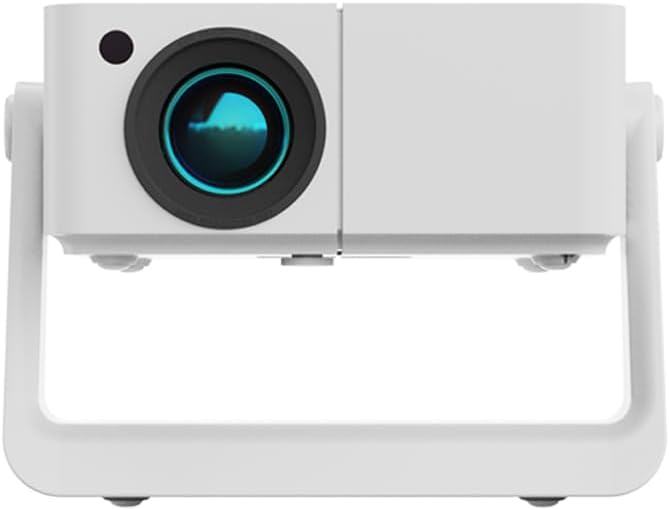
Figura 4.1: Quddiem view of the PONER SAUND H69 Projector, showing the lens and sensor.

Figura 4.2: Wara u ġenb view of the projector, highlighting the Headset jack, USB port, IR receiver, HDMI port, Power input, and Power button with F+/- controls.
Portijiet u Kontrolli:
- Lenti: Jipproġetta l-immaġni.
- Riċevitur IR: Għal sinjali ta' kontroll mill-bogħod.
- Jack tal-widna: 3.5mm audio output for headphones or external speakers.
- Port USB: Għall-konnessjoni ta' apparati tal-ħażna USB.
- Port HDMI: For connecting HDMI-enabled devices like laptops, gaming consoles, or TV sticks.
- Input ta' Enerġija: Tqabbad mal-adapter tal-enerġija.
- Buttuna tal-Qawwa: Ixgħel/itfi l-proġekter.
- F+/- Buttons: Adjust focus manually if needed.
5. Setup
5.1 Tixgħel Inizjali
- Connect the power adapter to the projector's power input port and then to a power outlet.
- Press the Power button on the projector or the remote control to turn on the device.
- The projector will display the startup screen.
5.2 Placement and Adjustment
The H69 projector features a built-in 360° adjustable stand, auto keystone correction, and electric focus for flexible setup.

Figure 5.1: The projector's built-in stand allows for 360° rotation, enabling projection onto ceilings, walls, or floors.
- Pożizzjonament: Place the projector on a stable surface. Utilize the 360° stand to adjust the projection angle as needed, allowing for projection on walls, ceilings, or floors.
- Korrezzjoni Auto Keystone: The projector automatically corrects trapezoidal distortion, ensuring a rectangular image even when projected at an angle.
- Fokus Elettriku: The projector features electric focus for precise image clarity. This can be adjusted via the remote control or the F+/- buttons on the projector.

Figure 5.2: Visual representation of auto keystone correction and electric focus adjusting the projected image.
5.3 Konnettività
The H69 projector offers multiple connectivity options:
- WiFi: Connect to your wireless network for online streaming and screen mirroring. Navigate to the 'Settings' menu on the projector's interface to configure WiFi.
- Bluetooth 5.2: Pair with external Bluetooth speakers or headphones for enhanced audio. Access Bluetooth settings from the projector's main menu.
- HDMI: Connect laptops, gaming consoles (e.g., PlayStation), TV boxes, or other HDMI-enabled devices using an HDMI cable.
- USB: Daħħal flash drive tal-USB biex tilgħab il-midja files direttament.
- TA’: Use the included AV cable to connect older devices.
6. Istruzzjonijiet Operattivi
6.1 Operazzjoni Bażika
- Power On/Off: Press the Power button on the projector or remote.
- Navigazzjoni: Use the arrow keys and OK button on the remote control to navigate the projector's Android interface.
- Għażla tas-Sors tal-Input: Select the desired input source (HDMI, USB, WiFi, etc.) from the main menu.
6.2 Konnessjoni ta' Apparati Esterni
The projector supports various external devices for versatile entertainment.

Figure 6.1: The projector's Android system provides access to various streaming applications for endless entertainment.
- Smartphones/Tablets: Connect via WiFi for screen mirroring (e.g., AirPlay for iOS, Miracast for Android). Ensure both devices are on the same WiFi network.
- Laptops/PCs: Connect via HDMI for a direct display output.
- Konsols tal-logħob: Connect via HDMI for an immersive gaming experience.
- Drajvs USB: Insert a USB drive into the USB port. The projector's media player will allow you to browse and play supported video, audio, and image files.
6.3 Image and Audio Adjustment
- Fokus: The projector features electric focus. Use the remote control or the F+/- buttons on the projector to achieve a sharp image.
- Korrezzjoni Keystone: The projector has automatic keystone correction. If manual adjustment is needed, it can typically be found in the 'Settings' menu.
- Zoom: Adjust the image size (50%-100% zoom) through the projector's settings without moving the unit.
- Volum: Adjust audio volume using the remote control.
7. Manutenzjoni
7.1 Tindif
- Lenti: Uża drapp artab u mingħajr suf iddisinjat speċifikament għal lentijiet ottiċi. Tużax prodotti tat-tindif jew drappijiet li joborxu.
- Korp tal-Proġettur: Wipe the surface with a soft, dry cloth. For stubborn marks, slightly dampmt id-drapp bl-ilma.
- Ftuħ tal-ventilazzjoni: Periodically clean the ventilation openings with a soft brush or compressed air to ensure proper airflow and prevent overheating.
7.2 Ħażna
Meta ma tkunx qed tużah għal perjodi twal, aħżen il-proġettur f'post frisk u niexef, 'il bogħod mix-xemx diretta u mit-trab eċċessiv. Huwa rakkomandat li tuża l-imballaġġ oriġinali jew kaxxa protettiva.
8 Issolvi l-problemi
Jekk tiltaqa' ma' problemi bil-proġettur tiegħek, jekk jogħġbok irreferi għall-problemi u s-soluzzjonijiet komuni li ġejjin:
| Problema | Kawża Possibbli | Soluzzjoni |
|---|---|---|
| Ebda immaġini murija | Qawwa mhux konnessa; Sors ta' input mhux korrett; Għatu tal-lenti mwaħħal. | Ensure power is connected and unit is on; Select correct input source (HDMI, USB, etc.); Remove lens cap. |
| L-immaġni hija mċajpra | Out of focus; Projector too far/close to screen. | Use electric focus (remote or F+/- buttons) to adjust; Ensure projector is within optimal projection distance. |
| L-immaġni hija distorta (forma ta' trapeżojde) | Il-proġettur mhux perpendikolari mal-iskrin. | Auto keystone correction should adjust automatically. If not, check settings for manual keystone adjustment. |
| L-ebda ħoss | Volume too low; Incorrect audio output; External device audio issue. | Increase volume; Check audio output settings on projector; Ensure external device audio is working. |
| Ma nistax nikkonnettja mal-WiFi/Bluetooth | Incorrect password; Out of range; Interference. | Verify WiFi password; Move projector closer to router; Reduce interference from other devices. For iPhone connectivity issues, ensure both devices support the same mirroring protocol and are on the same network. |
| Il-kontroll mill-bogħod ma jaħdimx | Batteries dead/incorrectly inserted; IR receiver blocked. | Replace batteries; Ensure correct polarity; Clear any obstructions between remote and projector's IR receiver. |
Jekk il-problema tippersisti wara li tipprova dawn is-soluzzjonijiet, jekk jogħġbok ikkuntattja l-appoġġ għall-klijenti.
9. Speċifikazzjonijiet
Key technical specifications for the PONER SAUND H69 Projector:
| Karatteristika | Speċifikazzjoni |
|---|---|
| Brand | PONER SAUND |
| Numru tal-Mudell | H69 |
| Riżoluzzjoni tal-Wiri | Native 1920 x 1080 (Full HD) |
| Luminożità | 500 lumens ANSI |
| Teknoloġija tal-Konnettività | HDMI, USB, WiFi (5G+2.4G WiFi6), Bluetooth 5.2 |
| Karatteristiċi Speċjali | 360° Stand, Auto Keystone Correction, Built-in Stand, Electric Focus |
| Użi Rakkomandati | Home Cinema, Business Presentations, Outdoor Movie |
| Kulur | Abjad |
| Piż tal-oġġett | 1.76 liri |
| Dimensjonijiet tal-Prodott | 6.5 x 6 x 6 pulzieri |
10. Garanzija u Appoġġ
Your PONER SAUND H69 Projector comes with a standard manufacturer's warranty. For specific warranty terms and conditions, please refer to the warranty card included in your package or visit the official PONER SAUND websit.
For technical support, troubleshooting assistance, or service inquiries, please contact PONER SAUND customer support through the contact information provided on the product packaging or the official brand website. Please have your model number (H69) and purchase details ready when contacting support.
Riżorsi onlajn:
- Żur il- PONER SAUND Store on Amazon għal informazzjoni u aġġornamenti dwar il-prodott.


