1. Introduzzjoni
Thank you for choosing the MLOVE BV230 Portable Bluetooth Speaker. This manual provides essential information for setting up, operating, and maintaining your speaker. The BV230 is designed for portability, delivering high-quality audio with enhanced bass, and features IP56 dust and water resistance, making it suitable for various environments.
2. Kontenut tal-Pakkett
Jekk jogħġbok kun żgur li l-oġġetti kollha huma preżenti fil-pakkett:
- 1 x MLOVE BV230 Bluetooth Speaker
- 1 x Cable tal-Iċċarġjar tal-USB Type-C
- 1 x Lanyard
- 1 x Manwal tal-Istruzzjonijiet (dan id-dokument)
3. Prodott Aktarview
Iffamiljarizza ruħek mal-komponenti u l-kontrolli tal-ispiker.
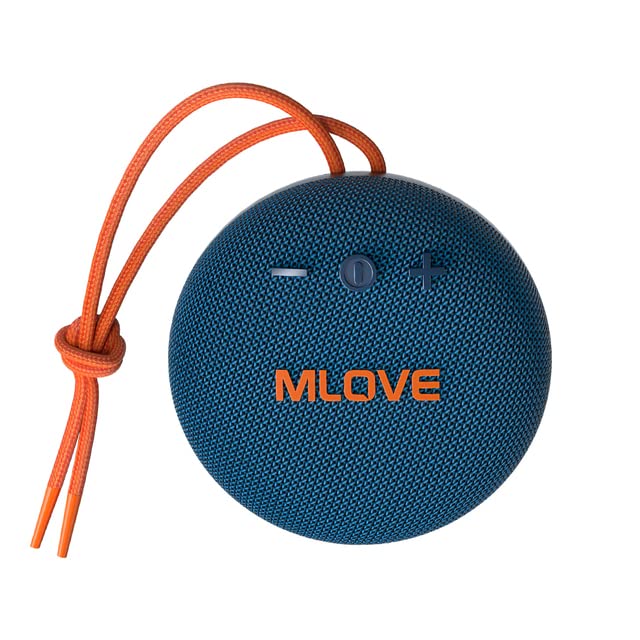
Figura 3.1: Quddiem view of the MLOVE BV230 speaker, showing the power button, volume controls, and MLOVE branding.
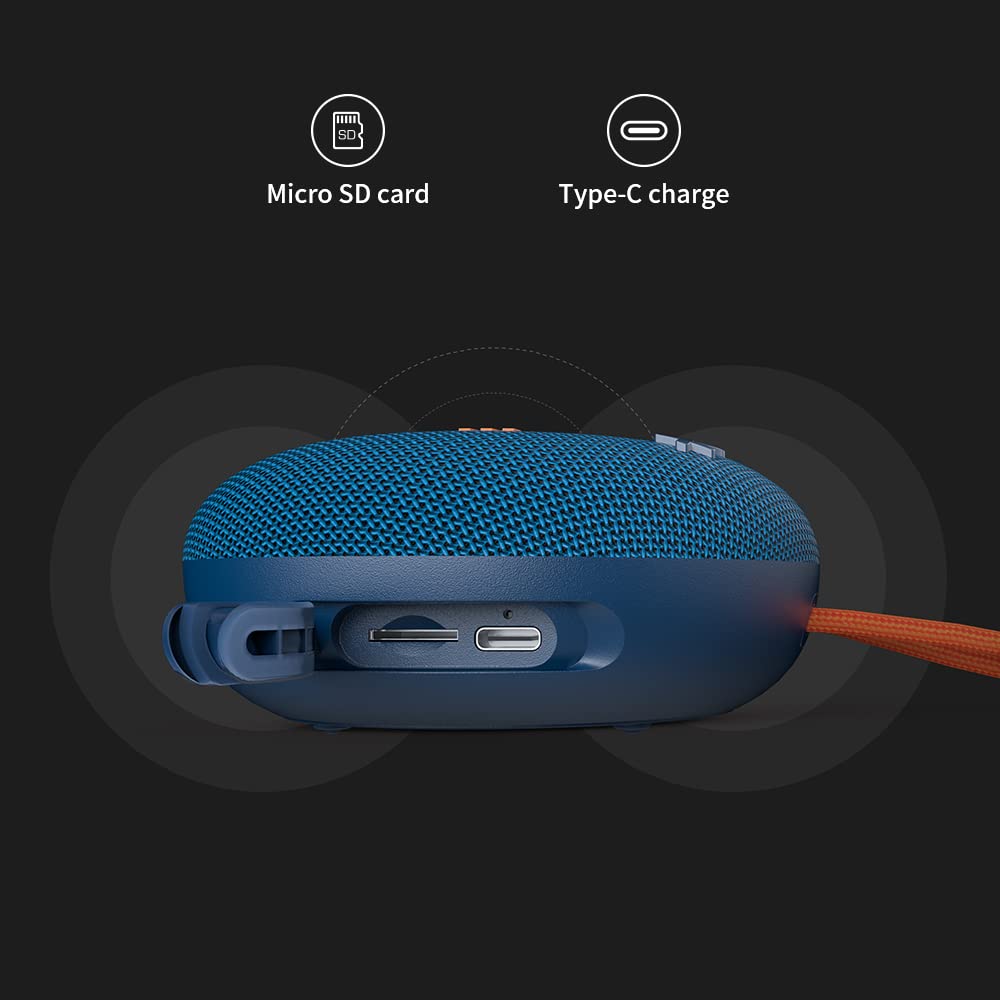
Figura 3.2: Ġenb view of the MLOVE BV230 speaker, highlighting the Micro-SD card slot and the USB Type-C charging port, protected by a rubber flap.
Buttuni tal-Kontroll:
- Buttuna tal-Qawwa: Agħfas u żomm biex tixgħel/titfi. Agħfas qasir biex tilgħab/twaqqaf il-mużika jew twieġeb/temm telefonati.
- Volum 'il fuq (+): Agħfas qasir biex iżżid il-volum. Agħfas fit-tul għat-trakka li jmiss.
- Volum 'l isfel (-): Agħfas qasir biex tnaqqas il-volum. Agħfas fit-tul għat-trakka ta' qabel.
4. Setup
4.1 Iċċarġjar tal-Ispeaker
Qabel l-ewwel użu, iċċarġja l-ispiker kompletament.
- Open the rubber flap on the side of the speaker to expose the charging port.
- Connect the included USB Type-C charging cable to the speaker's charging port.
- Qabbad it-tarf l-ieħor tal-kejbil ma' adapter tal-enerġija USB (mhux inkluż) jew mal-port USB tal-kompjuter.
- The charging indicator light will illuminate during charging and turn off once fully charged. A full charge takes approximately 3 hours.
4.2 Tixgħel/Jitfi
- Biex Tixgħel: Press and hold the Power button for approximately 2-3 seconds until you hear an audible prompt.
- Biex Tifi: Press and hold the Power button for approximately 2-3 seconds until you hear an audible prompt.
4.3 Tqabbil tal-Bluetooth
Connect your BV230 speaker to a Bluetooth-enabled device.
- Kun żgur li l-ispiker ikun mixgħul u fil-modalità ta' tqabbil Bluetooth (indikat minn LED li jteptep).
- Fuq l-apparat tiegħek (smartphone, tablet, eċċ.), attiva l-Bluetooth u fittex apparati disponibbli.
- Select "BV230" from the list of found devices.
- Ladarba jkun konness, l-ispiker se jipprovdi konferma li tinstema', u l-indikatur LED se jieqaf iteptep.
- The speaker will automatically reconnect to the last paired device when powered on, if within range (up to 10 meters).
4.4 Tqabbil ta' Stereo Veru Wireless (TWS)
Connect two MLOVE BV230 speakers for a true wireless stereo experience.

Figura 4.1: Two BV230 speakers demonstrating True Wireless Stereo (TWS) pairing for enhanced audio.
- Ensure both BV230 speakers are powered on and not connected to any other Bluetooth device.
- On one of the speakers (this will be the primary speaker), double-press the Power button. The speaker will enter TWS pairing mode.
- Iż-żewġ kelliema awtomatikament ifittxu u jikkonnettjaw ma' xulxin. Se tisma' konferma li tinstema' ladarba t-tqabbil tat-TWS ikun b'suċċess.
- Now, connect your Bluetooth device to the primary speaker (the one you initiated TWS pairing on) as described in Section 4.3.
- L-awdjo issa se jindaqq b'mod stereo fuq iż-żewġ kelliema.
4.5 Micro-SD Card Playback
Play music directly from a Micro-SD card.
- Open the rubber flap on the side of the speaker.
- Insert a Micro-SD card (with supported audio files) into the Micro-SD card slot until it clicks into place.
- The speaker will automatically switch to Micro-SD card playback mode.
- Use the Power button for play/pause and the Volume +/- buttons for track control.
5. Istruzzjonijiet Operattivi
5.1 Daqq tal-Mużika
- Play/Pawsa: Agħfas qasir il-buttuna Power.
- Volum 'il fuq: Agħfas fil-qosor il-buttuna '+'.
- Volum 'l isfel: Agħfas fil-qosor il-buttuna '-'.
- Track li jmiss: Agħfas fit-tul il-buttuna '+'.
- Track preċedenti: Agħfas fit-tul il-buttuna '-'.
5.2 Sejħiet mingħajr idejn
Il-mikrofonu inkorporat jippermetti sejħiet mingħajr idejn meta jkun konness permezz tal-Bluetooth.

Figura 5.1: The BV230 speaker facilitating a hands-free call, demonstrating its built-in microphone functionality.
- Irrispondi Sejħa: Short press the Power button when an incoming call is received.
- Tmiem Sejħa: Agħfas qasir il-buttuna tal-Qawwa waqt telefonata.
- Irrifjuta Sejħa: Long press the Power button when an incoming call is received.
6. Manutenzjoni
6.1 Tindif
To maintain the speaker's appearance and functionality:
- Imsaħ il-kelliem b 'soft, damp drapp.
- Tużax prodotti tat-tindif li joborxu, alkoħol, jew solventi kimiċi.
- Ensure the charging port and Micro-SD slot are dry before use or charging.
6.2 Reżistenza għall-Ilma u t-Trab (IP56)
The MLOVE BV230 speaker is rated IP56, meaning it is protected against dust ingress and can withstand water jets from any direction. This makes it suitable for outdoor use and splashes.

Figura 6.1: The BV230 speaker in water, illustrating its IP56 water resistance.
- Ensure the rubber flap covering the charging port and Micro-SD slot is securely closed to maintain water and dust resistance.
- Do not intentionally submerge the speaker in water for extended periods.
- Avoid exposing the speaker to saltwater or other chemicals, as this may damage the seals.
- If the speaker gets wet, wipe it dry before charging or opening the port flap.
6.3 Ħażna
- Aħżen l-ispiker f'post frisk u niexef 'il bogħod mix-xemx diretta u minn temperaturi estremi.
- If storing for an extended period, charge the battery to approximately 50% every few months to prolong battery life.
7 Issolvi l-problemi
If you encounter issues with your speaker, refer to the following solutions:
| Problema | Soluzzjoni Possibbli |
|---|---|
| L-ispiker ma jixgħelx. | Kun żgur li l-batterija hija ċċarġjata. Qabbad l-ispiker ma' sors ta' enerġija billi tuża l-kejbil USB Type-C. |
| Ma tistax tqabbad permezz tal-Bluetooth. |
|
| L-ebda ħoss jew volum baxx. |
|
| It-tqabbil tat-TWS ifalli. |
|
| Charging issue. |
|
8. Speċifikazzjonijiet
Key technical specifications for the MLOVE BV230 speaker:
| Karatteristika | Dettall |
|---|---|
| Isem tal-Mudell | BV230 |
| Dimensjonijiet (L x W x H) | 100.8 x 100.8 x 46 mm (approx. 108D x 46W x 108H Millimeters) |
| Piż tal-oġġett | 198 g (approx. 280 g with packaging) |
| Qawwa tal-Ħruġ tal-Ispeaker | 5 Watts |
| Kapaċità tal-batterija | 1500 mAh Polimer tal-litju |
| Ħin tal-logħob | Sa 8 sigħat (b'70% volum) |
| Ħin tal-Iċċarġjar | Madwar sagħtejn |
| Port tal-Iċċarġjar | USB Tip-Ċ |
| Verżjoni Bluetooth | 5.0 |
| Firxa Wireless | Sa 10 metri (33 pied) |
| Reżistenza għall-Ilma u t-Trab | IP56 |
| Materjal | Tessili |
| Metodu ta' Kontroll | Mess |
| Modalità tal-Ħruġ tal-Awdjo | Stereo (bit-tqabbil tat-TWS) |
9. Garanzija u Appoġġ
The MLOVE BV230 Portable Bluetooth Speaker comes with a 12-il xahar garanzija mid-data tax-xiri, li tkopri difetti fil-manifattura.
For technical support, warranty claims, or further assistance, please contact your retailer or the manufacturer directly. Please retain your proof of purchase for warranty service.


