JENSEN JCR-375 Stereo Digital Dual-Alarm Clock with Top-Loading CD Player, FM Tuner, USB Charging Port, and Battery Backup - Instruction Manual
Model: JCR-375
1. Introduzzjoni
This manual provides detailed instructions for the operation and maintenance of your JENSEN JCR-375 Stereo Digital Dual-Alarm Clock Radio with CD Player. This versatile device is designed for use on a nightstand or in various locations within your home, offering multiple audio playback options and convenient features.
2. Karatteristiċi ewlenin
- Multifunction 0.9-inch White LED display with high/low dimmer control.
- Built-in stereo speakers for audio output.
- Stereo headphone output for private listening.
- Top-loading CD player compatible with standard audio CDs, MP3 CDs, and CD-R/CD-RW discs.
- CD playback controls include skip/search (forward and back), repeat (1 or all tracks), and programmable memory.
- Digital FM radio tuner with up to 20 programmable presets.
- Auxiliary input (3.5mm) for connecting external audio devices.
- 2.1-amp USB port for charging smartphones and other compatible devices.
- Dual-alarm clock radio with sleep and snooze functions.
- Wake options: radio, CD, or alarm tone.
- Battery backup for clock settings (requires 2 'A' batteries, sold separately).
3. Prodott Aktarview

Figura 3.1: Quddiem view of the JCR-375 highlighting key features such as the top-loading CD player, built-in speaker, AUX-in jack, and 2.1 Amp Port tal-iċċarġjar tal-USB.

Figura 3.2: Minn fuq għal isfel view of the JCR-375 with the CD compartment open, showing a disc inserted. This illustrates the top-loading CD player design.

Figura 3.3: Quddiem view of the JCR-375, showcasing the clear white LED digital clock display and control buttons.

Figura 3.4: Ġenb view of the JCR-375, highlighting the convenient USB charging port located on the side panel.

Figura 3.5: Wara view of the JCR-375, displaying the power input and other rear connections.
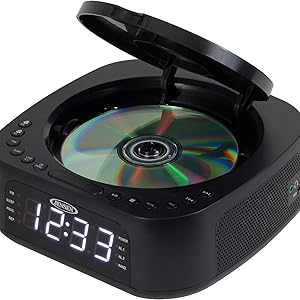
Figure 3.6: Diagram illustrating the compact dimensions of the JCR-375, measuring approximately 7.3 inches in length and width, and 2.8 inches in height.
4. Kontrolli u Indikaturi
Familiarize yourself with the various controls and indicators on your JCR-375 unit:
- Wiri LED: Shows time, alarm settings, FM frequency, and CD track information.
- Buttuna SNOOZE: Jissikket l-allarm temporanjament għal perjodu qasir.
- Buttuna POWER: Ixgħel jew jitfi l-unità.
- Buttuna SET TAL-ĦIN: Użat biex tissettja l-ħin kurrenti.
- ALARM 1 / ALARM 2 Buttons: Used to set and activate individual alarms.
- Buttuna DIMMER: Jaġġusta l-luminożità tad-displej LED.
- Buttuna SLEEP: Jattiva l-funzjoni tat-tajmer tal-irqad.
- CD/FM/AUX Function Button: Selects the desired audio source (CD, FM radio, Auxiliary input).
- TUNING / SKIP Buttons (<< / >>):
- In FM mode: Tunes the radio frequency.
- In CD mode: Skips to the previous or next track.
- Buttuna PLAY/PAUSE: Jibda jew iwaqqaf id-daqq tas-CD.
- Buttuna STOP: Twaqqaf il-qari tas-CD.
- Buttuna PROG (Programm): Used for programming CD tracks or FM presets.
- Buttuna MODE: Changes playback modes (e.g., repeat, random for CD).
- Kontroll tal-VOLUM: Jaġġusta l-livell tal-ħruġ tal-awdjo.
- Port tal-Iċċarġjar tal-USB: (Located on the side) For charging external devices.
- Jack AUX-IN: (Located on the side) For connecting external audio sources.
- Jack tal-headphone: (Located on the side) For private listening.
5. Setup
5.1 Konnessjoni tal-Enerġija
- Unpack the JCR-375 unit and place it on a stable, flat surface.
- Qabbad il-korda tal-enerġija AC mal-jack AC IN fuq wara tal-unità.
- Ipplaggja t-tarf l-ieħor tal-korda tal-enerġija AC ma' sokit standard tal-ħajt ta' 120V AC.
- The unit will power on and the display will illuminate.
5.2 Installazzjoni ta' Backup tal-Batterija
The JCR-375 requires 2 'A' batteries (not included) for battery backup. This feature ensures that clock and alarm settings are retained during a power outage.
- Sib il-kompartiment tal-batterija fil-qiegħ tal-unità.
- Iftaħ l-għatu tal-kompartiment tal-batterija.
- Insert 2 'A' batteries, observing the correct polarity (+ and -) as indicated inside the compartment.
- Agħlaq l-għatu tal-kompartiment tal-batterija sew.
Note: Battery backup only maintains clock and alarm settings; the unit will not operate during a power outage without AC power.
6. Istruzzjonijiet Operattivi
6.1 Issettjar tal-Arloġġ
- Agħfas u żomm il- IL-ĦIN IPPOST buttuna. Iċ-ċifri tas-siegħa se jteptep.
- Agħfas il- TUNING / SKIP (<< or >>) buttons to adjust the hour. Observe the PM indicator for correct AM/PM setting.
- Agħfas il- IL-ĦIN IPPOST Agħfas il-buttuna mill-ġdid. Iċ-ċifri tal-minuti jibdew jteptep.
- Agħfas il- TUNING / SKIP (<< or >>) buttuni biex jaġġustaw il-minuti.
- Agħfas il- IL-ĦIN IPPOST Agħfas il-buttuna għal darb'oħra biex tikkonferma u toħroġ mill-modalità tal-issettjar tal-ħin.
6.2 Setting the Alarms (Alarm 1 / Alarm 2)
The JCR-375 features two independent alarms.
- Agħfas u żomm il- ALLARM 1 or ALLARM 2 buttuna. Iċ-ċifri tas-siegħa tal-allarm se jteptep.
- Agħfas il- TUNING / SKIP (<< or >>) buttuni biex taġġusta s-siegħa tal-allarm.
- Press the selected ALLARM Agħfas il-buttuna mill-ġdid. Iċ-ċifri tal-minuti tal-allarm jibdew jteptep.
- Agħfas il- TUNING / SKIP (<< or >>) buttuni biex taġġusta l-minuti tal-allarm.
- Press the selected ALLARM button again to select the wake source (CD, FM, or Buzzer). The corresponding indicator will light up.
- Press the selected ALLARM Agħfas il-buttuna darba oħra biex tikkonferma u toħroġ mill-modalità tas-settings tal-allarm.
To activate/deactivate an alarm, briefly press the corresponding ALLARM button. The alarm indicator (AL.1 or AL.2) on the display will show its status.
6.3 Tħaddim tas-CD Player
- Open the CD compartment lid on top of the unit.
- Place a CD (audio CD, MP3 CD, CD-R/RW) onto the spindle with the label side facing up.
- Agħlaq l-għatu tal-kompartiment tas-CD.
- Agħfas il- CD/FM/AUX Function Agħfas il-buttuna ripetutament sakemm tintgħażel "CD".
- Agħfas il- DĦABBA/PAWŻA buttuna biex tibda daqq.
- Uża l- TUNING / SKIP (<< or >>) buttons to skip tracks. Press and hold to fast forward/rewind within a track.
- Agħfas il- STOP buttuna biex twaqqaf il-plejbek.
- Agħfas il- MODALITÀ button to cycle through repeat modes (Repeat 1, Repeat All, Random).
- To program tracks: While in STOP mode, press PROGRAMM. Select desired track with TUNING / SKIP, imbagħad agħfas PROGRAMM again to add. Repeat for up to 20 tracks. Press DĦABBA/PAWŻA to play programmed sequence.
6.4 Tħaddim tar-Radju FM
- Agħfas il- CD/FM/AUX Function button repeatedly until "FM" is selected.
- Agħfas il- TUNING / SKIP (<< or >>) buttons to manually tune to a desired station.
- Biex tiskennja awtomatikament għall-istazzjonijiet, agħfas u żomm il-buttuna TUNING / SKIP (<< or >>) buttons. The radio will stop at the next strong station.
- To preset stations: Tune to the desired station, then press and hold the PROGRAMM button until the preset number flashes. Use TUNING / SKIP to select a preset number (P01-P20), then press PROGRAMM mill-ġdid biex issalva.
- To recall presets: Briefly press the PROGRAMM buttuna biex tiċċaqlaq bejn l-istazzjonijiet salvati.
6.5 L-Użu tal-Input Awżiljarju
- Connect one end of a 3.5mm audio cable (not included) to the AUX-IN jack on the side of the JCR-375.
- Qabbad it-tarf l-ieħor tal-kejbil mal-jack tal-headphones jew mal-output tal-awdjo tal-apparat awdjo estern tiegħek (eż., smartphone, MP3 player).
- Agħfas il- CD/FM/AUX Function button repeatedly until "AUX" is selected.
- Ibda daqq fuq it-tagħmir awdjo estern tiegħek.
- Adjust the volume using the volume control on the JCR-375 and/or your external device.
6.6 Iċċarġjar USB
The JCR-375 features a 2.1-amp USB charging port for convenient charging of your mobile devices.
- Connect your device's USB charging cable (not included) to the USB port on the side of the JCR-375.
- Connect the other end of the cable to your smartphone or other compatible USB-powered device.
- L-iċċarġjar se jibda awtomatikament.
Note: This port is for charging only and does not support data transfer or audio playback from USB drives.
6.7 Sleep and Snooze Functions
- Timer ta 'l-Irqad: Agħfas il- L-IRQAD button repeatedly to set a sleep timer (e.g., 90, 60, 30, 15 minutes, OFF). The unit will automatically turn off after the selected time.
- Tnaqqis Meta tinstema' allarm, agħfas il-buttuna SNOOZE buttuna biex isikket temporanjament l-allarm għal madwar 9 minuti. L-allarm jerġa' jdoqq wara l-perjodu ta' snooze.
- Twaqqaf l-Allarm: To turn off a sounding alarm completely until the next day, press the QAWWA buttuna.
7. Manutenzjoni
7.1 Tindif tal-Unità
- Disconnect the unit from the power source before cleaning.
- Uża artab, damp drapp biex timsaħ l-uċuħ ta’ barra. Tużax prodotti tat-tindif jew solventi li joborxu.
- For the CD lens, use a specialized CD lens cleaner disc or a soft, lint-free cloth specifically designed for optical lenses.
7.2 Sostituzzjoni tal-batterija
Replace the backup batteries when the clock display starts to flicker or if the time is lost frequently during minor power interruptions. Refer to Section 5.2 for installation instructions.
8 Issolvi l-problemi
| Problema | Kawża Possibbli | Soluzzjoni |
|---|---|---|
| L-unità ma tixgħelx. | Il-korda tal-enerġija mhux imdaħħla sew. | Ensure the AC power cord is firmly connected to the unit and the wall outlet. |
| Is-CD ma jdoqqx jew jaqbeż. | Is-CD huwa maħmuġ, mibrux, jew imdaħħal ħażin. | Clean the CD with a soft cloth. Check for scratches. Ensure the CD is placed correctly with the label side up. |
| Riċeviment fqir tal-FM. | L-antenna mhux estiża jew pożizzjonata b'mod korrett. | Extend the FM wire antenna fully and adjust its position for better reception. |
| L-allarm ma jdoqqx. | Alarm not set or deactivated. Volume too low. | Verify alarm time and ensure the alarm indicator (AL.1/AL.2) is lit. Increase the volume. |
| Clock loses time during power outage. | Il-batteriji tal-backup huma mejta jew mhux installati. | Install new 'A' batteries or replace existing ones. |
| L-iċċarġjar tal-USB mhux qed jaħdem. | Apparat mhux kompatibbli jew kejbil difettuż. | Kun żgur li t-tagħmir tiegħek huwa kompatibbli mal-iċċarġjar bil-USB. Ipprova kejbil USB differenti. |
9. Speċifikazzjonijiet
| Karatteristika | Dettall |
|---|---|
| Numru tal-Mudell | JCR-375 |
| Sors tal-Enerġija | 120V AC |
| Backup tal-batterija | 2 x 'A' batteries (not included) |
| Wiri | LED abjad ta' 0.9 pulzieri |
| Output tal-Iċċarġjar tal-USB | 2.1 Amp |
| Konnettività | Auxiliary Input (3.5mm), Headphone Output (3.5mm) |
| Dimensjonijiet tal-Prodott (L x W x H) | 7.32 x 1.5 x 7.32 pulzieri (madwar) |
| Piż tal-oġġett | 1.7 liri |
| Manifattur | Jensen |
10. Garanzija u Appoġġ
Dan il-prodott huwa kopert minn a Garanzija limitata ta 'sena valid in the USA only. For warranty service or technical support, please contact Jensen customer service.
For further assistance, please visit the official Jensen webis-sit jew irreferi għall-informazzjoni ta' kuntatt ipprovduta max-xiri tiegħek.
Twissija tal-Proposta 65: Dan il-prodott jista' jkun fih kimiċi magħrufa mill-Istat ta' California li jikkawżaw kanċer u difetti fit-twelid jew ħsara riproduttiva oħra.


