1. Introduzzjoni
This manual provides detailed instructions for the setup, operation, and maintenance of your DreamSky DS2201 Wooden Digital Alarm Clock. Designed for bedrooms, this electric desk clock features large, easy-to-read numbers, a convenient USB charging port, and adjustable settings for alarm volume and display brightness. Please read this manual thoroughly to ensure proper use and to maximize the functionality of your device.
2. Karatteristiċi ewlenin
- Wirja Diġitali Kbira: Features 1.8-inch large numbers for clear visibility from a distance.
- Luminożità aġġustabbli: Offers 5 levels of display brightness, including an 'OFF' option, to suit various lighting conditions.
- Backup tal-batterija: Requires 2 AAA alkaline batteries (not included) to maintain alarm function during power outages. The display will not illuminate when operating on battery power alone.
- Customizable Alarm: Provides 5 levels of adjustable alarm volume, suitable for both light and heavy sleepers. The alarm sounds for 2 minutes.
- Funzjoni Snooze: A dedicated snooze button on the top allows for an additional 9 minutes of sleep.
- Port tal-Iċċarġjar tal-USB: Includes a convenient USB port for charging smart devices and other gadgets.
- Ħin tas-Sajf (DST): Equipped with a manual DST button for easy time adjustments.
- Wood Décor Design: A sleek wooden finish integrates well with various room aesthetics.
3. Kontenut tal-Pakkett
Meta tiftaħ il-pakkett, jekk jogħġbok kun żgur li l-oġġetti kollha elenkati hawn taħt huma preżenti u f'kundizzjoni tajba:
- DreamSky DS2201 Arloġġ ta 'allarm diġitali ta' l-injam
- Adapter tal-Enerġija 5V/1A
- Manwal għall-Utent (dan id-dokument)

Figure 3.1: Package contents including the alarm clock, power adapter, and user manual.
4. Setup
4.1 Konnessjoni tal-Enerġija
- Connect the provided 5V/1A power adapter to the DC 5V port on the back of the alarm clock.
- Plug the power adapter into a standard electrical outlet. The clock display will illuminate.

Figure 4.1: Powering the clock and using the USB charging port.
4.2 Battery Installation (Backup)
For alarm backup during power outages, install 2 AAA alkaline batteries (not included) into the battery compartment on the back of the clock. The display will not be active when running on battery power alone; only the alarm function is maintained.
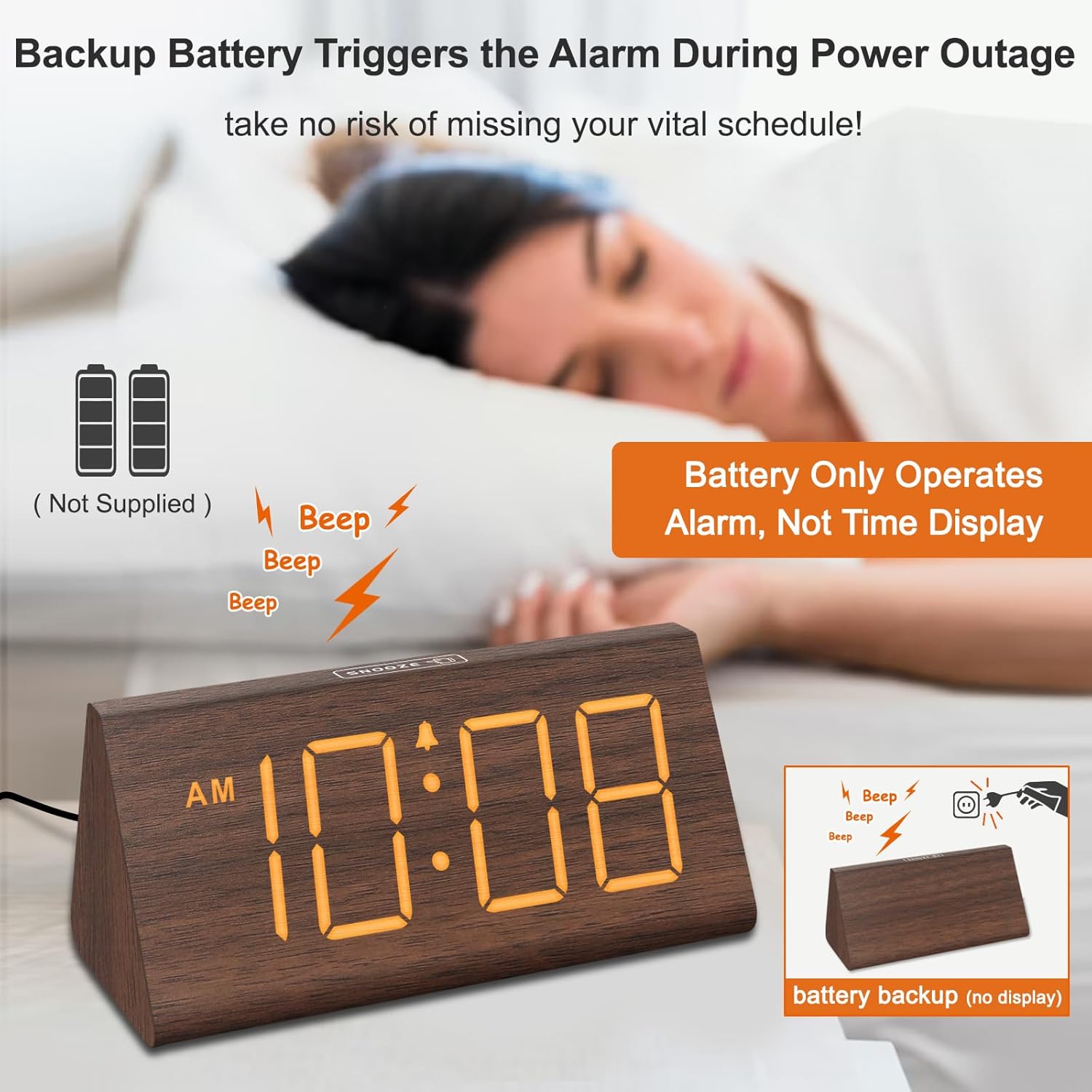
Figure 4.2: Battery compartment for alarm backup.
5. Istruzzjonijiet Operattivi
5.1 L-issettjar tal-ħin
- Agħfas il- IL-ĦIN IPPOST il-buttuna fuq wara tal-arloġġ. Iċ-ċifri tas-sigħat jibdew jteptep.
- Uża l- + u - buttuni biex taġġusta s-siegħa.
- Agħfas IL-ĦIN IPPOST Agħfas mill-ġdid biex tissettja l-minuti. Iċ-ċifri tal-minuti jibdew jteptep.
- Uża l- + u - buttuni biex jaġġustaw il-minuti.
- Agħfas IL-ĦIN IPPOST għat-tielet darba biex tikkonferma u toħroġ mill-modalità tal-issettjar tal-ħin.
- Biex taqleb bejn il-format ta' 12-il siegħa u ta' 24 siegħa, agħfas il-buttuna 12/24HR buttuna.
5.2 L-issettjar tal-allarm
- Agħfas il- SET TA 'ALLARM buttuna. Iċ-ċifri tas-siegħa tal-allarm se jteptep.
- Uża l- + u - buttuni biex taġġusta s-siegħa tal-allarm.
- Agħfas SET TA 'ALLARM Agħfas mill-ġdid biex tissettja l-minuti tal-allarm. Iċ-ċifri tal-minuti se jteptpu.
- Uża l- + u - buttuni biex taġġusta l-minuti tal-allarm.
- Agħfas SET TA 'ALLARM għat-tielet darba biex tikkonferma u toħroġ mill-modalità tal-issettjar tal-allarm.
- To turn the alarm ON or OFF, press the ON/OFF buttuna. Ikona ta' allarm tidher fuq id-displej meta l-allarm ikun attiv.
5.3 Funzjoni Snooze
Meta l-allarm jinstema ', agħfas il-buttuna SNOOZE button located on the top of the clock to temporarily silence the alarm for 9 minutes. The alarm will sound again after 9 minutes. To turn off the alarm for the day, press any button on the back of the clock.

Figure 5.1: Snooze button and alarm volume control.
5.4 Aġġustament tal-luminożità
Agħfas il- DIMMER button on the back of the clock to cycle through 5 levels of brightness (L01 to L05) and an 'OFF' option for the display.

Figure 5.2: Display brightness levels.
5.5 Aġġustament tal-Volum
Uża l- VOL+ u VOL- buttons on the back of the clock to adjust the alarm volume across 5 available levels.
5.6 Ħin tas-Sajf (DST)
To activate or deactivate Daylight Saving Time, press the DST ON / OFF button. When activated, the time will advance by one hour, and 'DST' will appear on the display. Press again to revert to standard time.
5.7 Port tal-Iċċarġjar tal-USB
The USB port on the back of the clock can be used to charge compatible smart devices. Simply connect your device's USB charging cable to the port.
6. Manutenzjoni
- Clean the clock's surface with a soft, dry cloth.
- Evita li tuża prodotti tat-tindif li joborxu, solventi, jew kimiċi ħarxa, għax dawn jistgħu jagħmlu ħsara lill-finitura.
- Żomm l-arloġġ 'il bogħod mix-xemx diretta, temperaturi estremi, u umdità għolja.
7 Issolvi l-problemi
| Problema | Kawża Possibbli | Soluzzjoni |
|---|---|---|
| Id-displej huwa mitfi jew mudlam. | Power adapter not connected; brightness set to OFF or lowest level; running on battery backup. | Ensure the power adapter is securely plugged in. Press the DIMMER button to adjust brightness. Remember, the display does not light up when on battery backup. |
| L-allarm ma jdoqqx. | Alarm is not activated; alarm volume is too low. | Agħfas il- ON/OFF button to activate the alarm (check for alarm icon on display). Adjust volume using VOL+. |
| Il-ħin mhux korrett. | Time not set correctly; DST setting incorrect. | Follow instructions in section 5.1 to set the time. Check DST setting using the DST ON / OFF buttuna. |
| L-iċċarġjar tal-USB mhux qed jaħdem. | Device not compatible; cable faulty; clock not powered. | Ensure your device is compatible with USB charging. Try a different USB cable. Verify the clock is connected to AC power. |
8. Speċifikazzjonijiet
- Ditta: DreamSky
- Mudell: DS2201
- Tip ta' wiri: Diġitali
- Sors tal-Enerġija: Corded Elettriku
- Dimensjonijiet tal-Prodott: 5.96"W x 2.7"Għ
- Materjal: Injam
- Piż tal-oġġett: 11.1 uqija
- Batteriji: 2 AAA batteries required (not included, for alarm backup only)
- Konnettività: USB
9. Garanzija u Appoġġ
Your DreamSky DS2201 Wooden Digital Alarm Clock comes with a Garanzija ta 'sostituzzjoni ta' sena.
Għal appoġġ għall-klijenti jew mistoqsijiet, jekk jogħġbok ikkuntattja:
Email: info@dreamsky4u.com


