1. Prodott Aktarview
L-Ourlife 4K Action Camera is designed for capturing high-quality video and photos in various environments, including underwater. It features 4K video recording, 16MP photos, Wi-Fi connectivity, and a durable waterproof casing.

Figure 1: Key Features of the Ourlife 4K Action Camera.
- Qbid b'Riżoluzzjoni Għolja: Records 4K/30FPS, 2.7K/30FPS, and 1080P/30FPS video, and captures 16MP still images.
- Aġġustabbli View Angolu: Offers 170°, 140°, 110°, and 70° field of view għażliet.
- Konnettività Wireless: Built-in Wi-Fi for connecting to the XDV App on your smartphone or tablet, allowing for remote control and media sharing.
- Kapaċità li ma jgħaddix ilma minnha: Submersible up to 40 meters (131 feet) with the included waterproof case.
- Skrin IPS ta' 2 pulzieri: Provides a clear display for previewing footage and navigating menus.
- Funzjonijiet versatili: Includes 4X zoom, time-lapse, loop recording, slow motion, and anti-shake features.
2. X'hemm fil-Kaxxa
Your Ourlife 4K Action Camera package includes the following components:

Figure 2: Complete set of accessories.
- 1x Ourlife 4K Action Camera
- 1x Kawża li ma jgħaddix ilma minnha
- 3x 1350mAh Rechargeable Batteries
- 1x Protective Door
- 1x Black Frame
- 2x Flat Adhesive Pads with Screw
- 1x Muntatura tar-Roti
- 1x J-hook Mount
- 1x Stand tal-Iċċarġjar
- 1x Increase Mount
- 1x Clip
- 1x Long Thumbscrew
- 1x Short Thumbscrew
- 1x Crowbar (for opening battery/SD card slot)
- 1x Extension Mount
- 1x 360° Rotating Screw
- 1x Cable USB Micro
- 1x Insurance Tether Strap
- 2x Release Buckles
- 1x Mirror Cloth
- Ċinga tal-polz 2x
- 2x Bandage
- 1x Kontroll mill-bogħod
- Pads li jwaħħlu 2x
3. Nibdew
3.1 Installazzjoni u Iċċarġjar tal-Batterija
To install a battery, gently open the battery compartment cover, often located at the bottom or side of the camera. A small crowbar tool might be provided to assist in opening tight covers. Insert a charged battery with the correct orientation.

Figure 3: Opening the battery compartment.
Before first use, fully charge the included batteries. Insert the batteries into the charging stand and connect the stand to a USB power source using the Micro USB cable. The indicator light on the charger will show charging status.
3.2 Daħħal Micro SD Card
A Micro SD card (not included, Class 10 or higher recommended, up to 64GB) is required for recording. Locate the Micro SD card slot on the side of the camera. Gently insert the card with the gold contacts facing the back of the camera until it clicks into place.

Figure 4: Inserting the Micro SD Card.
Importanti: Format the Micro SD card in the camera's settings menu before initial use to ensure proper functionality and avoid data corruption.
3.3 Using the Waterproof Case
For underwater activities or protection against dust and impact, place the camera inside the waterproof case. Ensure the case is securely latched and the rubber seal is clean and free of debris before submerging.

Figure 5: Camera in waterproof case during underwater use.
4. Operazzjoni Bażika
4.1 Tixgħel/Jitfi
- To power on, press and hold the Power/Mode button on the front of the camera until the screen illuminates.
- To power off, press and hold the Power/Mode button again until the screen turns off.
4.2 Modi ta' Qlib
Press the Power/Mode button repeatedly to cycle through different modes: Video Recording, Photo Mode, Playback Mode, and Settings Mode. The current mode icon will be displayed on the screen.
4.3 Recording Videos and Taking Photos
- In Video Recording mode, press the OK button (top button) to start recording. Press it again to stop.
- In Photo Mode, press the OK button to take a photo.
4.4 Wi-Fi Connection and XDV App
The camera features built-in Wi-Fi for remote control and file transfer via the XDV app. Download the XDV app from your smartphone's app store.
- Turn on the camera's Wi-Fi: In Video or Photo mode, press the Up button (side button) to activate Wi-Fi. The Wi-Fi icon will appear on the screen.
- On your smartphone, go to Wi-Fi settings and connect to the camera's Wi-Fi network (e.g., "Ourlife_XXXXXX"). The default password is "1234567890".
- Open the XDV app. You can now control the camera, preview footage, and download files għat-tagħmir tiegħek.
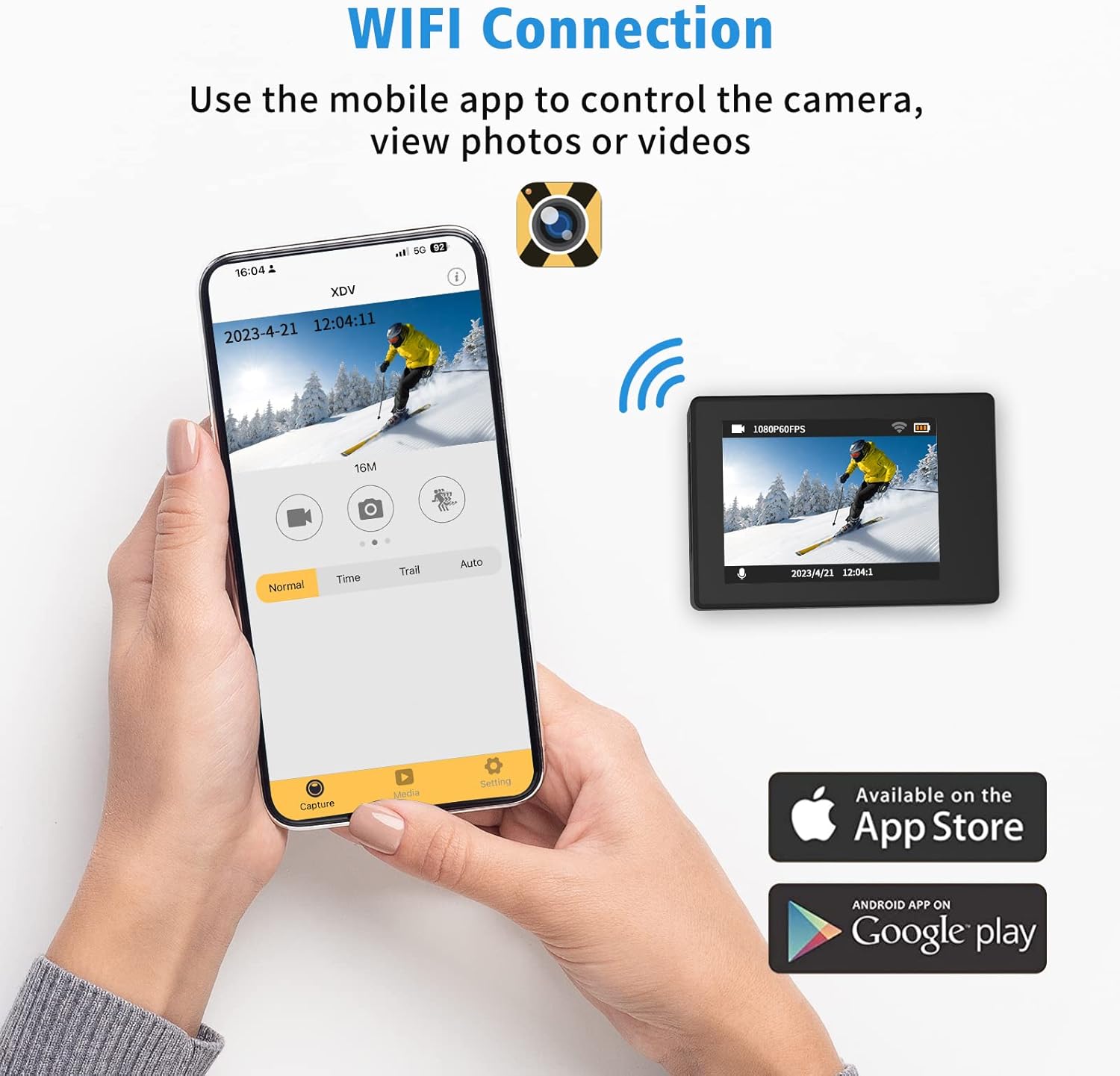
Figure 6: Connecting to the XDV App via Wi-Fi.
4.5 L-użu tal-Kontroll mill-bogħod
The included wrist remote control allows for convenient photo and video capture from a distance.
- Ensure the remote control battery is installed.
- Press the video button on the remote to start/stop video recording.
- Press the photo button on the remote to take a photo.
5. Manutenzjoni u Kura
- Tindif: Use the provided mirror cloth or a soft, lint-free cloth to clean the camera lens and screen. For the waterproof case, rinse with fresh water after saltwater use and allow to air dry.
- Kura tal-batterija: Store batteries in a cool, dry place. Do not expose to extreme temperatures. Recharge regularly, even if not in use, to maintain battery health.
- Ħażna: When not in use, store the camera and accessories in a protective case to prevent damage.
- Waterproof Case Seal: Regularly inspect the rubber seal of the waterproof case for any dirt, hair, or damage. A compromised seal can lead to water leakage.
6 Issolvi l-problemi
| Problema | Kawża Possibbli | Soluzzjoni |
|---|---|---|
| Il-kamera ma tixgħelx. | Batterija baxxa jew xejn ċarġ. | Ensure batteries are fully charged. Try a different charged battery. |
| Cannot record or take photos. | L-ebda kard Micro SD, il-kard hija mimlija, jew żball fil-kard. | Daħħal kard Micro SD. Ħassar il-messaġġi mhux meħtieġa. files or replace the card. Format the card in camera settings. |
| Il-konnessjoni tal-Wi-Fi tfalli. | Incorrect password, out of range, or app issue. | Ensure correct password (1234567890). Move closer to the camera. Restart camera and app. |
| Kwalità fqira tal-immaġni/vidjow. | Lens dirty, low light, or incorrect settings. | Clean the lens. Ensure adequate lighting. Check resolution settings (e.g., 4K, 16MP). |
| Water leakage in waterproof case. | Seal compromised or case not properly closed. | Inspect the rubber seal for debris or damage. Ensure all latches are securely fastened. |
7. Speċifikazzjonijiet
| Karatteristika | Dettall |
|---|---|
| Brand | Ourlife |
| Numru tal-Mudell | AT-30R |
| Riżoluzzjoni tal-vidjo | 4K/30FPS, 2.7K/30FPS, 1080P/30FPS |
| Riżoluzzjoni tar-Ritratti | 16MP |
| Fond li ma jgħaddix ilma minnu | Up to 40 meters (131 feet) with case |
| Daqs tal-Iskrin | 2 Pulzier IPS |
| View Angolu | 170°, 140°, 110°, 70° (Adjustable) |
| Konnettività | Wi-Fi |
| Ħażna | Micro SD (up to 64GB, Class 10+) |
| Batteriji | 3x 1350mAh Lithium Ion (included) |
| Karatteristiċi Speċjali | 4X Zoom, Time-lapse, Loop Recording, Slow Motion, Anti-shake |
8. Garanzija u Appoġġ
Ourlife products are manufactured to high quality standards. For warranty information, technical support, or service inquiries, please refer to the contact information provided on the product packaging or visit the official Ourlife websit.
Jekk jogħġbok żomm il-prova tax-xiri tiegħek għal kwalunkwe talba ta' garanzija.


