Introduzzjoni
This manual provides essential information for the proper setup, operation, and maintenance of your ONN 55-Inch Series 1 Class 4K Smart TV. Please read this manual thoroughly before using your television and retain it for future reference. This television offers a 4K (2160p) resolution display, smart TV functionalities with access to various streaming services, and compatibility with Alexa and Google Assistant.
Informazzjoni dwar is-Sigurtà
Istruzzjonijiet Importanti dwar is-Sigurtà:
- Timblokkax il-fetħiet tal-ventilazzjoni. Installa skont l-istruzzjonijiet tal-manifattur.
- Tinstallax ħdejn xi sorsi tas-sħana bħal radjaturi, reġistri tas-sħana, stufi, jew apparat ieħor (inkluż amplifiers) li jipproduċu sħana.
- Ipproteġi l-korda tad-dawl milli timxi fuqha jew maqrusa, partikolarment fil-plakek, ir-reċipjenti tal-konvenjenza, u l-punt fejn joħorġu mill-apparat.
- Uża biss aċċessorji/aċċessorji speċifikati mill-manifattur.
- Aqla’ dan l-apparat waqt maltempati tas-sajjetti jew meta ma jintużax għal perjodi twal ta’ żmien.
- Irreferi l-manutenzjoni kollha lil persunal tas-servizz kwalifikat. Is-servizz huwa meħtieġ meta l-apparat ikun ġie bil-ħsara b'xi mod, bħal korda tal-provvista tal-enerġija jew plagg ikun bil-ħsara, likwidu jkun inxtered jew oġġetti jkunu waqgħu fl-apparat, l-apparat ikun ġie espost għax-xita jew umdità, ma jaħdimx b'mod normali , jew twaqqgħet.
X'hemm fil-Kaxxa
Meta tiftaħ il-pakkett, kun żgur li l-oġġetti kollha huma preżenti:
- ONN 55-Inch Series 1 Class 4K Smart TV
- Kontroll mill-bogħod (bil-batteriji)
- Stands tat-TV (2)
- Viti għal Stands tat-TV
- Korda tal-Enerġija
- Gwida Quick Start
Note: Speakers are integrated into the television unit.
Setup
1. Twaħħil tal-Istands tat-TV
Carefully place the TV screen-down on a soft, clean surface to prevent damage. Align each stand with the corresponding screw holes on the bottom of the TV. Secure the stands using the provided screws.

Immaġni: Quddiem view of the ONN 55-Inch 4K Smart TV with its stands properly attached, displaying a vibrant screen. This illustrates the TV's appearance after stand installation.
2. Immuntar mal-Ħajt (Mhux obbligatorju)
If you choose to wall mount your TV, ensure you use a VESA-compatible wall mount kit (sold separately) that supports the TV's weight and size. Follow the instructions provided with your wall mount kit. Do not attempt to wall mount the TV with the stands attached.
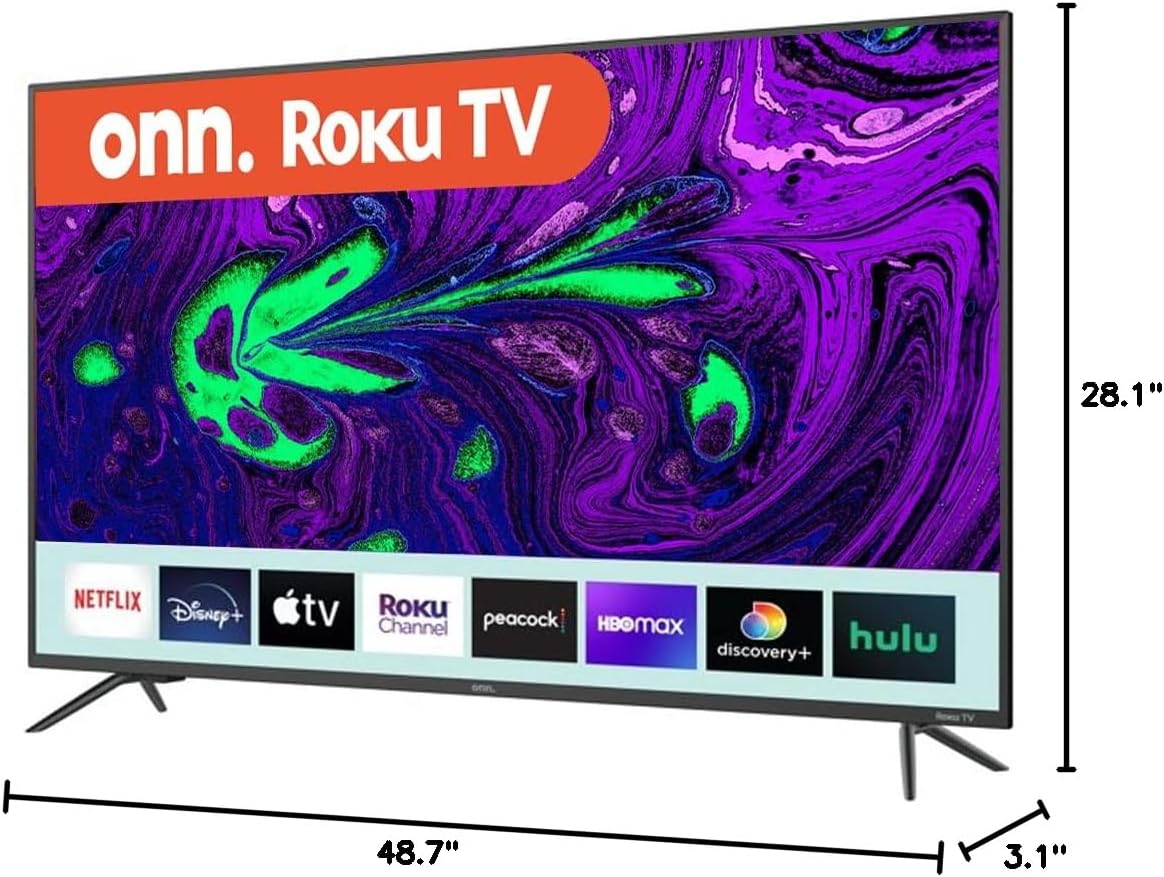
Image: Diagram showing the dimensions of the ONN 55-Inch 4K Smart TV, including width (48.7 inches), height (28.1 inches), and depth (3.1 inches). This is crucial for planning installation space or selecting a compatible wall mount.
3. Konnessjoni Periferali
Connect your external devices (e.g., cable box, Blu-ray player, gaming console) to the appropriate ports on the back or side of the TV. Refer to the 'Connections' section for port details.
4. Tixgħel u Setup Inizjali
- Ipplaggja l-korda tal-enerġija fit-TV u mbagħad f'sokit tal-ħajt.
- Agħfas il-buttuna tal-qawwa fuq il-kontroll remot jew fuq it-TV innifsu.
- Follow the on-screen instructions to select your language, connect to your Wi-Fi network, and complete the initial setup process. This includes channel scanning (if using an antenna) and linking your smart TV account.
It-Tħaddim tat-TV Tiegħek
Kontrolli Bażiċi
- Qawwa: Press the power button on the remote or TV to turn the TV on or off.
- Volum: Use the 'Volume Up' and 'Volume Down' buttons on the remote.
- Kanali: Use the 'Channel Up' and 'Channel Down' buttons for broadcast TV.
- Input: Press the 'Input' button to switch between connected devices (HDMI 1, HDMI 2, USB, etc.).
Karatteristiċi tat-TV Smart
Your ONN Smart TV provides instant access to a selection of apps from top streaming services. Navigate through the smart TV interface using your remote control. You can customize your home screen by adding or removing apps.
Kompatibilità tal-Assistent tal-Vuċi
This TV is compatible with Alexa and Google Assistant. Once configured, you can use voice commands to control various TV functions such as power, volume, channel changes, and app launching. Refer to the respective voice assistant's setup guide for integration instructions.
Kontroll tal-App mobbli
A mobile app is available for controlling your ONN Smart TV. This app can be used as an alternative remote control, offering features like channel browsing and voice control directly from your smartphone.
Konnessjonijiet
The ONN 55-Inch Smart TV offers a variety of connection ports for your entertainment needs:

Immaġni: Wara view of the ONN 55-Inch 4K Smart TV, highlighting the arrangement of various input and output ports. This image helps users identify where to connect their external devices.
| Tip ta 'port | Kwantità | Deskrizzjoni |
|---|---|---|
| HDMI | 3 | Connect high-definition devices like Blu-ray players, game consoles, or cable boxes. |
| USB | 1 | Qabbad apparati tal-ħażna USB għad-daqq tal-midja. |
| Kompost (AV) | 1 | Connect older devices using RCA cables (red, white, yellow). |
| Optical (Digital Audio Out) | 1 | Qabbad ma' soundbar jew sistema ta' home theater għal awdjo diġitali. |
| Coaxial/Cable (RF) | 1 | Qabbad antenna jew kejbil tat-TV. |
| LAN (Ethernet) | 1 | Connect to a wired network for internet access. |
| Headphone | 1 | Qabbad headphones għal smigħ privat. |
Manutenzjoni
Tindif tat-TV
- Dejjem aqla’ t-TV qabel ma tnaddaf.
- Uża drapp artab u niexef biex timsaħ l-iskrin u l-kabinett.
- Għal marki iebsa, ħassar bil-modampLaħlaħ id-drapp bl-ilma jew b'deterġent tal-iskrin ħafif u mhux abrażiv. Qatt ma tisprejjax id-deterġent direttament fuq l-iskrin.
- Evita li tuża prodotti tat-tindif, xama', jew solventi li joborxu għax jistgħu jagħmlu ħsara lill-finitura tat-TV.
Aġġornamenti tas-Software
Your Smart TV may receive periodic software updates to improve performance and add new features. Ensure your TV is connected to the internet to receive these updates automatically. You can also manually check for updates through the TV's settings menu.
Issolvi l-problemi
Jekk tiltaqa' ma' problemi bit-TV tiegħek, irreferi għall-problemi u s-soluzzjonijiet komuni li ġejjin:
| Problema | Soluzzjoni Possibbli |
|---|---|
| Ebda qawwa | Iċċekkja jekk il-korda tal-enerġija hijiex imdaħħla sew kemm fit-TV kif ukoll fis-sokit tal-ħajt. Ittestja s-sokit b'apparat ieħor. |
| L-ebda stampa, iżda l-ħoss huwa preżenti | Kun żgur li s-sors tad-dħul korrett huwa magħżul. Iċċekkja l-konnessjonijiet tal-kejbil kollha ma' apparati esterni. |
| L-ebda ħoss, iżda l-istampa hija preżenti | Iċċekkja l-livell tal-volum u s-settings tal-mute. Ivverifika l-konnessjonijiet tal-kejbil tal-awdjo jekk qed tuża kelliema esterni. |
| Il-kontroll mill-bogħod ma jaħdimx | Ibdel il-batteriji fir-remote. Kun żgur li m'hemm l-ebda ostaklu bejn ir-remote u s-sensor IR tat-TV. |
| Ma tistax tikkonnettja mal-Wi-Fi | Ivverifika l-password tal-Wi-Fi tiegħek. Erġa' ixgħel ir-router u t-TV. Kun żgur li t-TV jinsab fil-firxa tas-sinjal tal-Wi-Fi tiegħek. |
| Il-karatteristiċi intelliġenti huma bil-mod jew ma jirrispondux | Check your internet connection speed. Try restarting the TV. Clear app caches if available in settings. |
Speċifikazzjonijiet
Key technical specifications for the ONN 55-Inch Series 1 Class 4K Smart TV:
| Karatteristika | Speċifikazzjoni |
|---|---|
| Numru tal-Mudell | ONN551E018 |
| Daqs tal-Iskrin | 55 Pulzier (140 ċm djagonali viżibbli) |
| Teknoloġija tal-Wiri | LED |
| Riżoluzzjoni | 4K (2160p) |
| Riffriskar Rata | 60 Hz |
| Proporzjon ta' l-aspett | 16:9 |
| Konnettività | 3 HDMI, 1 USB, 1 Composite, 1 Optical, 1 Coaxial/Cable, 1 LAN, 1 Headphone, Wi-Fi |
| Karatteristiċi Smart | Smart Home Ready - Works with Apple Home, Amazon Alexa, and Google Home |
| Dimensjonijiet tal-Prodott (W x D x H) | 54 x 6 x 33 inches (approximate, with stands) |
| Piż tal-oġġett | 33.2 liri |
| Kulur | Iswed |
| Voltage | 1.1E+2 Volts (AC) |
Informazzjoni dwar Garanzija
This ONN television is covered by a limited warranty. For specific details regarding warranty coverage, duration, and terms, please refer to the warranty card included with your product or visit the official ONN support websit. Żomm il-prova tax-xiri tiegħek għal talbiet ta' garanzija.
Appoġġ
If you require further assistance or have questions not covered in this manual, please contact ONN customer support. Support contact information can typically be found on the manufacturer's webis-sit jew fuq l-imballaġġ tal-prodott.
For online resources, visit the official ONN support page.


