Introduzzjoni
This user manual provides detailed instructions for the installation, operation, and maintenance of your ATEM POWER 20A 12V/24V MPPT Solar Charge Controller. This device is designed to efficiently manage power flow from your solar panels to your battery bank, ensuring optimal charging and battery longevity. It is compatible with various battery types, including Lead Acid, AGM, Gel, Calcium, and LiFePO4 batteries.
Informazzjoni dwar is-Sigurtà
Please read all safety instructions carefully before installation and operation. Failure to follow these instructions may result in damage to the controller, battery, or personal injury.
- Ensure all connections are secure and correct polarity is observed to prevent damage.
- Do not expose the controller to water or excessive moisture.
- Install the controller in a well-ventilated area, away from flammable materials.
- Always disconnect the solar panel and battery before performing any maintenance or wiring changes.
- Use appropriate wire gauges for your system to prevent overheating.
Prodott Overview
The ATEM POWER MPPT Solar Charge Controller is a robust and intelligent device designed for various off-grid applications. It features advanced Maximum Power Point Tracking (MPPT) technology for high efficiency.
Karatteristiċi ewlenin:
- Attivazzjoni tal-Batterija tal-Litju: Capable of activating lithium batteries.
- Effiċjenza Għolja: Up to 99% tracking efficiency and 98% conversion efficiency.
- Greater Compatibility: Supports 12V/24V systems and automatically detects system voltage. Compatible with Lead Acid, AGM, Gel, Calcium, and LiFePO4 batteries.
- Intelligent & Safe: Features multiple protections including reverse polarity, overcurrent, overtemperature, undervoltage, overoltage, u short circuit.
- Disinn Durabbli: Made from strengthened ABS housing and aluminum alloy chassis with heat sinks.
- Faċli għall-utent: Simple screw terminals, multiple LED indicators for system information, and a button for battery type selection.
Komponenti:

Quddiem view of the ATEM POWER 20A 12V/24V MPPT Solar Charge Controller, showing LED indicators, MPPT label, voltage rating, and battery type selection area.

Image showing the retail box, the solar charge controller, and the user manual included in the package.
Setup
Follow these steps for proper installation of your solar charge controller. Always connect the battery first, then the solar panel, and finally the load.
Istruzzjonijiet tal-Wiring:
- Qabbad il-batterija: Connect the positive and negative terminals of your battery to the corresponding battery terminals on the solar charge controller. Ensure correct polarity.
- Qabbad il-Panel Solari: Connect the positive and negative terminals of your solar panel(s) to the corresponding solar input terminals on the controller. Ensure correct polarity.
- Qabbad it-Tagħbija (Mhux obbligatorju): If using a DC load directly from the controller, connect its positive and negative terminals to the load output terminals.

Diagram illustrating the correct wiring sequence: solar panel to controller, controller to battery, and controller to DC load/inverter for AC load.
Importanti: Always connect the battery first and disconnect the solar panel first when disassembling the system.
Istruzzjonijiet Operattivi
Għażla tat-Tip tal-Batterija:
The controller supports various battery types. It is crucial to select the correct battery type for optimal charging and battery health.
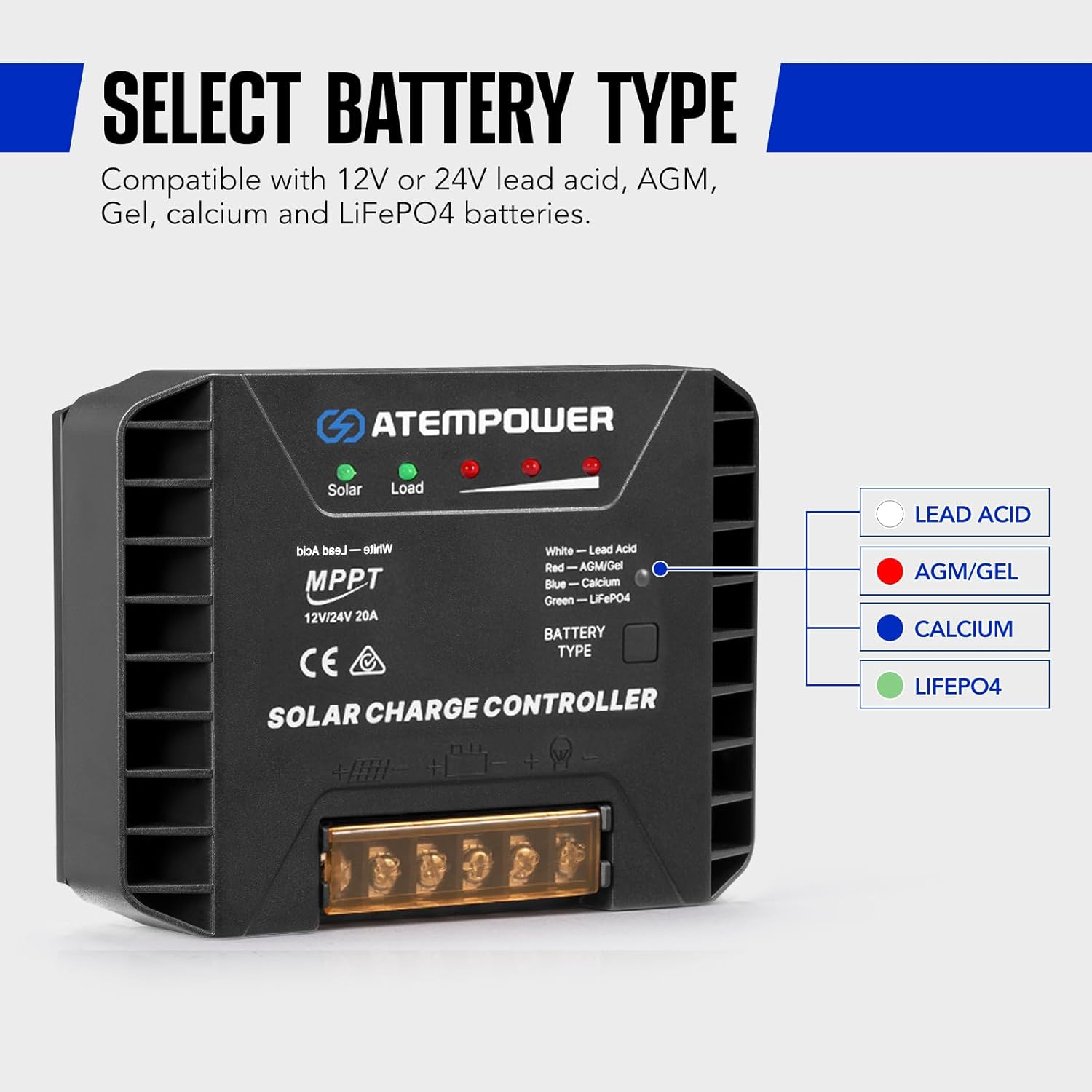
Image showing the battery type indicator lights: White for Lead Acid, Red for AGM/Gel, Blue for Calcium, and Green for LiFePO4.
How to Select Battery Type:
- Pass 1: Keep the battery and the controller connected.
- Pass 2: Long press the battery type button on the controller. Wait for the indicator light to flash.
- Pass 3: While the light is flashing, press the button repeatedly to cycle through the desired battery types (White: Lead Acid, Red: AGM/Gel, Blue: Calcium, Green: LiFePO4). Release the button when the desired battery type's indicator light is selected. The light will remain on, indicating successful selection.

Visual guide demonstrating the three steps for selecting the battery type using the long press method.
Attivazzjoni tal-Batterija tal-Litju:
This controller can activate deeply discharged LiFePO4 batteries.
- Switch on the "lithium battery mode" (by selecting LiFePO4 battery type).
- Connect your battery and solar panel to the controller. The controller will initiate the activation process to bring the battery back to life.

Diagram showing the solar panel and battery connected to the controller, illustrating the lithium battery activation feature.
Nifhmu l-Indikaturi LED:
The controller features multiple LED indicators to display system operation information.

Image highlighting the locations of the Solar Panel, Load, Battery Capacity, and Battery Type indicators, along with the Battery Type Selector button and USB output ports.
- Solar LED: Indicates solar panel activity and charging status.
- Load LED: Indicates the status of the connected DC load.
- Battery Capacity LEDs: A series of LEDs indicating the current battery charge level.
- LED tat-tip tal-batterija: Indicates the currently selected battery type (White, Red, Blue, Green).
Manutenzjoni
Manutenzjoni regolari tiżgura l-lonġevità u l-prestazzjoni ottimali tal-kontrollur tal-iċċarġjar solari tiegħek.
- Tindif: Naddaf il-barra tal-kontrollur perjodikament b'ċarruta niexfa biex tneħħi t-trab u l-fdalijiet. Kun żgur li l-fetħiet tal-ventilazzjoni huma ċari.
- Konnessjonijiet: Annually check all wiring connections for tightness and corrosion. Loose connections can cause overheating and poor performance.
- Ambjent: Ensure the installation environment remains within the specified operating temperature range and is free from excessive moisture or direct sunlight.
Issolvi l-problemi
Jekk tiltaqa' ma' problemi bil-kontrollur tiegħek, irreferi għall-problemi u s-soluzzjonijiet komuni li ġejjin:
| Problema | Kawża Possibbli | Soluzzjoni |
|---|---|---|
| L-ebda ċċarġjar minn pannell solari | No solar input; reversed polarity; faulty panel/wiring. | Check solar panel connections and polarity. Ensure sufficient sunlight. Test panel voltage. |
| Il-batterija ma tiċċarġjax kompletament | Incorrect battery type selected; insufficient solar input; battery issues. | Verify correct battery type selection. Increase solar panel capacity or improve sun exposure. Check battery health. |
| It-tagħbija mhux qed taħdem | Tagħbija żejda; short circuit; vultaġġ baxx tal-batterijatage; faulty load. | Reduce load. Check for short circuits. Ensure battery is adequately charged. Test the load device. |
| Controller LEDs not lit | No power from battery; reversed battery polarity. | Check battery connections and ensure battery has sufficient voltage. Correct polarity if reversed. |
If the problem persists after attempting these solutions, please contact ATEM POWER customer support.
Speċifikazzjonijiet
| Karatteristika | Speċifikazzjoni |
|---|---|
| Numru tal-Mudell | AP-MPPT-20A-LFP-UFA |
| Brand | QAWWA ATEM |
| Tip ta 'Wiri | LED |
| Voltage | 12V/24V (Auto Recognition) |
| Max. Iċċarġjar Kurrent | 20A |
| Materjal | Strengthened ABS, Aluminum Alloy |
| Kulur | Iswed |
| Piż tal-oġġett | 14.8 uqija (0.42 Kilogrammi) |
| Dimensjonijiet tal-Pakkett | 9.25 x 7.28 x 2.09 pulzieri |
| Komponenti Inklużi | Kontrollur Solari |
Garanzija
This ATEM POWER Solar Charge Controller comes with a 1-year warranty from the date of purchase. This warranty covers defects in materials and workmanship under normal use. It does not cover damage caused by misuse, accident, unauthorized modification, or improper installation.
Jekk jogħġbok żomm il-prova tax-xiri tiegħek għal pretensjonijiet ta' garanzija.
Appoġġ
For technical assistance, warranty claims, or further inquiries, please contact ATEM POWER customer support. Refer to the contact information provided with your product packaging or visit the official ATEM POWER websit għal dettalji ta 'appoġġ.
We are committed to providing excellent customer care and support for your ATEM POWER products.


