1. Introduzzjoni
Thank you for choosing the Bushnell CORE 4KS 30MP No Glow Trail Camera. This manual provides detailed instructions for setting up, operating, and maintaining your camera to ensure optimal performance in capturing wildlife images and videos. The CORE 4KS features 4K video recording, 30 MP photos, a 0.2-second trigger speed, and a 1.5-inch color LCD screen, all designed for reliable outdoor surveillance.
2. Kontenut tal-Pakkett
- Bushnell CORE 4KS Trail Camera
- Manwal għall-Utent (dan id-dokument)
- Ċinga tal-Immuntar
3. Setup
3.1. Installazzjoni tal-batterija
The camera requires six (6) AA batteries for operation. For best performance and battery life, we recommend using high-quality alkaline or lithium batteries. The camera is also compatible with a 12V external power source, such as a solar panel (sold separately), connected via the DC port.
- Iftaħ il-kaxxa tal-kamera billi tiftaħ il-klipps tal-ġenb.
- Locate the battery compartment at the bottom of the camera.
- Iġbed it-trej tal-batterija.
- Insert six AA batteries, ensuring correct polarity (+/-) as indicated inside the tray.
- Slide the battery tray back into the compartment until it clicks securely.

Figure 3.1: Battery tray removed for battery installation.

Figura 3.2: Intern view highlighting the removable battery tray and SD card slot.
3.2. Installazzjoni tal-Kard SD
A Class 10 or higher SD card (up to 512GB capacity) is required for storing photos and videos. The SD card is not included.
- With the camera housing open, locate the SD card slot on the side of the internal unit.
- Insert the SD card into the slot with the label facing the front of the camera until it clicks into place.
- To remove, press the card in until it springs out.
3.3. Immuntar tal-Kamera
The camera features a tree bark camouflage pattern for discreet placement in natural environments. Use the included mounting strap or a tripod (via the 1/4"-20 threaded insert on the back) to secure the camera.
- Select a sturdy tree or post at the desired height.
- Thread the mounting strap through the slots on the back of the camera.
- Wrap the strap around the tree/post and secure it tightly.
- Aġġusta l-angolu tal-kamera biex tkopri ż-żona mixtieqa.

Figure 3.3: Camera mounted on a tree using the provided strap.

Figura 3.4: Wara view of the camera, showing the mounting strap slots and tripod thread.
4. Istruzzjonijiet Operattivi
4.1. Powering On/Off and Navigation
After installing batteries and an SD card, open the camera housing to access the controls and 1.5-inch color LCD screen.

Figure 4.1: Camera open, displaying the LCD screen and control panel.
- Slide the power switch to the ON position. The LCD screen will illuminate.
- Use the navigation buttons (UP, DOWN, LEFT, RIGHT, OK) to move through the menu options.
- Press the MENU button to access the main settings menu.
- To power off, slide the power switch to the OFF position.
4.2. Settings Bażiċi
Access the MENU to configure the following settings:
- Modalità: Select between Photo, Video, or Hybrid (Photo + Video) mode.
- Riżoluzzjoni tar-Ritratti: Choose from various resolutions up to 30 MP.
- Riżoluzzjoni tal-vidjo: Select resolutions up to 4K (3840 x 2160).
- Tul tal-vidjo: Set video clip duration up to 60 seconds.
- Intervall ta' Trigger: Adjust the delay between consecutive triggers (from 1 second).
- Sensittività PIR: Set the Passive Infrared sensor sensitivity to Low, Medium, High, or Auto.
- Mod ta 'Esponiment: Choose from 3 exposure time modes.
- Data/Ħin: Issettja d-data u l-ħin kurrenti.
- GPS Geotagging: Enable or disable GPS for location stamping on images.
- Time Lapse: Configure automatic interval recordings (2 programmable periods).
4.3. ViewReġistrazzjonijiet
Tista' view captured photos and videos directly on the camera's LCD screen or by transferring them to a computer.
- Fuq il-Kamera: In playback mode, use the navigation buttons to scroll through images and videos. Press OK to play videos.
- Permezz ta' Karta SD: Remove the SD card and insert it into a compatible card reader on your computer.
- Permezz tal-USB: Connect the camera to your PC using a USB cable (not included) via the USB port located under the device.
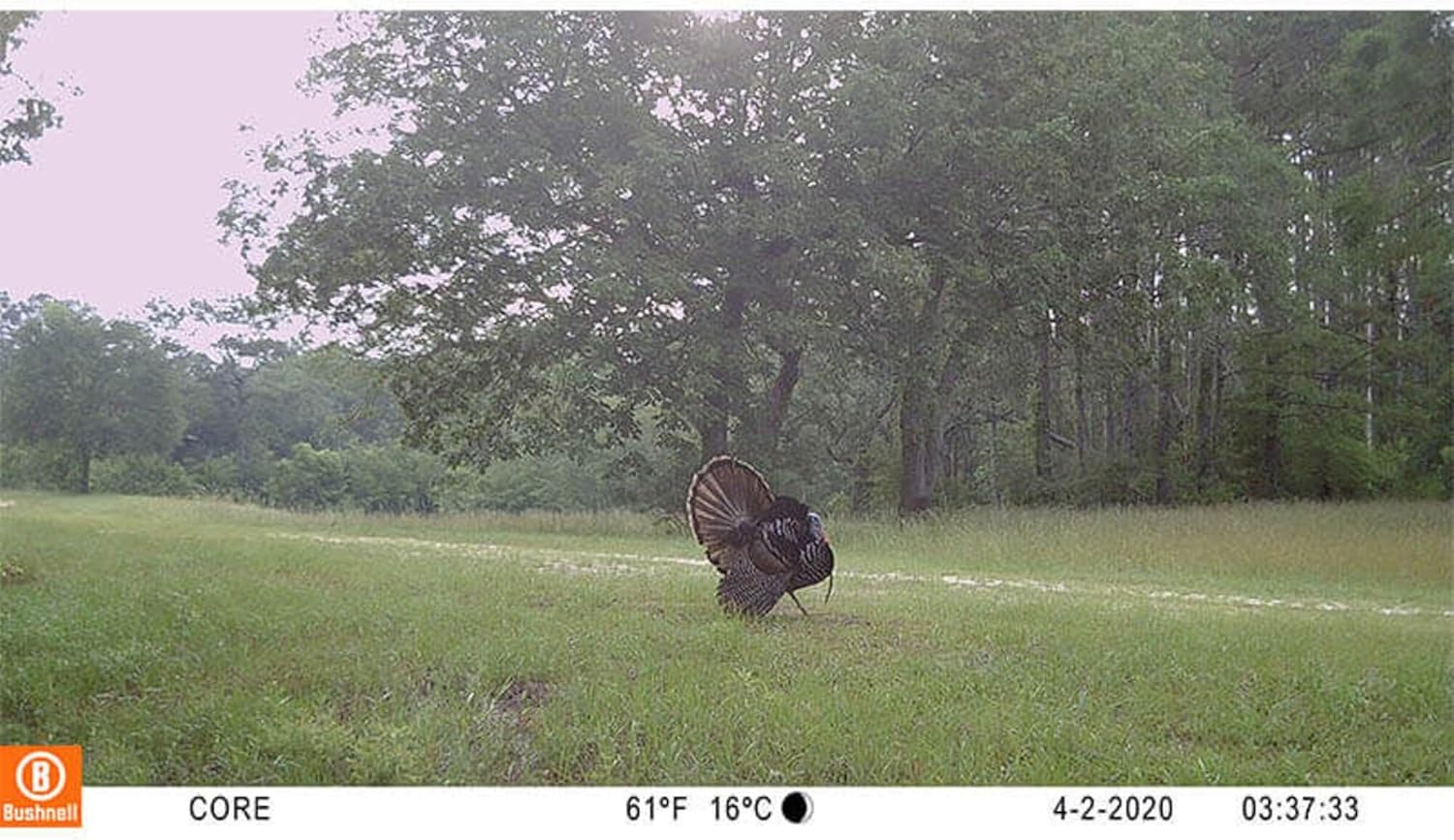
Figura 4.2: Eżample of an image captured by the camera, displaying data overlay.
5. Manutenzjoni
5.1. Ġestjoni tal-batterija
The camera offers up to 12 months of battery life depending on usage and settings. Replace batteries when the low battery indicator appears on the screen.
5.2. Ġestjoni tal-Kard SD
Regularly check the SD card capacity. Format the SD card periodically to maintain optimal performance and prevent data corruption. Back up important files qabel l-ifformattjar.
5.3. Tindif
Use a soft, dry cloth to clean the camera lens and housing. Avoid abrasive cleaners or solvents. Ensure the camera is dry before closing the housing and exposing it to outdoor elements.
6 Issolvi l-problemi
- Il-kamera ma tixgħelx: Check battery installation and ensure batteries are fresh. Verify the power switch is in the ON position.
- Ma nqabdu l-ebda ritratti/vidjows: Ensure an SD card is inserted and has sufficient space. Check PIR sensitivity settings and trigger interval. Verify the camera is in the correct operating mode.
- Kwalità fqira tal-immaġni/vidjow: Clean the camera lens. Ensure the camera is stable and not subject to excessive movement. Check resolution settings.
- Ħajja qasira tal-batterija: Use high-quality alkaline or lithium batteries. Reduce video length or increase trigger interval. Consider using an external solar panel.
7. Speċifikazzjonijiet

Figure 7.1: Key features and specifications of the camera.
| Karatteristika | Speċifikazzjoni |
|---|---|
| Numru tal-Mudell | 119949M |
| Riżoluzzjoni Għadha Effettiva | 30 MP |
| Riżoluzzjoni ta' Reġistrazzjoni tal-Vidjo | 4K (3840 x 2160) |
| Tul tal-Video | Sa 60 sekonda |
| Trigger Veloċità | 0.2 sekonda |
| Night Range | 34 metri (madwar 110 piedi) |
| Tip LED | No-Glow LEDs |
| Display Screen | LCD bil-kulur ta' 1.5 pulzieri |
| Ħażna | SD card, up to 512 GB (not included) |
| Sors tal-Enerġija | 6x AA batteries or 12V DC external (solar compatible) |
| Ħajja tal-batterija | Sa 12 xhur |
| Sensittività tas-Sensor PIR | 3 levels or Auto |
| Modi ta' Espożizzjoni | 3 modi |
| Komponenti Inklużi | Manwal għall-Utent |
| Dimensjonijiet (L x W x H) | 20 x 13 x 7 ċentimetru |
| Pajjiż ta' Oriġini | Iċ-Ċina |
8. Informazzjoni dwar Garanzija
This Bushnell CORE 4KS Trail Camera is covered by a manufacturer's warranty for a period of 2 years from the date of purchase. Please retain your proof of purchase for warranty claims. The warranty covers defects in materials and workmanship under normal use. It does not cover damage caused by misuse, accident, unauthorized modification, or neglect.
9. Appoġġ
For further assistance, technical support, or warranty inquiries, please refer to the official Bushnell website or contact their customer service department. Detailed contact information can typically be found on the manufacturer's websit jew fl-ippakkjar tal-prodott.


