1. Introduzzjoni
The OPTICON L-46X 2D Imager is a versatile barcode scanner designed to read both 1D and 2D barcodes. It incorporates Opticon’s advanced 2D CMOS imaging technology, enabling efficient point-and-shoot barcode scanning. The device features a disinfectant-ready protective casing, making it suitable for use in various environments, including healthcare settings.
2. Karatteristiċi ewlenin
- Teknoloġija ta' Skennjar Avvanzata: Utilizes next-generation scanning technology for optimal performance, durability, and reliability.
- Durabilità Robusta: Constructed with a durable, lightweight, and ergonomic design for comfortable extended use. The scanner is drop-tested to withstand falls of up to 6 feet onto concrete.
- Reżistenza Ambjentali: Features an IP42 rating, providing protection against dust and water splashes, making it suitable for demanding environments such as retail, logistics, and healthcare.
- Disinfectant Ready: Designed with a protective casing that can be safely disinfected.
- Konnettività: USB Cable for reliable connection to desktop and laptop computers.
3. Kontenut tal-Pakkett
Jekk jogħġbok ivverifika li l-oġġetti kollha huma preżenti fil-pakkett:
- L-46X Barcode Scanner Unit
- Kejbil tal-Konnessjoni USB
- Stand Mount (if included with your specific model)
4. Gwida ta' Setup
Follow these steps to set up your L-46X Barcode Scanner:
- Iftaħ l-iskaner mill-pakkett: Carefully remove the L-46X scanner and its accessories from the packaging.
- Qabbad il-Cable USB: Insert the USB cable into the port at the base of the scanner. Connect the other end of the USB cable to an available USB port on your desktop or laptop computer.
- Installazzjoni tas-sewwieq: The L-46X is typically a plug-and-play device. Your operating system (Windows, macOS, Linux) should automatically detect and install the necessary drivers. Wait for the installation to complete, which may take a few moments.
- Pożizzjona l-Iskaner: If your model includes a stand mount, assemble it according to its instructions and place the scanner securely in the stand. Ensure the scanner is positioned for easy access and comfortable use.
- Ittestja l-Iskaner: Open a text editor (e.g., Notepad, Word) or a compatible application. Scan a known barcode. The barcode data should appear in the text editor or application, indicating successful setup.
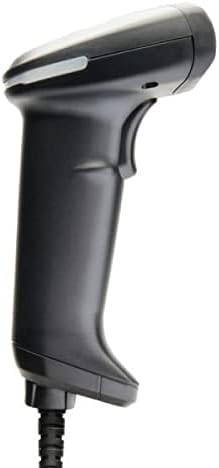
Image: The L-46X barcode scanner, a black handheld device with a trigger button and a USB cable extending from its base. This image illustrates the scanner's design and connectivity point.
5. Istruzzjonijiet Operattivi
To operate your L-46X Barcode Scanner:
- Qawwa Mixgħul: The scanner powers on automatically when connected to a powered USB port.
- Immira l-Iskaner: Point the scanning window of the L-46X directly at the barcode you wish to scan. Ensure the entire barcode is within the scanner's field of view.
- Agħfas il-Griller: Press and hold the trigger button located on the handle of the scanner. A scanning beam or light will be emitted.
- Ikkonferma l-Iskennjar: Upon a successful scan, the scanner will typically emit an audible beep and/or a visual indicator (e.g., an LED light will flash). The scanned data will be transmitted to your connected computer and appear in the active application.
- Rilaxx tat-Trigger: Release the trigger button after a successful scan.
The L-46X is capable of reading both 1D (linear) and 2D (matrix) barcodes, including QR codes, Data Matrix, and PDF417.
6. Manutenzjoni
Proper maintenance ensures the longevity and optimal performance of your L-46X scanner:
- Tindif tat-Tieqa tal-Iskennjar: Uża drapp ratba u mingħajr ħelu ftit dampened with water or a mild, non-abrasive cleaning solution to gently wipe the scanning window. Avoid harsh chemicals or abrasive materials that could scratch the surface.
- Tindif tas-Casing: The L-46X features a disinfectant-ready casing. You may use common disinfectant wipes or solutions to clean the exterior. Always follow the disinfectant manufacturer's instructions and ensure the scanner is powered off and disconnected before cleaning.
- Ħażna: When not in use, store the scanner in a clean, dry environment, away from extreme temperatures, direct sunlight, and corrosive materials.
- Kura tal-Cable: Evita li tgħawweġ jew iddawwar il-kejbil USB b'mod eċċessiv, għax dan jista' jagħmel ħsara lill-wajers interni.
7 Issolvi l-problemi
Jekk tiltaqa' ma' problemi bl-iskaner L-46X tiegħek, irreferi għall-problemi u s-soluzzjonijiet komuni li ġejjin:
| Problema | Kawża Possibbli | Soluzzjoni |
|---|---|---|
| L-iskaner ma jixgħelx. | USB cable not properly connected or USB port is faulty. | Ensure the USB cable is securely connected to both the scanner and the computer. Try a different USB port on your computer. |
| L-iskaner ma jaqrax il-barcodes. | Barcode is damaged, poor quality, or not supported; scanner window is dirty; incorrect aiming. | Try scanning a different, known-good barcode. Clean the scanning window. Ensure the barcode is fully within the scanner's field of view and the trigger is pressed. Verify the barcode type is supported (1D/2D). |
| Id-dejta skennjata tidher ħażin. | Keyboard layout mismatch or software conflict. | Ensure your computer's keyboard layout matches the scanner's default settings. Restart the computer and the application you are using. |
| No beep or visual confirmation after scanning. | Scanner settings may have disabled feedback. | Refer to the full programming manual (available from Opticon support) to enable audible/visual feedback. |
If the problem persists, please contact Opticon customer support for further assistance.
8. Speċifikazzjonijiet
| Karatteristika | Dettall |
|---|---|
| Mudell | L-46X |
| Teknoloġija tal-Iskennjar | 2D CMOS Imager (1D and 2D barcode support) |
| Konnettività | Cable USB |
| Sors tal-Enerġija | Elettriku bil-fili (permezz tal-USB) |
| Apparati Kompatibbli | Desktop, Laptop |
| Piż tal-oġġett | 1.5 liri |
| Klassifikazzjoni tad-Durabilità | IP42 (Reżistenti għat-trab u l-ilma) |
| Speċifikazzjoni tal-qatra | 6 feet to concrete |
| Manifattur | Ottiku |
9. Garanzija u Appoġġ
The OPTICON L-46X Barcode Scanner is backed by a garanzija tal-manifattur ta 'sentejn mid-data tax-xiri. Din il-garanzija tkopri difetti fil-materjali u l-abbilità taħt użu normali.
For technical support, warranty claims, or additional information, please contact Opticon customer service. You can typically find contact details on the official Opticon webis-sit jew permezz tal-bejjiegħ mill-ġdid tal-prodott tiegħek.
Jekk jogħġbok żomm il-prova tax-xiri tiegħek għal skopijiet ta' garanzija.


