1. Introduzzjoni
Thank you for choosing the Yaheetech Adjustable Drawing Table Set. This versatile workstation is designed for artists, drafters, and creative professionals, offering an inclinable tabletop, convenient side storage, and a comfortable stool. Please read this manual thoroughly before assembly and use to ensure proper setup and safe operation. Keep this manual for future reference.
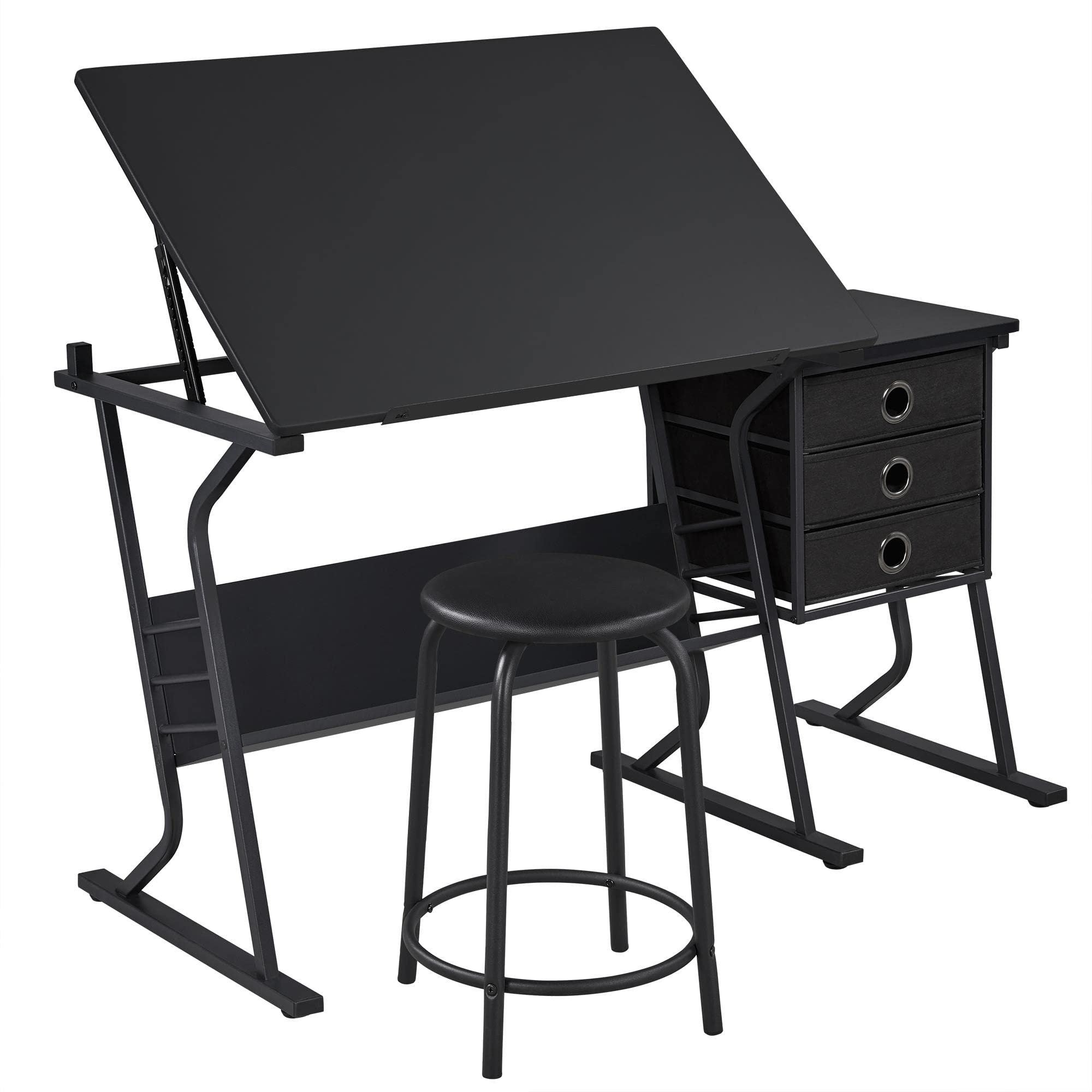
Image 1.1: The Yaheetech Adjustable Drawing Table Set, showcasing its design and functionality in a home office setting.
2. Istruzzjonijiet tas-Sigurtà
- Aqra l-Istruzzjonijiet Kollha: Ensure you understand all assembly and usage instructions before proceeding.
- Żomm lit-tfal 'il bogħod: During assembly, keep children and pets away from the work area. Small parts can be a choking hazard.
- Użu fuq Wiċċ Livell: Always assemble and use the table on a flat, stable, and level surface to prevent tipping.
- M'għandekx tagħbija żejda: Do not exceed the weight capacity of the table or stool. The stool supports up to 120 kg (264 lbs).
- Waħħal il-Qafliet Kollha: Ensure all screws, bolts, and connectors are securely tightened before use. Periodically check and re-tighten as needed.
- Evita Oġġetti li jaqtgħu: Do not use sharp objects directly on the tabletop surface to prevent scratches.
- Aġġustament xieraq: When adjusting the tabletop angle, ensure hands are clear of moving parts to prevent pinching.
- Reżistenza għall-Ilma: The composite board has a water-repellent coating, but avoid prolonged exposure to liquids. Wipe spills immediately.
3. Kontenut tal-Pakkett
Jekk jogħġbok ivverifika li l-komponenti kollha huma preżenti u mhux imħassra qabel tibda l-assemblaġġ. Jekk xi partijiet huma neqsin jew imħassra, ikkuntattja l-appoġġ għall-klijenti.
- Adjustable Main Tabletop
- Side Table with Frame
- 3 Non-woven Fabric Drawers
- Stool (Seat and Frame)
- Main Frame Components (Metal Legs, Supports)
- Xkaffa tal-Ħażna
- Pen Holder/Edge Stopper
- Ħardwer tal-Assemblaġġ (Viti, Boltijiet, Spanelli)
- Manwal ta' Istruzzjoni

Image 3.1: Detailed dimensions of the drawing table and stool, indicating overall size and individual component measurements.
4. Setup u Assemblea
Assembly typically requires two adults. Follow the numbered steps in the provided assembly guide. Ensure all parts are correctly oriented before tightening screws.
- Ħoll il-Komponenti: Carefully remove all parts from the packaging and lay them out on a clean, soft surface (e.g., a blanket or carpet) to prevent scratches.
- Arma l-Qafas Prinċipali: Connect the metal leg frames using the provided crossbars and hardware. Do not fully tighten screws until all components are aligned.
- Waħħal l-Ixkaffa tal-Ħażna: Secure the lower storage shelf to the main frame.
- Install Side Table Frame: Assemble the frame for the side table and attach it to the main table structure.
- Mount Tabletop: Attach the main tabletop to the adjustable mechanism on the frame. Ensure the tilt mechanism is correctly installed.
- Daħħal il-Kxaxen: Slide the three non-woven fabric drawers into the side table frame.
- Arma l-Ippurgar: Connect the stool legs and attach the padded seat.
- Issikkar finali: Once all components are in place and aligned, securely tighten all screws and bolts using the provided tools.
- Waħħal id-Detentur tal-Pinna: Place the removable pen holder/edge stopper along the bottom edge of the main tabletop.

Image 4.1: The robust tilt mechanism allows for easy adjustment of the main tabletop angle.

Image 4.2: The removable pen holder also functions as an edge stopper to prevent items from sliding off the tilted surface.
5. Istruzzjonijiet Operattivi
5.1 Adjusting the Tabletop Angle
The main tabletop can be adjusted from 0 to 40 degrees. It features 10 locking levels for precise positioning.
- Nisfruttaw: Gently lift the tabletop to disengage the locking mechanism.
- Aġġusta: Move the tabletop to your desired angle.
- Lock: Lower the tabletop slightly until it clicks into one of the 10 locking positions. Ensure it is securely locked before placing items on it.
The pen holder/edge stopper remains functional even when the tabletop is tilted.
5.2 Using the Side Table and Drawers
The side table provides additional flat workspace. The three non-woven fabric drawers offer convenient storage for stationery, art supplies, and other small items.
- Access Drawers: Pull the drawers out gently using the ring handles.
- Ħażna: Organize your supplies within the drawers.
- Wiċċ ċatt: The side table can hold a laptop, drinks, or other tools while you work on the main surface.

Image 5.1: The three fabric drawers provide ample storage for various supplies.
6. Manutenzjoni
- Tindif: Imsaħ l-uċuħ b'artab, damp drapp. Evita prodotti tat-tindif li joborxu jew kimiċi ħarxa li jistgħu jagħmlu ħsara lill-finitura.
- Ġestjoni tat-Tixrid: Although the tabletop is water-repellent, wipe up spills immediately to prevent staining or damage.
- Iċċekkja tal-Hardware: Periodically inspect all screws and bolts to ensure they remain tight. Re-tighten as necessary to maintain stability.
- Kura tal-Kxaxen: The non-woven fabric drawers can be spot cleaned with a mild detergent if needed. Allow them to air dry completely.
- Evita dawl tax-xemx dirett: Prolonged exposure to direct sunlight may cause fading or material degradation over time.
7 Issolvi l-problemi
- It-Tbandil tal-Mejda:
Soluzzjoni: Ensure the table is on a level surface. Check all assembly screws and bolts for tightness and re-tighten if loose. The adjustable feet (Image 7.1) can be used to compensate for uneven floors. - Tabletop Not Tilting/Locking:
Soluzzjoni: Verify that the tilt mechanism is free from obstructions. Ensure you are lifting the tabletop sufficiently to disengage the lock before adjusting. Check if the mechanism is properly installed according to the assembly instructions. - Drawers Stick/Don't Slide Smoothly:
Soluzzjoni: Ensure the drawers are inserted correctly and are not overloaded. Check the fabric for any tears or damage that might cause friction. - Partijiet Neqsin:
Soluzzjoni: Refer to the 'Package Contents' section. If parts are missing upon delivery, contact Yaheetech customer support immediately with your purchase details.

Image 7.1: Adjustable feet on the table legs help ensure stability on uneven floors.
8. Speċifikazzjonijiet
| Karatteristika | Speċifikazzjoni |
|---|---|
| Numru tal-Mudell | YA-00120554 |
| Kulur | Iswed |
| Materjali | Powder-coated Metal, Composite Board (with water-repellent coating), Non-woven Fabric, Foam, Synthetic Leather |
| Overall Dimensions (Table) | 128 cm (L) × 60 cm (W) × 75.5 cm - 111 cm (H) |
| Main Tabletop Dimensions | 90 cm (L) × 60 cm (W) |
| Tabletop Adjustable Angle | 0° - 40° (10 locking levels) |
| Dimensjonijiet tal-Ippurgar | 41.5 ċm (T) × 41.5 ċm (W) × 53.5 ċm (Għoli) |
| Kapaċità tal-Piż tal-Ippurgar | 120 kg (264 lbs) |
| Piż tal-Prodott | 22.5 kg (49.6 lbs) |
| Numru ta 'Kxaxen | 3 |
9. Garanzija u Appoġġ
Yaheetech products are manufactured with quality and durability in mind. While specific warranty details may vary by region and retailer, we stand behind our products. For any questions, concerns, or assistance with assembly or parts, please contact Yaheetech customer support through the retailer where you purchased the product or visit our official websit.
Please have your model number (YA-00120554) and purchase information ready when contacting support.


