Introduzzjoni
This manual provides detailed instructions for the assembly, operation, and maintenance of your MAIDeSITe Electric Height Adjustable Desk. Designed for ergonomic comfort, this desk allows seamless transitions between sitting and standing positions, promoting a healthier work environment. Please read this manual thoroughly before assembly and use to ensure proper function and safety.
Informazzjoni dwar is-Sigurtà
- Kun żgur li l-komponenti kollha huma preżenti u mhux imħassra qabel l-assemblaġġ.
- Żomm it-tfal u l-annimali domestiċi 'l bogħod mill-iskrivanija waqt l-operazzjoni.
- Tgħabbix iżżejjed l-iskrivanija. Irreferi għall-ispeċifikazzjonijiet għall-kapaċità massima tal-piż.
- Evita li tpoġġi likwidi direttament fuq il-pannell tal-kontroll jew ħdejn komponenti elettriċi.
- Ensure sufficient clearance around the desk when adjusting height to prevent obstructions.
- If any unusual noise or movement occurs, stop operation immediately and consult the troubleshooting section.
Kontenut tal-Pakkett
Before beginning assembly, verify that all parts are included in your package. Refer to the assembly diagram for a complete list of components.
- Desk Frame (Legs, Crossbar)
- Tabletop (120 x 60 cm)
- Panel tal-Kontroll b'Display LED
- Adapter tal-Enerġija u Cable
- Accessories: Drawer, Storage Bag, Cable Management Tray, Hooks, Casters (Wheels)
- Assembly Hardware (Screws, Allen Key, etc.)
Setup u Assemblea
The MAIDeSITe desk is designed for easy assembly with user-friendly instructions, included tools, and pre-drilled screw holes. It is recommended to have two people for assembly, though it can be done by one person.
Passi tal-Assemblea Fuqview:
- Ħoll il-Komponenti: Neħħi l-partijiet kollha mill-imballaġġ bir-reqqa u poġġihom fuq wiċċ nadif u artab biex tevita l-grif.
- Arma l-Qafas tal-Iskrivanija: Attach the lifting columns to the feet, then connect the crossbar. Ensure all screws are tightened securely.
- Waħħal il-wiċċ tal-mejda: Place the tabletop onto the assembled frame, aligning the pre-drilled holes. Secure the tabletop with the provided screws.
- Installa l-Panel tal-Kontroll: Mount the control panel to the underside of the tabletop in the designated area. Connect the motor and power cables to the control box and then to the control panel.
- Installa Aċċessorji: Attach the drawer, storage bag, cable management tray, and hooks as desired. If using casters, replace the standard feet with the casters.
- Qabbad l-Enerġija: Ipplaggja l-adapter tal-enerġija fil-kaxxa tal-kontroll u mbagħad f'sokit tal-ħajt.

Immaġni: Sploda view of the MAIDeSITe desk showing all components and their assembly points. This image illustrates the desk frame, tabletop sections, control panel, and various accessories like the storage bag, drawer, and cable management tray, along with the casters.

Immaġni: A diagram highlighting the ease of assembly, indicating user-friendly setup with included tools and pre-drilled screw holes for quick installation.
Istruzzjonijiet Operattivi
Control Panel Matulview:
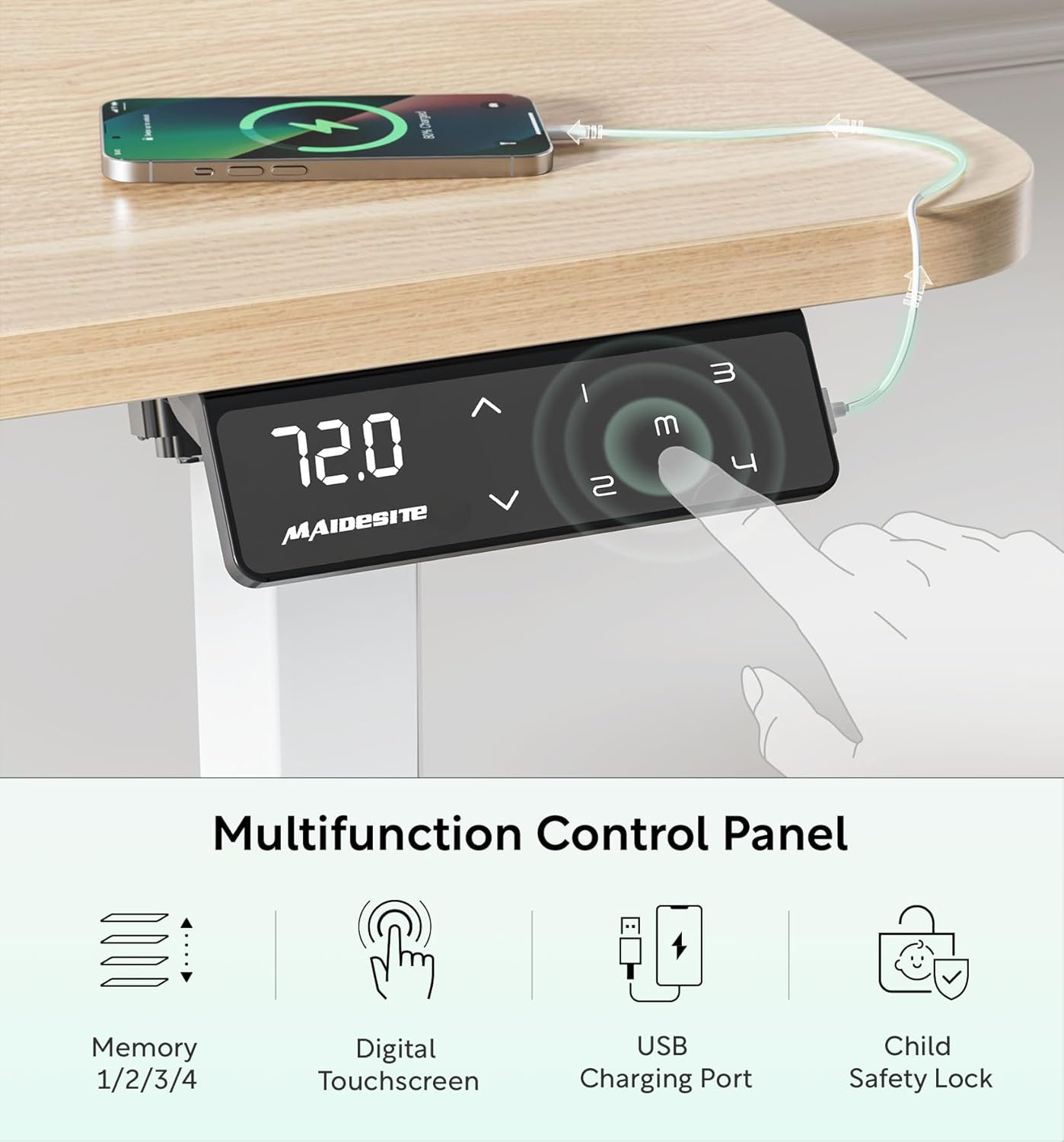
Immaġni: Close-up of the MAIDeSITe desk's multifunctional LED control panel. It features a digital touchscreen display showing the current height, up/down arrows for adjustment, four memory preset buttons (1, 2, 3, 4), a USB charging port, and a child safety lock button.
Aġġustament Għoli:
- Uża l- 'Il fuq (^) u 'L isfel (v) arrow buttons on the control panel to manually adjust the desk height. The current height will be displayed on the LED screen.
- The desk offers continuous height adjustment from 72 cm to 120 cm.

Immaġni: An illustration demonstrating the desk's height adjustment range, showing different user heights and corresponding desk heights from 72cm (sitting) to 120cm (standing).
Presets tal-memorja:
- The control panel features 4 programmable memory buttons (1, 2, 3, 4) to save your preferred sitting and standing heights.
- To Set a Memory Position: Adjust the desk to your desired height. Press and hold one of the memory buttons (1, 2, 3, or 4) until you hear a beep or the display flashes, indicating the height has been saved.
- To Use a Memory Position: Press the corresponding memory button (1, 2, 3, or 4) once. The desk will automatically move to the saved height.
Serratura tas-Sikurezza tat-Tfal:
- Activate the child safety lock to prevent accidental height adjustments.
- Biex Tattiva: Press the lock button on the control panel. The display may show "LOC" or a lock icon.
- Biex tiddiżattiva: Press the lock button again.
Immaġni: A visual representation of the child lock feature on the control panel, showing the "LOC" indicator when activated.
Port tal-Iċċarġjar tal-USB:
- A built-in USB port is available on the control panel for convenient charging of your electronic devices.
Sistema Kontra l-Ħabtiet:
- The desk is equipped with an anti-collision system that automatically stops movement if an obstruction is detected during height adjustment. This prevents damage to the desk or other objects.
- If the anti-collision system is triggered, the desk will reverse slightly. Remove the obstruction and resume adjustment.
Manutenzjoni
- Tindif: Imsaħ il-wiċċ tal-iskrivanija u l-qafas b'ċarruta ratba u damp cloth. Avoid abrasive cleaners or harsh chemicals that could damage the finish. The tabletop is water-resistant and easy to clean.
- Ġestjoni tal-Kejbil: Regularly check and organize cables using the provided cable management tray to prevent tangles and damage.
- Kura tal-Mutur: The electric motor is designed for long-term use and requires minimal maintenance. Avoid exposing it to excessive moisture or extreme temperatures.
- Manutenzjoni tal-Caster: If using casters, periodically check them for debris and ensure they roll smoothly. Lock them when the desk is in a stationary position.
Issolvi l-problemi
If you encounter any issues with your MAIDeSITe desk, please refer to the following common troubleshooting steps:
| Problema | Kawża Possibbli | Soluzzjoni |
|---|---|---|
| L-iskrivanija ma tiċċaqlaqx. | Power cable disconnected, child lock active, motor error. | Check power connections. Deactivate child lock. Unplug the desk for 10 seconds and plug back in to reset. |
| L-iskrivanija tiċċaqlaq b'mod irregolari jew tagħmel ħoss mhux tas-soltu. | Uneven load, loose connections, obstruction. | Ensure weight is evenly distributed. Check all screws and connections. Remove any obstructions. |
| Is-sistema kontra l-ħabtiet tattiva ta' spiss. | Obstruction in the path of movement. | Ensure there are no objects under or above the desk that could interfere with its movement. |
| Il-presets tal-memorja mhux qed jaħdmu. | Proċedura ta' salvataġġ mhux korretta. | Refer to the "Memory Presets" section and ensure you are pressing and holding the button until confirmation. |
Jekk il-problema tippersisti wara li tipprova dawn is-soluzzjonijiet, jekk jogħġbok ikkuntattja l-appoġġ għall-klijenti.
Speċifikazzjonijiet
| Karatteristika | Dettall |
|---|---|
| Brand | MAIDeSITe |
| Numru tal-Mudell | MJ-D2D-2-EU |
| Dimensjonijiet (L x W x H) | 120 x 60 x (72-120) ċm |
| Piż | 27 Kilogrammi |
| Kulur | Ballut |
| Materjal (Qafas) | 100% High-Quality Carbon Steel |
| Materjal (Wiċċ tal-mejda) | Engineered Wood with rounded corners, water-resistant |
| Medda ta 'Aġġustament Għoli | 72 ċm sa 120 ċm |
| Kapaċità Max Piż | 80 Kilogrammi |
| Tip ta' Mutur | Electric, Ultra-quiet (<45dB) |
| Veloċità | 25mm/s |
| Panel tal-Kontroll | LED Digital Touchscreen with 4 Memory Presets, USB Charging Port, Child Safety Lock |
| Karatteristiċi tas-Sigurtà | Anti-collision system, Child Safety Lock, Rounded Tabletop Corners |
| Aċċessorji Inklużi | Drawer, Storage Bag, Cable Management Tray, Hooks, Casters |
| Assemblea Meħtieġa | Iva |

Immaġni: A visual representation highlighting the superior specifications of the MAIDeSITe desk, including its powerful and ultra-quiet motor, 25mm/s smooth rise speed, 80kg high capacity, and anti-collision feature.
Garanzija u Appoġġ
Your MAIDeSITe Electric Height Adjustable Desk comes with a garanzija ta 'sena, ensuring peace of mind regarding its quality and durability. We are committed to providing excellent customer service.
For any questions, technical assistance, or warranty claims, please contact MAIDeSITe customer support through the retailer's platform or visit our official website. Please have your model number (MJ-D2D-2-EU) and purchase date available when contacting support.
Riżorsi onlajn: For additional information, FAQs, or video tutorials, please visit the official MAIDeSITe webis-sit jew il-paġna tal-prodott fuq is-sit tal-bejjiegħ bl-imnut.


