1. Introduzzjoni
Grazzi tax-xiriasing the Roadstar IR-540D+BT Micro Hi-Fi System. This system offers a wide range of audio options including Internet Radio, DAB+/FM digital radio, CD-MP3 playback, Bluetooth connectivity, and USB media support. This manual provides essential information for safe operation, setup, and troubleshooting to ensure optimal performance of your device.
2. Informazzjoni dwar is-Sigurtà
- Aqra l-istruzzjonijiet kollha bir-reqqa qabel l-użu.
- Żomm dan il-manwal għal referenza futura.
- Tesponix l-unità għax-xita jew għall-umdità biex tevita nar jew xokk elettriku.
- Aċċerta ruħek li jkun hemm ventilazzjoni xierqa; timblokkax xi fetħiet tal-ventilazzjoni.
- Uża biss aċċessorji/aċċessorji speċifikati mill-manifattur.
- Aqla 'l-unità waqt maltempati tas-sajjetti jew meta ma tintużax għal perjodi twal.
- Irreferi l-manutenzjoni kollha lil persunal tas-servizz kwalifikat.
3. Kontenut tal-Pakkett
Jekk jogħġbok iċċekkja li l-oġġetti kollha huma preżenti:
- Roadstar IR-540D+BT Micro Hi-Fi System
- Kontroll mill-bogħod
- Adapter tal-Enerġija
- Manwal għall-Utent (dan id-dokument)
4. Prodott Aktarview
Familiarize yourself with the main components and controls of your Hi-Fi system.
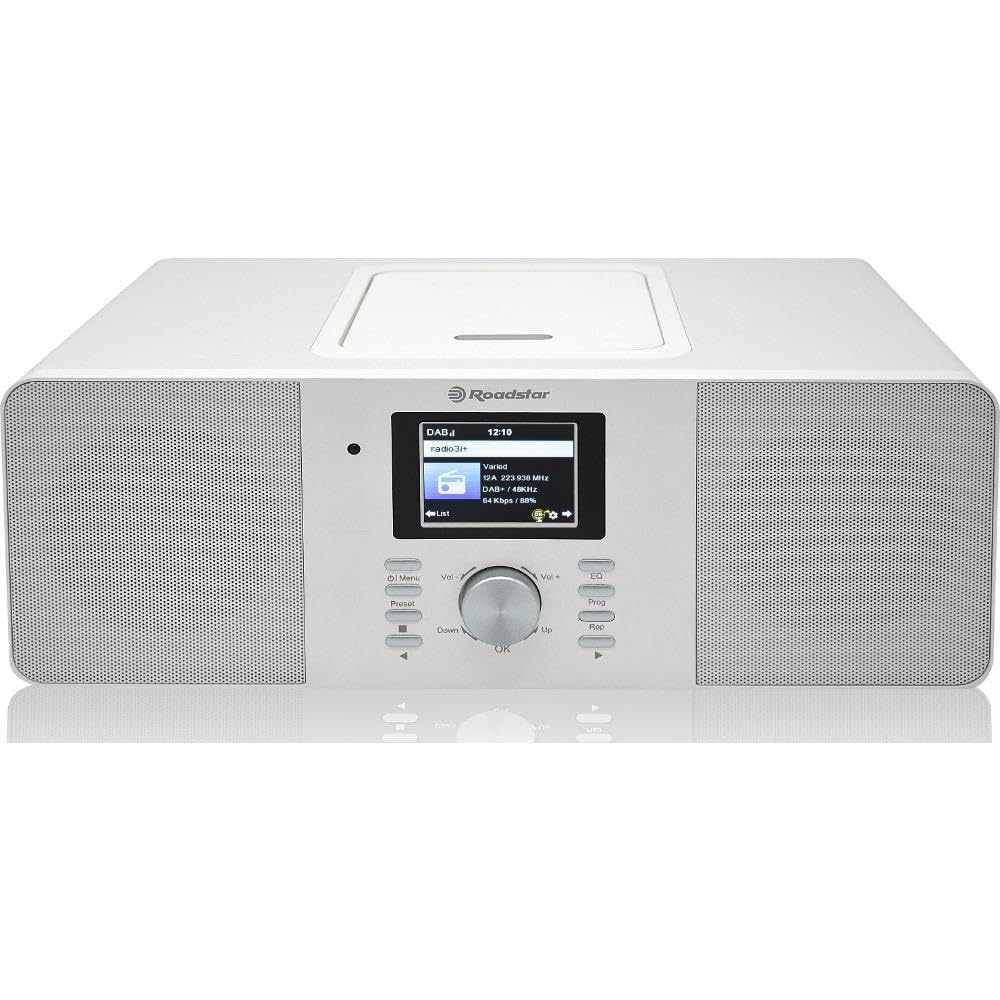
Figura 4.1: Quddiem view of the Roadstar IR-540D+BT Micro Hi-Fi System.

Figure 4.2: Close-up of the LCD display and main control buttons/knobs.
Kontrolli tal-Panew ta' Quddiem:
- Display LCD: Shows current mode, track information, radio station, time, etc.
- Buttuna tal-Qawwa: Ixgħel / itfi l-unità.
- Buttuna tal-Modalità: Switches between CD, Internet Radio, DAB+, FM, Bluetooth, AUX, USB.
- Buttuna tal-Volum: Jaġġusta l-livell tal-ħruġ tal-awdjo.
- Buttuni tan-Navigazzjoni ('Il fuq/'l isfel/Xellug/Lemin/OK): Għan-navigazzjoni u l-għażla tal-menù.
- Buttuna Play/Pause: Controls playback for CD/USB/Bluetooth.
- Buttuni Aqbeż/Tiftix: Skips tracks or searches radio stations.
- Port USB: For USB media playback and fast charging.
- Jack tal-headphone: Għal smigħ privat.
Konnessjonijiet tal-Panew ta' wara:
- AUX IN: Jack ta' 3.5mm għall-konnessjoni ta' apparati awdjo esterni.
- FM/DAB Antenna Input: For connecting the included antenna.
- DC IN: Konnessjoni tal-adapter tal-enerġija.

Figure 4.3: The Roadstar IR-540D+BT system shown with its multi-function remote control.
Funzjonijiet tal-Kontroll mill-bogħod:
- All basic functions (Power, Volume, Mode, Playback controls).
- Direct access buttons for different modes (e.g., CD, BT, Internet Radio).
- Numeric keypad for direct track/station entry.
- Alarm setting and sleep timer functions.
5. Setup
5.1 Konnessjoni tal-Enerġija
- Connect the power adapter to the DC IN jack on the rear of the unit.
- Ipplaggja l-adapter tal-enerġija fi żbokk tal-ħajt standard.
5.2 Konnessjoni tal-antenna
For optimal DAB+ and FM radio reception, connect the supplied antenna to the FM/DAB Antenna Input on the rear panel. Extend the antenna fully and adjust its position for the best signal.
5.3 Initial Wi-Fi Setup (for Internet Radio)
Upon first power-on or when selecting Internet Radio mode, the system will prompt you to configure network settings.
- Use the navigation buttons to select 'Network Setup' or 'Wi-Fi Setup'.
- The system will scan for available Wi-Fi networks. Select your network from the list.
- Enter your Wi-Fi password using the navigation buttons and 'OK' to confirm each character.
- Once connected, the system will confirm the connection. You can now access Internet Radio stations.
6. Istruzzjonijiet Operattivi
6.1 Operazzjoni Ġenerali
- Power On/Off: Press the Power button on the unit or remote.
- Agħżel il-Modalità: Press the 'Mode' button repeatedly to cycle through available sources (CD, Internet Radio, DAB+, FM, Bluetooth, AUX, USB).
- Aġġusta Volum: Rotate the Volume knob or use the VOL +/- buttons on the remote.
6.2 CD/MP3 Playback
- Iftaħ l-għatu tal-kompartiment tas-CD.
- Place a CD or MP3 CD with the label side facing up.
- Close the CD compartment cover. The system will automatically switch to CD mode and begin playback.
- Use the Play/Pause, Skip, and Search buttons for control.
6.3 Operazzjoni tar-Radju
6.3.1 Radju bl-Internet
- Agħżel il-modalità 'Radju tal-Internet'.
- Use the navigation buttons to browse stations by genre, location, or search.
- Press 'OK' to select a station.
Radju 6.3.2 DAB+/FM
- Select 'DAB+' or 'FM' mode.
- For DAB+, the system will perform an auto-scan for available stations. For FM, use the search buttons to find stations.
- To save a preset, press and hold the 'Preset' button, then select a preset number and press 'OK'.
6.4 Konnettività Bluetooth
- Select 'Bluetooth' mode. The display will show 'Pairing' or 'Waiting for connection'.
- Fuq l-apparat mobbli tiegħek (smartphone, tablet), attiva l-Bluetooth u fittex apparati disponibbli.
- Select 'IR-540D+BT' from the list.
- Once paired, you can play audio from your device through the Hi-Fi system.
6.5 Daqq u Iċċarġjar tal-USB
- Insert a USB flash drive into the USB port. The system will automatically switch to USB mode and begin playing compatible audio files (eż., MP3).
- The USB port also supports fast charging for compatible devices.
6.6 AUX IN Connection
Connect an external audio device (e.g., MP3 player, smartphone) to the AUX IN jack on the rear panel using a 3.5mm audio cable. Select 'AUX' mode to listen to audio from the connected device.
6.7 Funzjoni ta 'allarm

Figure 6.1: The display showing alarm clock settings.
The system features a dual alarm function.
- Press the 'Alarm' button on the remote or navigate through the menu to 'Alarm Settings'.
- Agħżel Allarm 1 jew Allarm 2.
- Set the desired alarm time, source (Buzzer, FM, DAB+, Internet Radio), and volume.
- Ippermetti l-allarm.
7. Manutenzjoni
- Tindif: Uża drapp artab u niexef biex tnaddaf l-unità. Tużax prodotti tat-tindif jew solventi li joborxu.
- CD Care: Immaniġġja s-CDs mit-truf tagħhom. Naddaf b'ċarruta ratba u mingħajr suf, billi timsaħ miċ-ċentru 'l barra.
- Ventilazzjoni: Kun żgur li l-fetħiet tal-ventilazzjoni ma jkunux imblukkati biex tevita sħana żejda.
8 Issolvi l-problemi
| Problema | Kawża Possibbli | Soluzzjoni |
|---|---|---|
| Ebda qawwa | Kejbil tal-enerġija mhux imqabbad; Sokit tal-enerġija difettuż. | Iċċekkja l-konnessjoni tal-kejbil tal-enerġija; Ipprova sokit differenti. |
| L-ebda ħoss | Volum baxx wisq; Modalità żbaljata magħżula; Headphones imqabbda. | Increase volume; Select correct source mode; Disconnect headphones. |
| Riċeviment ħażin tar-radju | Antenna not extended/positioned correctly; Weak signal. | Extend and reposition the antenna; Try auto-tuning again. |
| Tqabbil Bluetooth falla | Device not in pairing mode; Distance too far; Interference. | Ensure unit is in Bluetooth mode; Keep devices close; Restart both devices. |
| Ir-Radju tal-Internet mhux qed jikkonnettja | Incorrect Wi-Fi password; Router issues; Weak Wi-Fi signal. | Re-enter Wi-Fi password; Restart router; Move unit closer to router. |
9. Speċifikazzjonijiet
| Karatteristika | Speċifikazzjoni |
|---|---|
| Brand | Roadstar |
| Numru tal-Mudell | IR-540D+BT |
| Teknoloġija tal-Konnettività | Auxiliary, USB, Bluetooth, Wi-Fi |
| Standards Appoġġjati | CD, CD-R, CD-RW, MP3, WAV, AAC, WMA |
| Tip ta' Kelliem | Stereo |
| Qawwa tal-Ħruġ (RMS) | 2 x 10 W (Total 20W RMS) |
| Sors tal-Enerġija | Corded Elettriku |
| Apparati Kompatibbli | Plejer tal-MP3, Smartphone, Tablet |
| Tuner tar-Radju | Radju tal-Internet, DAB+, FM |
| Port USB | Playback and Fast Charging |
| Wiri | LCD diġitali |
| Karatteristiċi Speċjali | Dual Alarm, Equalizer Presets |
10. Garanzija u Appoġġ
For warranty information and technical support, please refer to the warranty card included with your product or visit the official Roadstar websit. Żomm il-prova tax-xiri tiegħek għal kwalunkwe talba ta' garanzija.