Introduzzjoni
This manual provides essential information for the safe and efficient operation of your Boxlight P8 WX35NXT DLP Projector. Please read this manual thoroughly before using the projector and retain it for future reference. The Boxlight P8 WX35NXT is an Ultra Short Throw DLP projector designed for various applications, offering WXGA resolution and 3500 ANSI lumens brightness.
Informazzjoni Importanti dwar is-Sigurtà
- Do not block ventilation openings: Ensure proper airflow around the projector to prevent overheating.
- Avoid direct eye exposure to the lens: The projector emits a bright light that can cause eye damage.
- Do not place near water or moisture: This can lead to electric shock or fire.
- Use only specified power supply: Refer to the product label for correct voltage u rekwiżiti attwali.
- Immaniġġja b'attenzjoni: Avoid dropping or subjecting the projector to strong impacts.
- Servizzi: Irreferi l-manutenzjoni kollha lil persunal tas-servizz kwalifikat.
Kontenut tal-Pakkett
Ivverifika li l-oġġetti kollha huma preżenti fil-pakkett:
- Boxlight P8 WX35NXT DLP Projector
- Korda tal-Enerġija
- Kontroll mill-bogħod (bil-batteriji)
- Kejbil VGA
- Manwal għall-Utent (dan id-dokument)
Prodott Overview
Komponenti tal-projector

Figura 1: Fuq view of the Boxlight P8 WX35NXT projector. This image displays the main lens assembly, the integrated control panel with navigation buttons, and the overall casing design. The projector features an ultra-short throw lens positioned at the top front, allowing for projection from a very short distance.
- Lenti tal-Projezzjoni: Located at the front-top, designed for ultra-short throw projection.
- Panel tal-Kontroll: Buttons for power, menu navigation, source selection, and keystone correction.
- Gradilji tal-ventilazzjoni: Located on the sides and front for heat dissipation.
- Ċirku tal-Fokus: Manual adjustment for image sharpness.
Portijiet tal-Konnettività
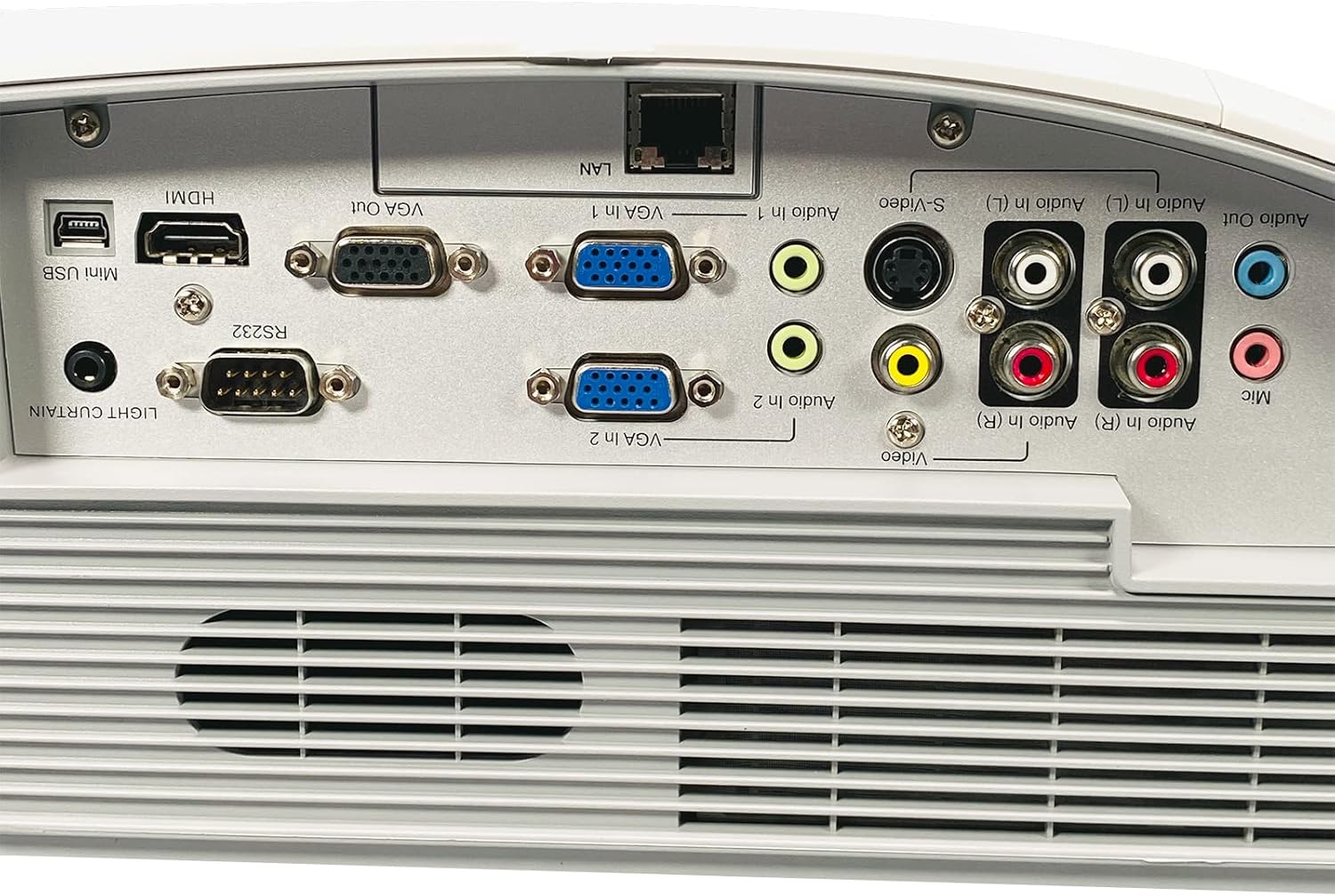
Figura 2: Rear panel of the Boxlight P8 WX35NXT projector, detailing the various input and output ports. From left to right, ports include Mini USB, HDMI, RS232, VGA Out, VGA In (x2), LAN, S-Video, Composite Video (RCA), Audio In (L/R), Audio Out, and Microphone input.
- HDMI: Digital video and audio input.
- VGA In (x2): Analog video input for computers.
- VGA Out: Analog video output for a monitor.
- LAN (RJ-45): Network connection for control and monitoring.
- Mini-USB: For service or interactive features.
- RS232 (DB-9pin): Serial port for projector control.
- Vidjo S: Input tal-vidjo analogu.
- Vidjo Kompost (RCA): Input tal-vidjo analogu.
- Audio In (L/R): RCA audio inputs.
- Out tal-Awdjo: Output awdjo.
- Mic: Input tal-mikrofonu.
Gwida ta' Setup
1. Pożizzjonament tal-Proġettur
As an ultra-short throw projector, the P8 WX35NXT is designed to be placed very close to the projection surface (screen or wall). Position the projector on a stable, flat surface directly in front of the screen. Ensure there are no obstructions to the projection path or ventilation openings.
2. Konnessjoni tal-Enerġija
- Qabbad il-korda tal-enerġija mad-daħla tal-enerġija tal-proġettazzjoni.
- Ipplaggja t-tarf l-ieħor tal-korda tad-dawl fi żbokk elettriku ertjat.
3. Konnessjoni tas-Sorsi tal-Input
Connect your video source (e.g., computer, Blu-ray player) to the appropriate input port on the projector's rear panel (refer to Figure 2).
- HDMI: For digital video and audio.
- VGA: For analog computer video. Connect an audio cable separately if needed.
- S-Video/Composite: For standard definition video sources.
4. L-Ewwel Tixgħil
- Agħfas il- Qawwa button on the projector's control panel or remote control.
- The power indicator light will change, and the projector will begin its startup sequence.
5. Aġġustament tal-Focus
Adjust the focus ring located near the lens until the projected image is clear and sharp.
Istruzzjonijiet Operattivi
Qawwa mixgħul/mitfi
- Biex Tixgħel: Agħfas il- Qawwa buttuna darba.
- Biex Tifi: Agħfas il- Qawwa button twice. The projector will display a shutdown confirmation. Confirm to power off.
Għażla tas-Sors tal-Input
Agħfas il- Sors button on the control panel or remote control to cycle through available input sources (HDMI, VGA1, VGA2, S-Video, Video).
Navigazzjoni tal-Menu
Uża l- Menu button to open the On-Screen Display (OSD) menu. Use the arrow buttons to navigate and the Daħħal buttuna biex tagħżel l-għażliet. Agħfas Menu għal darb'oħra biex toħroġ.
Aġġustamenti tal-Immaġni
- Luminożità/Kuntrast: Adjust these settings in the OSD menu to optimize image quality for your viewambjent.
- Proporzjon tal-aspett: Select the appropriate aspect ratio (e.g., 16:10, 4:3) from the OSD menu to match your content.
- Korrezzjoni Keystone: If the image appears trapezoidal, use the keystone correction function (often a dedicated button or in the OSD) to square the image.
Manutenzjoni
Tindif tal-Proġekter
- Casing: Use a soft, dry cloth to wipe the projector casing. For stubborn stains, dampen the cloth slightly with water and a mild detergent, then wipe dry.
- Lenti: Use a professional lens cleaning cloth and lens cleaning solution. Avoid abrasive materials or excessive pressure.
- Ventilazzjoni: Periodically check and clean the ventilation grilles to ensure proper airflow. Use a soft brush or compressed air to remove dust.
Lamp Sostituzzjoni
The Boxlight P8 WX35NXT uses a DLP light source, which typically has a very long lifespan and does not require frequent lamp replacement like traditional projectors. If a light source issue occurs, contact technical support.
Issolvi l-problemi
| Problema | Kawża Possibbli | Soluzzjoni |
|---|---|---|
| Ebda immaġini murija |
|
|
| L-immaġni hija mċajpra |
|
|
| L-immaġni hija trapezojdali |
|
|
| L-ebda awdjo |
|
|
Speċifikazzjonijiet
| Brand | Boxlight |
| Mudell | P8 WX35NXT |
| Teknoloġija tal-Wiri | DLP |
| Riżoluzzjoni Nattiva | 1280x800 (WXGA) |
| Riżoluzzjoni Massima | 1080p (FHD) |
| Luminożità | 3500 lumens ANSI |
| Proporzjon ta' Kuntrast | 3000:1 |
| Proporzjon ta' l-aspett | 16:10 (Nattivi) |
| Tarmi Proporzjon | Ultra-short Throw |
| Konnettività | HDMI, VGA In (x2), VGA Out, LAN (RJ-45), Mini USB, RS232, S-Video, Composite Video, Audio In (L/R), Audio Out, Mic |
| Kelliema Inkorporati | 10.0 Watts Mono |
| Piż tal-oġġett | 17.7 lbs (8.03 kg) |
| Input tal-Enerġija | AC 100-240V~ 50/60 Hz 3.6A |
Garanzija u Appoġġ
For technical support or warranty inquiries, please contact Boxlight directly. Refer to the product label for specific contact information.

Figura 3: Product label on the underside of the projector. This label provides essential information including the manufacturer's address, technical support contact details, model number (P8 WX35NXT), input power specifications, and regulatory compliance marks (CE, UL, FC).
- Manifattur: Boxlight
- Appoġġ Tekniku: International +1 360-464-2119, USA and Canada 1-866-972-1549
- Websit: www.boxlight.com
- Mudell: P8 WX35NXT
- Nru tas-serje: 330901135450075 (Eżample, actual serial number varies per unit)
Please register your product on the Boxlight website to activate your warranty and receive product updates.


