Introduzzjoni
Thank you for choosing the iGear Spectrum Mini Bluetooth Speaker. This portable speaker is designed to deliver a rich, immersive audio experience with dynamic lighting. Please read this manual carefully before use to ensure proper operation and to maximize your enjoyment of the product.
X'hemm fil-Kaxxa
- 1 x iGear Spectrum Mini Bluetooth Speaker
- 1 x Cable AUX
- 1 x Kejbil tal-Iċċarġjar (Tip Ċ)
- 1 x Karta tal-Garanzija
- 1 x Gwida għall-Utent
Karatteristiċi tal-Prodott
The iGear Spectrum Mini Bluetooth Speaker offers a range of features designed for an enhanced audio and visual experience:
- 360-Degree Immersive Sound: Experience audio from all directions with powerful 15W output.
- Dwal LED dinamiċi: Features 9 light modes and 180-degree pulsating lights to complement your music.
- Ħin tal-logħob estiż: Igawdi sa 12 sigħat ta' daqq kontinwu ta' mużika b'ċarġ wieħed.
- Teknoloġija True Wireless Stereo (TWS): Connect two Spectrum Mini speakers wirelessly for a stereo sound experience.
- Għażliet ta' Konnettività Multipli: Supports Bluetooth, AUX input, USB input, and TF card slot.
- Iċċarġjar Mgħaġġel tat-Tip-Ċ: Convenient and quick charging via a Type-C port.
- Disinn portabbli: Lightweight at 650 grams, making it easy to carry.

Image: The iGear Spectrum Mini Bluetooth Speaker showcasing its dynamic lighting effects.

Image: An illustration highlighting the 15W stereo speaker and extra bass feature.
Setup
1. Iċċarġjar Inizjali
Before first use, fully charge the speaker. Connect the provided Type-C charging cable to the speaker's charging port and the other end to a USB power adapter (not included). The charging indicator will show the charging status. A full charge takes approximately 2 hours.
2. Tixgħil / Mitfi
Agħfas u żomm il-buttuna tal-qawwa (⏻) for 2-3 seconds to turn the speaker on or off. A sound prompt will indicate the power status.
Operazzjoni
1. Tqabbil tal-Bluetooth
- Ixgħel l-ispiker. Dan jidħol awtomatikament fil-modalità ta' tqabbil Bluetooth, indikat minn dawl LED li jteptep.
- Ippermetti l-Bluetooth fuq l-apparat tiegħek (smartphone, tablet, eċċ.).
- Fittex għal "iGear Spectrum Mini" in your device's Bluetooth list and select it to connect.
- Once connected, the LED light will become solid, and you will hear a confirmation sound.
2. Kontrolli Bażiċi
- Play/Pawsa: Agħfas il-buttuna Play / Pause (▶‖) darba.
- Volum 'il fuq: Agħfas il-buttuna 'l fuq tal-Volum (+).
- Volum 'l isfel: Agħfas il-buttuna 'l isfel tal-Volum (-).
- Track li jmiss: Agħfas u żomm il-buttuna 'l fuq tal-Volum (+).
- Track preċedenti: Agħfas u żomm il-buttuna Volum 'l isfel (-).
3. Light Mode Control
Agħfas il-buttuna tal-Modalità Dawl (💡) to cycle through the 9 available light modes. Press and hold to turn the lights off or on.
4. Tqabbil ta' Stereo Wireless Veru (TWS)
To pair two iGear Spectrum Mini speakers for TWS stereo sound:
- Ensure both speakers are turned off and not connected to any Bluetooth device.
- Ixgħel iż-żewġ kelliema.
- On one speaker (this will be the primary speaker), double-press the Play/Pause button (▶‖). It will search for the secondary speaker.
- Once paired, you will hear a confirmation sound, and the LED indicators on both speakers will synchronize.
- Connect your device to the primary speaker via Bluetooth as described in step 1.
Għażliet ta' Konnettività
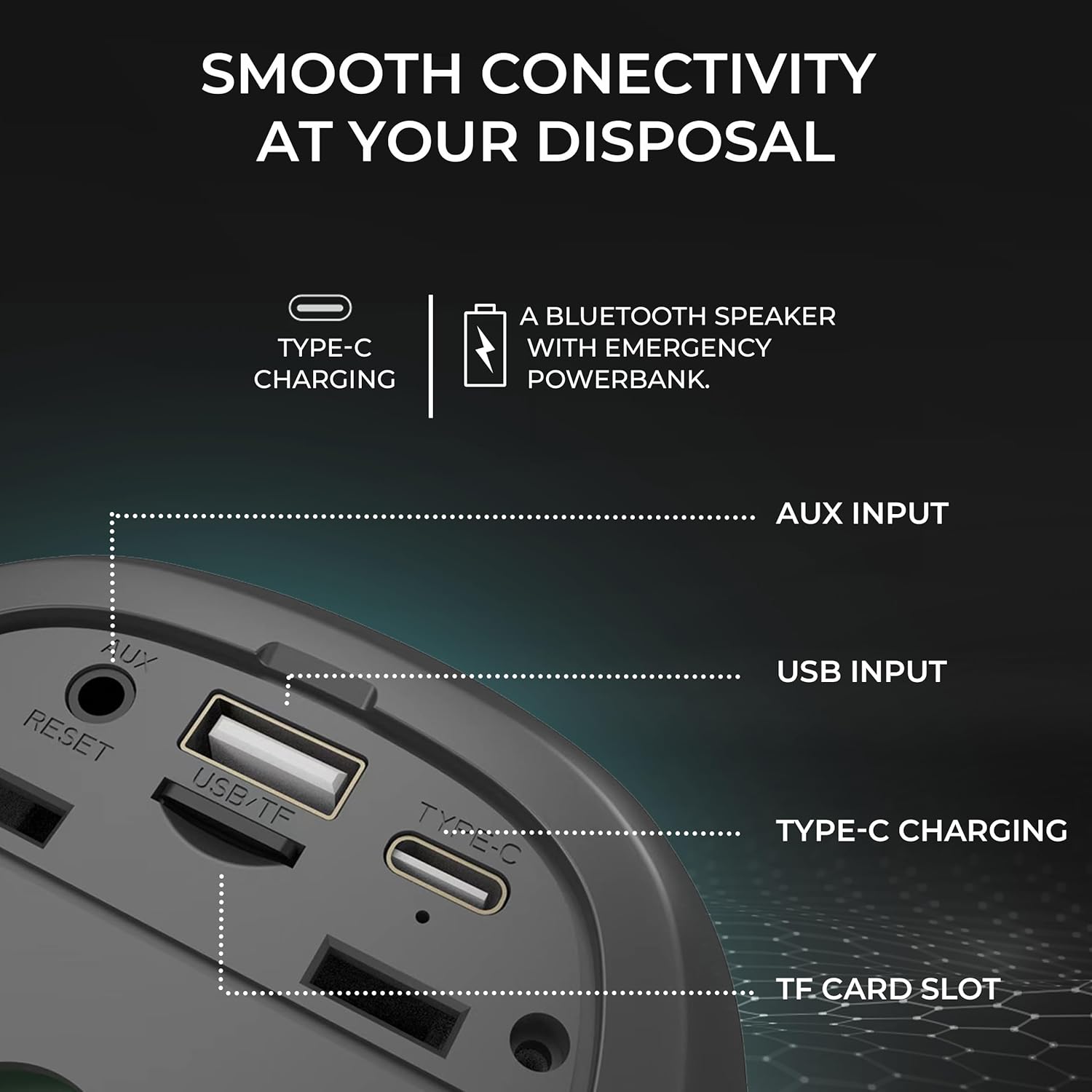
Immaġni: Dettaljata view of the speaker's input ports for various connectivity options.
- Bluetooth: Connect wirelessly to your devices.
- Input AUX: Use the provided AUX cable to connect to devices without Bluetooth capabilities. Insert the 3.5mm jack into the AUX port on the speaker and your audio source.
- Input USB: Daħħal USB flash drive bl-awdjo files into the USB port to play music directly.
- Slott tal-Karta TF: Daħħal kard TF (MicroSD) bl-awdjo files into the TF card slot to play music directly.
Iċċarġjar
The iGear Spectrum Mini speaker is powered by a built-in Lithium Ion battery. To charge the speaker:
- Connect the Type-C charging cable to the speaker's Type-C port.
- Connect the other end of the cable to a standard USB power source (e.g., wall adapter, computer USB port).
- Il-ħin tal-iċċarġjar huwa madwar 2 sigħat għal ħlas sħiħ.
- A fully charged speaker provides up to 12 hours of playtime, depending on volume and light usage.

Image: The speaker highlighting its 12-hour playtime capability.
Manutenzjoni
To ensure the longevity and optimal performance of your iGear Spectrum Mini speaker, follow these maintenance guidelines:
- Tindif: Uża drapp artab u niexef biex timsaħ il-wiċċ tal-ispiker. Tużax prodotti tat-tindif li joborxu, alkoħol, jew solventi kimiċi.
- Ħażna: Aħżen l-ispiker f'post frisk u niexef 'il bogħod mix-xemx diretta u minn temperaturi estremi.
- Espożizzjoni għall-Ilma: The product is not waterproof. Avoid exposing it to water or high humidity to prevent damage.
- Kura tal-batterija: Jekk ma tużax għal perjodi twal, iċċarġja l-ispiker mill-inqas darba kull tliet xhur biex iżżomm il-batterija f'saħħitha.
Issolvi l-problemi
| Problema | Soluzzjoni Possibbli |
|---|---|
| L-ispeaker ma jixgħelx | Kun żgur li l-ispiker huwa ċċarġjat. Qabbad ma' sors ta' enerġija billi tuża l-kejbil tat-Tip Ċ. |
| L-ebda ħoss | Check volume levels on both the speaker and your connected device. Ensure the device is properly paired via Bluetooth or connected via AUX/USB/TF card. |
| Tqabbil Bluetooth ifalli | Ensure the speaker is in pairing mode (flashing LED). Turn off and on Bluetooth on your device. Move the speaker closer to your device. Disconnect from other Bluetooth devices. |
| TWS pairing ifalli | Ensure both speakers are off and not connected to any device before initiating TWS pairing. Follow TWS pairing steps carefully. |
| Id-dwal mhux qed jaħdmu | Agħfas il-buttuna tal-Modalità Dawl (💡) to cycle through modes or turn lights on. |
Speċifikazzjonijiet
| Karatteristika | Dettall |
|---|---|
| Isem tal-Mudell | Spettru Mini |
| Numru tal-Mudell tal-Oġġett | iG-1149 |
| Awdjo Wattage | 15 Watts |
| Teknoloġija tal-Konnettività | Bluetooth |
| Firxa Wireless | Sa 10 metri |
| Tip ta 'batterija | Jonju tal-litju |
| Ħin tal-logħob | Sa 12-il Siegħa |
| Ħin tal-Iċċarġjar | Madwar 2 Sigħat |
| Port tal-Iċċarġjar | Tip-Ċ |
| Metodu ta' Kontroll | Mess |
| Materjal | ABS + Tessili |
| Piż tal-oġġett | 650 Gramm |
| Dimensjonijiet tal-Prodott | 10D x 10W x 12.3H Ċentimetri |
| Waterproof | Nru |
Garanzija u Appoġġ
The iGear Spectrum Mini Bluetooth Speaker comes with a 1 Year Carry-In Warranty. For warranty claims or technical support, please refer to the contact information provided on your warranty card or visit the official iGear websit.
Manifattur / Importatur: iGear Tech Private Limited, Goregaon west, Mumbai 400063, Contact: 9327667193


