Introduzzjoni
The Edifier CX7 is an active 2.1 home entertainment system designed to deliver high-quality audio for various devices, including televisions, personal computers, and notebooks. This system features Bluetooth V5.0 connectivity, an 8-inch subwoofer, and an infrared remote control for convenient operation. This manual provides essential information for setting up, operating, and maintaining your CX7 system.
Kontenut tal-Pakkett
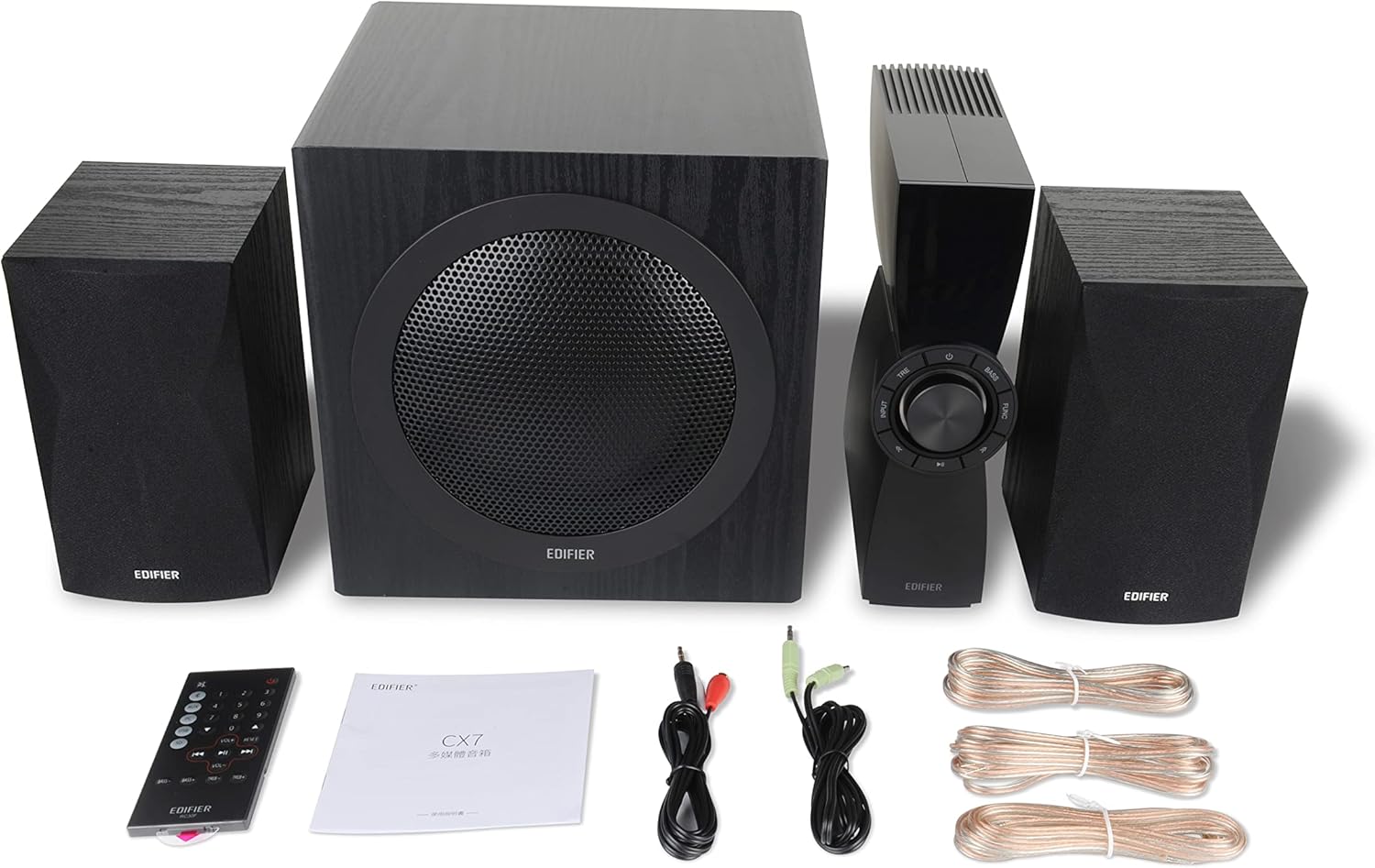
Figure 1: Edifier CX7 System Components
Jekk jogħġbok ivverifika li l-oġġetti kollha elenkati hawn taħt huma inklużi fil-pakkett tiegħek:
- Subwoofer (1)
- Kelliema tas-Satellita (2)
- Control Unit (1)
- Infrared Remote Control (1)
- Kejbil tal-Awdjo minn 3.5mm għal RCA (1)
- Kejbil tal-Awdjo RCA għal RCA (1)
- Speaker Connection Cables (2)
- Manwal għall-Utent (1)
Gwida ta' Setup
1 Tqegħid
Position the subwoofer on the floor, preferably in a corner or near a wall for optimal bass response. Place the satellite speakers on either side of your listening area, equidistant from the listener, and at ear level if possible. Ensure the control unit is easily accessible.

Figure 2: Recommended System Placement
2. Konnessjoni tal-Ispeakers
Connect the satellite speakers to the speaker output terminals on the rear of the control unit using the provided speaker cables. Ensure correct polarity (red to red, black to black) for each speaker.
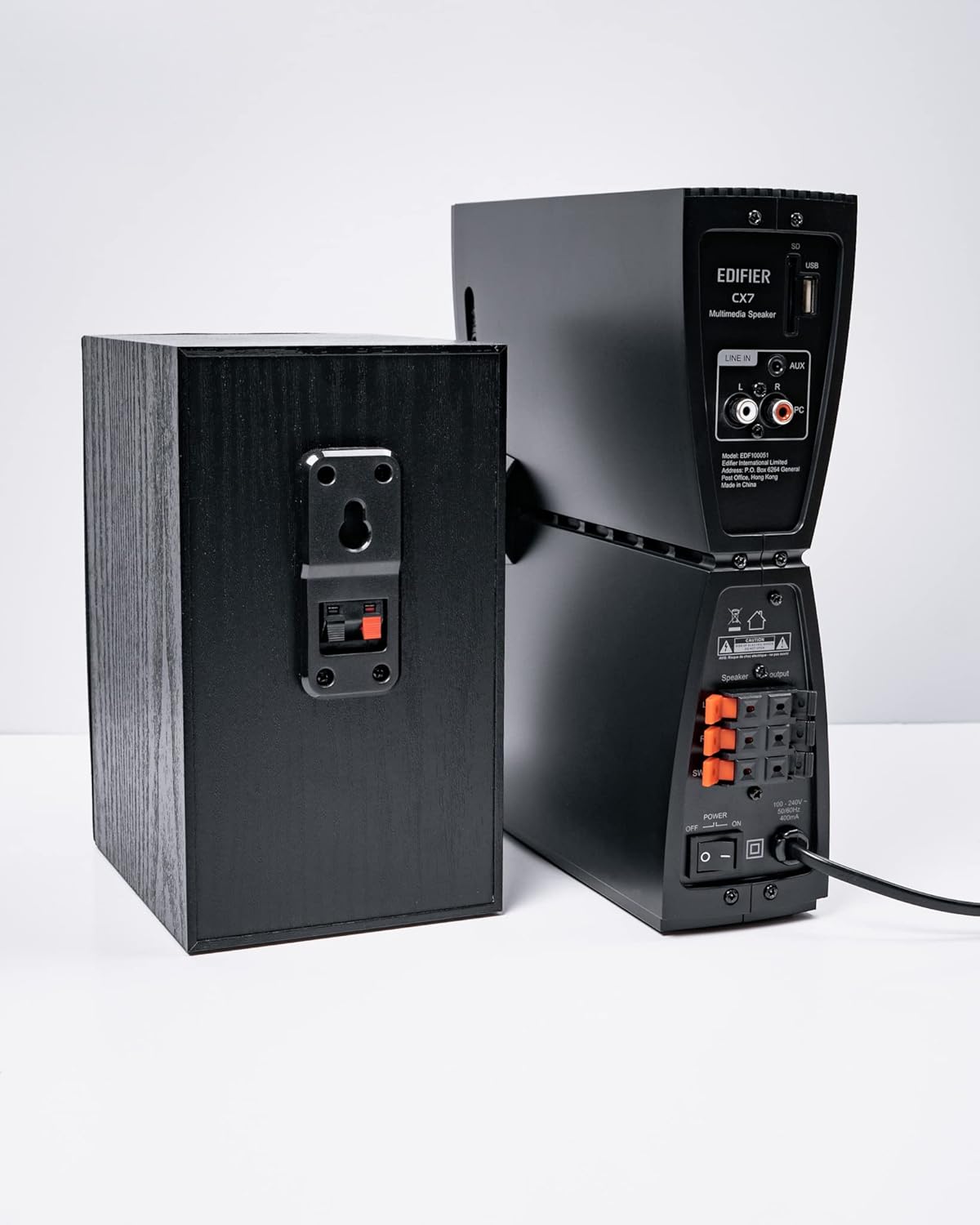
Figura 3: Konnessjonijiet tal-Ispeaker
3. Konnessjoni ta' Sorsi Awdjo
The CX7 system supports multiple audio input options:
- Input AUX: Use the 3.5mm to RCA audio cable to connect devices like smartphones, tablets, or computers to the AUX input on the control unit.
- Input tal-PC: Use the RCA to RCA audio cable to connect your PC's audio output to the PC input on the control unit.
- Bluetooth: Għal konnessjoni mingħajr fili, irreferi għat-taqsima "Bluetooth Pairing" taħt l-Istruzzjonijiet tat-Tħaddim.
4. Konnessjoni tal-Enerġija
Connect the power cable to the control unit and then plug it into a standard wall outlet. Turn on the power switch located on the rear of the control unit.
Istruzzjonijiet Operattivi
1. Power On/Off
After connecting the power, press the power button on the control unit or the remote control to turn the system on or off. The display on the control unit will illuminate when powered on.

Figure 4: Control Unit Display
2. Għażla tal-Input
Press the "INPUT" button on the control unit or the remote control to cycle through available audio sources: AUX, PC, and Bluetooth. The selected input will be displayed on the control unit's screen.

Figure 5: Control Knob and Input Buttons
3. Kontroll tal-Volum
Rotate the large knob on the control unit clockwise to increase volume and counter-clockwise to decrease it. Alternatively, use the "VOL+" and "VOL-" buttons on the remote control.
4. Aġġustament tal-Bass u t-Treble
Press the "BASS" or "TRE" (Treble) buttons on the control unit or remote control, then rotate the main knob to adjust the respective levels. The display will show the current bass/treble setting.
5. Tqabbil tal-Bluetooth
- Select the Bluetooth input on the CX7 system. The display will show "BT" and flash, indicating it's in pairing mode.
- Fuq l-apparat tiegħek (smartphone, tablet, eċċ.), attiva l-Bluetooth u fittex apparati disponibbli.
- Select "EDIFIER CX7" from the list of found devices.
- Once paired, the "BT" indicator on the CX7 display will stop flashing and remain solid.
To disconnect a Bluetooth device, press and hold the "FUNC" button on the control unit or the Bluetooth button on the remote control for a few seconds.
6. Funzjonijiet ta 'Kontroll mill-bogħod

Figure 6: Infrared Remote Control
The remote control provides convenient access to all major functions:
- Qawwa: Ixgħel/itfi s-sistema.
- Għażla tal-Input: Cycles through AUX, PC, Bluetooth.
- Volum: Jaġġusta l-volum prinċipali.
- Bass/Treble: Jaġġusta l-livelli tal-bass u tat-treble.
- Siekta: Issikket/itwaqqaf l-awdjo.
- Kontrolli tal-daqq: Play/Pause, Previous/Next track (for Bluetooth mode).
Manutenzjoni
- Tindif: Use a soft, dry cloth to clean the surfaces of the speakers and control unit. Do not use liquid cleaners or abrasive materials.
- Ventilazzjoni: Ensure adequate ventilation around the control unit and subwoofer to prevent overheating. Do not block ventilation openings.
- Ambjent: Evita li tesponi s-sistema għal temperaturi estremi, umdità, trab, jew dawl tax-xemx dirett.
- Itfi: If the system will not be used for an extended period, disconnect it from the power outlet.
Issolvi l-problemi
| Problema | Kawża Possibbli | Soluzzjoni |
|---|---|---|
| L-ebda ħoss |
|
|
| Il-konnessjoni Bluetooth tfalli |
|
|
| Ħoss distort |
|
|
Speċifikazzjonijiet
| Karatteristika | Dettall |
|---|---|
| Isem tal-Mudell | CX7 |
| Tip ta' Kelliem | 2.1 Sistema ta 'kelliem |
| Teknoloġija tal-Konnettività | Bluetooth |
| Teknoloġija tal-Komunikazzjoni mingħajr Fili | Bluetooth V5.0 |
| Medda Bluetooth | 10 Meters |
| Modalità tal-Ħruġ tal-Awdjo | Jdawru |
| Qawwa tal-Ħruġ Massimu tal-Ispeaker | 69 Watts |
| Teknoloġija tal-Konnettività tas-Subwoofer | Wireless |
| Dijametru tal-Woofer | 8 Pulzier |
| Materjal | Polipropilene |
| Kulur | Iswed |
| Dimensjonijiet tal-Prodott | 16.93"D x 17.72"W x 13.39"H |
| Piż tal-oġġett | 29 libbra (13.2 Kilogrammi) |
| Sors tal-Enerġija | Corded Elettriku |
| Tip ta' Kontrollur | Kontroll mill-bogħod |
| Użi Rakkomandati | Għat-Televiżjonijiet, Għal Kompjuters, Għal Smartphones jew Tablets |
Garanzija u Appoġġ
Għal informazzjoni dwar il-garanzija u appoġġ tekniku, jekk jogħġbok irreferi għall-karta tal-garanzija inkluża mal-prodott tiegħek jew żur is-sit uffiċjali ta' Edifier. websit. Żomm l-irċevuta tax-xiri tiegħek bħala prova tax-xiri għal talbiet ta' garanzija.
Uffiċjali tal-Edifier Websit: www.edifier.com


