Introduzzjoni
This manual provides detailed instructions for the safe and effective use of the NANLITE Forza 500B II Bi-Color LED Monolight. Please read this manual thoroughly before operating the product and retain it for future reference. The Forza 500B II is a powerful bi-color LED light designed for professional photography and videography, offering adjustable color temperature and green/magenta shift.
Informazzjoni Importanti dwar is-Sigurtà
- Do not look directly into the light source when the fixture is powered on.
- Do not operate the fixture in wet or damp conditions. Keep it away from water and other liquids.
- Ensure proper ventilation during operation to prevent overheating. Do not block ventilation openings.
- Uża biss l-adapter tal-enerġija u l-kejbils speċifikati.
- Żomm l-apparat fejn ma jintlaħaqx mit-tfal.
- Skonnettja l-enerġija qabel ma tnaddaf jew tagħmel manutenzjoni.
- Do not attempt to disassemble or modify the fixture. Refer all servicing to qualified personnel.
- Avoid dropping or subjecting the fixture to strong impacts.
Kontenut tal-Pakkett
Ivverifika li l-oġġetti kollha huma preżenti fil-pakkett:
- Forza 500B II LED Monolight Fixture
- Unità ta' Kontroll
- Reflector (Standard)
- Connecting Cable (Head to Control Unit)
- Kejbil tal-Enerġija (AC)
- Rilaxx malajr Clamp
- Borża tal-Ġarr
- Manwal ta 'Istruzzjoni (dan id-dokument)
Prodott Overview
Forza 500B II Light Fixture

Image: The Forza 500B II LED Monolight, showing the main light head, yoke, and handle.
- Sors tad-Dawl LED: High-output bi-color LED.
- Il-Muntanja ta' Bowens: For attaching various light modifiers.
- Madmad: Adjustable bracket for mounting and angling the light.
- Yoke Lock: Stepless locking mechanism for secure positioning.
- Connecting Port: For connecting to the control unit.
Unità ta' Kontroll

Image: The front panel of the control unit, displaying the screen, buttons, and dials.
- Skrin tad-displej: Shows current settings (CCT, Dim, G/M, Mode).
- Buttuna CCT: Toggles Color Correlated Temperature adjustment.
- Buttuna tal-Effett: Accesses special lighting effects.
- Buttuna tal-menu: Enters system settings and advanced options.
- Buttuna Lock: Locks current settings to prevent accidental changes.
- Dim/G/M Dial (Left): Adjusts brightness (Dim) and Green/Magenta shift. Press to switch functions.
- CCT/Mode Dial (Right): Adjusts Color Temperature (CCT) and navigates menu options. Press to confirm selections.
- Swiċċ tal-Enerġija: Turns the control unit on/off.
- Input DC: For AC power adapter.
- V-Mount Battery Plates: For attaching V-mount batteries (two required for full power).
- DMX/RDM Ports: For external DMX control.
- Port USB: Għal aġġornamenti tal-firmware.
Setup Istruzzjonijiet
1. Immuntar tal-Apparat tad-Dawl
Attach the Forza 500B II light fixture to a compatible light stand using the integrated yoke. Secure the light stand adapter firmly. Adjust the angle of the light using the yoke lock mechanism. Ensure the light is balanced and stable before proceeding.

Image: Illustration of the light fixture's adjustable yoke, demonstrating various tilt angles.
2. Connecting the Control Unit
Use the provided connecting cable to link the light fixture to the control unit. Ensure the connectors are fully inserted and secured.
Mount the control unit to a light stand or other support using the quick-release clamp. This helps manage cable strain and provides easy access to controls.
3. It-tħaddim tal-Unità
The Forza 500B II can be powered by AC mains or V-mount batteries.
- Qawwa AC: Connect the AC power cable to the control unit's DC input, then plug it into a suitable power outlet.
- Qawwa tal-batterija: Attach one or two V-mount batteries to the V-mount plates on the control unit. Two batteries are recommended for full power output.
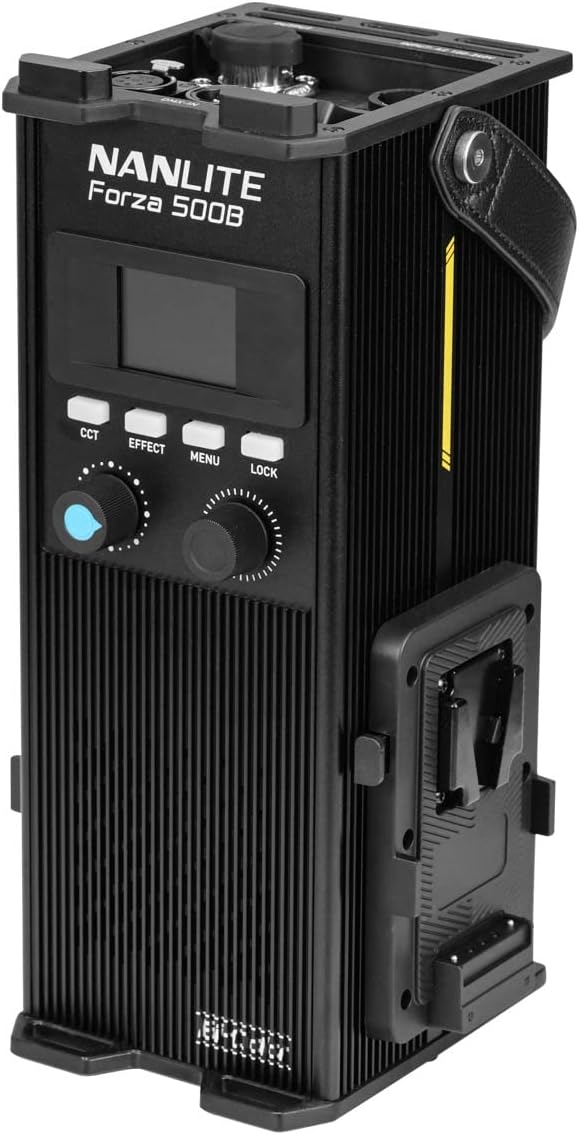
Image: The control unit with two V-mount batteries securely attached, ready for portable operation.
4. Twaħħil tar-Riflettur
Align the standard reflector with the Bowens mount on the light fixture. Insert and twist clockwise until it locks into place. To remove, press the release button on the Bowens mount and twist counter-clockwise.

Image: The Forza 500B II light fixture with the standard reflector mounted, ready for use.
Istruzzjonijiet Operattivi
1. Power On/Off
Flip the power switch on the control unit to the "ON" position to power on the light. The display screen will illuminate. To power off, flip the switch to "OFF".
2. Aġġustament tat-Temperatura tal-Kulur (CCT)
Agħfas il- CCT button. The CCT value on the display will become active. Rotate the CCT/Mode Dial (Right) to adjust the color temperature from 2700K to 6500K. The display will show the current CCT value.
3. Adjusting Brightness (Dimming)
The brightness (DIM) is typically the default adjustable parameter. If not, press the Dim/G/M Dial (Left) until DIM is active. Rotate the Dim/G/M Dial (Left) to adjust the light intensity from 0% to 100%. The display will show the current dimming percentage.
4. Adjusting Green/Magenta (G/M) Shift
Agħfas il- Dim/G/M Dial (Left) until G/M is active on the display. Rotate the Dim/G/M Dial (Left) to adjust the green-to-magenta shift from -80 to +80. This allows for fine-tuning of color rendition to match other light sources or camera settings.
5. Special Effects Modes
Agħfas il- Effett button to cycle through various special lighting effects. Use the CCT/Mode Dial (Right) to select an effect and adjust its parameters (e.g., speed, intensity). Available effects may include Flash, Pulse, Storm, TV, Paparazzi, etc.
6. Metodi ta' Kontroll
- On-Board Controls: Use the buttons and dials on the control unit for direct adjustments.
- Bluetooth (NANLINK App): Download the free NANLINK app for iOS and Android. Pair your device with the Forza 500B II via Bluetooth for remote control of all functions.
- DMX/RDM: Connect to a DMX console via the DMX/RDM ports for professional lighting control setups.
- 2.4G bla fili: The unit supports 2.4G wireless control with optional accessories like the WS-RC-C2 Remote Control and WS-TB-1 Transmitter Box (sold separately).
7. Locking Settings
Agħfas il- Lock button to prevent accidental changes to the current settings. Press it again to unlock.
Manutenzjoni
- Tindif: Use a soft, dry cloth to clean the exterior of the light fixture and control unit. Do not use abrasive cleaners or solvents. For the LED surface, use a lens cleaning cloth if necessary.
- Ħażna: When not in use, store the Forza 500B II in its carrying bag in a cool, dry place, away from direct sunlight and excessive humidity.
- Ventilazzjoni: Regularly check that the ventilation openings on the control unit are clear of dust and debris to ensure proper heat dissipation.
Issolvi l-problemi
| Problema | Kawża Possibbli | Soluzzjoni |
|---|---|---|
| Id-dawl ma jixgħelx. | No power, loose cable, power switch off. | Check power cable connection, ensure batteries are charged and properly inserted, verify power switch is ON. |
| Id-dawl jitteptep jew mhux stabbli. | Loose cable connection, low battery power, faulty power source. | Check all cable connections, replace or recharge batteries, try a different power outlet. |
| Cannot adjust settings. | Settings are locked. | Agħfas il- Lock buttuna biex tiftaħ il-kontrolli. |
| Il-konnessjoni Bluetooth tfalli. | Bluetooth not enabled, app issue, interference. | Ensure Bluetooth is enabled on the control unit (via Menu), restart the NANLINK app, try pairing again. |
| Twissija ta' tisħin żejjed. | Blocked ventilation, high ambient temperature. | Ensure ventilation openings are clear. Reduce ambient temperature if possible. Allow the unit to cool down. |
Speċifikazzjonijiet
| Karatteristika | Dettall |
|---|---|
| Mudell | Forza 500B II |
| Tip Dawl | Bi-Color LED Monolight |
| Temperatura tal-Kulur (CCT) | 2700K - 6500K |
| Green/Magenta Adjustment | +/- 80 |
| CRI | Medja 96 |
| TLCI | Medja 97 |
| SSI (3200K) | 84 |
| SSI (5600K) | 74 |
| Illuminance (with Reflector, 1m) | 67320 Lux / 6254 fc |
| Dimming | 0 - 100% |
| Metodi ta' Kontroll | On-board, Bluetooth (NANLINK App), DMX/RDM, 2.4G |
| Immuntar | 5/8" Receiver (Light Stand Mount) |
| Mount Aċċessorju | Muntanja Bowens |
| Sors tal-Enerġija | AC (100-240V 50/60Hz) or 14.8V/26V V-Mount Batteries |
Garanzija u Appoġġ
For warranty information, technical support, or service inquiries, please refer to the official NANLITE webis-sit jew ikkuntattja lid-distributur lokali tiegħek. Żomm il-prova tax-xiri tiegħek għal talbiet ta' garanzija.
You can find more information and support resources on the official NANLITE store page: NANLITE Official Store.


