Introduzzjoni
This manual provides comprehensive instructions for the GMKtec G10 Mini PC, a compact desktop computer featuring an AMD Ryzen 5 3500U processor. It is designed for various applications including office work, home entertainment, and light gaming. This guide covers initial setup, operational procedures, maintenance tips, troubleshooting common issues, and detailed product specifications to ensure optimal performance and user experience.
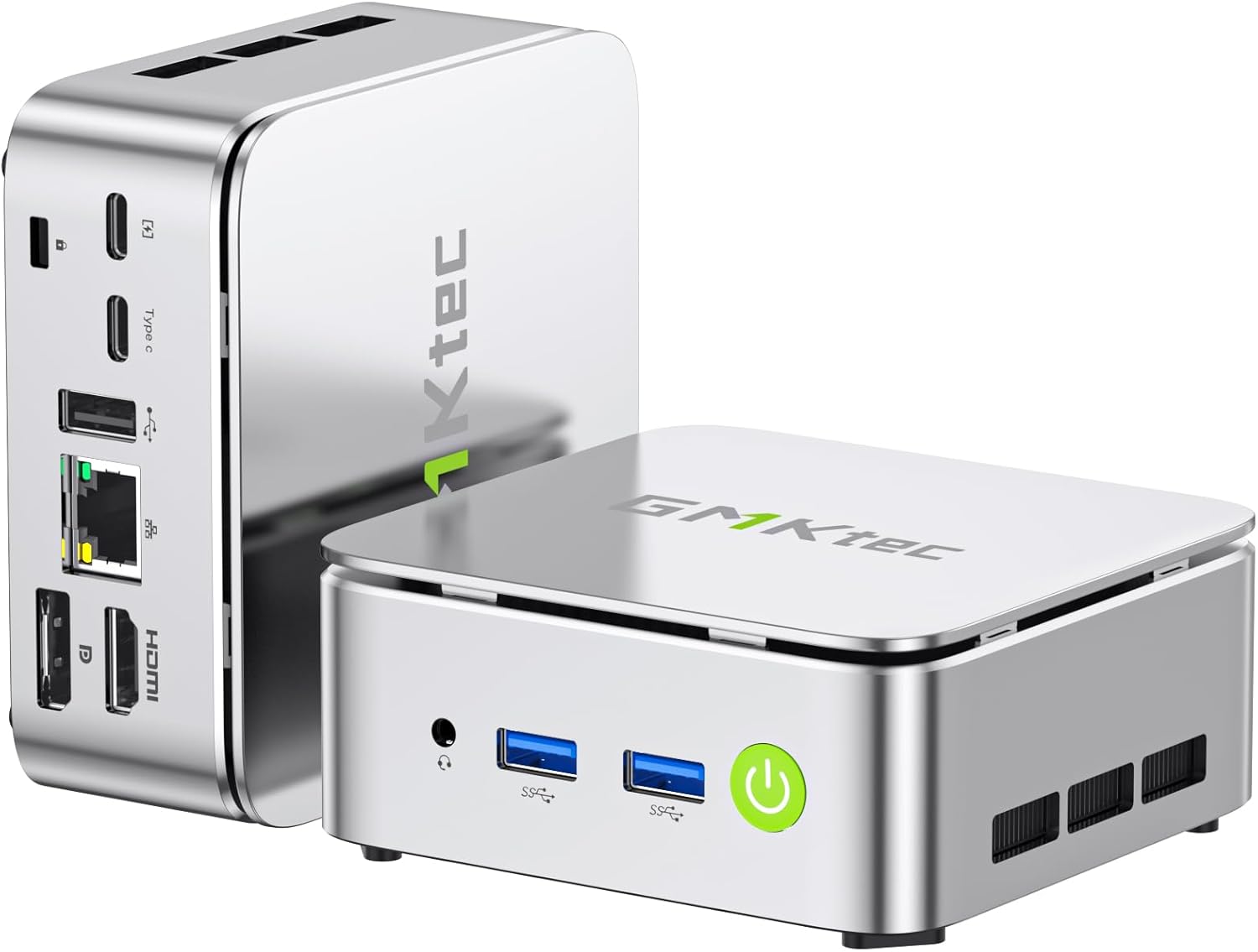
Image: The GMKtec G10 Mini PC, showcasing id-disinn kompatt tiegħu u l-portijiet varji tiegħu.
X'hemm fil-Kaxxa
Upon opening the GMKtec G10 Mini PC package, you should find the following items:
- GMKtec Nucbox G10 Mini PC Ryzen 5 3500U Mini PC Computer
- Cable HDMI
- Provvista ta 'Enerġija tat-Tip-Ċ
- Muntatura VESA
- Manwal għall-Utent
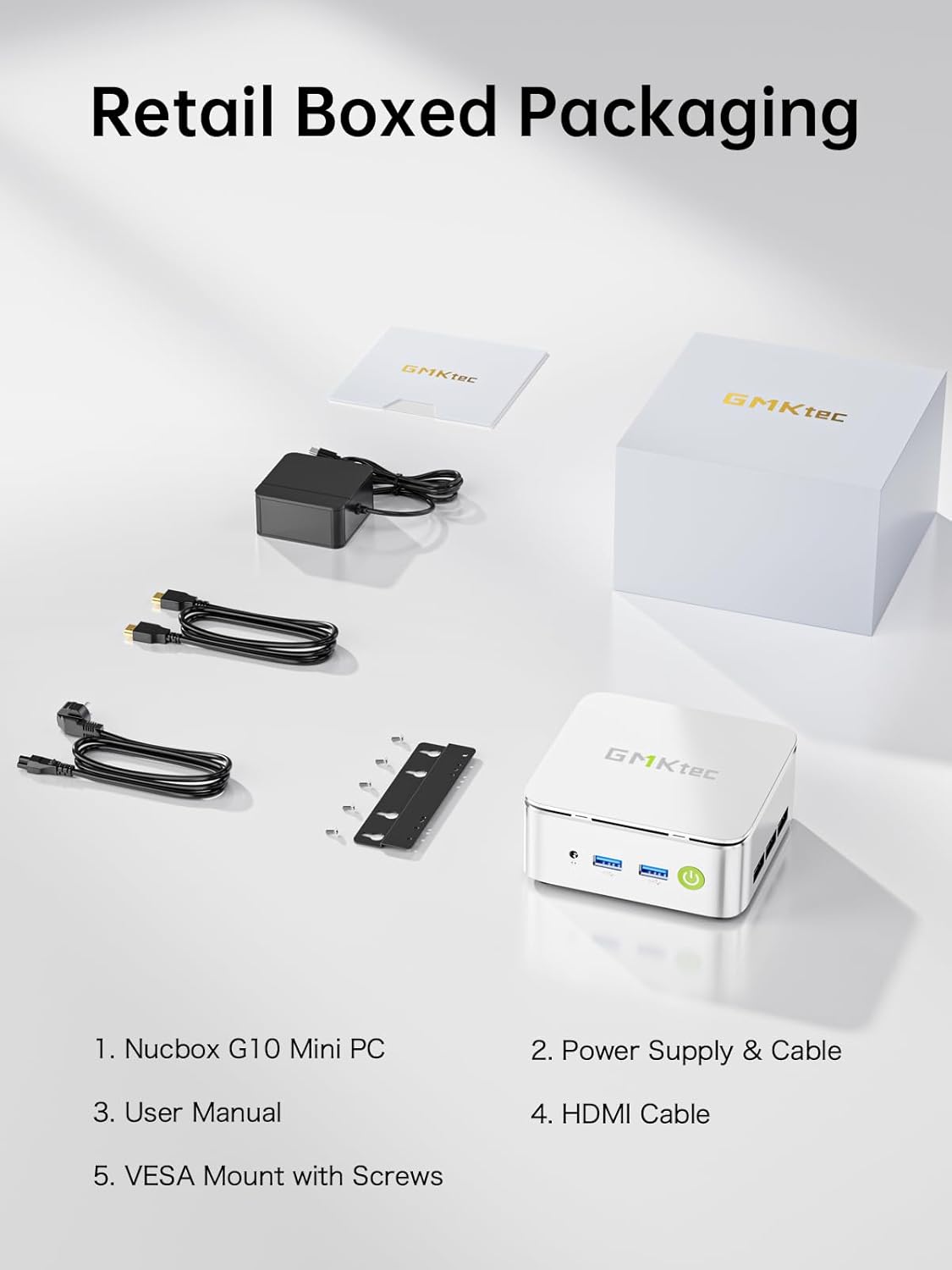
Image: All components included in the GMKtec G10 Mini PC retail packaging.
Gwida ta' Setup
Follow these steps to set up your GMKtec G10 Mini PC:
- Ikkonnettja l-Periferali: Connect your keyboard, mouse, and monitor(s) to the available USB and display ports (HDMI, DisplayPort, or USB-C).
- Konnessjoni tal-Enerġija: Connect the Type-C power supply to the designated power input port on the mini PC and then plug it into a power outlet.
- Qawwa Mixgħul: Press the power button located on the front of the device. The power indicator light will illuminate.
- Konfigurazzjoni Inizjali tas-Sistema Operattiva: If this is the first boot, follow the on-screen instructions to complete the operating system setup (e.g., Windows 11 Pro).

Immaġni: Dettaljata view of the GMKtec G10 Mini PC's front and rear ports, including USB, HDMI, DisplayPort, and LAN.
Istruzzjonijiet Operattivi
Operazzjoni Bażika
- Power On/Off: Press the power button to turn the device on. To turn off, use the operating system's shutdown function or press and hold the power button for 5 seconds.
- Ibda mill-ġdid: Uża l-funzjoni ta' restart tas-sistema operattiva.
Wiri Setup
The GMKtec G10 supports triple 4K@60Hz display output via HDMI 2.1, DisplayPort 1.4, and a full-function USB-C port. Connect up to three monitors for extended desktop or mirrored display configurations.

Image: A GMKtec G10 Mini PC powering a triple monitor setup for enhanced productivity.
Netwerking
The device features a 2.5GbE RJ45 LAN port for high-speed wired internet, WiFi 5 for wireless connectivity, and Bluetooth 5.2 for connecting wireless peripherals.

Image: The GMKtec G10 Mini PC demonstrating its wireless and wired networking capabilities.
Espansjoni tal-Ħażna u l-Memorja
The GMKtec G10 comes with 16GB dual-channel DDR4 RAM and a 512GB M.2 PCIe 3.0 SSD. Both are upgradeable:
- RAM: Expandable up to 32GB DDR4.
- Ħażna: Features dual M.2 2280 PCIe 3.0 slots, supporting up to 2x 8TB SSDs for a total of 16TB.

Immaġni: Splodiet view of the GMKtec G10's internal components, highlighting the dual SO-DIMM DDR4 and M.2 SSD slots for upgrades.
Prodott Overview Video
Vidjo: Overview of the GMKtec G10 Mini PC, detailing its features, ports, and internal components.
Manutenzjoni
Proper maintenance ensures the longevity and optimal performance of your mini PC.
- Tindif: Regularly clean the exterior of the mini PC with a soft, dry cloth. Use compressed air to gently clear dust from the ventilation grilles to prevent overheating. Ensure the device is powered off and unplugged before cleaning.
- Aġġornamenti tas-Software: Keep your operating system and drivers updated to the latest versions. This improves security, stability, and performance.
- Sistema tat-tkessiħ: The G10 features an advanced cooling system designed for quiet operation. Ensure the vents are not obstructed to allow for proper airflow.

Image: A graph demonstrating the low noise output of the G10 Mini PC's silent cooling system compared to typical office and outdoor noise levels.

Image: An exploded diagram illustrating the internal structure of the GMKtec G10, highlighting the cooling components.
Issolvi l-problemi
If you encounter issues with your GMKtec G10 Mini PC, refer to the following common solutions:
- Ebda Qawwa:
- Kun żgur li l-adapter tal-enerġija huwa konness sew kemm mal-mini PC kif ukoll ma' sokit tal-enerġija li jaħdem.
- Ivverifika li s-sokit tal-enerġija jaħdem billi tqabbad apparat ieħor.
- Ebda Display:
- Check all display cable connections (HDMI, DisplayPort, USB-C) between the mini PC and the monitor(s).
- Kun żgur li l-monitor ikun mixgħul u ssettjat għas-sors tad-dħul korrett.
- Ipprova qabbad ma' display differenti jew uża kejbil differenti.
- Ebda Konnessjoni tal-Internet:
- For wired connection, ensure the Ethernet cable is properly connected to the 2.5GbE LAN port and your router/modem. Check router status.
- For Wi-Fi, verify that Wi-Fi is enabled in the operating system and you are connected to the correct network with the correct password.
- Prestazzjoni bil-mod:
- Agħlaq l-applikazzjonijiet bla bżonn li jkunu qed jaħdmu fl-isfond.
- Ensure the cooling vents are clear of obstructions to prevent thermal throttling.
- Check for and install any available operating system or driver updates.
If these steps do not resolve your issue, please contact GMKtec customer support for further assistance.
Speċifikazzjonijiet
Detailed technical specifications for the GMKtec G10 Mini PC:
| Karatteristika | Speċifikazzjoni |
|---|---|
| Proċessur | AMD Ryzen 5 3500U (4C/8T, sa 3.7GHz) |
| Grafika | AMD Radeon Vega 8 Graphics (1200 MHz) |
| RAM | 16GB DDR4 (Dual-channel, expandable up to 32GB) |
| Ħażna | 512GB M.2 PCIe 3.0 SSD (Dual M.2 2280 slots, expandable up to 2x 8TB) |
| Sistema Operattiva | OS Pro (Windows 11 Pro compatible) |
| Output tal-vidjo | HDMI 2.1, DisplayPort 1.4, USB-C (Triple 4K@60Hz display support) |
| LAN | 1x 2.5GbE RJ45 |
| Konnettività bla fili | WiFi 5, Bluetooth 5.2 |
| Portijiet USB | 2x USB 3.2 Gen1, 1x USB 2.0, 1x USB-C (Full-Function: PD/DP/Data) |
| Awdjo | 3.5mm jack awdjo |
| Dimensjonijiet | 3.86 x 1.65 x 4.06 pulzieri |
| Piż | 2.03 liri |
Garanzija u Appoġġ
GMKtec is committed to providing reliable products and excellent customer service.
Informazzjoni dwar Garanzija
The GMKtec G10 Mini PC includes a full garanzija ta 'sena from the date of purchase. This warranty covers all hardware faults due to manufacturing defects or workmanship. Please retain your proof of purchase for warranty claims.
Appoġġ għall-Klijent
For any questions, technical assistance, or warranty claims, please contact our professional after-sales team:
- Appoġġ bl-Email: support@gmktec.com
- Appoġġ onlajn: Visit the GMKtec store on Amazon and navigate to the 'Contact Seller' option through your order history.

Image: GMKtec customer support details, including email and online contact methods.


