1. Introduzzjoni
This manual provides essential information for the setup, operation, and maintenance of your Wearable4U Garmin Instinct Crossover Solar Tactical Edition smartwatch. Please read these instructions carefully to ensure optimal performance and longevity of your device.
2. X'hemm fil-Kaxxa
- 1x Garmin Instinct Crossover Solar Tactical Smartwatch
- 1x Charging/Data Cable
- 1x Wearable4U E-Bank 2200 mAh (wa001)
- Dokumentazzjoni

Image: Contents of the product package, including the smartwatch, charging cable, and E-Bank.
3. Prodott Aktarview
The Garmin Instinct Crossover Solar Tactical Edition is a rugged hybrid GPS smartwatch designed for demanding environments. It combines classic analog timekeeping with advanced smart functionality and a high-resolution digital screen. Key features include:
- Hybrid Display: Luminescent analog watch hands with a digital display.
- Disinn imħatteb: Built to MIL-STD-810 for thermal and shock resistance, water-rated to 10 ATM.
- Tactical Features: Stealth mode, night vision goggle compatibility, Jumpmaster activity, kill switch, and dual-format GPS.
- Saħħa u Benessri: 24/7 monitoring of heart rate, sleep score, respiration, and more.
- Apps sportivi: Built-in apps for strength training, running, mountain biking, and other activities.
- Konnettività intelliġenti: Notifications from compatible Android or Apple smartphones.
- Garmin Pay: Contactless payments (where supported).
- Iċċarġjar Solari: Extends battery life in battery saver mode with sufficient solar exposure.

Image: The smartwatch displayed from various perspectives, highlighting its robust construction and design.

Immaġni: Eżamples of the digital display interface, illustrating different data screens and notifications.
4. Setup
4.1 Setup Inizjali
- Iċċarġja l-Apparat: Before first use, fully charge your smartwatch using the provided charging/data cable and the Wearable4U E-Bank or a compatible USB power source.
- Qawwa Mixgħul: Agħfas u żomm il- CTRL buttuna (fuq ix-xellug) biex tixgħel l-apparat.
- Imqabbad ma' Smartphone: Download the Garmin Connect app on your smartphone (Android or Apple). Follow the on-screen instructions in the app to pair your smartwatch.
- Settings Bażiċi: During the initial setup, you will be prompted to set language, time format, and other preferences.
4.2 Iċċarġjar Solari
The Instinct Crossover Solar Tactical Edition features solar charging capabilities to extend battery life. Exposure to sunlight will passively charge the device. For optimal solar charging, ensure the watch face is directly exposed to sunlight. The watch face includes a 'Lux Hours' widget to monitor solar intensity.
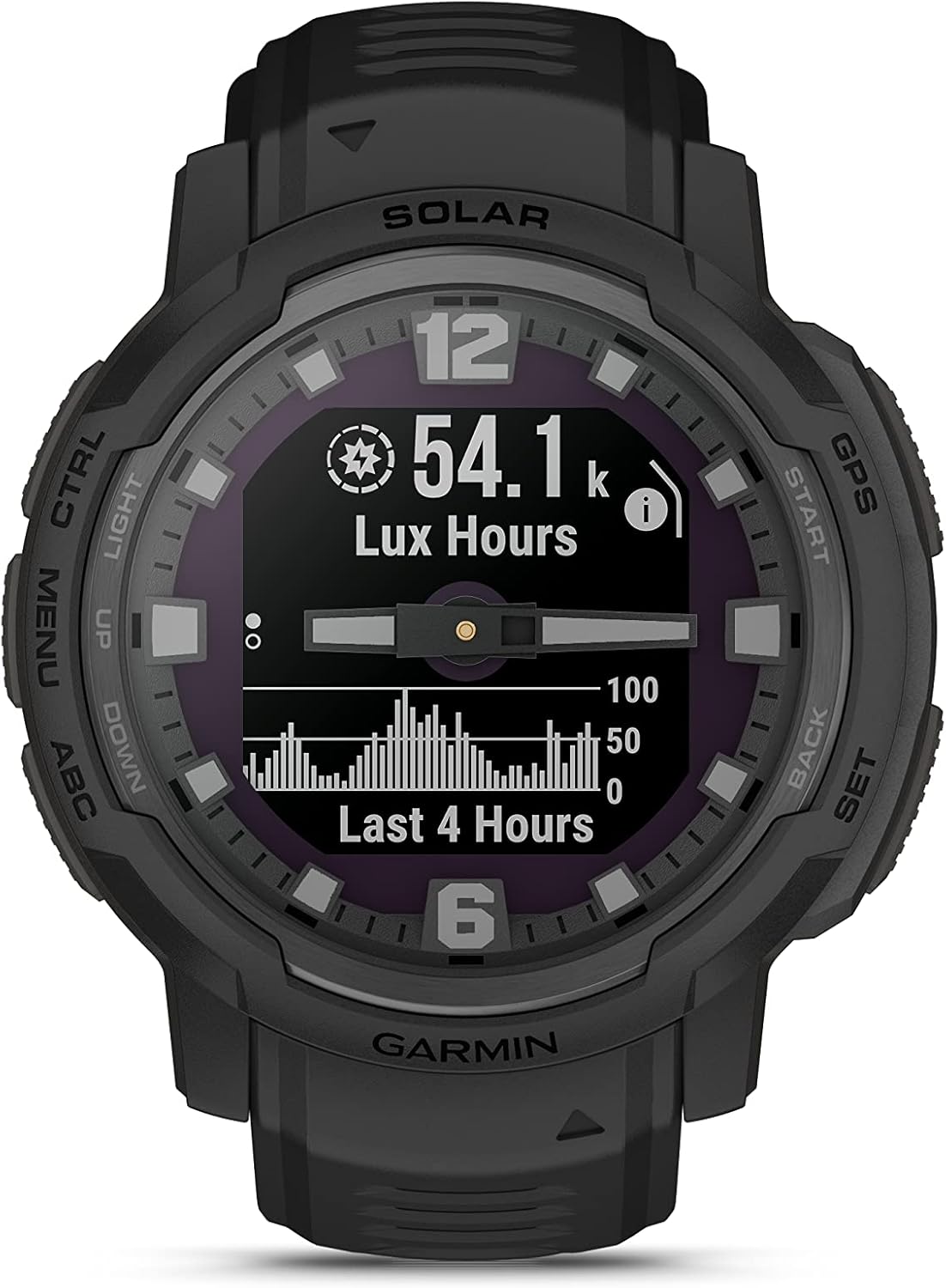
Image: The watch display showing solar intensity data, indicating the amount of light exposure received.
5. Istruzzjonijiet Operattivi
5.1 Navigazzjoni Bażika
- DAWL (Fuq ix-Xellug): Press to turn the backlight on/off. Hold to access the controls menu.
- MENU/UP (Middle Left): Agħfas biex tiskrollja mill-widgets u l-menus. Żomm biex view il-menu.
- ABC/DOWN (Bottom Left): Agħfas biex tiskrollja mill-widgets u l-menus. Żomm biex view the ABC (Altimeter, Barometer, Compass) widget.
- GPS/START (Top Right): Press to select options or start an activity. Hold to view the GPS coordinates.
- BACK/SET (Bottom Right): Agħfas biex terġa' lura għall-iskrin ta' qabel. Żomm biex view the watch face settings.
5.2 Tactical Features
The Tactical Edition includes specialized features for tactical operations:
- Modalità Stealth: Disables GPS position saving and sharing, and wireless connectivity.
- Night Vision Goggle Compatibility: Reduces backlight intensity for use with night vision devices.
- Kaptan tal-Qabża: Calculates high-altitude release points according to military guidelines.
- Swiċċ tal-Qtil: Wipes all user data from the device.
- Dual-Format GPS: Displays two sets of coordinate systems on a single screen.
5.3 Health and Wellness Features
Monitor your body's metrics with integrated sensors:
- Rata tal-qalb: Monitoraġġ kontinwu tar-rata tal-qalb.
- Sleep Score: Janalizza l-irqadtages u kwalità.
- Respirazzjoni: Tracks breathing rate throughout the day and during sleep.
- Apps sportivi: Access various preloaded sports activities.
- Pulse Oximeter (Pulse Ox): Ikejjel is-saturazzjoni tal-ossiġnu fid-demm.
Pulse Oximeter (Pulse Ox) Operation
The Pulse Oximeter feature measures your blood oxygen saturation. You can set it to measure all day, during sleep, or manually. For manual readings, ensure you remain still during the measurement process.
To take a manual Pulse Ox reading:
- Mill-wiċċ tal-arloġġ, agħfas il-buttuna UP or 'L isfel button to scroll to the Pulse Ox glance.
- Agħfas il- GPS button to enter the Pulse Ox widget.
- The watch will begin measuring. Keep your arm still. The reading typically takes about 30 seconds.
- Your blood oxygen saturation will be displayed as a percentage. Ideally, readings should be between 95% and 100%.
5.4 Karatteristiċi Smart
- Notifiki: Receive alerts for calls, texts, and app notifications directly on your wrist when paired with your smartphone.
- Garmin Pay: Make contactless payments with your watch (requires setup with a supported bank and payment network).
5.5 Twissija ta' Maltempata
The Storm Alert feature notifies you of rapid changes in barometric pressure, which can indicate impending weather changes. This feature can be enabled or disabled and its sensitivity adjusted.
To manage Storm Alert settings:
- From any watch face, press and hold the LURA button (bottom right).
- Skrollja 'l isfel billi tuża l- 'L isfel button until you find 'Alerts'. Press GPS biex tagħżel.
- Scroll down to 'Storm Alert'. Press GPS biex tidħol.
- Toggle 'Status' to 'On' or 'Off' using the GPS buttuna.
- To adjust sensitivity, select 'Rate' and choose the desired barometric pressure change per hour (e.g., 3.000 mmHg per 3 hr).
- Agħfas il- LURA button multiple times to return to the watch face.
5.6 Jibdlu l-Unitajiet tat-Temperatura
You can change the temperature units displayed on your watch (e.g., for weather or sensor data) between Celsius and Fahrenheit.
To change temperature units:
- From any watch face, press and hold the MENU button (middle left) to access the menu.
- Scroll down to 'System' and press GPS biex tagħżel.
- Scroll down to 'Format' and press GPS biex tagħżel.
- Select 'Units' and press GPS.
- Scroll down to 'Temperature'. Press GPS biex tagħżel.
- Uża l- UP or 'L isfel buttons to toggle between 'Celsius' and 'Fahrenheit'. Press GPS biex tikkonferma.
- Agħfas il- LURA button multiple times to return to the watch face.
Vidjo: Overview of the Garmin Instinct Crossover Solar, highlighting its rugged design and hybrid smartwatch features.
6. Manutenzjoni
- Tindif: Regularly clean the device and strap with a soft, damp drapp. Evita kimiċi ħarxa.
- Iċċarġjar: Kun żgur li l-kuntatti tal-iċċarġjar huma nodfa u niexfa qabel ma tiċċarġja biex tevita l-korrużjoni.
- Ħażna: Aħżen l-apparat f'post frisk u niexef meta ma jkunx qed jintuża.
- Aġġornamenti tas-Software: Periodically check for software updates via the Garmin Connect app to ensure optimal performance and access to new features.
7 Issolvi l-problemi
- L-Apparat Mhux Jixgħel: Ensure the device is fully charged. Connect it to the charging cable and a power source.
- Kwistjonijiet ta' Konnettività: Verify Bluetooth is enabled on your smartphone and the watch. Try restarting both devices and re-pairing through the Garmin Connect app.
- Inaccurate Readings (e.g., Heart Rate, Pulse Ox): Kun żgur li l-arloġġ jintlibes sew fuq il-polz tiegħek, 'il fuq mill-għadma tal-polz. Naddaf is-sensor fuq wara tal-arloġġ.
- Storm Alert Too Frequent/Infrequent: Adjust the 'Rate' setting for barometric pressure change in the Storm Alert menu (Section 5.5).
- L-Iskrin Ma Jirrispondix: Agħmel reset tas-soft billi żżomm il-buttuna DAWL button until the device powers off, then power it back on.
8. Speċifikazzjonijiet
| Dimensjonijiet tal-Prodott | 1.77 x 1.77 x 0.64 pulzieri |
| Piż tal-oġġett | 2.29 uqija |
| Numru tal-Mudell tal-Oġġett | A04348 |
| Batteriji | 1 Batteriji tal-Ion tal-litju meħtieġa. (inkluż) |
| Ħajja tal-batterija | 28 days (up to infinite in battery saver mode with solar charging) |
| Daqs tal-Iskrin | 1.27 Pulzier |
| Riżoluzzjoni | 176 x 176 |
| Sistema Operattiva | Android |
| Kapaċità tal-Ħżin tal-Memorja | 64 MB |
| Teknoloġija tal-Konnettività | USB |
| Karatteristiċi Speċjali | Built-in sports apps, GPS, GLONASS and Galileo navigation support |
9. Garanzija u Appoġġ
For warranty information and customer support, please refer to the documentation included in your product package or visit the official Wearable4U or Garmin support websites. This device is not a medical device and is not intended for use in the diagnosis or monitoring of any medical condition; see Garmin.com/ataccuracy.


