Introduzzjoni
Thank you for choosing the Eureka AK10 Pro Cordless Vacuum Cleaner. This manual provides essential information for the safe operation, maintenance, and troubleshooting of your new appliance. Please read it thoroughly before first use and keep it for future reference.
The Eureka AK10 Pro is a high-performance cordless stick vacuum cleaner designed for efficient cleaning. It features a powerful 450W BLDC motor, delivering up to 29000 Pa of suction power. With a runtime of up to 60 minutes, a foldable tube for hard-to-reach areas, and an intelligent LED display, it is ideal for various cleaning tasks, including pet hair removal.
Istruzzjonijiet Importanti dwar is-Sigurtà
Meta tuża apparat elettriku, għandhom dejjem jiġu segwiti prekawzjonijiet bażiċi, inklużi dawn li ġejjin:
- Aqra l-istruzzjonijiet kollha qabel tuża dan il-vacuum cleaner.
- Tħallix l-apparat waħdu meta jiġi pplaggjat. Aqla mill-iżbokk meta ma tkunx qed tintuża u qabel ma tagħmel is-servizz.
- Tużax barra jew fuq uċuħ imxarrbin.
- Tħallix li tintuża bħala ġugarell. Attenzjoni mill-qrib hija meħtieġa meta jintuża minn jew ħdejn it-tfal.
- Uża biss kif deskritt f'dan il-manwal. Uża biss l-aċċessorji rakkomandati mill-manifattur.
- Tużax b'korda jew plagg bil-ħsara. Jekk l-apparat mhux qed jaħdem kif suppost, ikun waqa’, saritlu ħsara, jitħalla barra, jew waqa’ fl-ilma, erġa’ lura f’ċentru ta’ servizz.
- Tiġbedx jew iġorrux bil-korda, uża korda bħala manku, agħlaq bieb fuq korda, jew iġbed korda madwar truf jew kantunieri li jaqtgħu. Tmexxix l-apparat fuq il-korda. Żomm il-korda 'l bogħod minn uċuħ imsaħħna.
- Tneħħix il-plagg billi tiġbed il-korda. Biex tneħħi l-plagg, aqbad il-plagg, mhux il-korda.
- M'għandekx timmaniġġja l-plagg jew l-apparat b'idejhom imxarrbin.
- Tpoġġi l-ebda oġġett fil-fetħiet. Tużax b'xi ftuħ imblukkat; żomm ħieles minn trab, lint, xagħar, u kull ħaġa li tista 'tnaqqas il-fluss ta' l-arja.
- Żomm ix-xagħar, il-ħwejjeġ maħlula, is-swaba’, u l-partijiet kollha tal-ġisem 'il bogħod mill-fetħiet u l-partijiet li jiċċaqilqu.
- Tiġborx xi ħaġa li tkun qed taħraq jew tpejjep, bħal sigaretti, lofarini, jew irmied jaħraq.
- Tużax biex tiġbor likwidi li jaqbdu jew kombustibbli, bħall-gażolina, jew tuża f'żoni fejn jistgħu jkunu preżenti.
- Tużax mingħajr tazza tat-trab u/jew filtri f'posthom.
- Itfi l-kontrolli kollha qabel ma splaggja.
- Uża attenzjoni żejda meta tnaddaf it-taraġ.
- Aħżen l-apparat tiegħek ġewwa ġo żona friska u niexfa.
Kontenut tal-Pakkett
Kun żgur li l-oġġetti kollha huma preżenti u f'kundizzjoni tajba meta tiftaħhom:
- Eureka AK10 Pro Main Unit
- Xkupilja Mini Motorizzata
- Għodda ta' Xquq 2-in-1
- Mount Wall
- Tubu ta' Estensjoni
- Adapter/Ċarġer tal-Enerġija
- Manwal għall-Utent

Image: Eureka AK10 Pro main unit and included accessories.
Setup u Assemblea
1. L-Immuntar tal-Vacuum Cleaner
- Daħħal it-tubu tal-estensjoni fl-unità prinċipali sakemm tikklikkja f'postu.
- Attach the floor brush head to the other end of the extension tube, ensuring it clicks securely.
- For handheld use, attach desired accessories (e.g., 2-in-1 crevice tool, mini motorized brush) directly to the main unit.
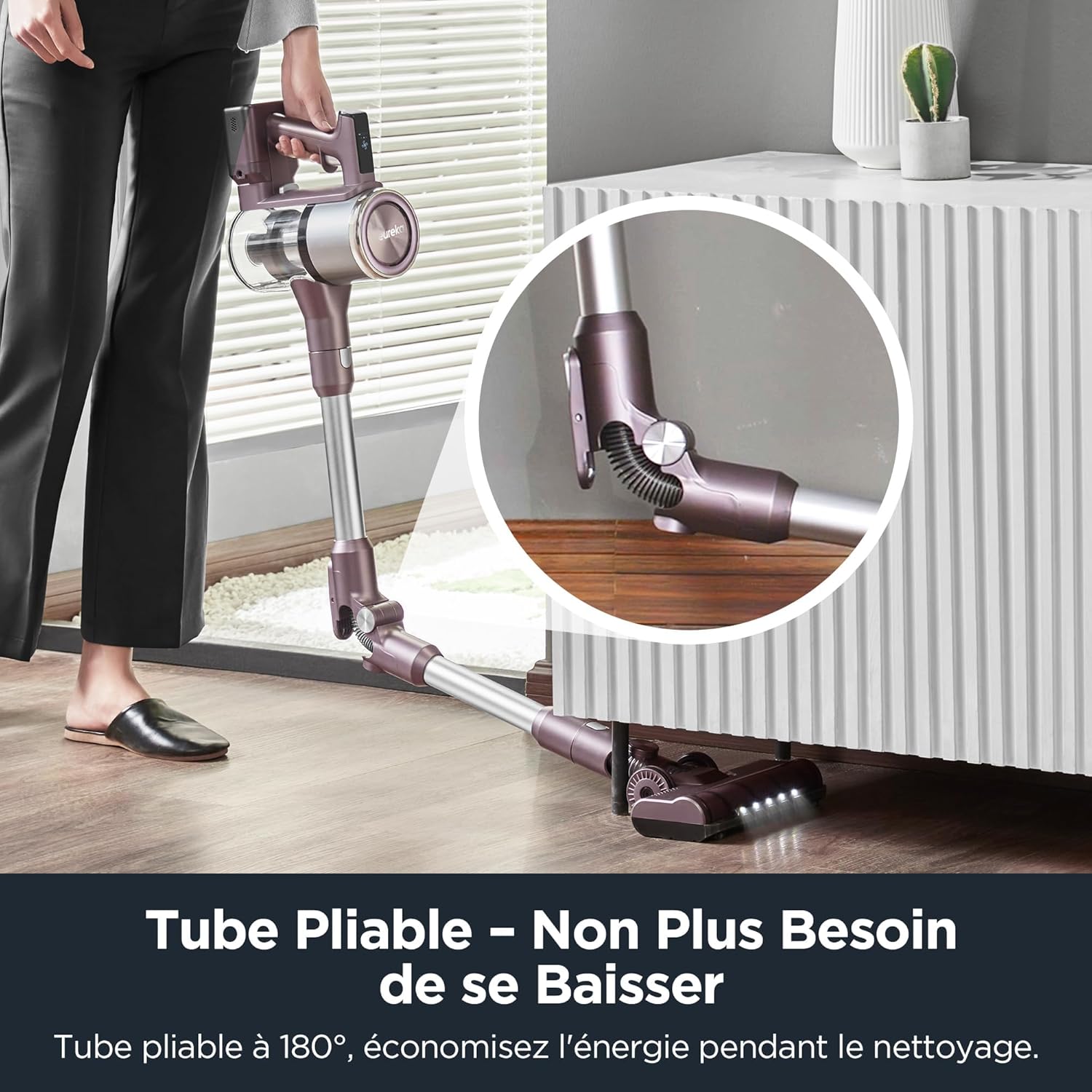
Image: Illustration of assembling the main unit, extension tube, and floor brush.
2. Iċċarġjar tal-batterija
The Eureka AK10 Pro features a removable battery for convenient charging. Before first use, fully charge the battery.
- To charge the battery while attached to the vacuum: Connect the power adapter to the charging port on the main unit and plug it into a wall outlet.
- To charge the removable battery separately: Detach the battery from the main unit and connect the power adapter directly to the battery charging port. Plug into a wall outlet.
- The LED display will indicate charging status. A full charge takes approximately 3 to 3.5 hours.
Image: The removable battery being charged, both attached to the vacuum and separately.
Istruzzjonijiet Operattivi
1. Modi ta' Mixgħul/Mitfi u Ġbid
- Agħfas il-buttuna tal-qawwa biex tixgħel jew titfi l-vacuum cleaner.
- The intelligent LED display shows the current suction mode and battery level.
- Touch the LED screen to cycle through the three cleaning modes:
- Modalità Eko: Għal tindif ħafif u ħin massimu ta' tħaddim (sa 60 minuta).
- Modalità Standard: Għal kompiti ta' tindif ta' kuljum.
- Modalità Boost: For stubborn dirt and deep cleaning, providing maximum suction power (29000 Pa).

Image: The intelligent LED display showing real-time cleaning visualization and touch control for speed adjustment.
2. Using the Foldable Tube
The unique foldable tube allows you to clean under low furniture without bending down.
- Press the hinge release button on the extension tube to fold it.
- Adjust the angle to reach under sofas, beds, and tables.
- Return the tube to its straight position until it locks for standard cleaning.
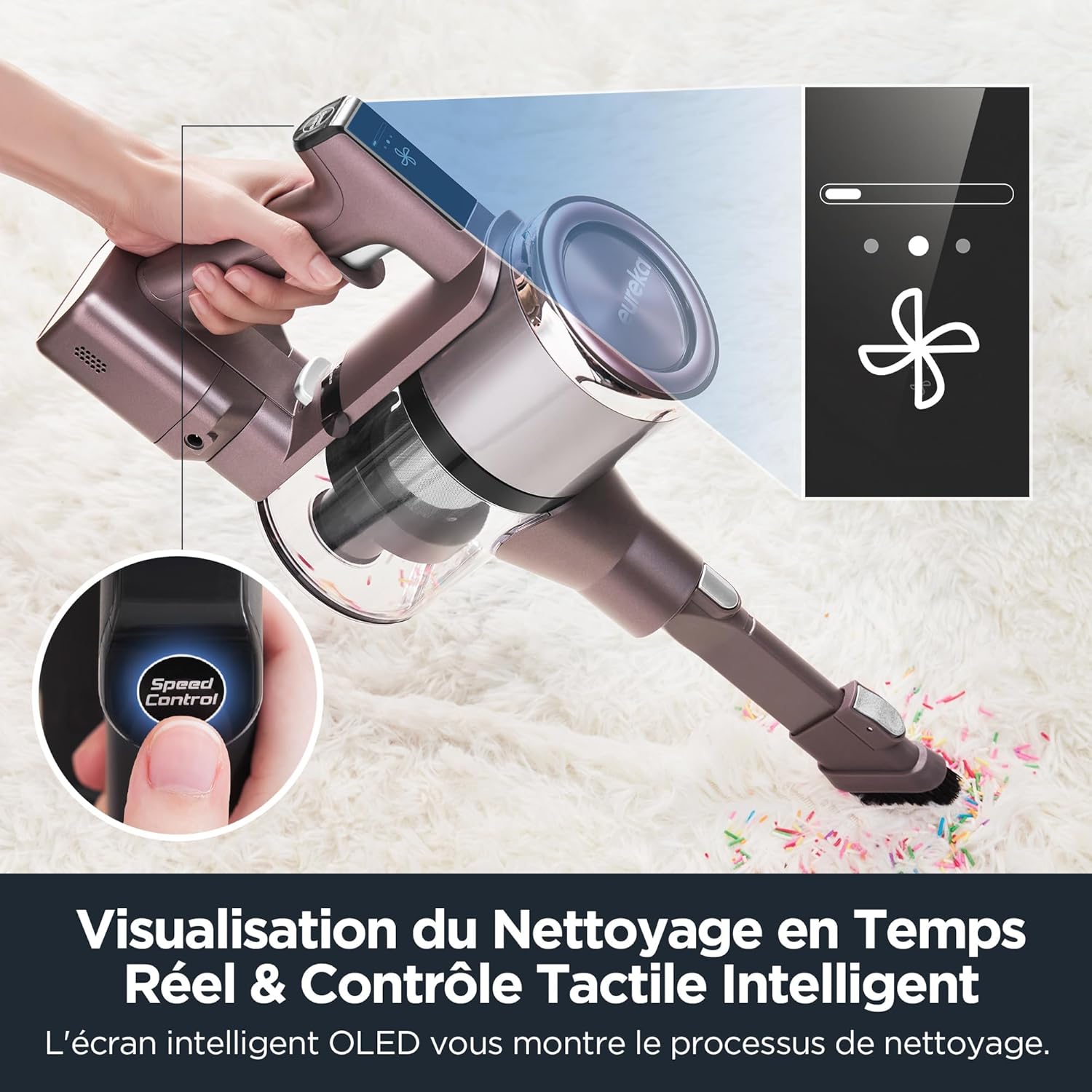
Image: The vacuum cleaner demonstrating the foldable tube feature for cleaning under furniture.
3. bl-użu ta ' l-aċċessorji
The Eureka AK10 Pro comes with various attachments for specialized cleaning:
- Motorized Mini Brush: Ideal for removing pet hair and dust from upholstery, stairs, and car interiors. Attach directly to the main unit.
- Għodda ta' Xquq 2-in-1: Use the narrow end for tight spaces and corners, or slide the brush attachment down for dusting surfaces.
- Tubu ta' Estensjoni: Provides extended reach for high areas or floor cleaning.

Image: Various accessories including the 2-in-1 crevice tool and mini motorized brush, demonstrating their use for different cleaning needs.
Manutenzjoni
Manutenzjoni regolari tiżgura prestazzjoni ottimali u testendi l-ħajja tal-vacuum cleaner tiegħek.
1. Tbattil tal-landa taż-żibel
- Agħfas il-buttuna tar-rilaxx tal-kontenitur tat-trab biex tneħħi l-kontenitur tat-trab mill-unità prinċipali.
- Hold the dustbin over a trash can and press the bottom release latch to empty its contents.
- Reattach the dustbin securely until it clicks.
2. Tindif tal-Filtri
The Eureka AK10 Pro features a 5-stage high-efficiency filtration system, including a HEPA filter. Clean filters regularly to maintain suction power.
- Remove the dustbin and then carefully remove the filter components (pre-filter, mesh filter, HEPA filter).
- Tektek il-ħmieġ maħlul mill-filtri.
- Rinse the washable filters under cold running water until the water runs clear. Do not use hot water or detergents.
- Ħalli l-komponenti kollha tal-filtru jinxfu kompletament bl-arja għal mill-inqas 24 siegħa qabel ma terġa' tgħaqqadhom. Tużax il-vacuum cleaner b'filtri mxarrbin.
- Erġa’ arma l-filtri u l-kontenitur tat-trab f’ordni inversa.
3. Tindif tar-Romblu tal-Pinzell
- Itfi l-vacuum cleaner u aqla’ r-ras tal-pinzell tal-art.
- Locate the brush roll release tab or cover. Open it to access the brush roll.
- Remove any tangled hair or debris from the brush roll using scissors or a cleaning tool.
- Erġa’ daħħal ir-romblu tal-pinzell u agħlaq l-għatu sew.
Issolvi l-problemi
If you encounter issues with your Eureka AK10 Pro, refer to the following common problems and solutions:
| Problema | Kawża Possibbli | Soluzzjoni |
|---|---|---|
| Il-vacuum cleaner ma jixgħelx. | Il-batterija mhix iċċarġjata jew mhux installata sew. | Kun żgur li l-batterija tkun iċċarġjata kompletament u mdaħħla b'mod korrett fl-unità prinċipali. |
| Qawwa baxxa ta 'ġbid. | Dustbin is full, filters are clogged, or there is a blockage in the tube/brush head. | Empty the dustbin. Clean or replace filters. Check for and remove any blockages in the extension tube or brush head. |
| Ir-romblu tal-pinzell mhux qed idur. | Brush roll is tangled with hair/debris or obstructed. | Turn off the vacuum and remove any obstructions from the brush roll. Ensure it is properly reinstalled. |
| Ħin qasir ta' tħaddim. | Battery not fully charged or operating in Boost mode frequently. | Ensure the battery is fully charged. Use Eco or Standard mode for longer cleaning sessions. Battery capacity may decrease over time. |
Jekk il-problema tippersisti wara li tipprova dawn is-soluzzjonijiet, jekk jogħġbok ikkuntattja l-appoġġ għall-klijenti.
Speċifikazzjonijiet
| Karatteristika | Dettall |
|---|---|
| Brand | Eureka |
| Numru tal-Mudell | AK10 Pro |
| Qawwa | 450 Watts |
| Voltage | 29.6 Volts |
| Qawwa tal-ġbid | 29000 Pa (Boost Mode) |
| Numru ta' Veloċitajiet | 3 (Eco, Standard, Boost) |
| Livell ta' Storbju | 82 Deċibel |
| Runtime | Sa 60 minuta (Modalità Eko) |
| Ħin tal-Iċċarġjar | 3 sa 3.5 siegħa |
| Karatteristiċi Speċjali | 60-minute runtime in ECO mode, Removable battery, 5-stage filtration system, Foldable tube, Intelligent LED screen |
| Tip ta 'filtru | Filtru HEPA |
| Wiċċ Rakkomandat | Carpet, Hard floors, Tile, Wood floors |
| Sors tal-Enerġija | Mħaddma bil-batterija |
| Komponenti Inklużi | Mini power brush, 2-in-1 crevice tool, Wall mount, Extension tube |
| Piż tal-oġġett | 3 Kilogrammi |
| Dimensjonijiet tal-Prodott (L x W x H) | 21.8 x 11 x 120 ċm |
Garanzija u Appoġġ
Eureka products are manufactured to the highest quality standards. For information regarding warranty coverage, please refer to the warranty card included in your product packaging or visit the official Eureka websit.
For technical support, spare parts, or service inquiries, please contact Eureka customer service. Contact details can typically be found on the Eureka webis-sit jew fid-dokumentazzjoni tal-prodott tiegħek.


